当前位置:网站首页>Unity鼠标光标使用学习
Unity鼠标光标使用学习
2022-08-08 05:15:00 【生活在他方】
Unity下的鼠标光标程序相关的就一个类下的2、3个方法。
首先,光标导入图片的设置需要将类型设置为Cursor。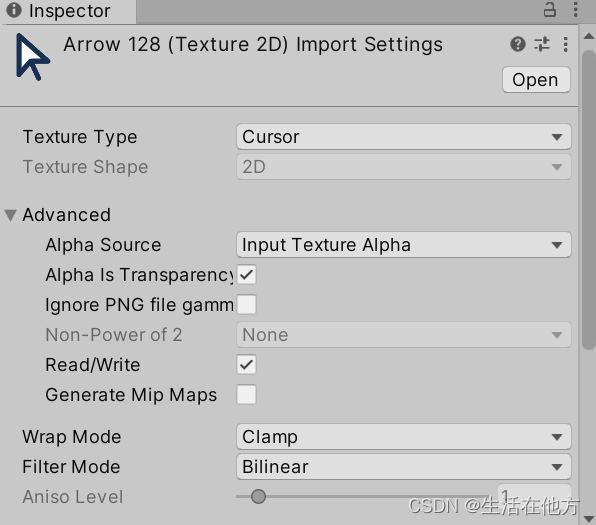
设置鼠标光标的方法就一个,SetCursor。第一个参数是图片,第二个参数是点击点的偏移量,第三个参数是类型。
    public Texture2D texture;
    void Start()
    {

        Cursor.SetCursor(texture, new Vector2(40, 4), CursorMode.Auto);
    }
当使用CursorMode.Auto的时候,会使用硬件进行光标处理。性能好,兼容好。但是,在windows系统下,会强制把光标大小缩小到32*32。

当使用CursorMode.ForceSoftware的时候,会使用软件来处理光标。在windows系统下想要鼠标光标变大这是唯一的方法,但是偶尔会有小bug。在使用中发现unity2022.1+HDRP环境下,图片颜色会变深。

要实现图标动画的话,只能一张一张的图片轮流替换。CodeMonkey大佬有提供光标动画的代码,我就直接抄过来了。
[CreateAssetMenu]
public class CursorAnimation : ScriptableObject
{

    public CursorType cursorType;
    public Texture2D[] textureArray;
    public float frameRate;
    public Vector2 offset;
}
public class CursorMananger : MonoBehaviour
{

    public CursorAnimation[] cursorAnimations;
    private CursorAnimation currentAnimation;

    private float frameRate;
    private int frameCount;
    private int currentFrame;
    private float frameTimer;

    private void Start()
    {

        SetActiveCursorAnimation(cursorAnimations[0]);
    }

    private void Update()
    {

        frameTimer -= Time.deltaTime;
        if (frameTimer <= 0f)
        {

            frameTimer += frameRate;
            currentFrame = (currentFrame + 1) % frameCount;
            Cursor.SetCursor(currentAnimation.textureArray[currentFrame], currentAnimation.offset, CursorMode.Auto);
        }

        if (Input.GetKeyDown(KeyCode.A)) SetActiveCursorAnimation(cursorAnimations[(int)CursorType.Arrow]);
        if (Input.GetKeyDown(KeyCode.S)) SetActiveCursorAnimation(cursorAnimations[(int)CursorType.Star]);
    }

    private void SetActiveCursorAnimation(CursorAnimation value)
    {

        currentAnimation = value;
        currentFrame = 0;
        frameTimer = value.frameRate;
        frameCount = value.textureArray.Length;
    }
}
B站光标效果演示视频:https://www.bilibili.com/video/BV1EN4y1j7Ne/
边栏推荐
- leetcode-isomorphic string judgment
- TSF Microservice Governance Combat Series (2) - Service Routing
- Week 9 10 Neural Networks
- 全网唯一OpenCyphal/UAVCAN教程(11)用candump和gawk工具写一个Cyphal协议解析小工具
- 14.Unity2D 横版 粒子系统特效 飙血粒子+高处落地粒子+对象池管理所有粒子
- 硬盘基础知识
- 76. The minimum cover substring
- Week 8 Transformer Language Models and Implications
- reduce具体使用以及使用reduce,toString,flat进行数组降维
- Single host docker builds redis-cluster
猜你喜欢

wpf中DataGrid的样式

2022-08-07 mysql/stonedb慢SQL-子查询-半连接

MySQL4 (multi-table query)

Matlab simulation of photovoltaic mppt maximum power control based on disturbance observation method

Connect two tables to update the third table (updata) in postgresql

使用ffmpeg解码音频sdl(push)播放

浅学软件逆向笔记(1)
Database sub-database sub-table, when?How to divide?
postman---postman parameterization

Redis设置开机自启动
随机推荐
【多任务模型】《Multi-Faceted Hierarchical Multi-Task Learning for a Large Number of Tasks with Multi-dimens
Spark entry learning-3-SparkSQL data abstraction
Lecture 84 Biweekly t4 6144 and Lecture 305 t4 6138
Personal Summary of OLTP and OLAP Issues
Cube - studio deployment process
Session 和 Cookie 使用
数据库ADB多个字符,想要导入到ES存为nested的类型,这个支持吗?有对应的文档吗
0 dictionary tree/string medium LeetCode676. Implement a magic dictionary
tracepoint: 定义函数及调用示例
[Redis] Redis Learning - Transaction
The big and small end problem caused by union union
ES6剩余参数的使用
基于扰动观察法的光伏mppt最大功率控制matlab仿真
【冷启动】快手《POSO: Personalized Cold Start Modules for Large-scale Recommender Systems》
IP核之RAM实验
走进音视频的世界——RGB与YUV格式
Matlab simulation of photovoltaic mppt maximum power control based on disturbance observation method
KMP和EXKMP(Z函数)
ES6解构赋值的使用说明
LVS:NAT模式详解