当前位置:网站首页>miniconda 换源(添加镜像)
miniconda 换源(添加镜像)
2022-04-22 05:37:00 【哈!小白要成长!】
1、查看当前镜像
(base) C:\Users\jcomhome>conda info

     active environment : base
    active env location : F:\miniconda\miniconda-install
            shell level : 1
       user config file : C:\Users\jcomhome\.condarc       # 配置文件位置
 populated config files :
          conda version : 4.10.3
    conda-build version : not installed
         python version : 3.9.5.final.0
       virtual packages : __cuda=8.0=0
                          __win=0=0
                          __archspec=1=x86_64
       base environment : F:\miniconda\miniconda-install  (writable)
      conda av data dir : F:\miniconda\miniconda-install\etc\conda
  conda av metadata url : None
           channel URLs : https://repo.anaconda.com/pkgs/main/win-64           # channel URLs 内容是当前镜像源,这里是 anaconda 镜像源
                          https://repo.anaconda.com/pkgs/main/noarch
                          https://repo.anaconda.com/pkgs/r/win-64
                          https://repo.anaconda.com/pkgs/r/noarch
                          https://repo.anaconda.com/pkgs/msys2/win-64
                          https://repo.anaconda.com/pkgs/msys2/noarch
          package cache : F:\miniconda\miniconda-install\pkgs
                          C:\Users\jcomhome\.conda\pkgs
                          C:\Users\jcomhome\AppData\Local\conda\conda\pkgs
       envs directories : F:\miniconda\miniconda-install\envs
                          C:\Users\jcomhome\.conda\envs
                          C:\Users\jcomhome\AppData\Local\conda\conda\envs
               platform : win-64
             user-agent : conda/4.10.3 requests/2.25.1 CPython/3.9.5 Windows/10 Windows/10.0.18362
          administrator : False
             netrc file : None
           offline mode : False
2、配置文件备份(防止修改过程出错)
(base) C:\Users\jcomhome>copy C:\Users\jcomhome\.condarc C:\Users\jcomhome\.condarc.bak
系统找不到指定的文件。
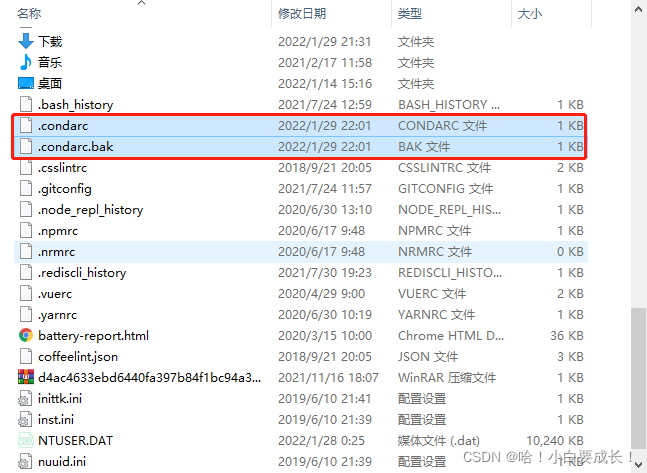
生成一下配置文件:conda config,再次查看备份
(base) C:\Users\jcomhome>conda config

(base) C:\Users\jcomhome>copy C:\Users\jcomhome\.condarc C:\Users\jcomhome\.condarc.bak
已复制         1 个文件。
3、修改配置文件
(base) C:\Users\jcomhome>conda config --add channels https://mirrors.tuna.tsinghua.edu.cn/anaconda/pkgs/free/

(base) C:\Users\jcomhome>conda config --add channels https://mirrors.tuna.tsinghua.edu.cn/anaconda/pkgs/main

(base) C:\Users\jcomhome>conda config --add channels https://mirrors.tuna.tsinghua.edu.cn/anaconda/pkgs/r

(base) C:\Users\jcomhome>conda config --add channels https://mirrors.tuna.tsinghua.edu.cn/anaconda/pkgs/pro

(base) C:\Users\jcomhome>conda config --add channels https://mirrors.tuna.tsinghua.edu.cn/anaconda/pkgs/msys2
查看是否添加上:
(base) C:\Users\jcomhome>conda info

     active environment : base
    active env location : F:\miniconda\miniconda-install
            shell level : 1
       user config file : C:\Users\jcomhome\.condarc
 populated config files : C:\Users\jcomhome\.condarc
          conda version : 4.10.3
    conda-build version : not installed
         python version : 3.9.5.final.0
       virtual packages : __cuda=8.0=0
                          __win=0=0
                          __archspec=1=x86_64
       base environment : F:\miniconda\miniconda-install  (writable)
      conda av data dir : F:\miniconda\miniconda-install\etc\conda
  conda av metadata url : None
           channel URLs : https://mirrors.tuna.tsinghua.edu.cn/anaconda/pkgs/msys2/win-64
                          https://mirrors.tuna.tsinghua.edu.cn/anaconda/pkgs/msys2/noarch
                          https://mirrors.tuna.tsinghua.edu.cn/anaconda/pkgs/pro/win-64
                          https://mirrors.tuna.tsinghua.edu.cn/anaconda/pkgs/pro/noarch
                          https://mirrors.tuna.tsinghua.edu.cn/anaconda/pkgs/r/win-64
                          https://mirrors.tuna.tsinghua.edu.cn/anaconda/pkgs/r/noarch
                          https://mirrors.tuna.tsinghua.edu.cn/anaconda/pkgs/main/win-64
                          https://mirrors.tuna.tsinghua.edu.cn/anaconda/pkgs/main/noarch
                          https://mirrors.tuna.tsinghua.edu.cn/anaconda/pkgs/free/win-64
                          https://mirrors.tuna.tsinghua.edu.cn/anaconda/pkgs/free/noarch
                          https://repo.anaconda.com/pkgs/main/win-64
                          https://repo.anaconda.com/pkgs/main/noarch
                          https://repo.anaconda.com/pkgs/r/win-64
                          https://repo.anaconda.com/pkgs/r/noarch
                          https://repo.anaconda.com/pkgs/msys2/win-64
                          https://repo.anaconda.com/pkgs/msys2/noarch
          package cache : F:\miniconda\miniconda-install\pkgs
                          C:\Users\jcomhome\.conda\pkgs
                          C:\Users\jcomhome\AppData\Local\conda\conda\pkgs
       envs directories : F:\miniconda\miniconda-install\envs
                          C:\Users\jcomhome\.conda\envs
                          C:\Users\jcomhome\AppData\Local\conda\conda\envs
               platform : win-64
             user-agent : conda/4.10.3 requests/2.25.1 CPython/3.9.5 Windows/10 Windows/10.0.18362
          administrator : False
             netrc file : None
           offline mode : False
再次install包,查看安装时是否出现,出现新添加镜像,说明镜像修改成功

版权声明
本文为[哈!小白要成长!]所创,转载请带上原文链接,感谢
https://blog.csdn.net/qq_41956139/article/details/122748299
边栏推荐
- LeetCode 2049. 统计最高分的节点数目--树的遍历
- Judge whether there are links in the linked list
- AcWing 836. 合并集合(并查集)
- Common methods of arrays (super detailed explanation)
- "Huawei Cup" programming competition for freshmen of Wuhan University J. hearsay file
- CopyOnWriteArrayList的使用场景
- 八皇后问题(回溯法,同时解决n皇后)
- 为什么数组的下标都是从0开始而不是1?
- kibana 搜索语法
- 5.The Simple Problem
猜你喜欢

数据挖掘——数据预处理
生成excel模板(下拉选、多级联动)

《PyTorch深度学习实践》Lecture_11 卷积神经网络进阶 Convolutional Neural Network

Judge whether there are links in the linked list
IDEA值得推荐的20款优秀的插件

LeetCode 2049. 统计最高分的节点数目--树的遍历

kibana 搜索语法
List分割最佳实践

vscode cmake-tools launching.json 使用文档(垃圾翻译)

opencv 使用 forEach 像素遍历(pixel 和 const int* position参数都有介绍)
随机推荐
Basic usage and common exceptions of homebrew
10.Advance Next Round
数据挖掘——数据预处理
LeetCode 589. N 叉树的前序遍历
Data mining clustering
关于form表单点击submit按钮后,页面自动刷新的问题解决
Redis缓存负载均衡使用的一致性哈希算法
Strong connected component of "tarjan" digraph
LeetCode 2049. 统计最高分的节点数目--树的遍历
常见的状态码
Array division (backpack)
TCGA下载GBM患者的RNA-seq数据
Goodbye 20202021 I'm coming
供应链服务术语
AcWing 1096. 地牢大师(三维 BFS)代码详细注释
9.Life, the Universe, and Everything
元注解(注解的注解)
使用高德地图API进行坐标转换:WGS84→GCJ02
torch使用踩坑日记,矩阵加速运算
Enquête JVM