当前位置:网站首页>Using pip to install third-party libraries in Pycharm fails to install: "Non-zero exit code (2)" solution
Using pip to install third-party libraries in Pycharm fails to install: "Non-zero exit code (2)" solution
2022-08-05 05:23:00 【When you are full, you will be strong】
[About pip install third-party library tips] Try to run this command from the system terminal. Make sure that you use the correct version of 'pip' installed for your Python interpreter located at 'D:\python3.7\venv\Scripts\python.exe'.
I haven't used pycharm for a long time. I recently did something related to image processing. I installed a third-party library and found that none of the libraries could be installed, and it kept prompting this thing.

I suspected that there was a problem with the python interpreter, but I decided to try installing it directly with cmd, so I found that the installation could be successful.

By the way, record the installation instructions, I always forget.
pip install package-i https://pypi.tuna.tsinghua.edu.cn/simple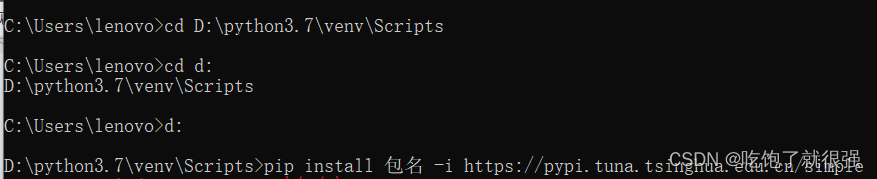
It is troublesome to install with cmd every time, but I still want to find a final solution.So according to the error prompt, guess it may be that the pip version and the interpreter are incompatible?
My computer is installed with python3.7
There is a python3.7 in the D and E disks in the computer, and I usually use the D disk interpreter.The pip version of the E disk is 19.0.3, and the pip version of the D disk is 22.1.2

Try to uninstall version 22.1.2,Install version 19.0.3
python -m pip uninstall pip
easy_install pip==19.0.3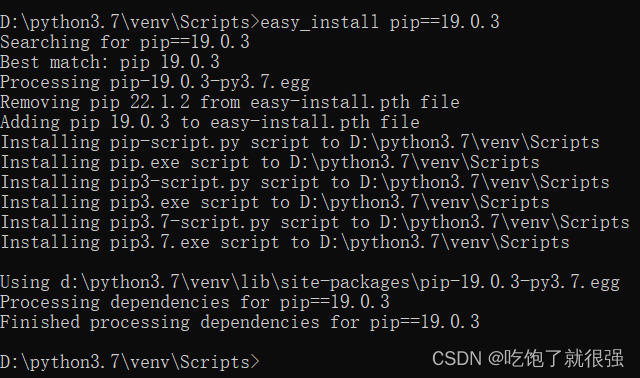
Then switch back to pycharm and useTry to install scipy, test whether the problem is solved, successfully solve the problem, feel comfortable!
I searched the Internet to find a solution. After suffering for two hours, I finally solved it. I am happy.
边栏推荐
猜你喜欢
RL强化学习总结(一)

『递归』递归概念与典型实例

【过一下7】全连接神经网络视频第一节的笔记
![[Student Graduation Project] Design and Implementation of the Website Based on the Web Student Information Management System (13 pages)](/img/86/9c9a2541f2b7089ae47e9832fffdb3.png)
[Student Graduation Project] Design and Implementation of the Website Based on the Web Student Information Management System (13 pages)
Algorithms - ones and zeros (Kotlin)

The software design experiment four bridge model experiment

Error creating bean with name 'configDataContextRefresher' defined in class path resource
![coppercam入门手册[6]](/img/d3/a7d44aa19acfb18c5a8cacdc8176e9.png)
coppercam入门手册[6]

多线程查询结果,添加List集合

【过一下8】全连接神经网络 视频 笔记
随机推荐
Wise Force Deleter强制删除工具
Requests库部署与常用函数讲解
Requests the library deployment and common function
The mall background management system based on Web design and implementation
Flutter学习5-集成-打包-发布
【过一下11】随机森林和特征工程
【读书】长期更新
[Go through 3] Convolution & Image Noise & Edge & Texture
逆向理论知识4
【过一下6】机器视觉视频 【过一下2被挤掉了】
C#关于set()和get()方法的理解及使用
【练一下1】糖尿病遗传风险检测挑战赛 【讯飞开放平台】
将照片形式的纸质公章转化为电子公章(不需要下载ps)
第5讲 使用pytorch实现线性回归
Opencv中,imag=cv2.cvtColor(imag,cv2.COLOR_BGR2GRAY) 报错:error:!_src.empty() in function ‘cv::cvtColor‘
Flutter learning 5-integration-packaging-publish
Error creating bean with name 'configDataContextRefresher' defined in class path resource
Qt制作18帧丘比特表白意中人、是你的丘比特嘛!!!
【过一下12】整整一星期没记录
Structured light 3D reconstruction (1) Striped structured light 3D reconstruction