当前位置:网站首页>ansible简单使用示例
ansible简单使用示例
2022-04-21 18:04:00 【雅冰石】
一 ansible介绍
在自动化工具中,最简单、易于上手,而且最流行的当属Ansible莫属了。
Ansible是一个开源配置管理工具,可以使用它来自动化任务,部署应用程序实现IT基础架构。Ansible可以用来自动化日常任务,比如,服务器的初始化配置、安全基线配置、更新和打补丁系统,安装软件包等。
1.1 Ansible优势

二 安装ansible
yum install ansible -y
三 使用ansible
3.1 创建专用账号
#在ansible节点及所有后端节点上创建该账号
chattr -ia /etc/passwd
chattr -ia /etc/group
chattr -ia /etc/shadow
chattr -ia /etc/gshadow
useradd ansible
usermod -aG wheel ansible
usermod -aG root ansible
passwd ansible
chown -R ansible:ansible /etc/ansible
#确保该用户可以被远程登录
vi /etc/ssh/sshd_config
在AllowUsers这一行后面添加能远程访问的用户,示例:
AllowUsers ansible
#重启ssh
service sshd restart
3.2 配置免密登录
配置ansible账号到后端服务器的免密登录
假如要在192.168.144.251上执行ansible,远程操作192.168.144.252及192.168.144.253。
则在192.168.144.251上生成秘钥:
su - ansible
ssh-keygen
#将秘钥拷贝到另外两台服务器上
ssh-copy-id 192.168.144.252
ssh-copy-id 192.168.144.253
#验证免密登录
ssh 192.168.144.252
Ssh 192.168.144.253
3.3 配置ansible
默认的配置文件位于/etc/ansible/ansible.cfg下。
vi /etc/ansible/hosts,添加:
[mariadb]
192.168.144.252
192.168.144.253
[ES]
192.168.144.254
3.4 简单使用示例
#ping下后端mariadb服务器,看是否能ping通:
ansible mariadb -m ping
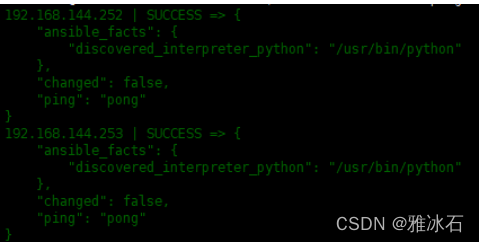
ping不通的话会提示Failed to connect to the host via ssh:
#只对某个组下某个主机进行变更:
ansible mariadb -m ping --limit "192.168.144.252"
#对某个网段进行操作:
ansible 192.168.144.* -m ping
#ping所有服务器
ansible all -m ping
#查看某个组下的所有主机列表
ansible mariadb --list
#查看某个组中的主机的磁盘空间
ansible mariadb -m command -a "df -h"
3.5 shell模块
ansible mariadb -m shell -a "echo hello world" > /opt/d.txt
文件会保存在ansible服务器上,不是后端服务器上。
3.6 script模块
#使用scripts模块可以在本地写一个脚本,在远程服务器上执行:
ansible mariadb -m script -a "/opt/a.sh"
3.7 copy模块
#将本机上的d.txt拷贝到后端mariadb节点上
ansible mariadb -m copy -a "src=/opt/d.txt dest=/opt/d.txt"
本篇文章参考了Ansible自动化入门,只要这一篇就够了
版权声明
本文为[雅冰石]所创,转载请带上原文链接,感谢
https://blog.csdn.net/YABIGNSHI/article/details/124296783
边栏推荐
- onnx效率问题:和Module & DataParallel比较
- 上位机这样玩,才有意思!
- New ETL scheduling batch management tool taskctl 8.0 simplest installation
- numpy. Ndarray does not support logical operations
- Is qiniu financial management useful? Is it safe?
- 怎么获取map值才不那么low,获取map参数的三种方式
- 头条自媒体运营秘籍,坚持下去你就可以打败90%的人
- Huawei cloud gaussdb (for influx) unveiling phase VI - hierarchical data storage
- 最基本的JDBC模板及数据库乱码处理
- Debugging garbled code of vs2019 visual studio terminal
猜你喜欢
Eating this open source gadget makes MCU development as efficient as Arduino

Finally complete the dream of student age - make a handheld machine and teach you with single chip microcomputer STM32

还剩下载次数,可留链接+邮箱

【今晚七点】metaRTC的发展和应用场景探讨

Laxcus distributed operation redundancy and fault tolerance node
![[breakthrough in key and difficult points of C language] - dynamic memory management](/img/15/259705392c1363bdde0ca12331fee8.png)
[breakthrough in key and difficult points of C language] - dynamic memory management
![[intensive reading of Thesis] perception based seam cutting for image stitching](/img/c2/d5408d69c30661249869f5bf9f1da6.png)
[intensive reading of Thesis] perception based seam cutting for image stitching

关于Linq语句

Weekly recommended short video: the competition between enterprises is to see who can seize the first opportunity
吃了这个开源小玩意让单片机开发和Arduino一样高效
随机推荐
PMP每日一练 | 考试不迷路-4.21
Chest X-ray images - dataset
numpy. Ndarray does not support logical operations
After reading this tutorial, you will have your own satellite (DIY full explanation)
Shell programming learning (III) condition judgment and process control
MySQL的默认用户名和密码的什么?
Zhongang Mining: a new and active application field of fluorite resources
Logstash ~ input of logstash (input)
包装类
干货|app自动化测试之Appium 源码分析
Do we media sidelines really earn tens of thousands a month? This article is shared without privacy
接口
LogStash~LogStash命令行可选参数
There is a prize for essay | a heavy prize of 5000 yuan. You are invited to contribute
Linux~libc. so. 6 (glibc_2.28) (64bit) is redis-5.0.3-1 nfs. x86_ 64 required
Finally complete the dream of student age - make a handheld machine and teach you with single chip microcomputer STM32
Modify the van dropdown menu default height
关于Linq语句
终于完成学生时代的梦想-制作掌机用单片机STM32手把手教你
mysql8.0设置忽略大小写后无法启动