当前位置:网站首页>Hard Disk Partitioning and Permanent Mounting
Hard Disk Partitioning and Permanent Mounting
2022-08-05 06:09:00 【Magic star】
Hard Disk Partitioning and Permanent Mounts
MBR partition
What is a hard disk: A computer hard disk is the main storage device of a computer.
The role of partitions
- Main partition: can be used directly, can be installed system
- Extended partition: cannot be used directly, it must be divided into logical partitions
- Logical partition: Relying on the extended partition, the space in the extended partition (with the operating system installed) is used
mbr partition:
Only partition the hard disk below 2T
A sector has 512 bytes, the first 446 bytes are the boot program
- Primary partition: serial number is 1-4
- Logical partition: sequence number starts from 5
- Extended partition: must be the primary partition
- The primary partition is not necessarily an extended partition
- The logical partition must not be the primary partition
gpt partition
It can have 128 partition tables and can partition hard disks above 2T
fdisk

Create a normal partition
Usage (fdisk disk name)

mkfs.xfs partition name (create filesystem)

mount: mount partition name folder name
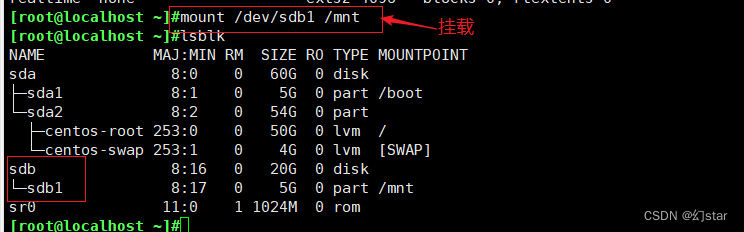
Create a logical partition
Usage (fdisk hard drive name)

mkfs.xfs partition name (create filesystem)

mount: mount partition name folder name


Create a special partition (swap partition)
Usage (fdisk hard drive name)


mount: mount partition name folder name
Create a special partition swap
The partition type must be changed to 82 (swap partition)
t: Change the partition type

Permanent mount
[[email protected] ~]#vim /etc/fstab
[[email protected] ~]#mount -a
Mounting rules
1. A mount point can only mount one device at a time
2. A mount point mounts multiple devices at the same time, only the data of the last device can be seen, the data on other devices will be hidden
3. A device can be mounted to multiple mount points at the same time
4. Usually the mount point is usually an existing empty directory
If a user is mountingThe mount directory cannot be unmounted
I want to remount
mount -o remount /dev/sdb1 /mnt/
mount -o remount,ro /dev/sdb1 /mnt/
fuser -km /mnt/ ###Kill directly
MBR 446 before the master boot record 64 after the boot program Partition table 2 mark bit
1. Partition fidsk gdisk Primary partition extension logic
2. Create file system mkfs. File system type mkswap
3. Mountmount swapon
Repair file system:
dd if=/dev/zero of=/dev/sdb1 bs=512 count=1
dd copy
if copy from where what /dev/zero
ofIt is copied to /dev/sdb1
bs=512 once copied 512
count=1 copied once
边栏推荐
- Getting Started 11 Automatically add version numbers
- 【UiPath2022+C#】UiPath控制流程概述
- C语言查看大小端(纯代码)
- Getting Started 03 Distinguish between development and production environments ("hot update" is performed only in the production environment)
- Unity中的GetEnumerator 方法及MoveNext、Reset方法
- 栈区中越界可能造成的死循环可能
- 海外服务器的优势
- spark源码-RPC通信机制
- D46_给刚体施加的力
- 快问快答—腾讯云服务器常见问题解答
猜你喜欢

Unity物理引擎中的碰撞、角色控制器、Cloth组件(布料)、关节 Joint
【UiPath2022+C#】UiPath Switch

【UiPath2022+C#】UiPath数据类型

硬核!Cocos开发面试必备十问,让你offer拿到手软

手把手教你搭建小程序
![[Paper Intensive Reading] Rich Feature Hierarchies for Accurate Object Detection and Semantic Segmentation (R-CNN)](/img/a7/fc3fe440f5e57362d44ae875b7d436.png)
[Paper Intensive Reading] Rich Feature Hierarchies for Accurate Object Detection and Semantic Segmentation (R-CNN)

Cocos Creator小游戏案例《棍子士兵》

Contextual non-local alignment of full-scale representations

“元宇宙”是个啥?都有哪些大招?

入门文档08 条件插件
随机推荐
【UiPath2022+C#】UiPath 数据操作
电子产品量产工具(2)- 输入系统实现
【Day8】 RAID磁盘阵列
海外服务器的优势
C语言查看大小端(纯代码)
腾讯内部技术:《轩辕传奇》服务器架构演变
D39_欧拉角与四元数
I217-V在openwrt软路由下大流量断网问题
【Day8】(超详细步骤)使用LVM扩容
链表章6道easy总结(leetcode)
入门文档09 独立的watch
浅谈遇到的小问题
【UiPath2022+C#】UiPath 练习-数据操作
SSL证书提示过期或者无效,该怎么处理呢?
入门文档05-2 使用return指示当前任务已完成
dsf5.0新建页面访问时重定向到首页的问题
【Day8】使用LVM扩容所涉及的命令
spark源码-任务提交流程之-5-CoarseGrainedExecutorBackend
spark算子-wholeTextFiles算子
“元宇宙”是个啥?都有哪些大招?