当前位置:网站首页>dom操作元素 总结
dom操作元素 总结
2022-04-21 15:54:00 【贾继宝】
<!-- 操作元素总结 -->
<!-- 操作元素内容 操作常见元素属性 操作表单元素属性 操作元素样式属性 -->
<!-- 元素内容 innerText innerHTML -->
<!-- 常见元素属性 src href title alt等 -->
<!-- 表单元素属性 type value disabled等 -->
<!-- 元素样式属性 element.style className -->
作业1.显示隐藏内容
<!DOCTYPE html>
<html lang="en">

<head>
    <meta charset="UTF-8">
    <meta http-equiv="X-UA-Compatible" content="IE=edge">
    <meta name="viewport" content="width=device-width, initial-scale=1.0">
    <title>Document</title>
    <style>
        input {
            color: #999;
            border: 1px solid pink;
        }
    </style>
</head>

<body>
    <!-- 操作元素总结 -->
    <!-- 操作元素内容  操作常见元素属性  操作表单元素属性  操作元素样式属性 -->
    <!-- 元素内容 innerText innerHTML -->
    <!-- 常见元素属性  src href title alt等 -->
    <!-- 表单元素属性  type value disabled等 -->
    <!-- 元素样式属性  element.style  className -->
    <input type="text" value="邮箱或账号" class="ipt">
    <script>
        var inp = document.querySelector('input');
        inp.onfocus = function() {
            if (this.value === '邮箱或账号') {
                this.value = '';
            }
            this.style.color = '#333';
        }
        inp.onblur = function() {
            if (this.value === '') {
                this.value = '邮箱或账号';
            }
            this.style.color = '#999';
        }
    </script>
</body>

</html>
效果
 --》
--》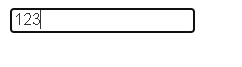 -》
-》
作业2 开关灯
<!DOCTYPE html>
<html lang="en">

<head>
    <meta charset="UTF-8">
    <meta http-equiv="X-UA-Compatible" content="IE=edge">
    <meta name="viewport" content="width=device-width, initial-scale=1.0">
    <title>Document</title>
</head>

<body>
    <button>开关灯</button>
    <script>
        var btn = document.querySelector('button');
        var flag = 0;
        btn.onclick = function() {
            if (flag == 0) {
                document.body.style.backgroundColor = 'pink';
                flag = 1;
            } else {
                document.body.style.backgroundColor = 'black';
                flag = 0;
            }
        }
    </script>
</body>

</html>
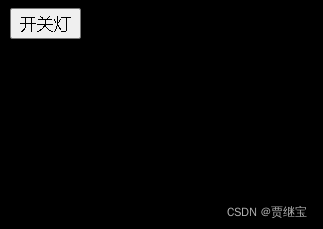
效果:
 --》
--》 --》
--》
作业3:下拉菜单
<!DOCTYPE html>
<html>

<head>
    <meta charset="utf-8">
    <title></title>
    <style>
        * {
            margin: 0px;
            padding: 0px;
        }

        ul {
            list-style: none;
            /* background-color: red; */
            /* width: 800px; */
        }

        #fold {
            margin: 100px auto;
            width: 85%;
        }

        #fold>li {
            float: left;
            width: 100px;
            text-align: center;
        }

        #fold>li>a {
            background-color: lightgray;
            display: inline-block;
            width: 100px;
            height: 30px;
            line-height: 30px;
            color: orange;
            text-decoration: none;
        }

        #fold>li>ul {
            display: none;
        }

        #fold>li>ul li:hover {
            background-color: darkorange;
        }
    </style>
</head>

<body>
    <div id="container">
        <ul id="fold">
            <li>
                <a href="#">微博</a>
                <ul>
                    <li>评论</li>
                    <li>店铺</li>
                    <li>发文</li>
                </ul>
            </li>
            <li>
                <a href="#">微博</a>
                <ul>
                    <li>评论</li>
                    <li>店铺</li>
                    <li>发文</li>
                </ul>
            </li>
            <li>
                <a href="#">微博</a>
                <ul>
                    <li>评论</li>
                    <li>店铺</li>
                    <li>发文</li>
                </ul>
            </li>
            <li>
                <a href="#">微博</a>
                <ul>
                    <li>评论</li>
                    <li>店铺</li>
                    <li>发文</li>
                </ul>
            </li>
        </ul>
    </div>
    <script>
        //获取li元素对象
        var uls = document.querySelector('#fold');
        var lis = uls.children; //获取uls节点下面的所有子元素节点
        // console.log(lis);
        //循环给每个li注册事件
        for (var i = 0; i < lis.length; i++) {
            lis[i].onmouseover = function() {
                this.children[1].style.display = 'block';
            }
            lis[i].onmouseout = function() {
                this.children[1].style.display = 'none';
            }
        }
    </script>
</body>

</html>
效果:



版权声明
本文为[贾继宝]所创,转载请带上原文链接,感谢
https://blog.csdn.net/pakerder/article/details/124294622
边栏推荐
猜你喜欢

许远东受邀上海管理科技论坛做《LTD数字化经营方法论》分享

HMC基金会Big Ma机器人同步代币HMC(希曼)将上线 PancakeSWAP

C语言进阶第43式:函数的意义

Emlparse: an ultra lightweight tool for batch parsing EML format e-mail

C语言进阶第41式:内存操作经典问题分析一
关于nodejs fs readFileSync 过程中强行关机 拉闸 断电 导致文件损坏的问题解决方案

ABAP string function list

首届船海数据智能应用创新大赛赛事公告

Xiaomi Hongmi's note 4x brush machine succeeded
HMC foundation big Ma robot synchronization token HMC (seaman) will launch pancakeswap
随机推荐
徽商期货开户是否可靠?资金安全吗?
Xiaobai learns MySQL - some differences in creating users in different versions
C语言进阶第42式:内存操作经典问题分析二
嵌入式GUI盘点-你了解几款?
Spark综合练习——电影评分数据分析
Mark一下,两年365个粉丝
"Checking and remedying deficiencies", sorting out the core concepts of DDD
Download the documentation tutorial for free
R语言aov函数进行单因素方差分析(One-way ANOVA)、使用Q-Q图来评估方差分析因变量的正态性、Bartlett验证方差的相等性(齐次性)、car包中的outlierTest函数异常检验
PHP 零基础入门笔记(11):字符串 String
一级等保怎么做?要收费吗?等保要求是什么?
Is the account opening of Huishang futures company reliable? Is the transaction safe?
Open source artifact of real-time pedestrian analysis, netizen: too strong!
2022年重庆最新建筑施工焊工(建筑特种作业)模拟题库及答案
mysql数据库字段上下移动
微信h5、APP、微信内jsapi支付接口
R语言coin包应用于独立性问题的置换检验(permutation tests)、使用wilcox.test函数进行两组数据的Wilcoxon符号秩检验、使用wilcoxsign_test函数置换检验
事务的隔离级别详解
How does infotnews memes, myths and NFT build cultural identity?
Season change 47 / 90