当前位置:网站首页>How to get started with MOOSE platform - an example of how to run the official tutorial
How to get started with MOOSE platform - an example of how to run the official tutorial
2022-08-04 06:19:00 【nuomi666】
This article only introduces how to run the official examples given by the MOOSE platform (Examples and Tutorials | MOOSE), how to install the MOOSE platform can refer to the official tutorial (Install MOOSE | MOOSE), this article is based on the Ubuntu 20.04 virtual machine of the windows10 system.
To run these examples, you can use the app you built yourself, or you can compile the app in the official example folder. In order to run through the examples as soon as possible, you can directly compile the app in the example folder here.
1. Switch the moose environment
First open Ubuntu, type
conda activate mooseIf you haven't built the moose environment, you can refer to (Conda MOOSE Environment |MOOSE),
At this point the beginning of the command line base will be changed to moose

2. Compile the app
Take Ee01 as an example, it is recommended that you put the original file inCopy once in the same directory, switch the working directory to the copied folder ~\projects\moose\examples\ex01_inputfile_copy, and then run make -j 4 to compile the app in this directory, where the number after j is how many threads to compileMeaning, -j4 is 4 threads.
cd ~/projects/moose/examples/ex01_inputfile_copymake -j 4The process of compilation
The compilation process is slow, just wait patiently for completion.
3. Running example
After the app is compiled, we can use the generated appname-opt file to run the corresponding executable file (name.i). Here we use the app:ex01-opt just compiled in the ex01_inputfile_copy directory to run ex01.i, enter the command
./ex01-opt -i ./ex01.iWait patiently for the results, the model information to be solved
Framework Information:MOOSE Version: git commit cddfe1453b on 2021-12-14LibMesh Version:PETSc Version: 3.15.1SLEPc Version: 3.15.1Current Time: Tue May 10 13:34:47 2022Executable Timestamp: Tue May 10 13:32:14 2022Parallelism:Num Processors: 1Num Threads: 1Mesh:Parallel Type: replicatedMesh Dimension: 3Spatial Dimension: 3Nodes: 3774Elems: 2476Num Subdomains: 1Nonlinear System:Num DOFs: 3774Num Local DOFs: 3774Variables: "diffused"Finite Element Types: "LAGRANGE"Approximation Orders: "FIRST"Execution Information:Executioner: SteadySolver Mode: Preconditioned JFNKThe process of solving, residual output
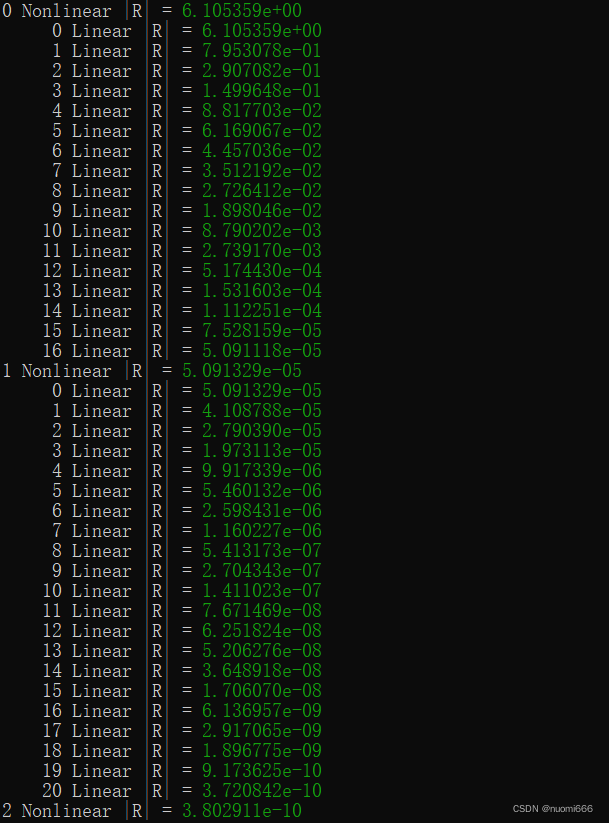
4. Viewing results
In this example, the final output file is ex01_out.e, in Exodus II format, which can be used with Paraview (Download | ParaView) view, or use the Peacock that comes with the Moose platform (Peacock | MOOSE).
After using Paraview to open, the first step is to check the variable name to be viewed in the Properties tab at the bottom left of the default interface, and the second step is to click the Apply button.

The third step is to select the displayed variables at the top of the interface. The fourth step is to display the type of solution domain (surface, mesh, or node, etc.), and for transient models, you can also adjust the time step.
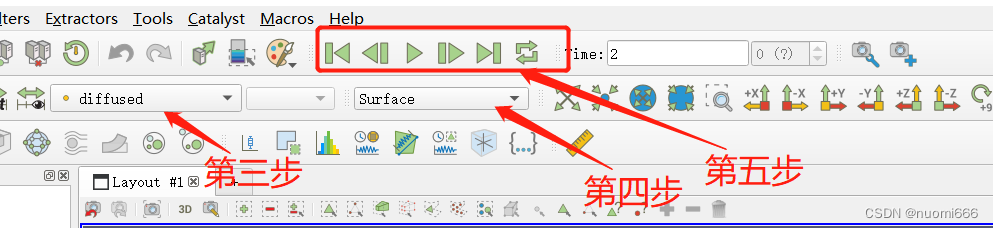
The final result display:

5. Remarks
During the initial compilation, an error code occurred
MAKEFILE:11:***MISSING SEPARATOR.STOP.Open the script file Makefile for viewing later, and find that it is blank. It should be caused by an operation error that deleted the content in the previous use process.
Solution: Open the GitHub repository of MOOSE official website, find the link of the damaged file, and use the GitHub file downloader (GitHub File Acceleration), download the appropriate file, and then replace the corrupted file.
边栏推荐
- [Introduction to go language] 12. Pointer
- Simple and clear, the three paradigms of database design
- yolov3 data reading (2)
- lstm pipeline 过程理解(输入输出)
- [CV-Learning] Semantic Segmentation
- 亚马逊云科技 Build On 2022 - AIot 第二季物联网专场实验心得
- MFC读取点云,只能正常显示第一个,显示后面时报错
- MNIST手写数字识别 —— Lenet-5首个商用级别卷积神经网络
- 动手学深度学习_卷积神经网络CNN
- yoloV5 使用——训练速度慢,加速训练
猜你喜欢




![[CV-Learning] Semantic Segmentation](/img/ad/ff5076495fa68e4bbf3be78f5ac6f2.png)

随机推荐
【CV-Learning】图像分类
计算某像素点法线
Pytorch问题总结
TensorRT 5 初步认识
No matching function for call to ‘RCTBridgeModuleNameForClass‘
动手学深度学习_softmax回归
PP-LiteSeg
MFC 打开与保存点云PCD文件
CSDN大礼包--高校圆桌派大礼包
Pytest常用插件
【CV-Learning】Object Detection & Instance Segmentation
典型CCN网络——efficientNet(2019-Google-已开源)
Amazon Cloud Technology Build On 2022 - AIot Season 2 IoT Special Experiment Experience
Golang环境变量设置(二)--GOMODULE&GOPROXY
动手学深度学习__张量
Th in thymeleaf: href use notes
MNIST手写数字识别 —— Lenet-5首个商用级别卷积神经网络
[Introduction to go language] 12. Pointer
Install dlib step pit record, error: WARNING: pip is configured with locations that require TLS/SSL
TypeError: load() missing 1 required positional argument: ‘Loader‘