当前位置:网站首页>Linux(CentOS)下安装 PostgreSQL
Linux(CentOS)下安装 PostgreSQL
2022-04-22 07:48:00 【流萤点火】
一、安装rpm
这个安装地址总是在变,若直接复制网上的命令可能行不通。因此直接去官网获取yum安装命令:
官网地址:https://www.postgresql.org/

点击Download

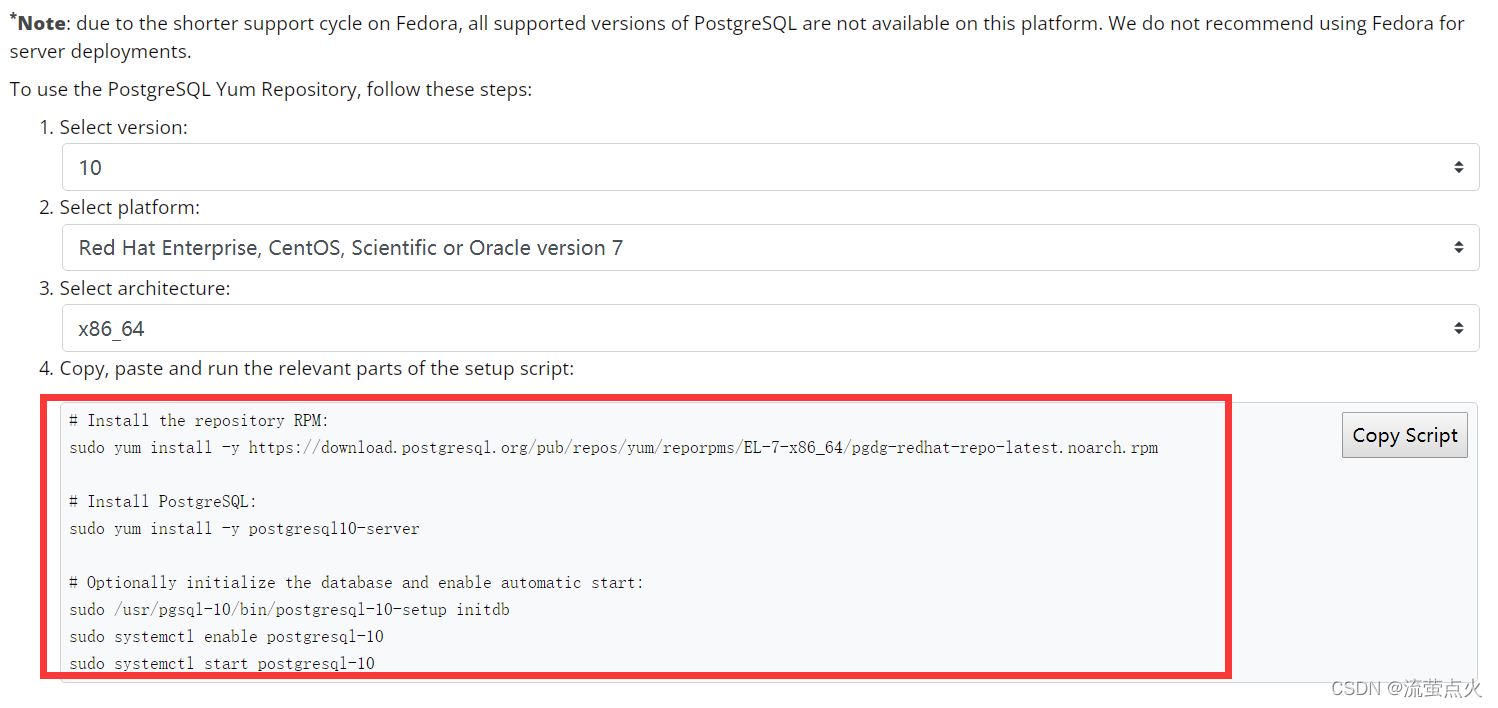
选择相应版本,按照官网提供命令来执行,如:

二、安装PostgreSQL,初始化
同样,根据官网文档进行安装和初始化
yum install -y postgresql10-server
/usr/pgsql-10/bin/postgresql-10-setup initdb
如:

三、设置开机启动
systemctl enable postgresql-10
systemctl start postgresql-10

四、修改密码
1、进入系统postgres用户
(yum安装postgresql,默认会建一个名为”postgres”的系统账号,用于执行PostgreSQL;)
su - postgres
#切换用户后,提示符变更为bash-4.2$
同时数据库中也会生成一个名为”postgres”的数据库用户,且密码已自动生成
2.登录数据库
#PostgreSQL在数据库用户同名的系统账号下登录免密;
-bash-4.2$ psql -U postgres
#执行后提示符变为 'postgres=#'

3.修改密码
#设置postgres 用户的密码为123456
postgres=# alter user postgres with password '123456'
退出
\q
五、开启远程连接
vi /var/lib/pgsql/10/data/postgresql.conf
修改#listen_addresses = ‘localhost’ 为 listen_addresses=’*’

六、远程连接主机认证
vi /var/lib/pgsql/10/data/pg_hba.conf
修改为:
#IPv4 local connections:
host all all 127.0.0.1/32 trust
host all all 0.0.0.0/0 trust
0.0.0.0/0表示允许所有服务器连接

修改完后重启服务
systemctl restart postgresql-10
八、查看端口
netstat -tunlp

九、Navicat连接PostgresSQL


注意:
如果是用的云服务器,记得在安全组中开放端口5432

参考文章链接:
https://www.linuxidc.com/Linux/2017-10/147536.htm
版权声明
本文为[流萤点火]所创,转载请带上原文链接,感谢
https://blog.csdn.net/weixin_44732379/article/details/122354162
边栏推荐
- 字符串的替换
- 100. 相同的树(Easy)
- 猴子吃桃子问题(循环、递归)
- Lambda expression
- Realization of floor decomposition animation in cesium
- Cesium collects terrain height and model height (asynchronous method, suitable for more data)
- JS judge the element to the top and fix it
- 字符串替换相关题目(合并数组)
- Level 3: node status check, data view and update
- Client server communication project 1
猜你喜欢

94. Middle order traversal of binary tree (easy)

Level 1: node monitoring mechanism
Arm bare metal (IV) -- exceptions and interrupts

CSDN怎么转载别人的博客

Shell command script

第3关:节点状态检查、数据查看和更新
1315. Sum of nodes with even grandfather node value (medium)

PCIe学习-PCIe总线怎样做到在软件上兼容PCI总线(七)

"Unexpected" operation in SQL statement

Matlab tip: to use 'xxx function', you must authorize, install and enable the following products: XXX toolbox
随机推荐
字符串的替换
require-dev.mikey179/vfsStream is invalid, it should not contain uppercase characters. Please use m
"Unexpected" operation in SQL statement
129. Find the sum of numbers from root node to leaf node (medium)
C语言之scanf/sprintf、fscanf/fprintf、sscanf/sprintf、snprintf
社会工程学之黑客七宗罪——贪婪(死亡之PING)
Level 2: create, list and delete child nodes
Function pointers and pointer functions
Cesium mouse picks up the feature and determines the feature category
Level 3: node status check, data view and update
PCIe学习-PCIe总线体系结构入门:事务层-数据链路层-物理层(八)
客户端与服务器通信项目1
空心字母金字塔
Level 2: ACL access control list
Shell notes
Aircrack 破解无线网密码 (跑字典法)
Installation de MySQL par CentOS
accumulator
100. 相同的树(Easy)
101. Symmetric binary tree (easy)