当前位置:网站首页>Ros2 learning notes (8) learn the startup file of ros2 from turnlesim
Ros2 learning notes (8) learn the startup file of ros2 from turnlesim
2022-04-22 12:29:00 【Xicheng Xiaokai】
Preface
Study ROS2 Way , Not through learning ROS1 Instead of , because ROS2 Of “ kernel ” differ ROS1, We must seriously start from scratch and learn again .
Ubuntu edition :20.04
ROS edition :Foxy
Review of study notes
- ROS2 Learning notes ( One ) Get document
- ubuntu20.04 install ROS2 and ROS1 coexistence
- ROS2 Learning notes ( Two ) from turtlesim Study ROS2 node
- ROS2 Learning notes ( 3、 ... and ) from turtlesim Study ROS2 The theme
- ROS2 Learning notes ( Four ) from turtlesim Study ROS2 service
- ROS2 Learning notes ( 5、 ... and ) from turtlesim Study ROS2 Parameters
- ROS2 Learning notes ( 6、 ... and ) from turtlesim Study ROS2 action
- ROS2 Learning notes ( 7、 ... and ) from turtlesim Study ROS2 Tools for
1.ROS2 Startup file
When we want to start a large project, we need to run multiple nodes at the same time , It's going to be a lot of trouble , If you run a single startup file, you can start the whole system, including all nodes and configurations , It will be very convenient .ROS2 The startup file in has such a function .
2. establish launch file
$ mkdir ros2_ws
$ cd ros2_ws
$ mkdir launch
$ touch launch/turtlesim_mimic_launch.py
Open a new file with a text editor .
3. To write launch file
Write a turtlesim Startup file for package , The goal of this file is to start two turtle simulators , Let one turtle imitate the movement of another turtle , The startup file code is as follows :
#  introduce ROS2 launch modular
from launch import LaunchDescription
from launch_ros.actions import Node

#  start-up launch File description
def generate_launch_description():
    return LaunchDescription([
        #  Start the first turtle Simulator
        Node(
            package='turtlesim',#  Function package of the node
            namespace='turtlesim1', #  Namespaces cannot be the same
            executable='turtlesim_node',#  Indicates the name of the executable file to run
            name='sim'#  Node name after startup
        ),
        #  Start the second turtle Simulator
        Node(
            package='turtlesim',
            namespace='turtlesim2',#  Namespaces cannot be the same
            executable='turtlesim_node',
            name='sim'
        ),
        #  start-up mimic
        Node(
            package='turtlesim',
            executable='mimic',
            name='mimic',
            # /input/pose The theme is remapped to /turtlesim1/turtle1/pose
            # /output/cmd_vel Topics will be mapped to /turtlesim2/turtle1/cmd_vel
            remappings=[
                ('/input/pose', '/turtlesim1/turtle1/pose'),
                ('/output/cmd_vel', '/turtlesim2/turtle1/cmd_vel'),
            ]
        )
    ])
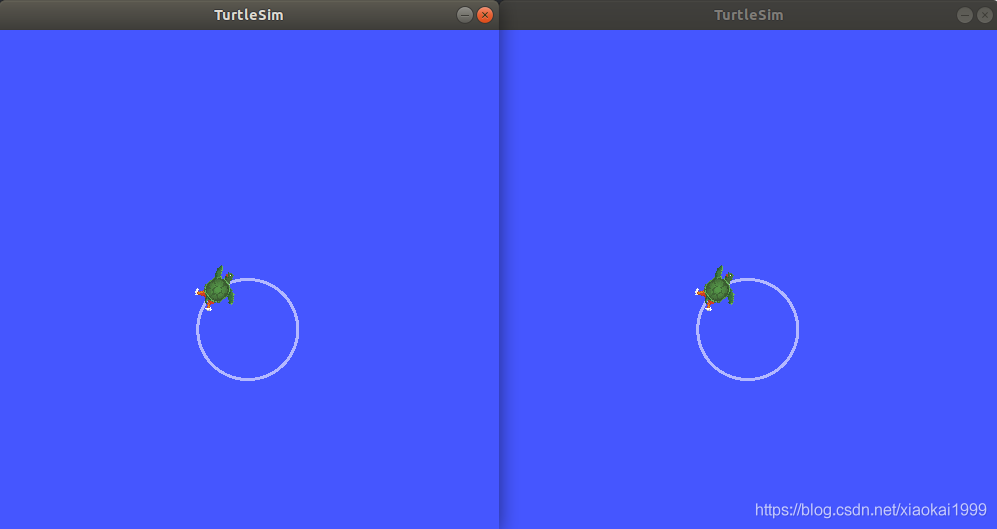
Through the remapping operation above , It can be seen that mimic Nodes subscribe to turtle1 The location of , Convert into pairs turtle2 The speed command is issued , It can make turtle2 imitation turtle1 Complete the same exercise
4.ros2 launch
The syntax of the startup file is as follows :
$ ros2 launch <package_name> <launch_file_name>
Start the file to see the effect :
$ cd launch
$ ros2 launch turtlesim_mimic_launch.py
----
[INFO] [launch]: Default logging verbosity is set to INFO
[INFO] [turtlesim_node-1]: process started with pid [11714]
[INFO] [turtlesim_node-2]: process started with pid [11715]
[INFO] [mimic-3]: process started with pid [11716]
Open the new terminal and issue the control command of the little turtle to control the movement of the little turtle :
$ ros2 topic pub -r 1 /turtlesim1/turtle1/cmd_vel geometry_msgs/msg/Twist "{linear: {x: 2.0, y: 0.0, z: 0.0}, angular: {x: 0.0, y: 0.0, z: -1.8}}"
We can see two turtles on the same road .
5.rqt_graph Tools
Start the new terminal , Use the following command to view the relationships in the node :
$ rqt_graph

summary
Startup files simplify the startup of complex systems , Use them well .
Reference:
https://docs.ros.org/en/foxy/Tutorials/Launch-Files/Creating-Launch-Files.html
Conclusion
This paper is also based on the author's learning and use experience , Strong subjectivity , If there is anything wrong or unclear , Welcome to leave a message in the comments area ~
In order to further discuss the problem with the readers , Set up a wechat group , It's convenient to answer your questions , You can also discuss problems together .
Add group links
版权声明
本文为[Xicheng Xiaokai]所创,转载请带上原文链接,感谢
https://yzsam.com/2022/04/202204221223330288.html
边栏推荐
- matlab 自动选择不标准桥梁跨径代码(源代码完全版)
- 关于服务器 url大小写的问题
- Pytorch processes RNN input variable length sequence padding
- 智能家居的新想法(2022)
- 低频(LF)RFID 智能终端
- What do the nouns a record, MX record and CNAME record mean?
- Ont and ONU
- What does 0ul or 1ul in STM32 mean?
- 腾讯云域名绑定
- Free trial for the first three months! Borui data alarm platform onealert is in progress
猜你喜欢

分享一下自己最近寫的一個移動端項目積累的一些實用技巧

前三个月免费试用!博睿数据告警平台OneAlert火热大促进行中

node. JS database error failed to lookup view "list" in views directory
论文阅读《Attention Concatenation Volume for Accurate and Efficient Stereo Matching》

【并发编程051】volatile 内存语义的实现原理

Tencent cloud domain name binding
node.js数据库报错Failed to lookup view “list“ in views directory

LeetCode 617、合并二叉树
C语言%7.2d、%-7d、%7.2f、%0.2f的含义

Concept and operation of stack
随机推荐
What is the difference between CPU and GPU?
Low frequency (LF) RFID intelligent terminal
redis 不能添加数据
TypeError: connection.connect is not a function
【并发编程050】内存屏障的种类以及说明?
LeetCode_DFS_中等_200.岛屿数量
Application case sharing of isolated integrated current sensor ch704 which can measure current above 50A
What does 0ul or 1ul in STM32 mean?
Codeforces Round #783 (Div. 2)
使用PHPstudy开启MySQL服务,并创建一个数据库
Knowledge points that need to be recorded in the work
案例4-1.7:文件传输(并查集)
JS基础11
前三个月免费试用!博睿数据告警平台OneAlert火热大促进行中
4.21 learning record DP record path (LCS) knapsack on tree (course selection) general tree DP (dance without boss)
Pytorch processes RNN input variable length sequence padding
2019年华为鸿蒙加入手机系统阵营,如何看待鸿蒙这三年的发展?
智能家居的新想法(2022)
【并发编程053】双重检查锁的变量为什么使用volatile变量
LeetCode 617、合并二叉树