当前位置:网站首页>(4) summary of methods to realize vertical centering
(4) summary of methods to realize vertical centering
2022-04-22 06:44:00 【Zhou zhouchi】
If the parent element's height Don't write , Just set the parent element padding:10px 0; You can center the child elements vertically ; If the parent element's height It's dead , It's more difficult to center vertically , Here are some ways to center vertically .
1. Use table The built-in function realizes vertical centering .
<!DOCTYPE html>
<html>
<head>
  <meta charset="utf-8">
  <title>JS Bin</title>
</head>
<body>
  <table class="parent">
    <tr>
      <td class="child">
       A string of text a string of text a string of text a string of text a string of text a string of text a string of text a string of text a string of text a string of text a string of text a string of text a string of text a string of text a string of text a string of text a string of text a string of text a string of text a string of text a string of text a string of text a string of text a string of text a string of text a string of text a string of text a string of text String of characters a string of characters a string of characters a string of characters a string of characters a string of characters a string of characters a string of characters a string of characters a string of characters a string of characters a string of characters a string of characters a string of characters a string of characters a string of characters a string of characters a string of characters a string of characters a string of characters a string of characters a string of characters a string of characters a string of characters a string of characters a string of characters a string of characters a string of characters a string of characters a string of characters Text a string of text a string of text
      </td>
    </tr>
  </table>
</body>
</html>
.parent{

  border: 1px solid red;
  height: 600px;
}

.child{

  border: 1px solid green;
}

2. hold div Pretend to be table Achieve vertical centering .
<!DOCTYPE html>
<html>
<head>
  <meta charset="utf-8">
  <title>JS Bin</title>
</head>
<body>
  <div class="table">
      <div class="td">
        <div class="child">
           A string of text a string of text a string of text a string of text a string of text a string of text a string of text a string of text a string of text a string of text a string of text a string of text a string of text a string of text a string of text a string of text a string of text a string of text a string of text a string of text a string of text a string of text a string of text a string of text a string of text a string of text a string of text a string of text String of characters a string of characters a string of characters a string of characters a string of characters a string of characters a string of characters a string of characters a string of characters a string of characters a string of characters a string of characters a string of characters a string of characters a string of characters a string of characters a string of characters a string of characters a string of characters a string of characters a string of characters a string of characters a string of characters a string of characters a string of characters a string of characters a string of characters a string of characters a string of characters a string of characters Text a string of text a string of text
        </div>
    </div>
  </div>
</body>
</html>
div.table{

  display: table;
  border: 1px solid red;
  height: 600px;
}
div.td{

  display: table-cell;
  border: 1px solid blue;
  vertical-align: middle;
}
.child{

  border: 1px solid black;
}
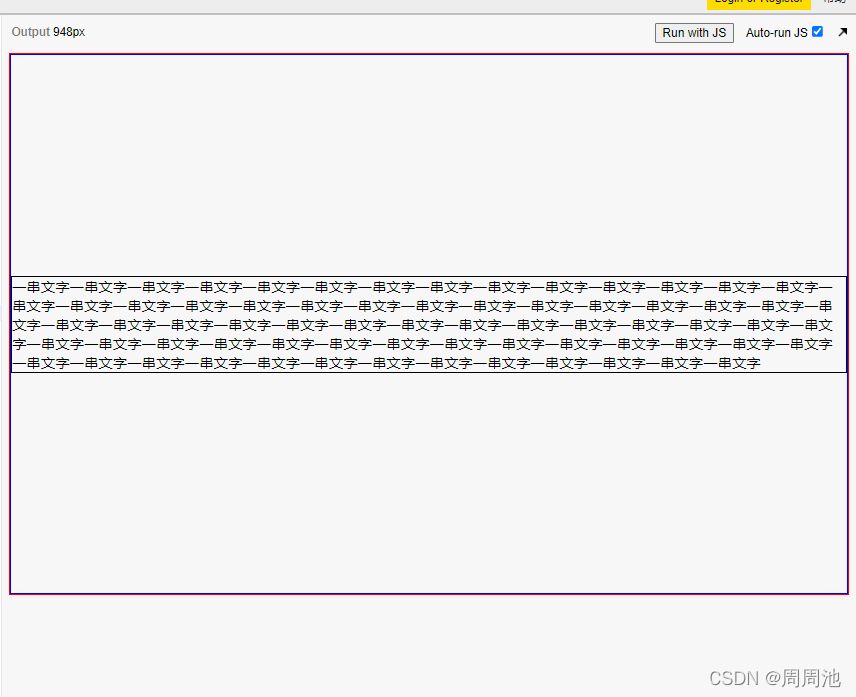
Use
display:tableTake the first one.divTurn intotable, Usedisplay:table-cellPut the second onedivTurn intotr, utilizetableThe built-in function realizes vertical centering .
3. Use absolute positioning +transform: translate(-50%,-50%);
<!DOCTYPE html>
<html>
<head>
  <meta charset="utf-8">
  <title>JS Bin</title>
</head>
<body>
  <div class="parent">
    <div class="child">
       A string of words a string of words a string of words a string of words a string of words a string of words a string of words a string of words a string of words
       A string of words a string of words a string of words a string of words a string of words a string of words a string of words a string of words a string of words
       A string of words a string of words a string of words a string of words a string of words a string of words a string of words a string of words a string of words
       A string of words a string of words a string of words a string of words a string of words a string of words a string of words a string of words a string of words
    </div>
  </div>
</body>
</html>
    .parent{

  height: 600px;
  border: 1px solid red;
  position: relative;
}
.child{

  border: 1px solid green;
  position: absolute;
  top: 50%;
  left: 50%;
  transform: translate(-50%,-50%);
}

The parent element uses relative positioning , Sub elements use absolute positioning , Set child elements
top: 50%;left: 50%;transform: translate(-50%,-50%);, Complete horizontal and vertical centering relative to parent element
4. Use flex Layout
<!DOCTYPE html>
<html>
<head>
  <meta charset="utf-8">
  <title>JS Bin</title>
</head>
<body>
  <div class="parent">
    <div class="child">
       A string of words a string of words a string of words a string of words a string of words a string of words a string of words a string of words a string of words
    </div>

  </div>
</body>
</html>
.parent{

  height: 600px;
  border: 3px solid red;

  display: flex;
  justify-content: center;
  align-items: center;
}
.child{

  border: 3px solid green;
  width: 300px;
}

flex It's the best , Set... In the parent element
justify-content: center;align-items: center;, This completes the horizontal and vertical centering of the child elements
版权声明
本文为[Zhou zhouchi]所创,转载请带上原文链接,感谢
https://yzsam.com/2022/04/202204220557472183.html
边栏推荐
猜你喜欢

EXCEL IFS函数的使用

利用win自带功能让处于同一局域网的两个电脑之间互传文件(速度和本地磁盘间互传相同)
(4种)实现垂直居中的方法总结

A series of interpretations of the general data protection regulations (gdpr): how to judge whether offshore enterprises are under the jurisdiction of gdpr?

创新实训(九)整合

Copu helped Peking University Graduate open source public elective course - Open Source PostgreSQL R & D course successfully enter Peking University

MySQL——索引

The installation of redis is started and used by rookies (Windows)

EXCEL 分列功能的使用

Pgdoucer best practices: Series 3
随机推荐
POM文件浅析
从零开始学安卓(kotlin)一 ——入门
MongoDB初接触——基础介绍篇
创新实训(十二)爬虫
JS get screen, browser, web page height and width
The difference between watch and computed
EXCEL VLOOKUP函数的使用(二)
uniapp小程序锚点(只支持当前页面操作,切勿跨页面操作)
OpenCV+CLion 人脸识别+人脸模型训练
CLion+OpenCV 识别身份证号码---检测身份证号码
JS 获取屏幕,浏览器,网页高度宽度
MySQL备忘录(供自己查询所用)
MYSQL中,CAST函数的使用规则
js对url进行编码和解码(三种方式区别)
nodejs+Express+mongodb
剑指offer:栈的压入、弹出序列
自定义switch控件
创新实训(九)整合
微信支付功能
scala中的伴生类和伴生对象