当前位置:网站首页>自定义微信小程序顶部导航栏(自适应微信胶囊按钮,flex布局)
自定义微信小程序顶部导航栏(自适应微信胶囊按钮,flex布局)
2022-04-22 05:59:00 【周周池】
在之前完成的小程序项目中,遇到微信顶部导航栏高度,在不同手高度不一样问题(不适配微信胶囊按钮)。总结了一下特发这篇文章整理思路
问题
- 一个前端,肯定不希望页面结构不好看。客户、老板、自己不满意啊
解决方法
- 通过
uni.getSystemInfo获取系统信息(用来手机状态栏高度),因为状态栏的高度不同的手机是不一样的,状态栏如下

- 通过
uni.getMenuButtonBoundingClientRect()获取微信小程序胶囊按钮的信息(top:胶囊按钮上边界坐标、height:胶囊按钮的高度) - 通过
wx.getSystemInfoSync()把px转化为rpx,因为uni.getSystemInfo和uni.getMenuButtonBoundingClientRect()获取的数据单位都是px
关键代码
uni.getSystemInfo({

				success: function(e) {

					let myStatusBar = 0
					let myCustomBar = 0
					let myNvaMartom = 0
					let myNavHeight = 0
					let custom = uni.getMenuButtonBoundingClientRect();
					myStatusBar = e.statusBarHeight;
					myNavHeight = custom.height
					myNvaMartom = custom.top - e.statusBarHeight
					myCustomBar = (myNvaMartom * 2 + custom.height) - 2
					that.StatusBar = myStatusBar * 750 / wx.getSystemInfoSync()
						.windowWidth;
					that.CustomBar = (myCustomBar * 750 / wx.getSystemInfoSync()
						.windowWidth)+12;
					that.NvaMartom = myNvaMartom * 750 / wx.getSystemInfoSync()
						.windowWidth;
					that.NavHeight = myNavHeight * 750 / wx.getSystemInfoSync()
						.windowWidth;
					that.Page_MagTOP = that.CustomBar + that.StatusBar
					console.log("顶部状态栏高度", that.StatusBar)
					console.log("导航栏高度", that.CustomBar)
					console.log("胶囊按钮上边距", that.NvaMartom)
					console.log("胶囊按钮高度", that.NavHeight)
					console.log("页面内容距离顶部的上边距,导航栏全部高度", that.Page_MagTOP)
				}
			})
顶部导航栏肯定用的多啊,所以要封装起来,定义为公共组件
components/Status_bar/Status_bar.vue
<template>
<view class="">
<view :style="{'height':Page_MagTOP+'rpx'}" style="width: 750rpx;"></view>
<view class="status_bar_my " :style="{'height':StatusBar+'rpx','background-color':Statusbar_top_bgc}">
</view>
<view class="" style="width: 750rpx;position: fixed;z-index: 16000;" :style="{'top':StatusBar+'rpx','height':CustomBar+'rpx'}">
<view class="page_title_ii" style="z-index: 999;" :style="{'height':CustomBar+'rpx','background-color':Statusbar_bgc,'color':color}">
<view class="" style="
width: 50rpx;
" @tap="childMethod()" :style="{
'height':NavHeight+'rpx','line-height':NavHeight+'rpx'}">
<span class="iconfont" v-if='iSTotheArrow' style="font-size: 34rpx;font-weight: 700;" :style="{'color':color}"></span>
</view>
<text class="font-size-tile" :style="{'height':NavHeight+'rpx','line-height':NavHeight+'rpx'}" style="">{
{
HeadLineTitle}}</text>
<view class="navigateBackrr"></view>
</view>
</view>
</view>
</template>
<script>
export default {
props: {
HeadLineTitle: {
type: String,
default: '顶部标题'
},
Statusbar_top_bgc: {
type: String,
default: '#fff'
},
Statusbar_bgc: {
type: String,
default: '#fff'
},
color: {
type: String,
default: '#000'
},
fatherMethod: {
type: Function,
default: null
},
iSTotheArrow: {
type: Boolean,
default: true
}
},
data() {
return {
StatusBar: 0,
CustomBar: 0,
NvaMartom: 0,
NavHeight: 0,
Page_MagTOP: 0,
}
},
methods: {
childMethod() {
if (this.fatherMethod) {
this.fatherMethod()
}
}
},
mounted() {
let that = this
uni.getSystemInfo({
success: function(e) {
let myStatusBar = 0
let myCustomBar = 0
let myNvaMartom = 0
let myNavHeight = 0
let custom = uni.getMenuButtonBoundingClientRect();
myStatusBar = e.statusBarHeight;
myNavHeight = custom.height
myNvaMartom = custom.top - e.statusBarHeight
myCustomBar = (myNvaMartom * 2 + custom.height) - 2
that.StatusBar = myStatusBar * 750 / wx.getSystemInfoSync()
.windowWidth;
that.CustomBar = (myCustomBar * 750 / wx.getSystemInfoSync()
.windowWidth)+12;
that.NvaMartom = myNvaMartom * 750 / wx.getSystemInfoSync()
.windowWidth;
that.NavHeight = myNavHeight * 750 / wx.getSystemInfoSync()
.windowWidth;
that.Page_MagTOP = that.CustomBar + that.StatusBar
}
})
this.$emit("ZXNavigtionHeigth",that.Page_MagTOP)
this.$emit("ZXStatusBar",that.StatusBar)
this.$emit("ZXNavHeight",that.NavHeight)
}
}
</script>
<style lang="scss">
.status_bar_my {
position: fixed;
top: 0rpx;
height: var(--status-bar-height);
width: 750rpx;
z-index: 1000;
background-color: #ffffff;
}
=
.page_title_ii {
display: flex;
justify-content: space-between;
align-items: center;
font-size: 36rpx;
z-index: 999;
padding: 0 25rpx;
.navigateBackrr {
width: 50rpx;
height: 50rpx;
}
}
</style>
iSTotheArrow接收父组件的方法方法,(退出页面箭头的方法)
this.$emit()触发实例上的方法,把公共组件的值传给父组件
调用
- 导入再注册
import Status_bar from '@/components/Status_bar/Status_bar.vue' - 使用
<StatusBar HeadLineTitle='账户设置' Statusbar_top_bgc='#f63434' Statusbar_bgc='#f63434' color='#fff' :fatherMethod='fatherMethod'></StatusBar>
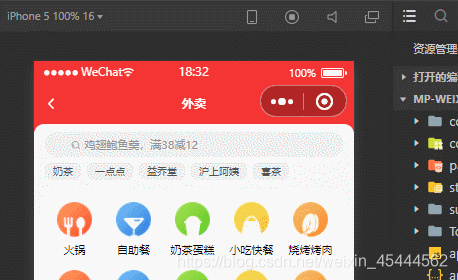
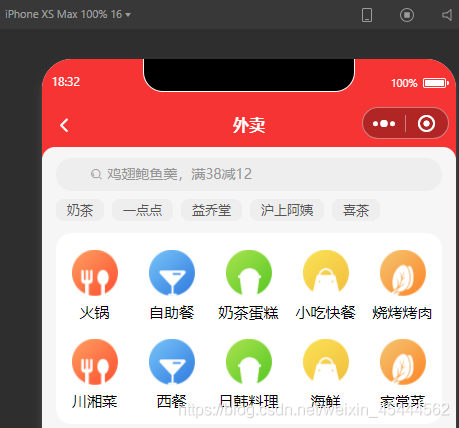
效果图
iPhone 5
iPhone XS Max
版权声明
本文为[周周池]所创,转载请带上原文链接,感谢
https://blog.csdn.net/weixin_45444562/article/details/119541358
边栏推荐
- 剑指offer:栈的压入、弹出序列
- nodejs+Express+mongodb
- EXCEL 利用替换、分列、填充功能综合整理财务数据
- JS five methods to judge the most complete data types
- Uniapp wechat applet user authorization to obtain current location information Tencent map
- 点击触发其他dom元素:< $refs,$el >
- js,jq单行文字上下滚动
- 8张图让你一步步看清 async/await 和 promise 的执行顺序
- MySQL在面试中经常被问到的经典问题。
- Intersection of interval lists
猜你喜欢
指纹支付相关的细节处理

点击触发其他dom元素:< $refs,$el >

Solve the problem of error in installing PostgreSQL under windows2012 R2
MySQL——一条语句的执行流程和原理

一套sql语句同时支持Oracle跟Mysql?

创新实训(六)路由
一个三目表达式,引起的空指针

Shumei technology and surging news jointly released the "network information content security insight report"

Pixel mobile telecom 4G cracking (including unlocking BL and root)
从零开始学安卓(kotlin)二——Activity
随机推荐
Canvas和SVG的区别
Pgdoucer best practices: a series
创新实训(九)整合
JS get screen, browser, web page height and width
Using ltree to process hierarchical data in PostgreSQL
js判断数据类型最全的5种方法
知识点整理:es6
手写通用防抖与节流函数
小程序蓝牙连接低功耗设备(BLE)记录
Use PG_ STAT_ Replication monitoring replication
docker 安装与MYSQL5.7安装
pixel手机救砖教程
总结一下我使用过的定时器:@Scheduled注解
剑指offer:栈的压入、弹出序列
JS 获取屏幕,浏览器,网页高度宽度
微信小程序接口封装(uniapp)
EXCEL IFS函数的使用
知网下载pdf(再也不想用CAJViewer啦!!!)
Uniapp global interception 401 jumps to the login page
指纹支付相关的细节处理