当前位置:网站首页>nacos基础(7):配置管理
nacos基础(7):配置管理
2022-04-23 11:18:00 【逆水行舟没有退路】
前言
nacos配置管理的详细使用。
第一节 配置列表
1. 修改数据

修改数据,点击发布,弹出内容对比,帮助用户减少修改失误,数据项的发生的差异,点击确认发布即可。


2. 导出导入
当我们希望从命名空间A将的配置搬到命名空间B时,可能内容有很多,这时使用导出导入功能提高效率。
(1)导出
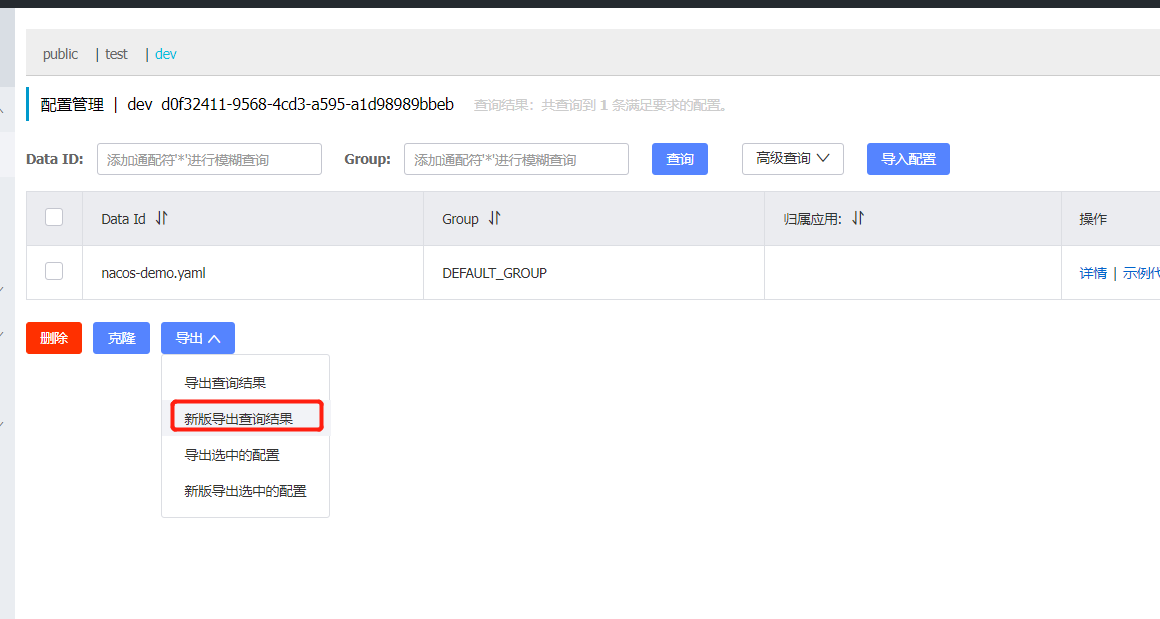
(2)切换命名空间,并点击导入配置,选择刚刚下载的文件。


3. 克隆
我们也可以使用克隆,将A命名空间的配置克隆到命名空间B

第二节 历史版本
我们可以通过历史版本功能查看配置文件的历史修改记录,以及历史版本的相信信息,也可以通过点击回滚,使用历史版本替代当前的内容。

详情信息

第三节 监听查询
nacos提供配置订阅者即监听者查询能力,同时提供客户端当前配置的MD5校验值,以便帮助用户更好的检查配置变更是否推送到client段。
这里只需要添加监听器就好了。
package com.it2;

import com.alibaba.nacos.api.NacosFactory;
import com.alibaba.nacos.api.config.ConfigService;
import com.alibaba.nacos.api.config.listener.Listener;
import com.alibaba.nacos.api.exception.NacosException;

import java.util.Properties;
import java.util.concurrent.Executor;
import java.util.concurrent.TimeUnit;

public class NacosDemo02 {


    public static void main(String[] args) throws NacosException, InterruptedException {


        String dataId="nacos-demo.yaml";
        String group="DEFAULT_GROUP";

        String serverAddr="127.0.0.1:8848";

        Properties properties=new Properties();
        properties.put("serverAddr",serverAddr);
        //这是从非public的命名空间获取配置集,就需要命名空间的id
        properties.put("namespace","d0f32411-9568-4cd3-a595-a1d98989bbeb");

        ConfigService configService=  NacosFactory.createConfigService(properties);
        String config=configService.getConfig(dataId,group,3000);
        System.out.println(config);

        configService.addListener(dataId, group, new Listener() {

            public Executor getExecutor() {

                return null;
            }

            public void receiveConfigInfo(String s) {

                //用于接受监听内容
                System.out.println(s);
            }
        });

        //休眠避免程序被结束
        TimeUnit.HOURS.sleep(1L);

    }
}
运行代码,输出的内容。

此时在nacos中修改这个配置文件,给被监听的配置文件增加信息,并发布。

当在nacos修改数据集发布后,监听器立即收到了新的配置内容。

同时在nacos的配置管理下的监听查询,我们也可以看到被监听的内容,MD5码表示被监听的数据集的MD5码。

版权声明
本文为[逆水行舟没有退路]所创,转载请带上原文链接,感谢
https://blog.csdn.net/u011628753/article/details/124358253
边栏推荐
- Mysql中一千万条数据怎么快速查询
- Jupyter Lab 十大高生产力插件
- Detailed explanation of integer data type tinyint in MySQL
- Introduction to neo4j authoritative guide, recommended by Qiu Bojun, Zhou Hongxiang, Hu Xiaofeng, Zhou Tao and other celebrities
- 如何使用JDBC CallableStatement.wasNull()方法调用来查看最后一个OUT参数的值是否为 SQL NULL
- Excel·VBA数组冒泡排序函数
- MySQL8.0升级的踩坑历险记
- 闹钟场景识别
- Detailed explanation of writing sequence and execution sequence of MySQL series SQL query statements
- MySQL面试题讲解之如何设置Hash索引
猜你喜欢







随机推荐
Mba-day6 logic - hypothetical reasoning exercises
Usage Summary of datetime and timestamp in MySQL
Prevent SQL injection in web projects
Learning go language 0x02: understanding slice
PlatoFarm推出正式版游戏经济模型的特点分析
Cumcm 2021 - B: préparation d'oléfines C4 par couplage éthanol (2)
升级cpolar内网穿透能获得的功能
Visual Road (XII) detailed explanation of collection class
Cygwin 中的 rename 用法
map<QString, bool> 的使用记录
How to use JDBC callablestatement The wasnull () method is called to check whether the value of the last out parameter is SQL null
分享两个实用的shell脚本
qt5.8 64 位静态库中想使用sqlite但静态库没有编译支持库的方法
MySQL partition table can be classified by month
Detailed explanation of integer data type tinyint in MySQL
MySQL interview questions explain how to set hash index
Oracle连通性测试小工具
Learn go language 0x05: the exercise code of map in go language journey
赛微微电科创板上市破发:跌幅达26% 公司市值44亿
Excel·VBA数组冒泡排序函数