当前位置:网站首页>SkiaSharp 之 WPF 自绘 投篮小游戏(案例版)
SkiaSharp 之 WPF 自绘 投篮小游戏(案例版)
2022-08-06 21:00:00 【蓝创精英团队】
此案例主要是针对光线投影法碰撞检测功能的示例,顺便做成了一个小游戏,很简单,但是,效果却很不错。
投篮小游戏
规则,点击投篮目标点,就会有一个球沿着相关抛物线,然后,判断是否进入篮子里,其实就是一个矩形,直接是按照碰撞检测来的,碰到就算进去了,对其增加了一个分数统计等功能。
Wpf 和 SkiaSharp
新建一个 WPF 项目,然后,Nuget 包即可
要添加 Nuget 包
Install-Package SkiaSharp.Views.WPF -Version 2.88.0
其中核心逻辑是这部分,会以我设置的 60FPS 来刷新当前的画板。
skContainer.PaintSurface += SkContainer_PaintSurface;
_ = Task.Run(() =>
{

    while (true)
    {

        try
        {

            Dispatcher.Invoke(() =>
            {

                skContainer.InvalidateVisual();
            });
            _ = SpinWait.SpinUntil(() => false, 1000 / 60);//每秒60帧
        }
        catch
        {

            break;
        }
    }
});
弹球实体代码 (Ball.cs)
public class Ball
{

    public double X {
     get; set; }
    public double Y {
     get; set; }
    public double VX {
     get; set; }
    public double VY {
     get; set; }
    public int Radius {
     get; set; }
}
##粒子花园核心类 (ParticleGarden.cs)
/// <summary>
/// 光线投影法碰撞检测
/// 投篮小游戏
/// </summary>
public class RayProjection
{

    public SKPoint centerPoint;
    public double G = 0.3;
    public double F = 0.98;
    public double Easing = 0.03;
    public bool IsMoving = false;
    public SKPoint CurrentMousePoint = SKPoint.Empty;
    public SKPoint lastPoint = SKPoint.Empty;
    public Rect Box;
    public Ball Ball;
    public SKCanvas canvas;
    public int ALLCount = 10;
    public List<bool> bools = new List<bool>();
    public bool IsOver = false;
    /// <summary>
    /// 渲染
    /// </summary>
    public void Render(SKCanvas canvas, SKTypeface Font, int Width, int Height)
    {

        canvas.Clear(SKColors.White);
        this.canvas = canvas;
        centerPoint = new SKPoint(Width / 2, Height / 2);
        //球
        if (Ball == null)
        {

            Ball = new Ball()
            {

                X = 50,
                Y = Height - 50,
                Radius = 30
            };
        }
        //箱子
        var boxX = Width - 170;
        var boxY = Height - 80;
        if (Box.X == 0)
        {

            Box = new Rect(boxX, boxY, 120, 70);
        }
        else
        {

            if (Box.X != boxX && Box.Y != boxY)
            {

                Box.X = boxX;
                Box.Y = boxY;
            }
        }

        if (bools.Count >= ALLCount)
        {

            IsOver = true;
        }

        if (!IsOver)
        {

            if (IsMoving)
            {

                BallMove(Width, Height);
            }
            else
            {

                DrawLine();
            }

            //弹球
            DrawCircle(canvas, Ball);
            //矩形
            DrawRect(canvas, Box);

            //计分
            using var paint1 = new SKPaint
            {

                Color = SKColors.Blue,
                IsAntialias = true,
                Typeface = Font,
                TextSize = 24
            };
            string count = $"总次数:{
      ALLCount} 剩余次数:{
      ALLCount - bools.Count} 投中次数:{
      bools.Count(t => t)}";
            canvas.DrawText(count, 100, 20, paint1);
        }
        else
        {

            SKColor sKColor = SKColors.Blue;
            //计分
            var SuccessCount = bools.Count(t => t);
            string count = "";
            switch (SuccessCount)
            {

                case 0:
                    {

                        count = $"太糗了吧,一个都没投中!";
                        sKColor = SKColors.Black;
                    }
                    break;
                case 1:
                case 2:
                case 3:
                case 4:
                case 5:
                    {

                        count = $"你才投中:{
      SuccessCount}次,继续努力!";
                        sKColor = SKColors.Blue;
                    }
                    break;
                case 6:
                case 7:
                case 8:
                case 9:
                    {

                        count = $"恭喜 投中:{
      SuccessCount}次!!!";
                        sKColor = SKColors.YellowGreen;
                    }
                    break;
                case 10: {
     count = $"全部投中,你太厉害了!";
                        sKColor = SKColors.Red;
                    } break;
            }
            using var paint1 = new SKPaint
            {

                Color = sKColor,
                IsAntialias = true,
                Typeface = Font,
                TextSize = 48
            };
            var fontCenter = paint1.MeasureText(count);
            canvas.DrawText(count, centerPoint.X - fontCenter / 2, centerPoint.Y, paint1);
        }
        using var paint = new SKPaint
        {

            Color = SKColors.Blue,
            IsAntialias = true,
            Typeface = Font,
            TextSize = 24
        };
        string by = $"by 蓝创精英团队";
        canvas.DrawText(by, 600, 20, paint);
    }
    /// <summary>
    /// 画一个圆
    /// </summary>
    public void DrawCircle(SKCanvas canvas, Ball ball)
    {

        using var paint = new SKPaint
        {

            Color = SKColors.Blue,
            Style = SKPaintStyle.Fill,
            IsAntialias = true,
            StrokeWidth = 2
        };
        canvas.DrawCircle((float)ball.X, (float)ball.Y, ball.Radius, paint);
    }
    /// <summary>
    /// 画一个矩形
    /// </summary>
    public void DrawRect(SKCanvas canvas, Rect box)
    {

        using var paint = new SKPaint
        {

            Color = SKColors.Green,
            Style = SKPaintStyle.Fill,
            IsAntialias = true,
            StrokeWidth = 2
        };
        canvas.DrawRect((float)box.X, (float)box.Y, (float)box.Width, (float)box.Height, paint);
    }
    /// <summary>
    /// 划线
    /// </summary>
    public void DrawLine()
    {

        //划线
        using var LinePaint = new SKPaint
        {

            Color = SKColors.Red,
            Style = SKPaintStyle.Fill,
            StrokeWidth = 2,
            IsStroke = true,
            StrokeCap = SKStrokeCap.Round,
            IsAntialias = true
        };
        var path = new SKPath();
        path.MoveTo((float)CurrentMousePoint.X, (float)CurrentMousePoint.Y);
        path.LineTo((float)Ball.X, (float)Ball.Y);
        path.Close();
        canvas.DrawPath(path, LinePaint);
    }
    public void BallMove(int Width, int Height)
    {

        Ball.VX *= F;
        Ball.VY *= F;
        Ball.VY += G;

        Ball.X += Ball.VX;
        Ball.Y += Ball.VY;

        var hit = CheckHit();
        // 边界处理和碰撞检测
        if (hit || Ball.X - Ball.Radius > Width || Ball.X + Ball.Radius < 0 || Ball.Y - Ball.Radius > Height || Ball.Y + Ball.Radius < 0)
        {

            bools.Add(hit);
            IsMoving = false;
            Ball.X = 50;
            Ball.Y = Height - 50;
        }

        lastPoint.X = (float)Ball.X;
        lastPoint.Y = (float)Ball.Y;
    }
    public bool CheckHit()
    {

        var k1 = (Ball.Y - lastPoint.Y) / (Ball.X - lastPoint.X);
        var b1 = lastPoint.Y - k1 * lastPoint.X;
        var k2 = 0;
        var b2 = Ball.Y;
        var cx = (b2 - b1) / (k1 - k2);
        var cy = k1 * cx + b1;
        if (cx - Ball.Radius / 2 > Box.X && cx + Ball.Radius / 2 < Box.X + Box.Width && Ball.Y - Ball.Radius > Box.Y)
        {

            return true;
        }
        return false;
    }
    public void MouseMove(SKPoint sKPoint)
    {

        CurrentMousePoint = sKPoint;
    }
    public void MouseDown(SKPoint sKPoint)
    {

        CurrentMousePoint = sKPoint;
    }
    public void MouseUp(SKPoint sKPoint)
    {

        if (bools.Count < ALLCount)
        {

            IsMoving = true;
            Ball.VX = (sKPoint.X - Ball.X) * Easing;
            Ball.VY = (sKPoint.Y - Ball.Y) * Easing;
            lastPoint.X = (float)Ball.X;
            lastPoint.Y = (float)Ball.Y;
        }
    }
}
效果如下:
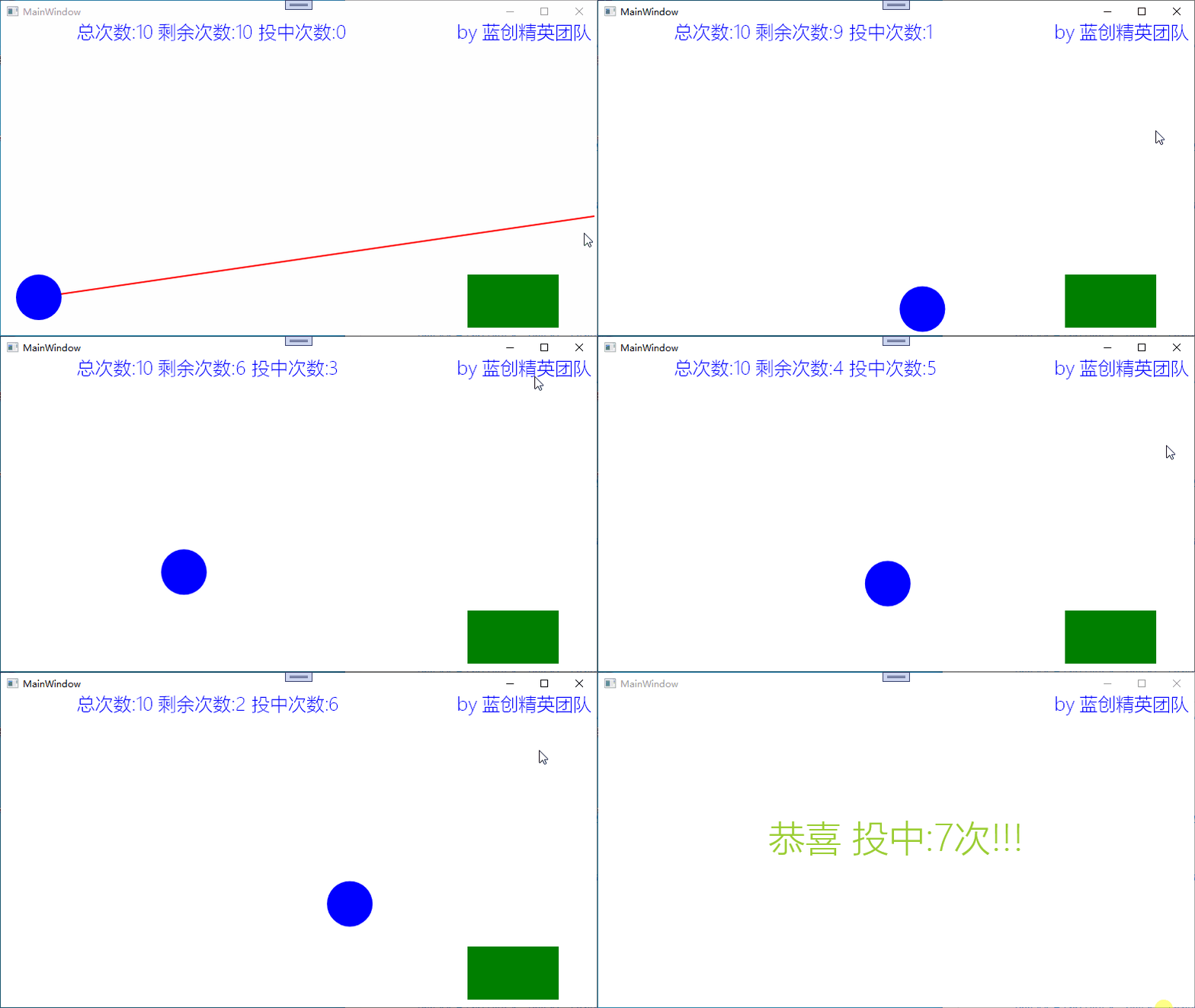
还不错,得了7分,当然,我也可以得10分的,不过,还好了。
总结
这个特效的案例重点是光线投影法碰撞检测,同时又对其增加了游戏的属性,虽然东西都很简单,但是作为一个雏形来讲也是不错的。
SkiaSharp 基础系列算是告一段落了,基础知识相关暂时都已经有了一个深度的了解,对于它的基础应用已经有一个不错的认识了,那么,基于它的应用应该也会多起来,我这边主要参考Avalonia的内部SkiaSharp使用原理,当然,用法肯定不局限的。
代码地址
https://github.com/kesshei/WPFSkiaRayProjectionDemo.git
https://gitee.com/kesshei/WPFSkiaRayProjectionDemo.git
阅
一键三连呦!,感谢大佬的支持,您的支持就是我的动力!
版权
蓝创精英团队(公众号同名,CSDN 同名,CNBlogs 同名)
边栏推荐
猜你喜欢

多线程-并发问题

硅谷课堂第十课-营销模块和公众号菜单管理

iQOO Neo6 evaluation: product strength has been steadily upgraded, a good choice at the same price

Vikinger v1.9.3汉化版WordPress模板主题

How to automatically identify the coding of crawler web pages

uniapp 左滑删除效果一、效果二(2个方式自选其一)(整理)

云GPU如何安装和启动VNC远程桌面服务?
Introduction to Distributed Architecture

oracle关联表查询用in关联查询用字符隔开逗号隔开

openssl官网文档资料
随机推荐
How to automatically identify the coding of crawler web pages
Tomato学习笔记-Vscode配置Makefile(使用task.jason和launch.jason)
Flume (1) --------- Flume overview
【PyTorch量化实践(2)】
开传奇GM常用网站
利用类加载器获取文件路径报错空指针异常
A simple preview image in uniapp
2. 线性表的基本概念 + 基本操作
一套次世代建模的流程是怎样的?
AVL树插入新节点后调整的四种情况(左单旋、右单旋、双旋)
[target detection] data enhancement: YOLO official data enhancement implementation / simple use of imgaug
Kotlin - Coroutine Dispatcher CoroutineDispatcher
【WPF】级联Combobox及其与ListView的联动
win32概述及框架
iQOO Neo6评测:产品力稳步升级 同价位不错的选择
硅谷课堂第十五课-腾讯云部署
【基于yolov5的图像识别】
STM32MP157A driver development | 02-Use sdmmc interface to read and write sd card (hot swap)
深度学习-基础
TI AM335x继任者?AM6254性能解析