当前位置:网站首页>Tar source package management - source package installation method
Tar source package management - source package installation method
2022-04-22 08:48:00 【qdzhanghao】
One 、 Source code installation nginx
1. Compilation environment, such as gcc and gcc-c++ compiler ,make
2. Prepare the software : nginx-1.18.0.tar.gz
Deploy Nginx
install nginx Source code compilation , Required dependency package :
[root@tiehao ~]# yum -y install gcc gcc-c++ make zlib-devel pcre pcre-devel openssl-devel
Package description :
gcc c Language compiler .
gcc-c++ c++ Language compiler .
make be used for configure and make Compiled tools .
zlib :nginx Provide gzip Compress modular , need zlib Library support .
pcre The purpose of the package is to make nginx regular expression , Address rewrite rewrite
openssl-devel : Give Way nginx Provide ssl function .
a key , a key 、 Key if there is no... In the folder configure file , The required steps are as follows :
yum -y install autoconf
autoreconf Generate configure file
Start installation :
Source code compilation 3 Axe :./configure , make ,make install
[root@tiehao ~]# tar xvf nginx-1.18.0.tar.gz
[root@tiehao ~]# cd nginx-1.18.0
[root@tiehao nginx-1.18.0]# ./configure --prefix=/usr/local/nginx
[root@tiehao ~]# make -j 4 (4 Kernel compilation , According to the actual situation cpu Check the number )
[root@tiehao ~]# make install
3. Detailed source code installation 3 Axe To configure (configure)、 compile (make)、 install (make install)
# ./configure
a. Specify installation path , for example --prefix=/usr/local/nginx
b. Enable or disable a function , for example --enable-ssl,--disable-filter
c. Associated with other software , for example --with-pcre --with-http_ssl_module
d. Check the installation environment , For example, whether there is a compiler gcc, Whether to meet the software dependency requirements
The resulting :Makefile
# make -j 4 # Compile the source code file into an executable binary file , Press Makefile File compilation ,
Use -j 4 Appoint 4 The core CPU compile , Speed up
# make install # Press Makefile Define the file path to install
# make clean // Clear the last time make The command produces object and Makefile file . Use scenarios : When reconfiguration is required, execute configure when , It has to be executed first make clean. as follows :
[root@tiehao nginx-1.18.0]# make clean ( Just clear the previous executable and configuration files )
rm -rf Makefile objs
[root@tiehao nginx-1.18.0]# ./configure --prefix=/usr/local/nginx # Reconfigure
4. Delete source code package :
installed , Delete source code package :
Sometimes the deletion is not clean , So we suggest that when you install , stay configure Step add a : --prefix Parameters . When deleting or backing up in this way , Directly to delete --prefix The specified installation directory operation is OK .
[root@tiehao ~]# rm -rf /usr/local/nginx/
Two 、 Source code compilation error 5 A perfect solution
[root@teihao extundelete-0.2.4]# tar xvf extundelete-0.2.4.tar.bz2
[root@tiehao ~]# cd extundelete-0.2.4
# Installation solves the dependency .
[root@tiehao extundelete-0.2.4]# ./configure # Check the system installation environment
Configuring extundelete 0.2.4
configure: error: Can't find ext2fs library
After the source code compilation error , Common solutions :
common 5 Methods
Method 1:
[root@tiehao ~]# mount /dev/sr0 /mnt
[root@tiehao Packages]# cd /mnt/BaseOS/Packages
[root@tiehao Packages]# rpm -ivh ext2fs
# Switch to the path where the local software package is located , Press two tab key . General situation ,ext2fs It starts with the name of the package to be installed .
If there is Automatic completion
Method 2:[root@tiehao Packages]# ls *ext2fs* # Find the complete keyword
Method 3:[root@tiehao Packages]# ls *2fs* # Find some keywords
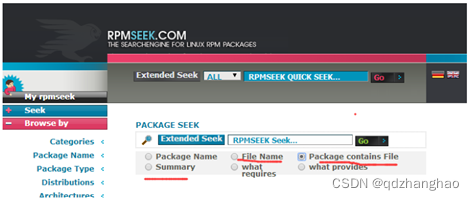
Method 4: Ultimate trick
http://www.rpmseek.com/index.html
Method 5: Use yum Search for , This method is recommended
[root@tiehao Packages]# yum search 2fs #centos7 Easy to use in
Installation Library :
[root@tiehao ~]# cd /mnt/BaseOS/Packages/
[root@tiehao Packages]# rpm -ivh e2fsprogs-libs-1.45.6-1.el8.x86_64.rpm
Verifying... ################################# [100%]
Preparing... ################################# [100%]
package e2fsprogs-libs-1.45.6-1.el8.x86_64 is already installed
Interaction : This shows that the library has been installed , however configure I said I couldn't find . What do I do ?
solve : Library installed , It shows that it can't be found . This situation : You need to install the development files of the library
[root@tiehao Packages]# rpm -ivh e2fsprogs-devel-1.45.6-1.el8.x86_64.rpm
devel = development ( Development )
error : Dependency detection failed :
libcom_err-devel(x86-64) = 1.45.6-1.el8 By e2fsprogs-devel-1.45.6-1.el8.x86_64 need
[root@tiehao Packages]# ls libcom_err-devel*
[root@tiehao Packages]# rpm -ivh libcom_err-devel-1.45.6-1.el8.x86_64.rpm
or
[root@tiehao extundelete-0.2.4]# yum -y install e2fsprogs-devel.x86_64
Expand : skill
see rpm Files generated after package installation :
[root@tiehao Packages]#rpm -qpl e2fsprogs-devel-1.41.12-11.el6.x86_64.rpm |more

notes : You can see a lot of .h Final document , These files are called header files . With these header files , ./configure adopt .h Headline
Pieces of , To find the corresponding library file . So library files and devel All development packages must be installed .
[root@tiehao extundelete-0.2.4]# ./configure
Configuring extundelete 0.2.4
Writing generated files to disk
It's settled ,ext2fs The problem of missing library files , There are no compilation and installation steps here , because extundelete Only in
centos6 Lower installation .
summary , Features of software installation method :
rpm+yum: convenient , The software version is low . Good stability 、 Easy to manage . Poor performance .
Source code compilation and installation : trouble , The software version is new , Can be customized . Slightly less stable 、 The management is a little poor . Good performance .
Source code compilation and installation : Mainly installation LAMP or LNMP Architecture , We will use
Attached address :https://github.com/openssh/openssh-portable/archive/refs/tags/V_8_3_P1.tar.gz
版权声明
本文为[qdzhanghao]所创,转载请带上原文链接,感谢
https://yzsam.com/2022/04/202204220745423153.html
边栏推荐
- VMware虚拟机通信与联网
- Elastic job installation deployment access
- 电脑重置后恢复mysql服务
- ROM、RAM、SRAM、DRAM、Flash、SDRAM区别
- 腾讯视频自动签到详细版(多种方式得V值)
- SQL窗口函数
- Cesium realizes the monomer of buildings (divided into buildings and layers)
- Postgres + PostGIS + GeoServer offline path planning function (record)
- xfs 文件系统的备份和恢复(包含磁盘挂载)
- 大于/小于/等于 的缩写(sql数据库的简写包括mangodb)
猜你喜欢


![Reorganize notes: [Ultimate method] create user-defined code templates in vscade](/img/82/745bdc43c0a1191db1b2a13e5091d0.png)



随机推荐
JS cross domain problem solving
重整笔记记录:【终极方法】在Vscode中用户创建自定义代码模板
Cesium mouse picks up the feature and determines the feature category
相对路径和绝对路径区别(面试常问)
Realization of floor decomposition animation in cesium
Hyperledger Fabric1. 4 environment construction and example test
static的用法【详解】
实现“ 字体逐渐展现 ”程序
大于/小于/等于 的缩写(sql数据库的简写包括mangodb)
Putty 配置 - 自我感觉舒适
617. Merge binary tree (easy)
C语言的攻克之路
Fabric test example, encountered order exited (x) x seconds
素数求解的N种境界
使用art-template继承时CompileError: Invalid or unexpected token generated
日志切割-搭建远程日志收集服务器
PCIe learning - how to make PCIe bus compatible with PCI bus in software (7)
PCIe learning - Introduction to PCIe bus architecture: transaction layer - data link layer - physical layer (8)
初识C语言~循环语句
PCIe learning - basic concepts of PCIe bus (6)