当前位置:网站首页>【ubuntu20.04安装MySQL以及MySQL-workbench可视化工具】
【ubuntu20.04安装MySQL以及MySQL-workbench可视化工具】
2022-08-04 21:09:00 【嗯嗯嗯吧】
文章目录
前言
本文基于Ubuntu20.04 LST 以及MySQL 8.0.29,可视化工具使用mysql-workbench-community_8.0.29-1ubuntu20.04_amd64.deb
安装步骤
1.安装MySQL
sudo apt-get update  #获取最新的软件源
sudo apt-get install mysql-server #安装mysql
启动与关闭MySQL
service mysql start  #启动MySQL
service mysql stop  #关闭MySQL
2.配置MySQL
开始配置:
sudo mysql_secure_installation


...
# 1.询问是否安装密码插件,我选择 No
VALIDATE PASSWORD COMPONENT can be used to test passwords
and improve security. It checks the strength of password
and allows the users to set only those passwords which are
secure enough. Would you like to setup VALIDATE PASSWORD component?
Press y|Y for Yes, any other key for No: n

# 2.为root用户设置密码
Please set the password for root here.

New password:

Re-enter new password:
#2.1 解决方法详见下一小节,解决bug
 ... Failed! Error: SET PASSWORD has no significance for user 'root'@'localhost' as the authentication method used doesn't store authentication data in the MySQL server. Please consider using ALTER USER instead if you want to change authentication parameters.

# 2.2 解决bug后,重新设置密码
New password:

Re-enter new password:

#3.删除匿名用户,我选No
By default, a MySQL installation has an anonymous user,
allowing anyone to log into MySQL without having to have
a user account created for them. This is intended only for
testing, and to make the installation go a bit smoother.
You should remove them before moving into a production
environment.

Remove anonymous users? (Press y|Y for Yes, any other key for No) : n

 ... skipping.

#4.禁止root管理员从远程登录,这里我选 No
Normally, root should only be allowed to connect from
'localhost'. This ensures that someone cannot guess at
the root password from the network.

Disallow root login remotely? (Press y|Y for Yes, any other key for No) : n

 ... skipping.

 #5.删除test数据库并取消对它的访问权限, 我选 No
By default, MySQL comes with a database named 'test' that
anyone can access. This is also intended only for testing,
and should be removed before moving into a production
environment.


Remove test database and access to it? (Press y|Y for Yes, any other key for No) : n

 ... skipping.

 #6.刷新授权表,让初始化后的设定立即生效, 选 Yes
Reloading the privilege tables will ensure that all changes
made so far will take effect immediately.

Reload privilege tables now? (Press y|Y for Yes, any other key for No) : y
Success.

All done!
3.解决配置MySQL中的bug
解决报错Failed! Error: SET PASSWORD has no significance for user ‘root’@‘localhost’ as the authentication me
sudo mysql


ALTER USER 'root'@'localhost' IDENTIFIED WITH mysql_native_password BY 'your_password';
完成显示如下图,即可重复完成上节中的修改密码的操作
4.安装可视化工具MySQL-workbench
命令行直接安装MySQL-workbench,安装不了
sudo apt-get install MySQL-workbench
 安装包下载地址如下:https://dev.mysql.com/downloads/workbench/,选择与本机系统以及MySQL版本相符的版本进行下载,由于系统与版本为Ubuntu20.04 LST 以及MySQL 8.0.29,故可视化工具使用mysql-workbench-community_8.0.29-1ubuntu20.04_amd64.deb。对本机系统与MySQL版本不清楚的,可以参照以下命令行进行查询
sudo mysql


SELECT @@VERSION;
完成mysql-workbench版本下载后,终端进入下载目录,进行安装
sudo dpkg -i mysql-workbench-community_8.0.29-1ubuntu20.04_amd64.deb
若出现下图所示的依赖错误 可以输入以下命令解决问题,然后重复执行上述安装命令
sudo apt -f install
由于在上述设置中,允许root管理员从远程连接,所以界面中有Local instance 3306,点击进入然后输入密码即可进入图形管理界面
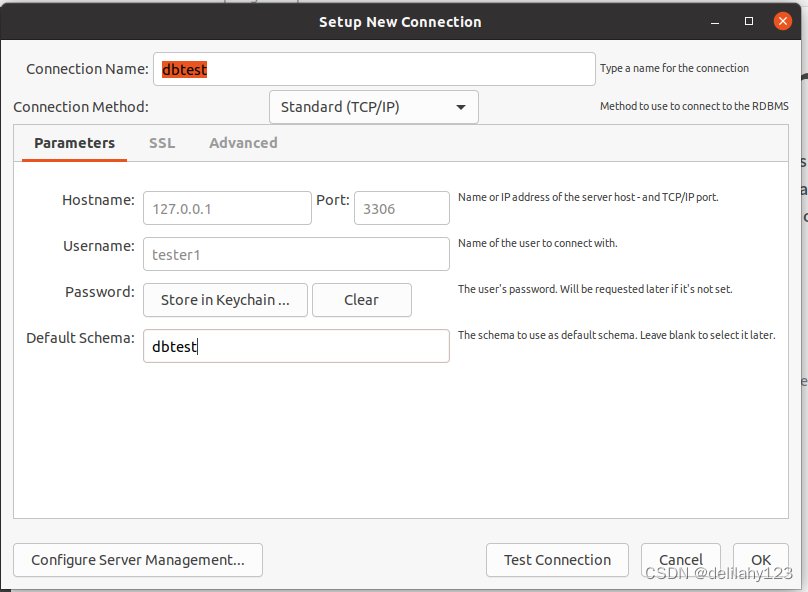
 连接成功即可开始MySQL的图形化界面操作使用。
总结
由于学习与提升原因,本人安装了win10与ubuntu 20.04双系统,文章旨在分享ubuntu 20.04系统上安装MySQL与图形化工具mysql-workbench的步骤过程和问题解决方法,希望可以帮助到大家。后续也会继续分享其他方面的学习内容,希望能与大家沟通学习,共同进步。
先自我介绍一下,小编13年上师交大毕业,曾经在小公司待过,去过华为OPPO等大厂,18年进入阿里,直到现在。深知大多数初中级java工程师,想要升技能,往往是需要自己摸索成长或是报班学习,但对于培训机构动则近万元的学费,着实压力不小。自己不成体系的自学效率很低又漫长,而且容易碰到天花板技术停止不前。因此我收集了一份《java开发全套学习资料》送给大家,初衷也很简单,就是希望帮助到想自学又不知道该从何学起的朋友,同时减轻大家的负担。添加下方名片,即可获取全套学习资料哦
边栏推荐
- [21 days learning challenge - kernel notes] (2), based in the device tree
- 数电快速入门(四)(组合逻辑电路的分析以及设计的介绍)
- STP基本配置及802.1D生成树协议的改进
- Dotnet using WMI software acquisition system installation
- 数电快速入门(五)(编码器的介绍以及通用编码器74LS148和74LS147的介绍)
- 27. Dimensionality reduction
- Common methods of js's new Function()
- 经验分享|盘点企业进行知识管理时的困惑类型
- visual studio 2015 warning MSB3246
- 大资本已开始逃离加密领域?
猜你喜欢

数电快速入门(二)(复合逻辑运算和逻辑代数的基本定律的介绍)

STM32MP157A驱动开发 | 01- 板载LED作为系统心跳指示灯

数电快速入门(四)(组合逻辑电路的分析以及设计的介绍)

大势所趋之下的nft拍卖,未来艺术品的新赋能
SPSS-System Clustering Software Practice
无代码平台字段设置:基础设置入门教程
LayaBox---TypeScript---首次接触遇到的问题

Hands-on Deep Learning_NiN

数电快速入门(五)(编码器的介绍以及通用编码器74LS148和74LS147的介绍)

stm32mp157系统移植 | 移植ST官方5.10内核到小熊派开发板
随机推荐
Oreo域名授权验证系统v1.0.6公益开源版本网站源码
[2022 Hangzhou Electric Power Multi-School 5 1012 Questions Buy Figurines] Application of STL
JWT主动校验Token是否过期
How to make good use of builder mode
[21 days learning challenge - kernel notes] (2), based in the device tree
[Teach you to use the serial port idle interrupt of the STM32HAL library]
win10 uwp 使用 WinDbg 调试
Red team kill-free development practice of simulated confrontation
LayaBox---TypeScript---Problems encountered at first contact
3. Byte stream and character stream of IO stream
dotnet 通过 WMI 获取系统安装软件
PRIMAL: Pathfinding via Reinforcement and Imitation Multi-Agent Learning 代码解析
LINQ to SQL (Group By/Having/Count/Sum/Min/Max/Avg操作符)
用 Excel 爬取网络数据的四个小案例
LayaBox---TypeScript---结构
Android 面试——如何写一个又好又快的日志库?
adb控制常用命令
数电快速入门(三)(卡诺图化简法的介绍)
Spss-系统聚类手算实操
【随记】新一天搬砖 --20220727