当前位置:网站首页>RHCE-ansible
RHCE-ansible
2022-04-22 18:47:00 【困惑的Z同学】
1)安装和配置ansible以及ansible控制节点server.example.com如下:
2)创建一个名为/home/student/ansible/inventory的静态库存文件如下所示:
2.1)node1 是dev主机组的成员
2.2)node2是test主机组的成员
2.3)node1和node2是prod主机组的成员
2.4)node1是balancers主机组的一员
2.5)prod组是webservers主机组的成员
3).创建一个名为/home/student/ansible/ansible.cfg的配置文件,如下所示:
3.1主机库存文件/home/student/ansible/inventory
3.2剧本中角色的位置被定义为/home/student/ansible/roles
4)控制主机中登录student用户,remote_user = devops,开启特权升级
在Server主机安装ansible,并写入host文件
(安装前必须确认是否有python模块)
[root@server ztx]# yum install ansible
server

node1

node2
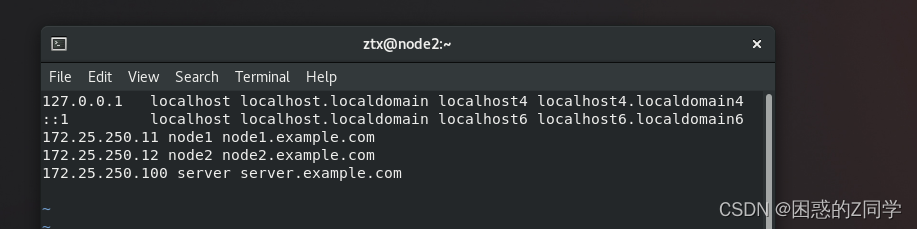
在控制添加用户student
[root@server ztx]# useradd student
[student@server ~]$ mkdir ansible
[student@server ~]$ cd ansible/
[student@server ansible]$ vim inventory

[student@server ansible]$ vim ansible.cfg
 查看能否看到配置文件
[student@server ansible]$ ansible --version

更改信息
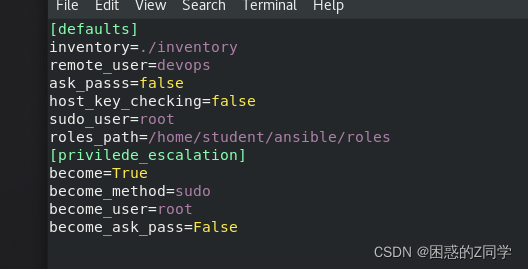
添加用户devops
[root@node1 admin]# [root@node1 admin]# passwd devops
Changing password for user devops.
New password:
Retype new password:
passwd: all authentication tokens updated successfully.
useradd devops

[root@node2 ztx]# useradd devops
[root@node2 ztx]# passwd devops
Changing password for user devops.
New password:
Retype new password:
passwd: all authentication tokens updated successfully.
实现免密登录
[student@server ansible]$ ssh-keygen  -t rsa -f  ~/.ssh/id_rsa -P "" -q
[student@server ansible]$ ssh-copy-id  -i ~/.ssh/id_rsa.pub  devops@node1
/usr/bin/ssh-copy-id: INFO: Source of key(s) to be installed: "/home/student/.ssh/id_rsa.pub"
/usr/bin/ssh-copy-id: INFO: attempting to log in with the new key(s), to filter out any that are already installed
/usr/bin/ssh-copy-id: INFO: 1 key(s) remain to be installed -- if you are prompted now it is to install the new keys
devops@node1's password: Number of key(s) added: 1 Now try logging into the machine, with: "ssh 'devops@node1'" and check to make sure that only the key(s) you wanted were added. [student@server ansible]$ ssh-copy-id -i ~/.ssh/id_rsa.pub devops@node2 /usr/bin/ssh-copy-id: INFO: Source of key(s) to be installed: "/home/student/.ssh/id_rsa.pub" The authenticity of host 'node2 (172.25.250.12)' can't be established.
ECDSA key fingerprint is SHA256:Kl2g1gJ/9cWTXV1FmBR/dPdcCIcd+GVoFLxMuNxGQ7Y.
Are you sure you want to continue connecting (yes/no/[fingerprint])? yes
/usr/bin/ssh-copy-id: INFO: attempting to log in with the new key(s), to filter out any that are already installed
/usr/bin/ssh-copy-id: INFO: 1 key(s) remain to be installed -- if you are prompted now it is to install the new keys
devops@node2's password: Number of key(s) added: 1 Now try logging into the machine, with: "ssh 'devops@node2'"
and check to make sure that only the key(s) you wanted were added.
测试免密登录

版权声明
本文为[困惑的Z同学]所创,转载请带上原文链接,感谢
https://blog.csdn.net/a505964648/article/details/124325644
边栏推荐
猜你喜欢

基于SSM框架开发OA企业在线办公系统项目教程-附源码-毕业设计

PostgreSQL 15即将支持SQL标准中的MERGE语句

PCB Layout Stackup setting

208. 实现 Trie (前缀树)
描述文件中的全局类型

B03 based on STM32 single chip microcomputer independent key control nixie tube stopwatch Proteus design, Keil program, C language, source code, standard library version

General mode of deploying modern applications in kubernetes cluster

存储网络请求日志

TypeScript中的命名空间使用

What kind of database products do we need
随机推荐
ul li实现多行多列的布局思路
[drive] TX2 transplants EC20 startup module
【网络安全】Duomicms的变量覆盖漏洞从白盒测试到实战
B03基于STM32单片机独立按键控制数码管秒表Proteus设计、keil程序、c语言、源码,标准库版本
【Proteus仿真】51单片机8路舵机点动±90°点动控制
Namespace usage in typescript
Hackmyvm (XXV) helium, series of articles continuously updated
【全网最全】JSR303参数校验与全局异常处理(从理论到实践别用if判断参数了)
今日指数项目之数据分时行情、数据备份和个股涨跌幅开发【十一】
【服务器数据恢复】服务器进水导致多块硬盘同时掉线,服务器崩溃的数据恢复案例
Stream demo
【接口测试基础】第十篇 | 详解Postman请求前置脚本及其工作原理
SegAttnGAN Text to Image Generation with Segmentation Attention
【驱动】TX2移植EC20启动模块
如何设计 API 接口,实现统一格式返回
【手部姿态估计】【论文详读】3D Hand Pose Estimation with a Single Infrared Camera via Domain Transfer Learning
.net core 中配置文件映射到类
大话JMeter4|不同的并发数可以自动化做压测吗?
对.NET未来的一点感悟
How to select the mobile phone running memory?