当前位置:网站首页>更改小程序原生radio的颜色及大小
更改小程序原生radio的颜色及大小
2022-08-05 05:29:00 【weixin_43923808】
方式一:
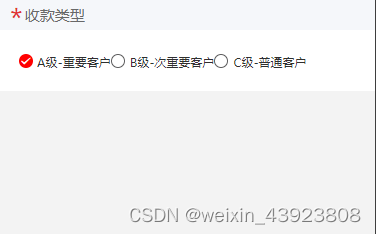
<template>
 <view class="content1">
      <radio-group @change='change1' class="radio_css">
        <radio value="2" disabled="{
   {title=='bianji'}}" checked="{
   {customerLevel==2}}"><text class="{
   {customerLevel==2?'red':''}}"> A级-重要客户</text></radio>
        <radio value="3" disabled="{
   {title=='bianji'}}" class="radio2_css" checked="{
   {customerLevel==3}}"><text class="{
   {customerLevel==3?'red':''}}">B级-次重要客户</text></radio>
        <radio value="4" disabled="{
   {title=='bianji'}}" class="radio2_css" checked="{
   {customerLevel==4}}"><text class="{
   {customerLevel==4?'red':''}}">C级-普通客户</text></radio>

      </radio-group>
</template>
注意style 后面没有scoped
<style lang="less">
radio-group text {
font-size: 25rpx;
// color: #666666;
}
radio .wx-radio-input {
border-radius: 50%; /* 圆角 */
width: 24rpx;
border: 2rpx solid #5e5e5f;
height: 24rpx;
}
radio .wx-radio-input.wx-radio-input-checked {
border: none;
background: red;
}
radio .wx-radio-input.wx-radio-input-checked::before {
border-radius: 50%; /* 圆角 */
width: 28rpx; /* 选中后对勾大小,不要超过背景的尺寸 */
height: 28rpx; /* 选中后对勾大小,不要超过背景的尺寸 */
line-height: 28rpx;
text-align: center;
font-size: 20rpx; /* 对勾大小 30rpx */
color: #fff; /* 对勾颜色 白色 */
background: red;
transform: translate(-50%, -50%) scale(1);
}
/*checkbox 整体大小 */
checkbox {
// width: 200rpx;
// height: 80rpx;
}
/*checkbox 选项框大小 */
checkbox .wx-checkbox-input {
width: 30rpx;
height: 30rpx;
border: 2rpx solid #5e5e5f;
}
/*checkbox选中后样式 */
checkbox .wx-checkbox-input.wx-checkbox-input-checked {
background: #e83232;
border: 2rpx solid #e83232;
}
/*checkbox选中后图标样式 */
checkbox .wx-checkbox-input.wx-checkbox-input-checked::before {
width: 30rpx;
height: 30rpx;
line-height: 30rpx;
text-align: center;
font-size: 22rpx;
color: #fff;
background: transparent;
transform: translate(-50%, -50%) scale(1);
-webkit-transform: translate(-50%, -50%) scale(1);
}
</style>方式二:
<template>
 <view class="content1">
      <radio-group @change='change1' class="radio_css">
        <radio value="2" disabled="{
   {title=='bianji'}}" checked="{
   {customerLevel==2}}"><text class="{
   {customerLevel==2?'red':''}}"> A级-重要客户</text></radio>
        <radio value="3" disabled="{
   {title=='bianji'}}" class="radio2_css" checked="{
   {customerLevel==3}}"><text class="{
   {customerLevel==3?'red':''}}">B级-次重要客户</text></radio>
        <radio value="4" disabled="{
   {title=='bianji'}}" class="radio2_css" checked="{
   {customerLevel==4}}"><text class="{
   {customerLevel==4?'red':''}}">C级-普通客户</text></radio>

      </radio-group>
</template>
注意style 后面没有scoped
<style lang="less">
radio-group text {
font-size: 25rpx;
// color: #666666;
}
radio .wx-radio-input {
border-radius: 50%; /* 圆角 */
width: 24rpx;
border: 2rpx solid #5e5e5f;
height: 24rpx;
}
radio .wx-radio-input.wx-radio-input-checked {
border: none;
background: red;
}
radio .wx-radio-input.wx-radio-input-checked::before {
border-radius: 50%; /* 圆角 */
width: 28rpx; /* 选中后对勾大小,不要超过背景的尺寸 */
height: 28rpx; /* 选中后对勾大小,不要超过背景的尺寸 */
line-height: 28rpx;
text-align: center;
font-size: 20rpx; /* 对勾大小 30rpx */
color: #fff; /* 对勾颜色 白色 */
background: red;
transform: translate(-50%, -50%) scale(1);
}
/*checkbox 整体大小 */
checkbox {
// width: 200rpx;
// height: 80rpx;
}
/*checkbox 选项框大小 */
checkbox .wx-checkbox-input {
width: 30rpx;
height: 30rpx;
border: 2rpx solid #5e5e5f;
}
/*checkbox选中后样式 */
checkbox .wx-checkbox-input.wx-checkbox-input-checked {
border: 4rpx solid red !important; /* 外圈边框,选中状态颜色*/
background-color: white !important; /* 外圈边框与内圈实心圆间的内容的颜色,不设置就默认是上面的绿色*/
}
/*checkbox选中后图标样式 */
checkbox .wx-checkbox-input.wx-checkbox-input-checked::before {
width: 60%;
height: 60%;
background: red; /* 内圈实心圆选中状态颜色*/
border-radius: 50%;
content: ''; /* 隐藏️*/
transform: translate(-50%, -50%) scale(1);
-webkit-transform: translate(-50%, -50%) scale(1);
}
</style>
边栏推荐
猜你喜欢

LaTeX 图片加标题 文本分栏自动换行
数组&的运算

lingo入门——河北省第三届研究生建模竞赛B题

The cocos interview answers you are looking for are all here!

【FAQ】CCAPI兼容EOS相机列表(2022年8月 更新)

LeetCode练习及自己理解记录(1)

After docker is deployed, mysql cannot connect

超简单的白鹭egret项目添加图片详细教程

GetEnumerator method and MoveNext and Reset methods in Unity

【8】Docker中部署Redis
随机推荐
The hook of the operation of the selenium module
网络排错基础-学习笔记
config.js related configuration summary
Successful indie developers deal with failure & imposters
Difference between link and @improt
【8】Docker中部署Redis
Pytorch分布式并行处理
Late night drinking, 50 classic SQL questions, really fragrant~
Complete mysql offline installation in 5 minutes
Teach you simple steps to achieve industrial raspberries pie properly installed RS232 USB drive
Linux中安装Redis教程
多行文本省略
人人AI(吴恩达系列)
LeetCode练习及自己理解记录(1)
System basics - study notes (some command records)
txt文件英语单词词频统计
scikit-image image processing notes
关于Antd的Affix突然不好用了,或者Window的scroll监听不好用了
DisabledDate date picker datePicker
product learning materials