当前位置:网站首页>pyautocad 选择对象报错的解决方案
pyautocad 选择对象报错的解决方案
2022-04-22 06:08:00 【orzzd】
pyautocad 选择对象报错的解决方案
简介
pyautocad 库由俄罗斯工程师 Roman Haritonov 开发,用于简化使用 Python 语言书写 AutoCAD ActiveX Automation 脚本。该包的文档和GIthub在此。
错误说明
在官方文档中,提供了一个迭代选择对象的解决方案:
for text in acad.iter_objects('Text'):
    print text.TextString, text.InsertionPoint
for obj in acad.iter_objects(['Text', 'Line']):
    print obj.ObjectName
但经过实际的使用,我的机器会提示如下错误:
_ctypes.COMError: (-2147467262, '不支持此接口', (None, None, None, 0, None))

_ctypes.COMError: (-2147467262, 'No such interface supported', (None, None, None, 0, None))
查阅论坛,我发现 “-2147467262” 这个错误是通常是由于与所用程序的连接不良导致的,我的机子曾经安装过AutoCAD2008、AutoCAD2010、AutoCAD2020、AutoCAD2021几个版本,所以可能是安装的版本太多所导致的错误。
初步解决方案
在论坛中,给出了两个解决方案,第一个解决方案是通过 acad.iter_objects_fast,代替acad.iter_objects,经过测试发现是可以的,但是会有bug。我的需求是获取全部的对象,然后将其删除,使用acad.iter_objects_fast这个方法,总是不能获取到最后一个对象,就是每次删除都会出现留下最后一个对象的情况。
最终考虑第二种解决方案,改使用win32com这个包来控制AutoCAD。
最终解决方案
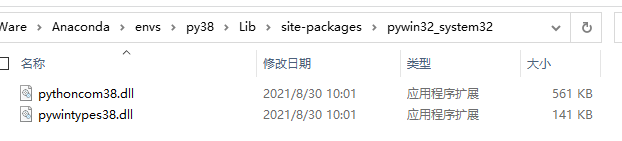
首先导入该包:import win32com.client as win32,如果没有这个包,可以使用pip install win32com进行下载。但是我这台机子会报错:DLL load failed while importing win32api: 找不到指定的模块 ,百度后发现,将环境下***\Lib\site-packages\pywin32_system32\里面的内容***拷贝至***C:\Windows\System32***即可解决。
而后使用win32com来控制CAD,代码如下:
# 创建AutoCAD实例
wincad = win32.Dispatch("AutoCAD.Application")
doc = wincad.ActiveDocument
# 清除存在的选择集
try:
    self.doc.SelectionSets.Item("SS1").Delete()
except:
    print("Delete selection failed")
# 创建选择集
slt = self.doc.SelectionSets.Add("SS1")
# 全选
slt.Select(5)  # acSelectionSetAll = 5
# 依次删除
for i in range(slt.Count):
     slt[i].delete()
win32com的其他使用方法可以查看参考链接。
参考链接
pyautocad example is not running
ImportError: DLL load failed while importing win32api: 找不到指定的模块
第五章 创建和编辑AutoCAD对象
创建和编辑AutoCAD对象(VBA&python)
版权声明
本文为[orzzd]所创,转载请带上原文链接,感谢
https://blog.csdn.net/qq_37263248/article/details/121751597
边栏推荐
- 集成电路模拟版图入门-版图基础学习笔记(三)
- QT basic knowledge summary (continuous refresh)
- 腾讯云物联网-网关设备体验
- Sss1700 qfn36 single chip designs a USB typec headset | supports the automatic switching of USB headset scheme between wire control and European and American regulations
- 疫情环境下工程机械中的透传云网关远程程序升级方案
- Typical application cases of can optical fiber converter and can bus optical transceiver in fire Networking (buildings, factories, offshore wind power, pipe gallery, etc.)
- 超定方程的求解
- Matlab Simulink installation compiler MinGW
- RT thread software package production and release process
- 量化5个城市的PM2.5随时间的变化情况
猜你喜欢

微电子专业是做芯片的吗?芯片和什么专业有关?

STM32 learning record 0003 -- Interpretation of STM32 chip

RT-Thread 软件包制作及发布流程

Can bus record diagnostic assistant

STM32 learning record 0004 - ISP serial port download

Clark transform of PMSM FOC control MATLAB / Simulink simulation

The same via will have different impedance???
C skill tree evaluation - 0415 experience diary

在消防联网(楼宇、工厂、海上风电、管廊等)中CAN光纤转换器、CAN总线光端机典型应用案例

Matlab Simulink installation compiler MinGW
随机推荐
数字IC设计自学入门难吗?如何快速入门呢?
[蓝桥杯省赛] 负载均衡
DP转HDMI方案|CS5216方案应用|CS5216设计方案
Replace rtd2171u | cs5266 design circuit | type C to HDMI scheme | cs5266an
疫情环境下工程机械中的透传云网关远程程序升级方案
Cs5202 chip specification 𞓜 cs5202 replaces cs5212 | HDMI to VGA chip
DP to HDMI scheme | cs5216 Scheme Application | cs5216 design scheme
STM32 learning record 0001 - learning preparation
Qinheng ch573 development board
USB音频芯片/TYPEC音视频处理芯片方案选型表
Application of mcicecan in industrial computer
Audio type 523 + VGA + 5 + HDC to 5 + VGA
LCFNET系列CAN转光纤以太网设备实现CAN网络之间超远距离光纤连通
Dcoker安装
RT-Thread 软件包制作及发布流程
Copy, create and delete QDIR file directory of QT
FreeRTOS v10. 1.0 source code Chinese annotation version
从 Spec.到芯片_(数字IC、模拟IC、FPGA/CPLD设计的流程及EDA工具)
STM32学习记录0005——JLINK下载与调试
Inverse Clark transform of PMSM FOC control MATLAB / Simulink simulation