当前位置:网站首页>Unity编辑器拓展--Scene视图自定义拓展
Unity编辑器拓展--Scene视图自定义拓展
2022-08-07 22:00:00 【IT学徒.】
前言
在游戏项目开发的过程中,为了减少我们的工作量和避免重复的工作量,我们需要引入一些插件和开发一些工具来使我们的工作更加的顺利,Unity提供十分多的编辑器拓展的API使得我们能够使用我们自定义的一些功能。
我们需要在我们项目的Assets目录下新建一个Editor的目录,Unity会自动认为Editor是我们编辑器的脚本。在进行打包的时候不会将这个文件夹编译进去,只有在我们编辑器模式下才会起作用。
Scene视图自定义拓展
新建一个TestScene脚本来控制Scene视图的拓展:
```csharp
using System.Collections;
using System.Collections.Generic;
using UnityEngine;
using UnityEditor;
using System;
public class TestScene : MonoBehaviour
{
    void Start()
    {
        //不能在这写,因为编辑器脚本不会执行Start函数
        //UnityEditor.SceneView.duringSceneGui()
    }
    /// <summary>
    /// 初始化脚本的时候就会执行下面函数
    /// </summary>
    [InitializeOnLoadMethod]
    static void InitializeOnload()
    {
        //duringSceneGui里面是一个Action。我们需要传一个回调函数进去
        UnityEditor.SceneView.duringSceneGui += (sceneView) =>
        {
            if (Event.current != null)
            {
                if (Event.current.button == 1&&Event.current.type==EventType.MouseDown)
                {
                    //1代表的是鼠标的右键,EventType.MouseDown代表鼠标按下
                    Debug.Log("鼠标右键按下");
                }
                else if (Event.current.button == 0&&Event.current.type == EventType.MouseDown)
                {
                    //0代表的是鼠标的左键
                    Debug.Log("鼠标左键按下");
                }
            }
        };
    }
}
输出结果如下: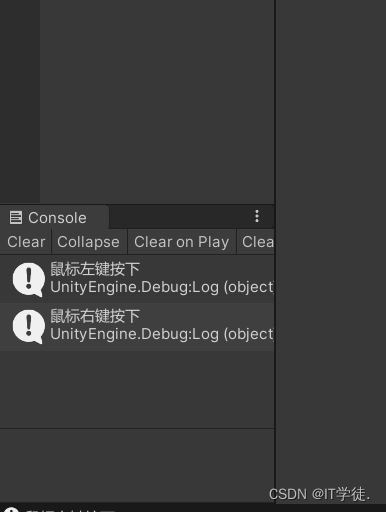
那么我们如果想要点击的时候出现一个弹出框该怎么实现呢?废话不多说,直接上代码。
using System.Collections;
using System.Collections.Generic;
using UnityEngine;
using UnityEditor;
using System;

public class TestScene : MonoBehaviour
{

    void Start()
    {

        //不能在这写,因为编辑器脚本不会执行Start函数
        //UnityEditor.SceneView.duringSceneGui()
    }

    /// <summary>
    /// 初始化脚本的时候就会执行下面函数
    /// </summary>
    [InitializeOnLoadMethod]
    static void InitializeOnload()
    {

        //duringSceneGui里面是一个Action。我们需要传一个回调函数进去
        UnityEditor.SceneView.duringSceneGui += (sceneView) =>
        {

            if (Event.current != null)
            {

                if (Event.current.button == 1&&Event.current.type==EventType.MouseDown)
                {

                    //1代表的是鼠标的右键,EventType.MouseDown代表鼠标按下
                    Debug.Log("鼠标右键按下");
                    //弹出框
                    Rect position = new Rect(Event.current.mousePosition.x, Event.current.mousePosition.y-100, 100, 100);
                    //弹出框内容
                    GUIContent[] contents = new GUIContent[] {
     new GUIContent("Test1"), new GUIContent("SceneMenu/Test2")};
                    //点击时触发的函数
                    ///参数介绍:
                    /// 1.展示的位置 2.弹出框展示的内容 3.有没有被选中选中了就有一个勾
                    /// 4.点击时的回调函数 5传进去的数据(具体可以根据这个data来输出结果)
                    ///
                    EditorUtility.DisplayCustomMenu(position, contents, -1,(data,opt,select)=>
                    {

                        Debug.LogFormat("data:{0},opt:{1},select:{2},value:{3}", data, opt, select, opt[select]);
                    },1);
                }
                else if (Event.current.button == 0&&Event.current.type == EventType.MouseDown)
                {

                    //0代表的是鼠标的左键
                    Debug.Log("鼠标左键按下");
                }
            }
        };
    }
}
具体效果如下所示:

我们也可以根据选择的内容做出相应的反应:
using System.Collections;
using System.Collections.Generic;
using UnityEngine;
using UnityEditor;
using System;

public class TestScene : MonoBehaviour
{

    void Start()
    {

        //不能在这写,因为编辑器脚本不会执行Start函数
        //UnityEditor.SceneView.duringSceneGui()
    }

    /// <summary>
    /// 初始化脚本的时候就会执行下面函数
    /// </summary>
    [InitializeOnLoadMethod]
    static void InitializeOnload()
    {

        //duringSceneGui里面是一个Action。我们需要传一个回调函数进去
        UnityEditor.SceneView.duringSceneGui += (sceneView) =>
        {

            if (Event.current != null)
            {

                if (Event.current.button == 1&&Event.current.type==EventType.MouseDown)
                {

                    //1代表的是鼠标的右键,EventType.MouseDown代表鼠标按下
                    Debug.Log("鼠标右键按下");
                    //弹出框
                    Rect position = new Rect(Event.current.mousePosition.x, Event.current.mousePosition.y-100, 100, 100);
                    //弹出框内容
                    GUIContent[] contents = new GUIContent[] {
     new GUIContent("Test1"), new GUIContent("SceneMenu/Test2")};
                    //点击时触发的函数
                    ///参数介绍:
                    /// 1.展示的位置 2.弹出框展示的内容 3.有没有被选中选中了就有一个勾
                    /// 4.点击时的回调函数 5传进去的数据(具体可以根据这个data来输出结果)
                    ///
                    EditorUtility.DisplayCustomMenu(position, contents, -1,(data,opt,select)=>
                    {

                        ///捕获列表参数说明1.data数据2.是他的一些选项3.当前选中的是第几个
                        if ((int)data == select)
                        {

                            Debug.Log(true);
                        }
                        else
                        {

                            Debug.Log(false);
                        }
                    },1);
                }
                else if (Event.current.button == 0&&Event.current.type == EventType.MouseDown)
                {

                    //0代表的是鼠标的左键
                    Debug.Log("鼠标左键按下");
                }
            }
        };
    }
}
具体效果如下:


那么Scene视图的自定义拓展就介绍到这里了
边栏推荐
猜你喜欢

【openwrt】使用VMware开发openwrt

ECCV 2022 | 清华&腾讯AI Lab提出REALY: 重新思考3D人脸重建的评估方法
苹果怎么装双系统 苹果电脑双系统安装教程

win7定时关机怎么设置 win7定时关机设置方法

Win7系统下System Idle Process占用率高怎么办

Nifi configuration mysql_binlog reads

Mind quantum 基础知识学习笔记(1)
详解中断系统
![[kali-privilege escalation] (4.2.3) Social Engineering Toolkit: QR Code Combination Attack](/img/22/ad8d23b9efb8825f1ef9fa96c6fe21.png)
[kali-privilege escalation] (4.2.3) Social Engineering Toolkit: QR Code Combination Attack

Flutter for Web:为什么 Flutter 最适合 Web 应用开发?
随机推荐
无法访问打印机怎么办 共享打印机无法访问权限怎么解决
如果Controller里有私有的方法,能成功访问吗?
Leecode-SQL 1393. Capital Gains and Losses on Stocks
How to check your broadband account and password How to check your broadband account and password
JDBC简介
PL2303GT USB to RS232 Serial Bridge Controller (Built in RS232 XCVR)驱动地址
Error - Junit unit test @Before not executed
How to use the keyboard to control the computer without a mouse How to use the keyboard instead of the mouse to move
低成本、大容量、高交互…Polkadot 引领 GameFi 实现新突破
2022年危险化学品生产单位安全生产管理人员考试试题及模拟考试
用户信息管理系统项目测试
苹果怎么装双系统 苹果电脑双系统安装教程
The basics of database learning
微服务重启脚本
我想要开一个账户,开户安全吗
tensorflow/serving deploys keras's h5 model service
[CNN record] pytorch gather function
打开方式默认怎么修改 怎么更改文件的打开方式
The 2019 ICPC Asia Nanjing Regional Contest(A、C、K)
What risk fund accounts?Handle the fund account the safest?