当前位置:网站首页>Introduction to Qt (5) - file operation, hotkey and mouse reading (implementation of txt window)
Introduction to Qt (5) - file operation, hotkey and mouse reading (implementation of txt window)
2022-08-08 23:06:00 【light chases rain】

注意,是选这个MainWindow
一、ui设计
1.1 Image result
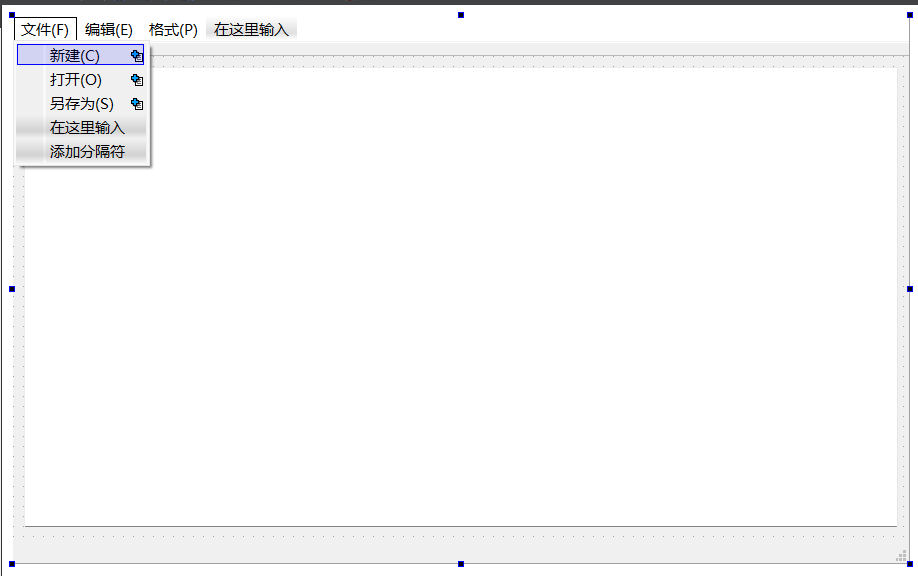
1.2 类名定义

二、代码展示
2.1 MainWindow.h
#ifndef MAINWINDOW_H
#define MAINWINDOW_H

#include <QMainWindow>
#include <QFileDialog>
#include <QMessageBox>
#include <QKeyEvent>
#include <QMouseEvent>
#include <QDebug>

namespace Ui {

class MainWindow;
}

class MainWindow : public QMainWindow
{

    Q_OBJECT

public:
    explicit MainWindow(QWidget *parent = 0);
    void keyPressEvent(QKeyEvent *k);
    void mousePressEvent(QMouseEvent *m);
    ~MainWindow();

private slots:
    void NewActionSlots();
    void OpenActionSlots();
    void SaveActionSlots();

private:
    Ui::MainWindow *ui;

};

#endif // MAINWINDOW_H
2.2 main.cpp
#include "mainwindow.h"
#include <QApplication>

int main(int argc, char *argv[])
{

    QApplication a(argc, argv);
    MainWindow w;
    w.show();

    return a.exec();
}
2.3 MainWindow.cpp
#include "mainwindow.h"
#include "ui_mainwindow.h"

MainWindow::MainWindow(QWidget *parent) :
    QMainWindow(parent),
    ui(new Ui::MainWindow)
{
    ui->setupUi(this);
    connect(ui->Newaction,&QAction::triggered,this,&MainWindow::NewActionSlots);
    connect(ui->Openaction,&QAction::triggered,this,&MainWindow::OpenActionSlots);
    connect(ui->Saveaction,&QAction::triggered,this,&MainWindow::SaveActionSlots);
}

MainWindow::~MainWindow()
{
    delete ui;
}

void MainWindow::NewActionSlots()
{
    ui->textEdit->clear();
    this->setWindowTitle("新建文本文档.txt");
}

void MainWindow::OpenActionSlots()
{
    QString filename = QFileDialog::getOpenFileName(this,tr("请选择一个文件"),
                                                    QCoreApplication::applicationFilePath(),
                                                    "*.cpp");
    if(filename.isEmpty())
    {
        QMessageBox::warning(this,"警告","请选择一个文件");
    }
    else {
        QFile file(filename);
        file.open(QIODevice::ReadOnly);
        QByteArray ba = file.readAll();
        ui->textEdit->setText(QString(ba));
        file.close();
    }
}

void MainWindow::SaveActionSlots()
{
    QString filename = QFileDialog::getSaveFileName(this,tr("请选择一个文件"),
                                                    QCoreApplication::applicationFilePath());
    if(filename.isEmpty())
    {
        QMessageBox::warning(this,"警告","请选择一个文件");
    }
    else {
        QFile file(filename);
        file.open(QIODevice::WriteOnly);
        QByteArray ba;
        ba.append(ui->textEdit->toPlainText());
        file.write(ba);
        file.close();
    }
}

void MainWindow::keyPressEvent(QKeyEvent *k)
{
    if(k->modifiers() == Qt::ControlModifier && k->key() == Qt::Key_S)
    {
        SaveActionSlots();
    }
    if(k->modifiers() == Qt::ControlModifier && k->key() == Qt::Key_C)
    {
        NewActionSlots();
    }
    if(k->modifiers() == Qt::ControlModifier && k->key() == Qt::Key_O)
    {
        OpenActionSlots();
    }
}
void MainWindow::mousePressEvent(QMouseEvent *m)
{
    QPoint pt = m->pos();
    qDebug()<<pt;
    if(m->button() == Qt::LeftButton)
    {
        qDebug()<<"左键被按下";
    }
    else if(m->button() == Qt::RightButton)
    {
        qDebug()<<"右键被按下";
    }
}
三、成果展示

边栏推荐
猜你喜欢





随机推荐
微信公众号 接口测试平台 获取自定义菜单教程
套接字(Socket)
免费ARP
GIL和池的概念
新安装Laravel Framework 6.18.35 php artisan migrate 报错
Application Layer Protocol - RADIUS
wps表格怎么筛选出需要的内容?wps表格筛选出需要的内容的方法
Virtualization type (with picture)
2022牛客多校六 A-Array(构造+哈夫曼)
WeChat applet wx:for loop output example
Hi3516 使用 wifi模块
ArcPy要素批量转dwg
【PP-YOLOv2】测试自定义的数据集
MySQL indexes a field in a table
4399IT运维实习生面试经历
三国战绩物品序号.txt
2022牛客多校六 B-Eezie and Pie (dfs)
Hi3516 use wifi module
wps表格分两页断开怎么办?wps表格分两页断开的解决方法
按键精灵 删除文件 命令