当前位置:网站首页>C#和DL-EPI通信
C#和DL-EPI通信
2022-08-06 05:25:00 【QtHalcon】
DL-EP1是通过Ethernet/IP通信的,较为复杂,不想折腾建议换成DL-EN1,可以直接用TCP发送M0就能获取传感器的值。
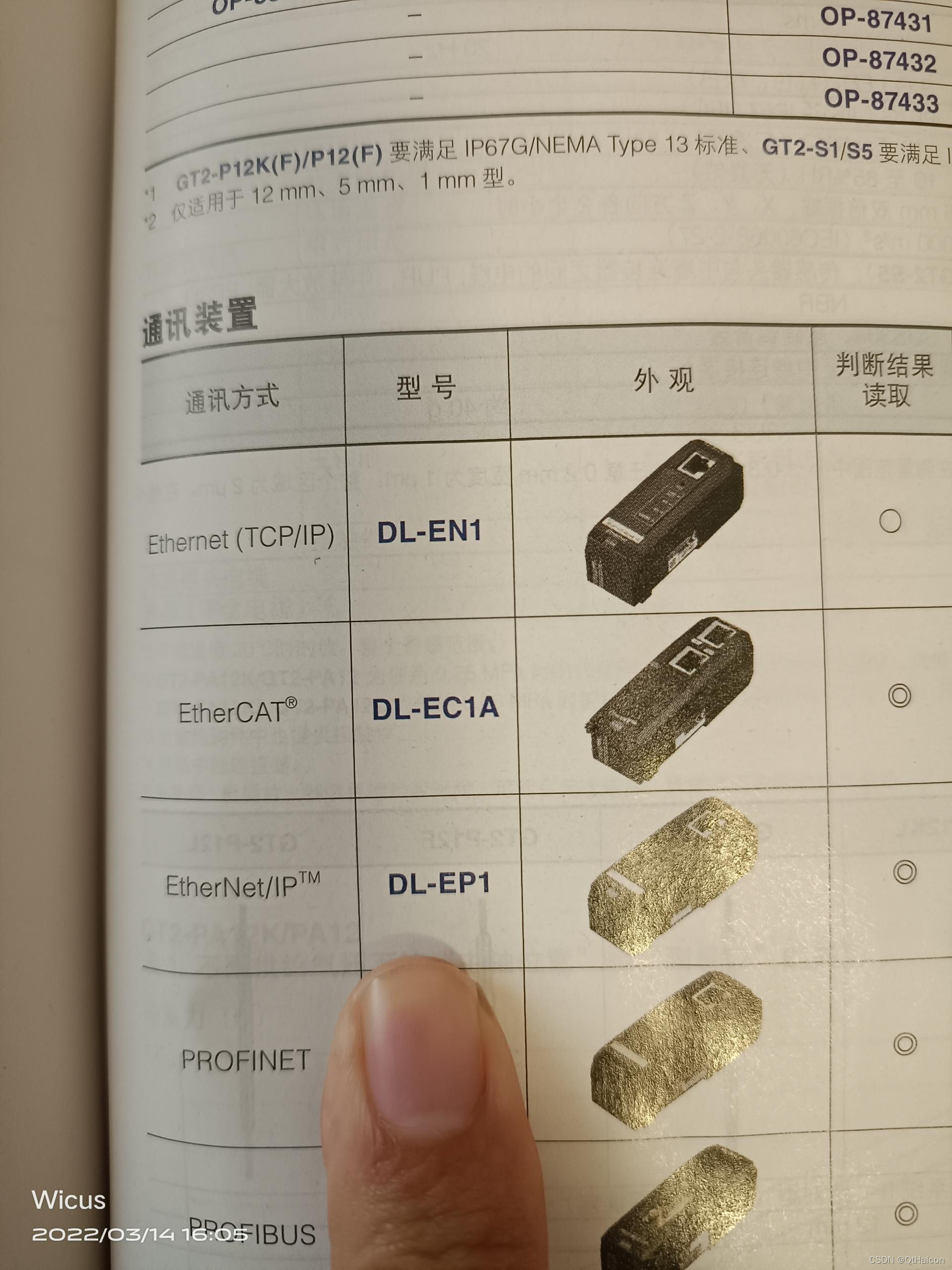
如果实在要通信就用下面的库。
 https://github.com/rossmann-engineering/EEIP.NET
然后用下面代码替换掉Program.cs的内容

代码如下:
using System;
using System.Collections.Generic;
using System.Linq;
using System.Text;
using System.Threading.Tasks;
using Sres.Net.EEIP;
using System.IO;

//This example demonstrates the usage of Implicit Messaging
//whith an Keyence NU-EP1 Network Unit. This is an Input Only connection.
//The 128 received bytes returns the state of the Sensors (Page 3-9 of Keyence Manual contains the assignment).
//Keyence Users Manual Page 3-6 No. 2
//此示例演示隐式消息传递的用法
//使用Keyence NU-EP1网络单元。这是一个仅输入的连接。
//接收到的128个字节返回传感器的状态(Keyence手册第3-9页包含分配)。
//Keyence用户手册第3-6页第2页
namespace Keyence_NU_RP1_Implicit
{
    class Program
    {
        static void Main(string[] args)
        {
            //
            string Path = Directory.GetCurrentDirectory();
            string[] FileDataList = File.ReadAllLines(Path + "\\config.txt",Encoding.Default);
            if (FileDataList.Length <= 0) return;
            for (int i = 0; i < FileDataList.Length; ++i) {
                Console.WriteLine("Data" + i + ":" + FileDataList[i]);
            }

            //
            EEIPClient eeipClient = new EEIPClient();
            //Ip-Address of the Ethernet-IP Device (In this case Keyence-NU-EP1)
            eeipClient.IPAddress = FileDataList[0];
            //A Session has to be registered before any communication can be established
            eeipClient.RegisterSession();

            //Parameters from Originator -> Target 来自发起人->目标的参数
            eeipClient.O_T_InstanceID = 0xfe;              //输出程序集的实例ID
            eeipClient.O_T_Length = 0;
            eeipClient.O_T_RealTimeFormat = Sres.Net.EEIP.RealTimeFormat.Header32Bit;   //Header Format
            eeipClient.O_T_OwnerRedundant = false;
            eeipClient.O_T_Priority = Sres.Net.EEIP.Priority.Low;
            eeipClient.O_T_VariableLength = false;
            eeipClient.O_T_ConnectionType = Sres.Net.EEIP.ConnectionType.Point_to_Point;
            eeipClient.RequestedPacketRate_O_T = 500000;    //RPI in  500ms is the Standard value


            //Parameters from Target -> Originator 来自目标->发起人的参数
            eeipClient.T_O_InstanceID = 0x64;
            eeipClient.T_O_Length = 168;
            eeipClient.T_O_RealTimeFormat = Sres.Net.EEIP.RealTimeFormat.Modeless;
            eeipClient.T_O_OwnerRedundant = false;
            eeipClient.T_O_Priority = Sres.Net.EEIP.Priority.Scheduled;
            eeipClient.T_O_VariableLength = false;
            eeipClient.T_O_ConnectionType = Sres.Net.EEIP.ConnectionType.Multicast;
            eeipClient.RequestedPacketRate_T_O = 500000;    //RPI in  500ms is the Standard value

            //Forward open initiates the Implicit Messaging Forward open启动隐式消息传递
            eeipClient.ForwardOpen();

            while (true)
            {
                //read pw
                var responze = eeipClient.GetAttributeSingle(0x0E, 0x67,1,0x325);
                int PVInt = BitConverter.ToInt32(responze, 0);
                //read numn point
                var reaponee2 = eeipClient.GetAttributeSingle(0x4D, 0x67,1,0x325);
                int point = BitConverter.ToInt16(reaponee2, 0);
                //用于计算真实数值
                double value = ((double)PVInt) * Math.Pow(0.1, point) ;
                Console.WriteLine("测距值:" + value);


                System.Threading.Thread.Sleep(500);
            }

            //Close the Session
            eeipClient.ForwardClose();
            eeipClient.UnRegisterSession();
        }
    }
}
然后在EIPClient.cs添加这个函数
        public byte[] GetAttributeSingle(int service, int classID, int instanceID, int attributeID)
        {
            byte[] requestedPath = GetEPath(classID, instanceID, attributeID);
            if (sessionHandle == 0) {
                //If a Session is not Registers, Try to Registers a Session with the predefined IP-Address and Port
                //如果会话未注册,请尝试使用预定义的IP地址和端口注册会话
                this.RegisterSession();
            }
            byte[] dataToSend = new byte[42+ requestedPath.Length];
            Encapsulation encapsulation = new Encapsulation();
            encapsulation.SessionHandle = sessionHandle;
            encapsulation.Command = Encapsulation.CommandsEnum.SendRRData;
            encapsulation.Length = (UInt16)(18 + requestedPath.Length);
            //---------------Interface Handle CIP
            encapsulation.CommandSpecificData.Add(0);
            encapsulation.CommandSpecificData.Add(0);
            encapsulation.CommandSpecificData.Add(0);
            encapsulation.CommandSpecificData.Add(0);
            //----------------Interface Handle CIP

            //----------------Timeout
            encapsulation.CommandSpecificData.Add(0);
            encapsulation.CommandSpecificData.Add(0);
            //----------------Timeout

            //Common Packet Format (Table 2-6.1)
            Encapsulation.CommonPacketFormat commonPacketFormat = new Encapsulation.CommonPacketFormat();
            commonPacketFormat.ItemCount = 0x02;

            commonPacketFormat.AddressItem = 0x0000;        //NULL (used for UCMM Messages)
            commonPacketFormat.AddressLength = 0x0000;

            commonPacketFormat.DataItem = 0xB2;
            commonPacketFormat.DataLength = (UInt16)(2 + requestedPath.Length);


            //----------------CIP Command "Get Attribute Single"
            commonPacketFormat.Data.Add((byte)service);
            //commonPacketFormat.Data.Add((byte)Sres.Net.EEIP.CIPCommonServices.Get_Attribute_Single);
            //----------------CIP Command "Get Attribute Single"

            //----------------Requested Path size (number of 16 bit words)
            commonPacketFormat.Data.Add((byte)(requestedPath.Length / 2));
            //----------------Requested Path size (number of 16 bit words)

            //----------------Path segment for Class ID
            //----------------Path segment for Class ID

            //----------------Path segment for Instance ID
            //----------------Path segment for Instace ID

            //----------------Path segment for Attribute ID
            //----------------Path segment for Attribute ID

            for (int i = 0; i < requestedPath.Length; i++)
            {
                commonPacketFormat.Data.Add(requestedPath[i]);
            }

            byte[] dataToWrite = new byte[encapsulation.toBytes().Length + commonPacketFormat.toBytes().Length];
            System.Buffer.BlockCopy(encapsulation.toBytes(), 0, dataToWrite, 0, encapsulation.toBytes().Length);
            System.Buffer.BlockCopy(commonPacketFormat.toBytes(), 0, dataToWrite, encapsulation.toBytes().Length, commonPacketFormat.toBytes().Length);
            encapsulation.toBytes();

            stream.Write(dataToWrite, 0, dataToWrite.Length);
            byte[] data = new Byte[564];

            Int32 bytes = stream.Read(data, 0, data.Length);

            //--------------------------BEGIN Error?
            if (data[42] != 0)      //Exception codes see "Table B-1.1 CIP General Status Codes"
            {
                throw new CIPException(GeneralStatusCodes.GetStatusCode(data[42]));
            }
            //--------------------------END Error?

            byte[] returnData = new byte[bytes - 44];
            System.Buffer.BlockCopy(data, 44, returnData, 0, bytes-44);

            return returnData;
        }
最后,具体的参数设置可以根据自己的传感器去设置,我这里是IL-1000


边栏推荐
猜你喜欢

How many slots does a Flink task need?

好的架构是进化来的,不是设计来的
Raspberry Pi official system cancels the pi user, how to initialize the default user and connect SSH without a display?
Convolutional Neural Networks for Handwritten Digit Classification

普通工厂类和抽象工厂类的区别
SSH服务详解

LVS introduces keepalived automatic switching mechanism
卷积神经网络手写数字分类

shp 解析的数据添加至pg空间库中
十二、一起学习Lua table(表)
随机推荐
Raspberry Pi official system cancels the pi user, how to initialize the default user and connect SSH without a display?
动态规划之乘积最大子数组
搭建自己的V Rising自建服务器,以及常见的V Rising服务器问题解决方案
R爬虫常用的包与用法
Flink 任务到底需要多少个 Slot
The Home Assistant container on the Raspberry Pi uses the command sensor to obtain and display information such as CPU temperature, memory usage, etc.
十、 一起学习Lua 数组
AI直接剪视频?哥本哈根大学提出基于CLIP的文本视频目标编辑模型
R语言实现空间对象可视化--以郑州市为例
7月17日上午,阿里AE技术团队直播专场,分享CVPR挑战赛冠军、亚军方案!
geoserver 发布 矢量切片(pbf)并用openlayers 6.14 /leaflet 1.8 加载展示 (二)(小白必备:超详细教程)
MySQL optimization query details and index optimization examples
全网最全面的SSM整合(没有之一)
地理加权回归R语言实例
arcgis 4.17 结合 three js 实现炫酷效果
初识网络层
十五、一起学习Lua 协同程序(coroutine)
系统安全管理
卷积神经网络笔记
Explain in detail how to install Home Assistant Supervised on Raspberry Pi to make smart devices at home smarter