当前位置:网站首页>交换综合实验
交换综合实验
2022-08-07 19:10:00 【橘子爱吃橘子】
文章目录
一、实验要求
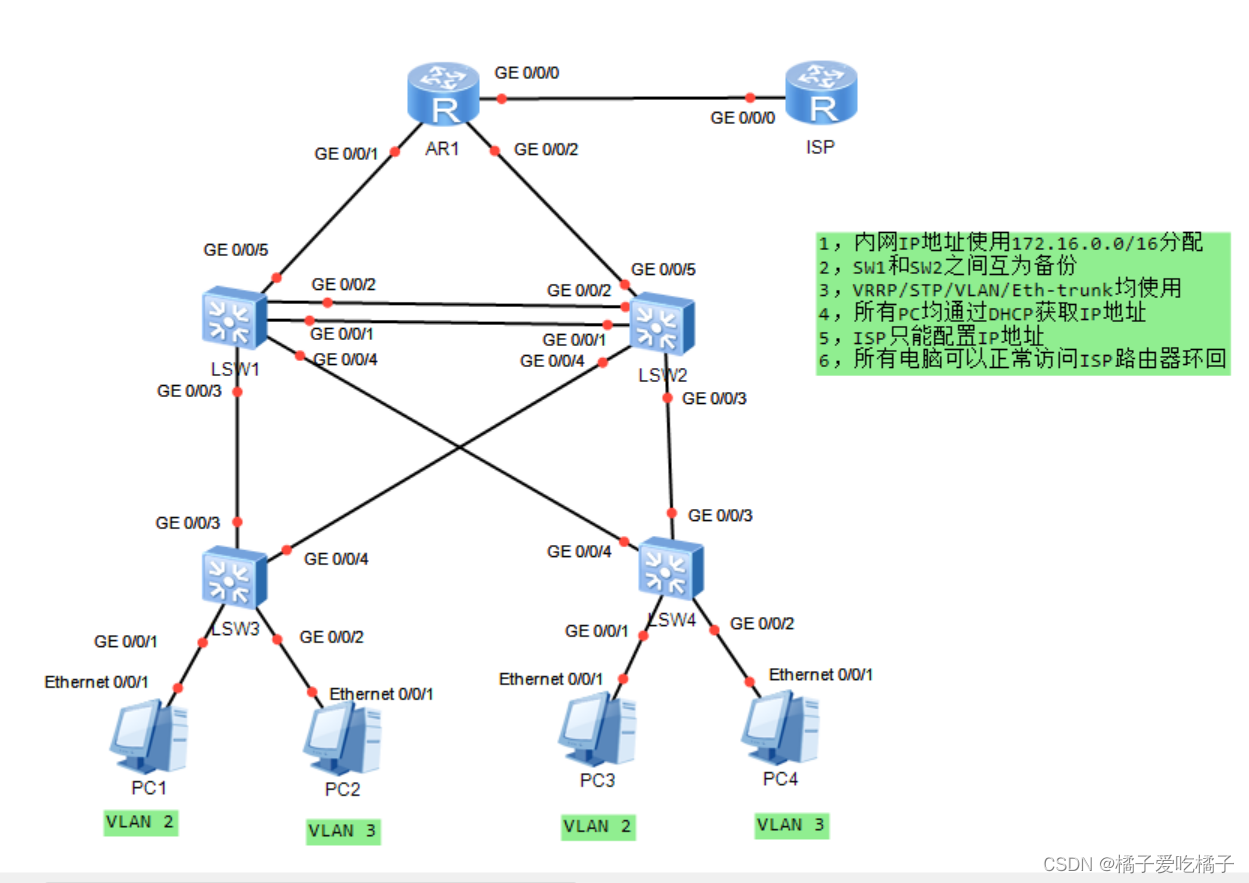
二、创建Eth-trunk
[lsw1]interface Eth-Trunk 0----创建Eth-trunk 0
[lsw1]int g 0/0/2
[lsw1-GigabitEthernet0/0/2]eth-trunk 0----让 int g 0/0/2口属于Eth-trunk
[lsw1-GigabitEthernet0/0/2]int g 0/0/1
[lsw1-GigabitEthernet0/0/1]eth-trunk 0

[lsw3]interface Eth-Trunk 0
[lsw3-Eth-Trunk0]int g 0/0/2
[lsw3-GigabitEthernet0/0/2]eth-trunk 0
[lsw3-GigabitEthernet0/0/2]int g 0/0/1
[lsw3-GigabitEthernet0/0/1]eth-trunk 0
三、创建VLAN、划分VLAN并做trunk干道
[lsw1]vlan 2---创建VLAN
[lsw1]port-group group-member GigabitEthernet 0/0/3 to GigabitEthernet 0/0/4 Eth-Trunk 0----批量创建trunk链路
[lsw1-port-group]port link-type trunk
[lsw1-port-group]port trunk allow-pass vlan 2 ----将所做的接口划入VLAN 2

[lsw2]vlan 2
[lsw2]int g 0/0/1
[lsw2-GigabitEthernet0/0/1]port link-type access
[lsw2-GigabitEthernet0/0/1]port default vlan 2
[lsw2]q
[lsw2]vlan 3
[lsw2]int g 0/0/2
[lsw2-GigabitEthernet0/0/2]port link-type access
[lsw2-GigabitEthernet0/0/2]port default vlan 3
[lsw2-GigabitEthernet0/0/2]
[lsw2]q
[lsw2-GigabitEthernet0/0/2]int g 0/0/3
[lsw2-GigabitEthernet0/0/3]port link-type trunk
[lsw2-GigabitEthernet0/0/3]port trunk allow-pass vlan 2
[lsw2]q
[lsw2-GigabitEthernet0/0/3]int g 0/0/4
[lsw2-GigabitEthernet0/0/4]port link-type trunk
[lsw2-GigabitEthernet0/0/4]port trunk allow-pass vlan 2

[lsw3]vlan 2
[lsw3]port-group  group-member  GigabitEthernet 0/0/3 to  GigabitEthernet 0/0/4 Eth-Trunk 0
[lsw3-port-group]port link-type trunk
[lsw3-GigabitEthernet0/0/4]port trunk allow-pass vlan 2

[lsw4]vlan batch 2 to 3---批量创建VLAN
[lsw4]int g 0/0/1
[lsw4-GigabitEthernet0/0/1]port link-type access
[lsw4-GigabitEthernet0/0/1]port default vlan 2
[lsw4]q
[lsw4]int g 0/0/2
[lsw4-GigabitEthernet0/0/2]port link-type access
[lsw4-GigabitEthernet0/0/2]port default vlan 3
[lsw4-GigabitEthernet0/0/2]
[lsw4]q
[lsw4]port-group group-member GigabitEthernet 0/0/3 to GigabitEthernet 0/0/4
[lsw4-port-group]port link-type trunk
[lsw4-port-group]port trunk allow-pass vlan 2
[lsw4-port-group]q
四、STP
[lsw1]stp enable ----开启STP
[lsw1]stp mode mstp ---使用mstp模式
[lsw1]stp region-configuration
[lsw1-mst-region]region-name a----给这个区域命名为a
[lsw1-mst-region]instance 1 vlan 1----组1放入VLAN 1
[lsw1-mst-region]instance 2 vlan 2----组2放入VLAN 2
[lsw1-mst-region]active region-configuration -----激活mstp

[lsw2]stp enable
[lsw2]stp mode mstp
[lsw2]stp region-configuration
[lsw2-mst-region] region-name a
[lsw2-mst-region] instance 1 vlan 1
[lsw2-mst-region] instance 2 vlan 2
[lsw2-mst-region] active region-configuration

[lsw3]stp enable
[lsw3]stp mode mstp
[lsw3]stp region-configuration
[lsw3-mst-region] region-name a
[lsw3-mst-region] instance 1 vlan 1
[lsw3-mst-region] instance 2 vlan 2
[lsw3-mst-region] active region-configuration

[lsw4]stp enable
[lsw4]stp mode mstp
[lsw4]stp region-configuration
[lsw4-mst-region] region-name a
[lsw4-mst-region] instance 1 vlan 1
[lsw4-mst-region] instance 2 vlan 2
[lsw4-mst-region] active region-configuration
因为根网桥的选举跑到了下面的接口,所以需要我们进行手动更改
[lsw1]stp instance 1 root primary ----做组1的主根
[lsw1]stp instance 2 root secondary ---做组2的备份根
[lsw1]

[lsw2]port-group group-member GigabitEthernet 0/0/1 to GigabitEthernet 0/0/2
[lsw2-port-group]stp edged-port enable


[lsw3]stp instance 1 root secondary
[lsw3]stp instance  2 root primary
[lsw3]

[lsw4]port-group group-member GigabitEthernet 0/0/1 to GigabitEthernet 0/0/2
[lsw4-port-group]stp edged-port enable
五、SVI及VRRP的创建
IP地址划分:
VLANif :172.16.0.0/25
VLANif2 : 172.16.0.128/25
r1 : 172.16.0.0/30
r2 : 172.16.0.4/30
配置VRRP
[lsw1]interface Vlanif 1----创建vlanif 1
[lsw1-Vlanif1]ip address 172.16.1.1 25
[lsw1-Vlanif1]vrrp vrid 1 virtual-ip 172.16.1.126
[lsw1-Vlanif1]vrrp vrid 1 priority 110
[lsw1-Vlanif1]vrrp vrid 1 track  interface GigabitEthernet  0/0/1 reduced 50
[lsw1-Vlanif1]q
[lsw1]interface Vlanif 2
[lsw1-Vlanif2]ip address 172.16.1.129 25
[lsw1-Vlanif2]vrrp vrid 1 virtual-ip 172.16.1.254
[lsw1-Vlanif2]vrrp vrid 1 priority 110
[lsw1-Vlanif2]vrrp vrid 1 track interface GigabitEthernet 0/0/1 reduced 50
[lsw1-Vlanif2]

[lsw3]interface Vlanif 1
[lsw3-Vlanif1]ip address 172.16.1.2 25
[lsw3-Vlanif1]vrrp vrid 1 virtual-ip 172.16.1.126
[lsw3-Vlanif1]vrrp vrid 1 priority 110
[lsw3-Vlanif1]vrrp vrid 1 track interface GigabitEthernet 0/0/1 reduced 50
[lsw3-Vlanif1]
[lsw3]interface Vlanif 2
[lsw3-Vlanif2]ip address 172.16.1.130 25
[lsw3-Vlanif2]vrrp vrid 1 virtual-ip 172.16.1.254
[lsw3-Vlanif2]vrrp vrid 1 priority 110
[lsw3-Vlanif2]vrrp vrid 1 track interface GigabitEthernet 0/0/1 reduced 50
[lsw3-Vlanif2]
六、配置DHCP
[lsw1]dhcp enable -----开启DHCP
[lsw1]ip pool lsw1
[lsw1-ip-pool-lsw1]network 172.16.1.0 mask 25--宣告网段
[lsw1-ip-pool-lsw1]gateway-list 172.16.1.126----设置网关
[lsw1-ip-pool-lsw1]q
[lsw1]dhcp enable
[lsw1]ip pool lsw1-2---创建第二个地址池
[lsw1-ip-pool-lsw1-2]network 172.16.1.128 mask 25
[lsw1-ip-pool-lsw1-2]gateway-list 172.16.1.254
[lsw1-ip-pool-lsw1-2]q
[lsw1]int Vlanif 1
[lsw1-Vlanif1]dhcp select global  ----设置全局模式
[lsw1-Vlanif1]q
[lsw1]int Vlanif 2
[lsw1-Vlanif2]dhcp select global
[lsw1-Vlanif2]q
[lsw1]

[lsw3]dhcp enable
[lsw3-ip-pool-lsw1]network 172.16.1.0 mask 25
[lsw3-ip-pool-lsw1]gateway-list 172.16.1.126
[lsw3-ip-pool-lsw1]q
[lsw3]dhcp enable
[lsw3]ip pool lsw1-2
[lsw3-ip-pool-lsw1-2]network 172.16.1.128 mask 25
[lsw3-ip-pool-lsw1-2]gateway-list 172.16.1.254
[lsw3-ip-pool-lsw1-2]q
[lsw3]interface Vlanif 1
[lsw3-Vlanif1]dhcp select global
[lsw3-Vlanif1]q
[lsw3]interface Vlanif 2
[lsw3-Vlanif2]dhcp select global
[lsw3-Vlanif2]q
[lsw3]
PC端使用DHCP自动获取IP地址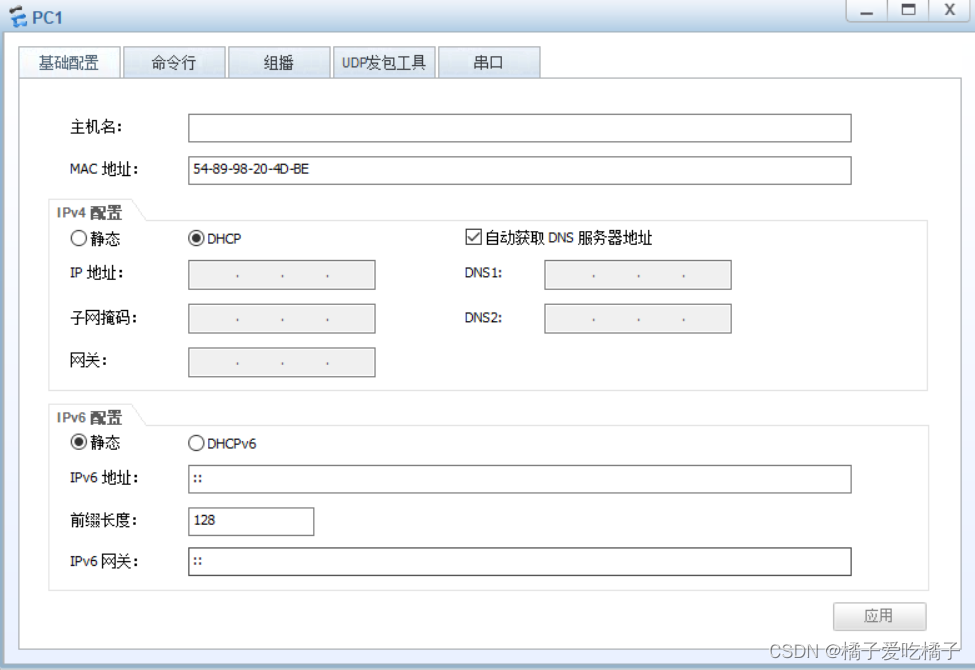
七、配置路由器和交换机IP地址、启用RIP协议
[r1]int g 0/0/0
[r1-GigabitEthernet0/0/0]ip address 12.0.0.1 24
[r1-GigabitEthernet0/0/0]int g 0/0/1
[r1-GigabitEthernet0/0/1]ip address 172.16.0.1 30
[r1-GigabitEthernet0/0/1]int g 0/0/2
[r1-GigabitEthernet0/0/2]ip address 172.16.0.5 30
[r1-GigabitEthernet0/0/2]

[lsp]interface  GigabitEthernet 0/0/0
[lsp-GigabitEthernet0/0/0]ip address 12.0.0.2 24
[lsp-GigabitEthernet0/0/0]int lo0
[lsp-LoopBack0]ip address 2.2.2.2 24
[lsp-LoopBack0]

[lsw1]vlan 100
[lsw1]int Vlanif 100
[lsw1-Vlanif100]ip address 172.16.0.2 30
[lsw1]vlan 100
[lsw1-vlan100]int g 0/0/1
[lsw1-GigabitEthernet0/0/1]port link-type access
[lsw1-GigabitEthernet0/0/1]port default vlan 100
[lsw1-GigabitEthernet0/0/1]

[lsw3]vlan 100
[lsw3-vlan100]q
[lsw3]interface Vlanif 100
[lsw3-Vlanif100]ip address 172.16.0.6 30
[lsw3-Vlanif100]q
[lsw3]int g 0/0/1
[lsw3-GigabitEthernet0/0/1]port link-type access
[lsw3-GigabitEthernet0/0/1]port default vlan 100
[lsw3-GigabitEthernet0/0/1]
启用RIP协议
[lsw1]rip
[lsw1-rip-1]v 2
[lsw1-rip-1]ne
[lsw1-rip-1]network 172.16.0.0
[lsw1-rip-1]

[lsw3]rip
[lsw3-rip-1]v 2
[lsw3-rip-1]network 172.16.0.0
[lsw3-rip-1]q
[lsw3]
做ACL列表
[r1]acl 2000
[r1-acl-basic-2000]rule  permit  source 172.16.0.0 0.0.255.255
[r1-acl-basic-2000]q
[r1]int g 0/0/0
[r1-GigabitEthernet0/0/0]nat outbound 2000
[r1-GigabitEthernet0/0/0]q
[r1]
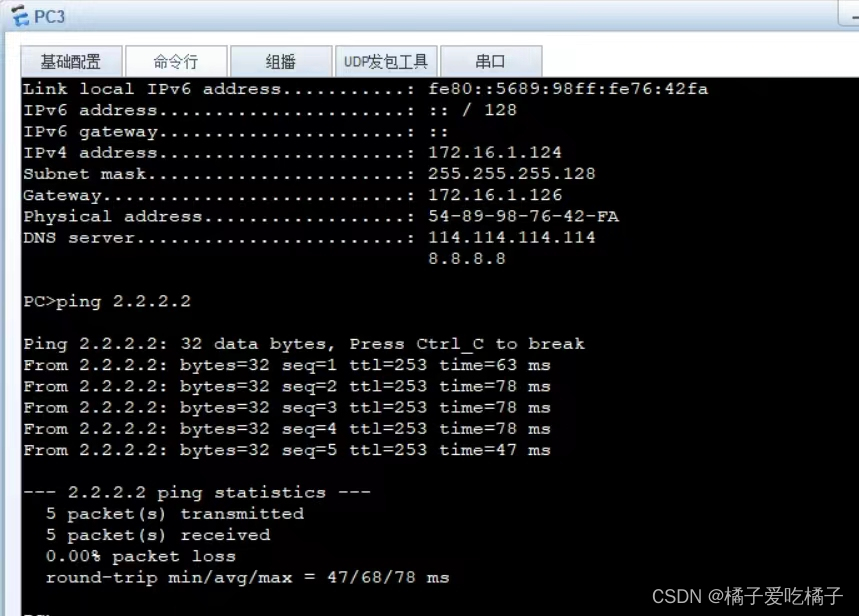
八、测试截图


边栏推荐
- 全球首个!元宇宙安全极客大会来了
- Database table design with tree structure
- [2022 Nioke Duo School 4 C] Easy Counting Problem (generating function NTT)
- cesium 压平的一种实现方式
- [ACTF2020 新生赛]BackupFile
- 第61章 Jquery JSON Table EntityFrameworkCore自动生成数据库
- 每天20分钟之hystrix
- #C语言大小写转换#
- CSDN Competition Phase 3 Courier, Small Fish Swimming Problem Solving
- vim你也可以写文本块
猜你喜欢
英文转换-在线英文批量转换器免费

谷粒商城项目搭建

Telnet协议抓包-工具Wireshark
![[chestnut sugar GIS] DOS - how to create subfolders in batches inside the current folder](/img/b7/49264e33f8b47964860a635d6efbc4.png)
[chestnut sugar GIS] DOS - how to create subfolders in batches inside the current folder

Technology Sharing | How to do json response assertion in interface automation test?

redis详解(内部分享版)

Scala entry to proficient (Shang Silicon Valley study notes)

浩辰软件IPO过会:年营收2.4亿拟募资7.5亿 红杉是股东

UEditorPlus v2.3.0发布 图片抓取重构,多处样式优化
![[ACTF2020 新生赛]BackupFile](/img/0e/bb967a3a16771f16e17ae4580468cf.png)
[ACTF2020 新生赛]BackupFile
随机推荐
Kuaishou management adjustment: Liu Feng and Ma Hongbin are respectively in charge of commercialization and internationalization
Translation Assistant - Free Translation Assistant Download
[chestnut sugar GIS] DOS - how to create subfolders in batches inside the current folder
When shooting video, is the higher the frame rate the better?
Three ways to splicing int type variables and String type variables in dart
更简单的掩码图像建模框架SimMIM介绍和PyTorch代码实现
Chapter 3 Operators and Identifiers and Keywords
cesium 源码分析 裁切面原理
[ACTF2020 新生赛]BackupFile
百万年薪架构师谈:掌握这【6+2】学习路线 进BAT拿月薪40k真不难
SAS Planet下载卫星地图
【Leetcode-链表强训】
SQL Server 递归+向上统计
收藏 | 一文看懂注意力机制
认识UDS诊断29认证服务
[2022 杭电多校5] Count Set (生成函数 分治NTT)
Which translation software is more accurate
数据库小记
[2022 Nioke Duo School 2 E] Falfa with Substring (binomial inversion NTT)
vim你也可以写文本块