当前位置:网站首页>实现简易计算器
实现简易计算器
2022-04-22 17:12:00 【時間不夠以後】
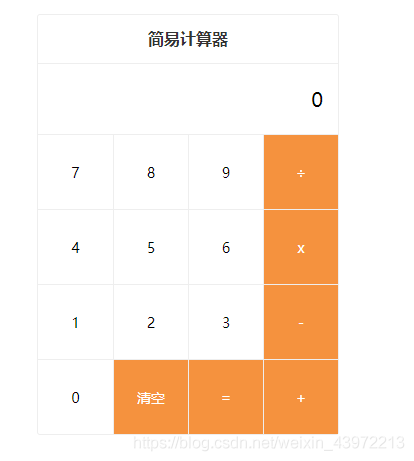
问题描述:
1、除法操作时,如果被除数为0,则结果为0
2、结果如果为小数,最多保留小数点后两位,如2 / 3 =0.67(显示0.67),1 / 2 = 0.5(显示0.5)
<!DOCTYPE html>
<html>
	<head>
		<meta charset="utf-8">
		<title>百度笔试0329</title>
		<style type="text/css"> body, ul, li,select {
       margin: 0; padding: 0; box-sizing: border-box; } ul,li {
      list-style: none;} .calculator {
       max-width: 300px; margin: 20px auto; border: 1px solid #eee; border-radius: 3px; } .cal-header {
       font-size: 16px; color: #333; font-weight: bold; height: 48px; line-height: 48px; border-bottom: 1px solid #eee; text-align: center; } .cal-main {
       font-size: 14px; } .cal-main .origin-value {
       padding: 15px; height: 40px; line-height: 40px; font-size: 20px; text-align: right; overflow: hidden; text-overflow:ellipsis; white-space: nowrap; } .cal-main .origin-type, .cal-main .target-type {
       padding-left: 5px; width: 70px; font-size: 14px; height: 30px; border: 1px solid #eee; background-color: #fff; vertical-align: middle; margin-right: 10px; border-radius: 3px; } .cal-keyboard {
       overflow: hidden; } .cal-items {
       overflow: hidden; } .cal-items li {
       user-select: none; float: left; display: inline-block; width: 75px; height: 75px; text-align: center; line-height: 75px; border-top: 1px solid #eee; border-left: 1px solid #eee; box-sizing: border-box; } li:nth-of-type(4n+1) {
       border-left: none; } li[data-action=operator] {
       background: #f5923e; color: #fff; } .buttons {
       float: left; width: 75px; } .buttons .btn {
       width: 75px; background-color: #fff; border-top: 1px solid #eee; border-left: 1px solid #eee; height: 150px; line-height: 150px; text-align: center; } .btn-esc {
       color: #ff5a34; } .btn-backspace {
       position: relative; } </style>
	</head>
	<body>
		<div class="calculator">
		    <header class="cal-header">简易计算器</header>
		    <main class="cal-main">
		        <div class="origin-value">0</div>
		        <div class="cal-keyboard">
		            <ul class="cal-items">
		                <li data-action="num">7</li>
		                <li data-action="num">8</li>
		                <li data-action="num">9</li>
		                <li data-action="operator">÷</li>
		                <li data-action="num">4</li>
		                <li data-action="num">5</li>
		                <li data-action="num">6</li>
		                <li data-action="operator">x</li>
		                <li data-action="num">1</li>
		                <li data-action="num">2</li>
		                <li data-action="num">3</li>
		                <li data-action="operator">-</li>
		                <li data-action="num">0</li>
		                <li data-action="operator">清空</li>
		                <li data-action="operator">=</li>
		                <li data-action="operator">+</li>
		            </ul>
		        </div>
		    </main>
		</div>
		<script type="text/javascript"> var Calculator = {
       init: function () {
       var that = this; if (!that.isInited) {
       that.isInited = true; // 保存操作信息 // total: Number, 总的结果 // next: String, 下一个和 total 进行运算的数据 // action: String, 操作符号 that.data = {
      total: 0, next: '', action: ''}; that.bindEvent(); } }, bindEvent: function () {
       var that = this; // 获取 .cal-keyboard 元素 var keyboardEl = document.getElementsByClassName('cal-keyboard')[0] keyboardEl && keyboardEl.addEventListener('click', function (event) {
       // 获取当前点击的dom元素 var target = event.target; // 获取target的 data-action 值 var action = target.getAttribute('data-action'); // 获取target的内容 var value = target.innerHTML; if (action === 'num' || action === 'operator') {
       that.result(value, action === 'num'); } }); }, result: function (action, isNum) {
       var that = this; var data = that.data; if (isNum) {
       data.next = data.next === '0' ? action : (data.next + action); !data.action && (data.total = 0); } else if (action === '清空') {
       // 设置清空时的对应状态 data.total = 0; data.next = ''; data.action = ''; } else if (action === '=') {
       if (data.next || data.action) {
       data.total = that.calculate(data.total, data.next, data.action); data.next = ''; data.action = ''; } } else if (!data.next) {
       data.action = action; } else if (data.action) {
       data.total = that.calculate(data.total, data.next, data.action); data.next = ''; data.action = action; } else {
       data.total = +data.next || 0; data.next = ''; data.action = action; } // 获取 .origin-value 元素 var valEl = document.getElementsByClassName('origin-value')[0]; valEl && (valEl.innerHTML = data.next || data.total || '0'); }, calculate: function (n1, n2, operator) {
       n1 = +n1 || 0; n2 = +n2 || 0; if (operator === '÷') {
       // 获取除法的结果 if(n2 == 0 || n1 == 0) return 0 return Math.round((n1/n2)*100)/100; } else if (operator === 'x') {
       // 获取乘法的结果 return n1 * n2; } else if (operator === '+') {
       // 获取加法的结果 return n1 + n2; } else if (operator === '-') {
       // 获取减法的结果 return n1 - n2; } } }; Calculator.init(); </script>
	</body>
</html>
版权声明
本文为[時間不夠以後]所创,转载请带上原文链接,感谢
https://blog.csdn.net/weixin_43972213/article/details/105187145
边栏推荐
- CLion 中添加 release 配置
- 關於閉包的7道面試題
- Check whether the paper is retrieved by SCI
- 到家的最少跳跃次数-c语言dfs
- The most expensive new shares in 2022 are coming. Xiaomi and Huawei earn 10 times
- 阿里云日志服务sls的典型应用场景
- How can we make the calendar note of win10 computer display 24 solar terms?
- Opendaylight analysis of SDN learning (1)
- 2022年环境影响评价工程师考试技术导则与标准练习题及答案
- [Dahua cloud native] wonderful relationship between message queue and express cabinet (with video)
猜你喜欢

Check whether the paper is retrieved by SCI

小熊电器的三重压力:扩张、存货和对手

今天又出bug了,在用到mogoDb查询数据时,发现返回的数据为null...

Jiaoxia is following the old path of perfect diary

關於閉包的7道面試題

Opendaylight analysis of SDN learning (3)

2022年环境影响评价工程师考试技术导则与标准练习题及答案

SaaS 长河下,AfterShip 技术升级的“加减法”
Vscode most complete practical plug-in (VIP collection version)

Typical application scenarios of alicloud log service SLS
随机推荐
Find string in folder
【分布式项目】认证服务中心、社交登录OAuth2.0、单点登录、分布式Session解决方案
怎么能让win10电脑日历便签上显示二十四节气?
Apache配置多端口
云原生大厦的基石之一「云原生可观测性」
15 ContentProvider
Vscode most complete practical plug-in (VIP collection version)
恢复wifi操作
面向全球市场,PlatoFarm今日登录HUOBI等全球四大平台
Sqlalchemy过滤时间
JS to get the first character of Chinese characters
Shiro缓存管理
Notes on deep learning (I) -- loss function
Swagger authorization test
Hybrid Backpack
MATLAB---回归分析
Check whether the paper is retrieved by SCI
Detonate the most bombs - C language DFS recursive approach
PIP install image source
PHP通过FTP上传、下载