当前位置:网站首页>MPLS Comprehensive Experiment
MPLS Comprehensive Experiment
2022-08-03 23:51:00 【qq_52178594】
1.实验要求及其拓扑图:

2.划分好IP 的拓扑图

3.实验分析:
1,R1和R5是客户A两个站点的CE设备,R6和R7是客户b两个站点的CE设备.通过MPLS VPN骨干网络分别连接不同客户的不同站点
2,R1和R5采用静态路由的方式传递私网路由;R6通过RIP将私网路由传递给PE设备;R7通过OSPF将私网路由传递给PE设备
3,R7You can access the public network by pulling a single network cable to protect the certificate,R7可以访问R2/R3/R4环回
1.进行公网IPconfiguration also creates a loopback interface(这里仅展示R2)
[r2]int g 0/0/2
[r2-GigabitEthernet0/0/2]ip ad 23.0.0.1 24
Aug  1 2022 15:33:31-08:00 r2 %%01IFNET/4/LINK_STATE(l)[0]:The line protocol IP
on the interface GigabitEthernet0/0/2 has entered the UP state.
[r2-GigabitEthernet0/0/2]int l0
[r2-LoopBack0]ip ad 2.2.2.2 24
[r2-LoopBack0]q
查看ip配置情况

2.用OSPF来宣告路由
R2 ospf配置
[r2]ospf 1 router-id 2.2.2.2
[r2-ospf-1]a 0
[r2-ospf-1-area-0.0.0.0]net 2.2.2.2 0.0.0.0
[r2-ospf-1-area-0.0.0.0]net 23.0.0.0 0.0.0.255


R3 ospf 配置
[r3]ospf 1 router-id 3.3.3.3
[r3-ospf-1]a 0
[r3-ospf-1-area-0.0.0.0]net 3.3.3.3 0.0.0.0
[r3-ospf-1-area-0.0.0.0]net 23.0.0.0 0.0.0.255
[r3-ospf-1-area-0.0.0.0]net 34.0.0.0 0.0.


R4 ospf 配置
[r4]ospf 1 router-id 4.4.4.4
[r4-ospf-1]a 0
[r4-ospf-1-area-0.0.0.0]net 4.4.4.4 0.0.0.0
[r4-ospf-1-area-0.0.0.0]net 34.0.0.0 0.0.0.255
查看用ospf获取到的路由(仅展示R4)
3.创建MPLS
[r3]mp lsr-id 3.3.3.3    ---mpls的router-id,要为本地设备的真实ip地址,且邻居可达
[r3]mpls                ---全局开启mpls协议
Info: Mpls starting, please wait... OK!
[r3-mpls]mpls ldp         ---激活LDP协议
The interface is up and active
[r3-mpls-ldp]int g 0/0/0
[r3-GigabitEthernet0/0/0]mpl
[r3-GigabitEthernet0/0/0]mpl ldp
[r3-GigabitEthernet0/0/0]int g 0/0/1
[r3-GigabitEthernet0/0/1]mpl
[r3-GigabitEthernet0/0/1]mpl ld

注:每个接口都需要
4.配置MPLS-VPN(R4also need to configure)
[r2]ip v
[r2]ip vpn-instance a            ---创建名为a的vrf空间
[r2-vpn-instance-a]route-distinguisher 100:100	---配置RD值
[r2-vpn-instance-a-af-ipv4]vpn-target 100:1 both   ---配置PT值
[r2-vpn-instance-a-af-ipv4]q
[r2-vpn-instance-a]q
[r2]ip v
[r2]ip vpn-instance b
[r2-vpn-instance-b]route-distinguisher 200:200
[r2-vpn-instance-b-af-ipv4]vpn-target 200:1 both
[r2-vpn-instance-b-af-ipv4]q
[r2-vpn-instance-b]q
[r2]int g 0/0/0
[r2-GigabitEthernet0/0/0]ip binding vpn-instance a    ---关联到vrf空间
[r2-GigabitEthernet0/0/0]ip ad 192.168.2.2 24    ---配置私有ip地址
[r2-GigabitEthernet0/0/0]int g 0/0/1
[r2-GigabitEthernet0/0/1]ip binding vpn-instance b
[r2-GigabitEthernet0/0/1]ip ad 172.16.2.2 24
5.The private network address is divided according to the classificationIP配置即可,该处省略
6.BGP建邻
R2
[r2]bgp 1
[r2-bgp]router-id 2.2.2.2
[r2-bgp]peer 4.4.4.4 as 1
[r2-bgp]peer 4.4.4.4 connect-interface LoopBack 0 ----Select Loopback to build neighbors
[r2-bgp]ipv4-family vpnv4
[r2-bgp-af-vpnv4]peer 4.4.4.4 en

R4:
[r4]bgp 1
[r4-bgp]router-id 4.4.4.4
[r4-bgp]peer 2.2.2.2 as 1
[r4-bgp]peer 2.2.2.2 connect-interface LoopBack 0
[r4-bgp]ipv4-family vpnv4
[r4-bgp-af-vpnv4]peer 2.2.2.2 enable
7.静态路由配置
[r1]ip route-static 192.168.3.0 24 192.168.2.2
[r1]ip route-static 192.168.4.0 24 192.168.2.2

[r2]ip route-static vpn-instance a 192.168.1.0 24 192.168.2.1

[r4]ip route-static vpn-instance a 192.168.4.0 24 192.168.3.2

[r5]ip route-static 192.168.1.0 24 192.168.3.1
[r5]ip route-static 192.168.2.0 24 192.168.3.1
8.进入BGP中发布路由
[r2-bgp]ipv4-family vpn-instance a
[r2-bgp-a]import-route direct
[r2-bgp-a]import-route static


[r4-bgp]ipv4-family vpn-instance a
[r4-bgp-a]import-route d
[r4-bgp-a]import-route s
9.R6和R7分别进行RIP,和OSPF配置,并进行重发布(IGP配置略,Only show reposts)
[r2]bgp 1
[r2-bgp]ipv4-family vpn-instance b
[r2-bgp-b]import-route rip 1
[r2-bgp-b]q
[r2-bgp]q
[r2]rip
[r2-rip-1]import-route bgp

[r4]bgp 1
[r4-bgp]ipv4-family vpn-instance b
[r4-bgp-b]import-route ospf 2
[r4-bgp-b]q
[r4-bgp]q
[r4]ospf 2
[r4-ospf-2]import-route bgp
10.配置缺省,使R7可以访问R2/R3/R4环回.
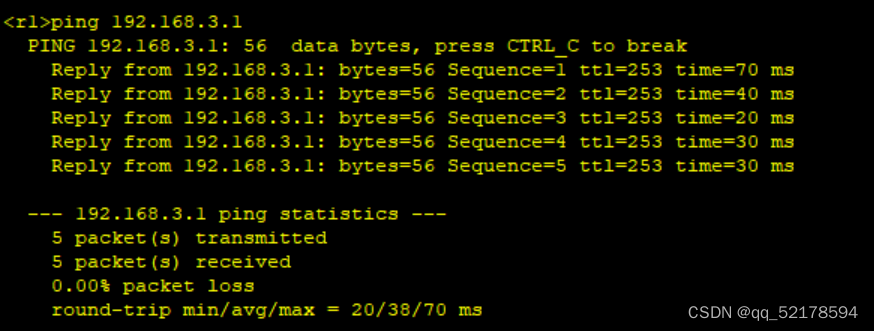
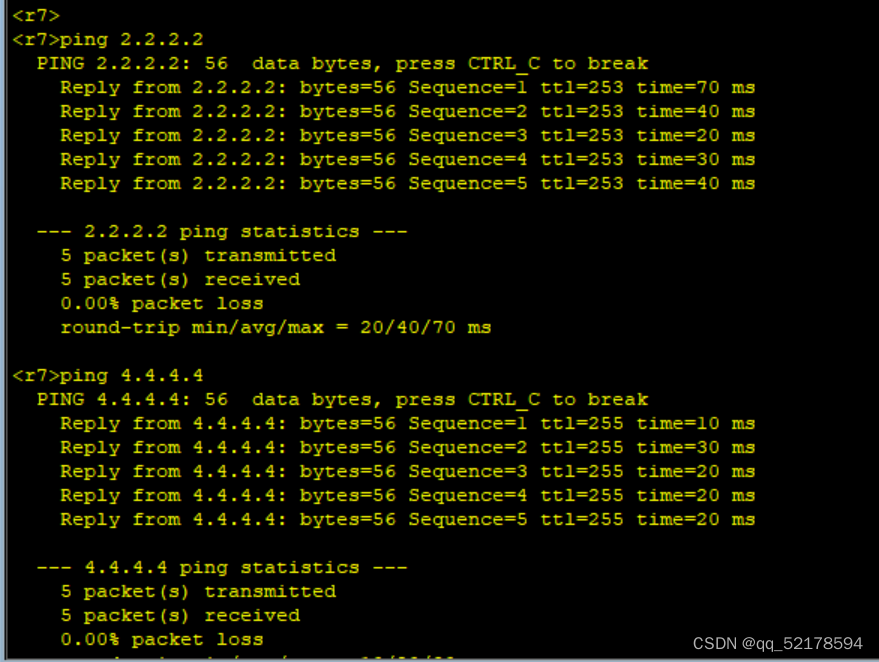
[r7]ip route-static 0.0.0.0 0 47.0.0.14.实验结果验证:

边栏推荐
- 2022-08-03:以下go语言代码输出什么?A:2;B:3;C:1;D:0。 package main import “fmt“ func main() { slice := []i
- 超级完美版布局有快捷键,有背景置换
- 3D 语义分割——2DPASS
- Another MySQL masterpiece published by Glacier (send the book at the end of the article)!!
- JVM垃圾回收总结(未完待续)
- P1996 约瑟夫问题
- 浅谈我国产业园区未来的发展方向
- 设置工作模式与环境(下):探查和收集信息
- SRE运维解密-什么是SRE:DevOps模型的具体实践!
- XSLT – 编辑 XML概述
猜你喜欢

Why Flutter Flutter of tutorials is the best choice for business?
MPLS综合实验

redis持久化方式

七夕活动浪漫上线,别让网络拖慢和小姐姐的开黑时间

【论文阅读】TRO 2021: Fail-Safe Motion Planning for Online Verification of Autonomous Vehicles Using Conve

射频芯片ATE测试从入门到放弃之参数测试

伦敦银最新均线分析系统怎么操作?
End-to-End Lane Marker Detection via Row-wise Classification

Pytest学习-skip/skipif

Walk the Maze BFS
随机推荐
Prometheus监控Harbor(二进制版)
【并发编程】ReentrantLock的lockInterruptibly()方法源码分析
win10+cuda11.7+pytorch1.12.0安装
简单了解下 TCP,学习握手和挥手以及各种状态到底是怎么样的
vscode插件设置——Golang开发环境配置
Creo 9.0在草图环境中创建坐标系
OPC UA 与IEC61499 深度融合(1)
七夕?new一个对象
Scala基础【正则表达式、框架式开发原则】
详谈RDMA技术原理和三种实现方式
禾匠编译错误记录
七夕活动浪漫上线,别让网络拖慢和小姐姐的开黑时间
Pytest学习-skip/skipif
internship:编写excel表的上传方法(导入)
A simple understanding of TCP, learn how to shake hands, wave hands and various states
逆波兰表达式求值
现货白银需要注意八大事项
查看CUDA、pytorch等的版本号
一文搞定 SQL Server 执行计划
Zilliz 2023 Fall Campus Recruitment Officially Launched!