当前位置:网站首页>七种让盒子水平垂直居中的方法
七种让盒子水平垂直居中的方法
2022-08-05 05:24:00 【MoXinXueWEB】
方法一:定位+ 平移
<!DOCTYPE html>
<html lang="en">
<head>
    <meta charset="UTF-8">
    <meta name="viewport" content="width=device-width, initial-scale=1.0">
    <title>Document</title>
    <style> .parent {
       width: 500px; height: 500px; border: 1px solid #000; position: relative; } .child {
       width: 100px; height: 100px; border: 1px solid #999; position: absolute; top: 50%; left: 50%; transform: translate(-50%, -50%); } </style>
</head>
<body>
    <div class="parent">
    	<div class="child">我是子元素</div>
    </div>
</body>
</html>
方法二:弹性布局
<!DOCTYPE html>
<html lang="en">
<head>
    <meta charset="UTF-8">
    <meta name="viewport" content="width=device-width, initial-scale=1.0">
    <title>Document</title>
    <style> .parent {
       width: 500px; height: 500px; border: 1px solid #000; display: flex; justify-content: center; align-items: center; } .child {
       width: 100px; height: 100px; border: 1px solid #999; } </style>
</head>
<body>
    <div class="parent">
    	<div class="child">我是子元素</div>
    </div>
</body>
</html>
方法三:网格 Grid
<!DOCTYPE html>
<html lang="en">
<head>
    <meta charset="UTF-8">
    <meta name="viewport" content="width=device-width, initial-scale=1.0">
    <title>Document</title>
    <style> .parent {
       width: 500px; height: 500px; border: 1px solid #000; display: grid; place-items: center; } .child {
       width: 100px; height: 100px; border: 1px solid #999; } </style>
</head>
<body>
    <div class="parent">
    	<div class="child">我是子元素</div>
    </div>
</body>
</html>
方法四:margin:auto;
<!DOCTYPE html>
<html lang="en">
<head>
    <meta charset="UTF-8">
    <meta name="viewport" content="width=device-width, initial-scale=1.0">
    <title>Document</title>
    <style> .parent {
       width: 500px; height: 500px; border: 1px solid #000; position: relative; } .child {
       width: 100px; height: 100px; border: 1px solid #999; position: absolute; margin: auto; top: 0; left: 0; right: 0; bottom: 0; } </style>
</head>
<body>
    <div class="parent">
    	<div class="child">我是子元素</div>
    </div>
</body>
</html>
方法五:表格布局
<!DOCTYPE html>
<html lang="en">
<head>
    <meta charset="UTF-8">
    <meta name="viewport" content="width=device-width, initial-scale=1.0">
    <title>Document</title>
    <style> .parent {
       width: 500px; height: 500px; border: 1px solid #000; display: table-cell; vertical-align: middle; text-align: center; } .child {
       width: 100px; height: 100px; border: 1px solid #999; display: inline-block; } </style>
</head>
<body>
    <div class="parent">
    	<div class="child">我是子元素</div>
    </div>
</body>
</html>
方法六:计算父盒子与子盒子的空间距离
<!DOCTYPE html>
<html lang="en">
<head>
    <meta charset="UTF-8">
    <meta name="viewport" content="width=device-width, initial-scale=1.0">
    <title>Document</title>
    <style> .parent {
       width: 500px; height: 500px; border: 1px solid #000; } .child {
       width: 100px; height: 100px; border: 1px solid #999; margin-top: 200px; margin-left: 200px; } </style>
</head>
<body>
    <div class="parent">
    	<div class="child">我是子元素</div>
    </div>
</body>
</html>
方法七:定位+负边距
<!DOCTYPE html>
<html lang="en">
<head>
    <meta charset="UTF-8">
    <meta name="viewport" content="width=device-width, initial-scale=1.0">
    <title>Document</title>
    <style> .parent {
       width: 500px; height: 500px; border: 1px solid #000; position: relative; } .child {
       width: 100px; height: 100px; border: 1px solid #999; position: absolute; top: 50%; left: 50%; margin-top: -50px; margin-left: -50px; } </style>
</head>
<body>
    <div class="parent">
    	<div class="child">我是子元素</div>
    </div>
</body>
</html>
边栏推荐
- 正则表达式小实例--验证邮箱地址
- 原生JS带你了解数组方法实现及使用
- Tencent greetings function SCF - entry instructions
- OpenCV3.0 is compatible with VS2010 and VS2013
- js dynamically get screen width and height
- Why can't I add a new hard disk to scan?How to solve?
- 产品学习资料
- Servlet跳转到JSP页面,转发和重定向
- Spark source code-task submission process-6.1-sparkContext initialization-create spark driver side execution environment SparkEnv
- 网络层协议介绍
猜你喜欢

传输层协议

IP packet format (ICMP protocol and ARP protocol)

Dsf5.0 bounced points determine not return a value
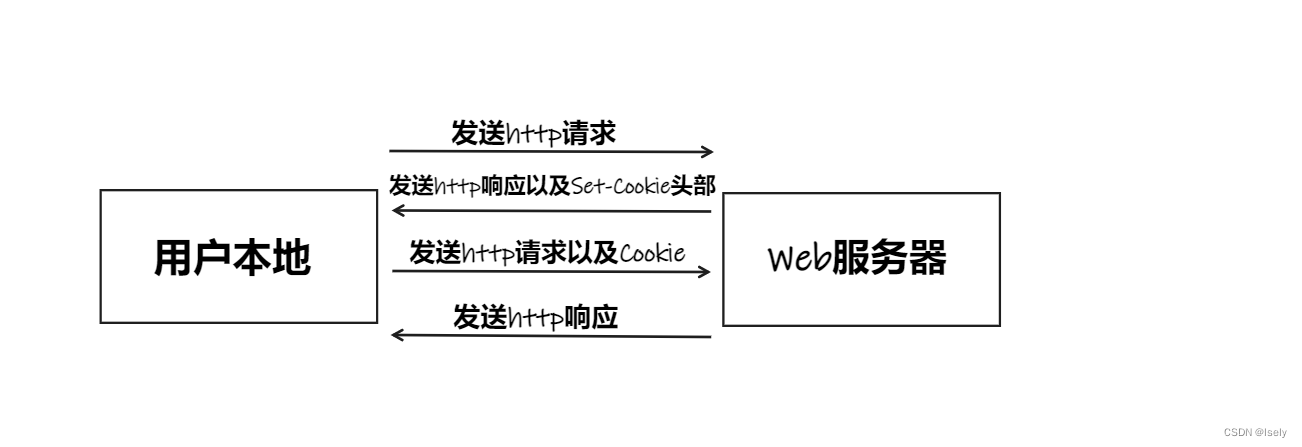
Take you in-depth understanding of cookies
![[Day1] (Super detailed steps) Build a soft RAID disk array](/img/40/cda8e5522c2795e03c0d47e8a689f8.png)
[Day1] (Super detailed steps) Build a soft RAID disk array
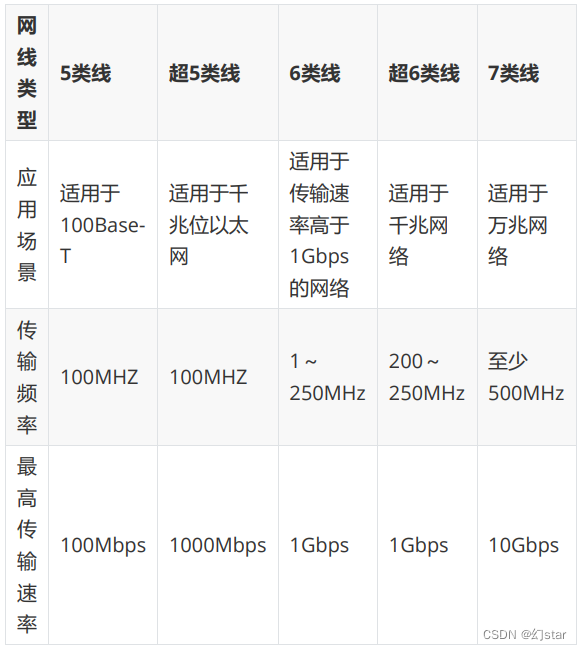
网络布线与数制转换

el-autocomplete使用

One-arm routing and 30% switch

运维的高光时刻,从智能化开始
![[Day5] Soft and hard links File storage, deletion, directory management commands](/img/15/7ed58a180a72ace3463626bf446633.png)
[Day5] Soft and hard links File storage, deletion, directory management commands
随机推荐
Unity realizes first-person roaming (nanny-level tutorial)
入职前,没想到他们玩的这么花
LinkSLA insists that users come first and creates a sustainable operation and maintenance service plan
OpenCV3.0 is compatible with VS2010 and VS2013
Getting Started Doc 06 Adding files to a stream
Tencent greetings function SCF - entry instructions
This is indeed the best article on microservice architecture I have read!
Browser Storage WebStorage
Will intelligent operation and maintenance replace manual operation and maintenance?
增长:IT运维发展趋势报告
路由器和静态路由的配置
spark operator-parallelize operator
磁盘管理与文件系统
ROS2下使用ROS1 bag的方法
传输层协议
One-arm routing and 30% switch
RAID磁盘阵列
Dsf5.0 bounced points determine not return a value
flink cdc 目前支持Gauss数据库源吗
The spark operator - repartition operator