当前位置:网站首页>实验5 组件及事件处理
实验5 组件及事件处理
2022-04-22 06:29:00 【一只快乐的野指针D】
一、实验目的
学习使用组件类;学习使用布局类;学习Java的事件处理模式及各种事件的处理。
二、实验内容
实现如图所示的注册窗口和登录窗口,在注册窗口中填写好注册信息,点击注册按钮,将切换到登录窗口,在登录窗口中输入用户名和密码,如果用户名和密码与注册时输入的一致则弹出登录成功对话框,否则弹出登录失败对话框。
思考:修改程序,将注册信息保存到文件,登录时,输入的用户名和密码与保存的一致则弹出登录成功对话框,否则弹出登录失败对话框。
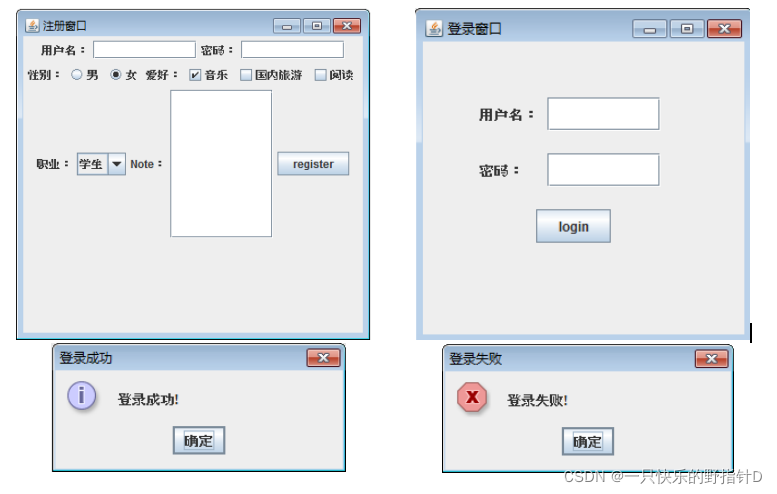
三、代码实现
//登录界面
import javax.swing.*;
import java.awt.*;
import java.awt.event.ActionEvent;
import java.awt.event.ActionListener;
import java.io.BufferedReader;
import java.io.File;
import java.io.FileReader;

public class LoginFrame extends JFrame {
    public LoginFrame() {
        init();
    }

    public void init() {
        JFrame frame = new JFrame("登录窗口");
        frame.setBounds(400, 100, 480, 410);
        frame.setLayout(null);
        Font font = new Font("Serief", Font.BOLD, 18);

        Label lb_username = new Label("用户名:");
        lb_username.setBounds(100, 76, 76, 20);
        lb_username.setFont(font);
        JTextField jtf_username = new JTextField();
        jtf_username.setBounds(199, 73, 127, 30);
        jtf_username.setFont(font);
        frame.add(lb_username);
        frame.add(jtf_username);

        Label lb_password = new Label("密码:");
        lb_password.setBounds(100, 143, 76, 20);
        lb_password.setFont(font);
        JPasswordField jpf_password = new JPasswordField();
        jpf_password.setBounds(199, 140, 127, 30);
        jpf_password.setFont(font);
        frame.add(lb_password);
        frame.add(jpf_password);

        JButton btn_login = new JButton("login");
        btn_login.setBounds(190, 220, 80, 40);
        btn_login.setFont(font);
        btn_login.addActionListener(new ActionListener() {
            @Override
            public void actionPerformed(ActionEvent e) {
                String username = jtf_username.getText().trim();
                String password = String.valueOf(jpf_password.getPassword());
                File file = new File("./user.txt");
                boolean result = false;
                if (file.exists()) {
                    try {
                        BufferedReader bfr = new BufferedReader(new FileReader(file));
                        String curLine = null;
                        while ((curLine = bfr.readLine()) != null) {
                            System.out.println(curLine);
                            String[] infos = curLine.split("---");
                            if (username.equals(infos[0]) && password.equals(infos[1])) {
                                result = true;
                                break;
                            }
                        }
                        bfr.close();
                        if (result) {
                            frame.setVisible(false);
                            JOptionPane.showMessageDialog(null, "登录成功!", "登录成功", JOptionPane.INFORMATION_MESSAGE);
                        } else {
                            JOptionPane.showMessageDialog(null, "登录失败!", "登录失败", JOptionPane.ERROR_MESSAGE);
                        }
                    } catch (Exception ep) {
                        ep.printStackTrace();
                    }
                } else {
                    JOptionPane.showMessageDialog(null, "登录失败!", "登录失败", JOptionPane.ERROR_MESSAGE);
                }
            }
        });
        frame.add(btn_login);

        frame.setVisible(true);
        frame.setDefaultCloseOperation(WindowConstants.EXIT_ON_CLOSE);
    }
}
//注册界面
import javafx.scene.control.ComboBox;

import javax.swing.*;
import java.awt.*;
import java.awt.event.ActionEvent;
import java.awt.event.ActionListener;
import java.io.File;
import java.io.FileWriter;

public class RegisterFrame {
    public RegisterFrame() {
        init();
    }

    public void init() {
        JFrame frame = new JFrame("注册窗口");
        frame.setLayout(new FlowLayout(FlowLayout.LEFT, 50, 30));
        frame.setBounds(400, 100, 760, 600);

        Font font = new Font("Serief", Font.BOLD, 18);

        JPanel row1 = new JPanel(new FlowLayout(FlowLayout.LEFT, 20, 5));
        Label lb_username = new Label("用户名:");
        lb_username.setSize(76, 20);
        lb_username.setFont(font);
        row1.add(lb_username);

        JTextField jtf_username = new JTextField();
        jtf_username.setPreferredSize(new Dimension(140, 30));
        jtf_username.setFont(font);
        row1.add(jtf_username);

        Label lb_password = new Label("密码:");
        lb_password.setSize(66, 20);
        lb_password.setFont(font);
        row1.add(lb_password);

        JPasswordField jpf_password = new JPasswordField();
        jpf_password.setPreferredSize(new Dimension(140, 30));
        jpf_password.setFont(font);
        row1.add(jpf_password);

        JPanel row2 = new JPanel(new FlowLayout(FlowLayout.LEFT, 20, 5));

        Label lb_sex = new Label("性别:");
        lb_sex.setSize(66, 20);
        lb_sex.setFont(font);
        row2.add(lb_sex);

        ButtonGroup rbtgp = new ButtonGroup();
        JRadioButton rb1 = new JRadioButton("男");
        rb1.setFont(font);
        rb1.setSelected(true);
        JRadioButton rb2 = new JRadioButton("女");
        rb2.setFont(font);
        rbtgp.add(rb1);
        rbtgp.add(rb2);

        row2.add(rb1);
        row2.add(rb2);

        Label lb_hobby = new Label("爱好:");
        lb_hobby.setSize(66, 20);
        lb_hobby.setFont(font);
        row2.add(lb_hobby);
        JCheckBox cb1 = new JCheckBox("音乐");
        cb1.setFont(font);
        JCheckBox cb2 = new JCheckBox("国内旅游");
        cb2.setFont(font);
        JCheckBox cb3 = new JCheckBox("阅读");
        cb3.setFont(font);

        row2.add(cb1);
        row2.add(cb2);
        row2.add(cb3);

        JPanel row3 = new JPanel(new FlowLayout(FlowLayout.LEFT, 20, 5));
        Label lb_job = new Label("职业:");
        lb_job.setSize(66, 20);
        lb_job.setFont(font);
        row3.add(lb_job);

        JComboBox<String> cb_job = new JComboBox<>();
        cb_job.setFont(font);
        cb_job.setEnabled(true);
        cb_job.addItem("学生");
        cb_job.addItem("企业员工");
        cb_job.addItem("教师");
        row3.add(cb_job);

        Label lb_note = new Label("Note:");
        lb_note.setSize(66, 20);
        lb_note.setFont(font);
        row3.add(lb_note);

        JTextArea ta_note = new JTextArea(10,10);
        ta_note.setFont(font);
        row3.add(ta_note);

        JButton btn_register = new JButton("register");
        btn_register.setFont(font);
        btn_register.setPreferredSize(new Dimension(130, 35));
        btn_register.addActionListener(new ActionListener() {
            @Override
            public void actionPerformed(ActionEvent e) {
                String username = jtf_username.getText().trim();
                String password = String.valueOf(jpf_password.getPassword()).trim();
                if (username.equals("") || password.equals("")) {
                    JOptionPane.showMessageDialog(null, "用户名或密码不能为空!", "注册失败", JOptionPane.WARNING_MESSAGE);
                    return;
                }
                try {
                    File file = new File("./user.txt");
                    // 创建文件
                    file.createNewFile();
                    //将用户信息写入文件中
                    FileWriter fw = new FileWriter(file, true);
                    String content = username + "---" + password + "\n";
                    fw.write(content);
                    fw.close();

                    // 跳转到登录界面
                    frame.setVisible(false);
                    new LoginFrame();
                } catch (Exception ep) {
                    ep.printStackTrace();
                }
            }
        });
        row3.add(btn_register);

        frame.add(row1);
        frame.add(row2);
        frame.add(row3);

        frame.setDefaultCloseOperation(WindowConstants.EXIT_ON_CLOSE);
        frame.setVisible(true);

    }
}
//主程序
public class Test5 {
    public static void main(String[] args) {
        new RegisterFrame();
    }
}
四、运行结果
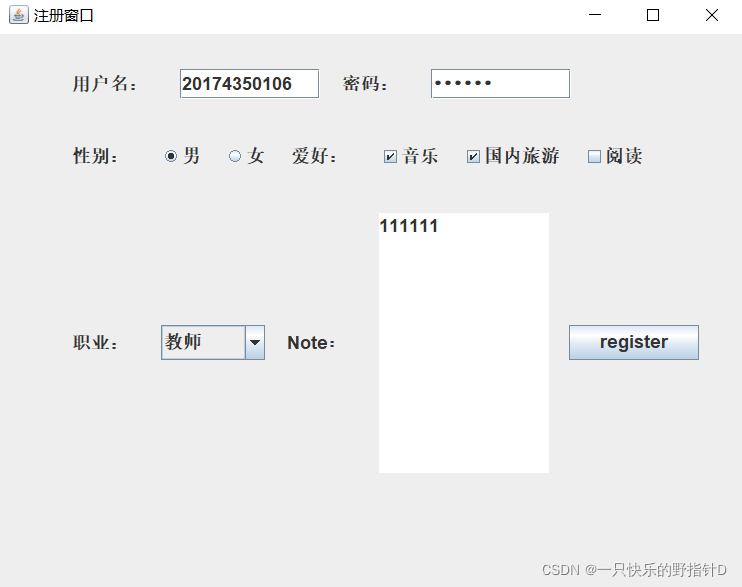
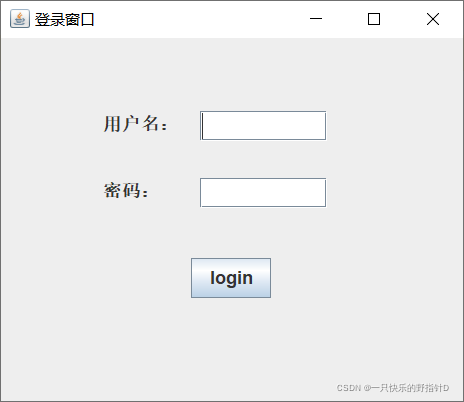
版权声明
本文为[一只快乐的野指针D]所创,转载请带上原文链接,感谢
https://blog.csdn.net/sjhdxpz/article/details/121758654
边栏推荐
- 树莓派4B:使用raspi-config实现USB BOOT
- SuperSocket在.Net5中使用——Command篇
- [write missed scan from scratch] host discovery -- handwritten a subdomain name digger
- 2021-10-08 Selenium无头模式打开浏览器
- 继续树莓派4B+OLED:开机自动显示IP地址
- .net5 WebAPI中搭建WebSocket服务端
- Supersocket is Used in net5 - appsession and supersocketservice
- TCP三次握手和四次挥手
- A simple implementation of esp32 graphic web server
- 解决MSSQL 消息 3989,级别 16,状态 1
猜你喜欢
![[communication interface can bus]](/img/71/e4285890a6c9298b79c00797afe595.png)
[communication interface can bus]

树莓派:模拟iSCSI存储

Learning notes of chicken with vegetables -- SQL injection -- sqli lab learning while practicing

Ultra vires and business logic vulnerabilities

About information collection

XSS range clearance
![STM32 peripherals [II] I2C](/img/98/13b749c8c1edc038b70e62389df9fe.png)
STM32 peripherals [II] I2C

A simple image processor running across C raspberry pie

世平信息上榜《2021年中国网络安全市场全景图》

Document security notes
随机推荐
昆仑通态 │ G系列屏如何与西门子300国产MPI适配器连接
读取SAE J1939协议数据流
Raspberry Pie: use mono and C to call MSSQL database
关于XSS跨站
Mqtt [i] Introduction to basic knowledge
SuperSocket在.Net5中使用——AppSession和SuperSocketService篇
About XSS Cross Station
世平信息成功通过CMMI 3级认定
SuperSocket在.Net5中使用——WebSocket Server篇
Call another function within a shell function (without return value and with return value)
SSRF 与 XXE 攻击原理及利用
C#自制一个简单的树莓派IP寻找工具
关于信息收集
.Net5 Log4Net启动一段时间后记录日志到数据库中失败问题
Winform让Form窗体切换前置及活动状态
Plain CSRF vulnerability
Raspberry Pie: 4.2-inch ink screen
2021-10-08 Selenium无头模式打开浏览器
An alternative method of sending fixed format Chinese short message in Arduino: taking dht22 + GSM module as an example
Read SAE J1939 protocol data stream