当前位置:网站首页>Ros2 learning notes (IX) learn the bag recording of ros2 from turnlesim
Ros2 learning notes (IX) learn the bag recording of ros2 from turnlesim
2022-04-22 12:29:00 【Xicheng Xiaokai】
Preface
Study ROS2 Way , Not through learning ROS1 Instead of , because ROS2 Of “ kernel ” differ ROS1, We must seriously start from scratch and learn again .
Ubuntu edition :20.04
ROS edition :Foxy
Review of study notes
- ROS2 Learning notes ( One ) Get document
- ubuntu20.04 install ROS2 and ROS1 coexistence
- ROS2 Learning notes ( Two ) from turtlesim Study ROS2 node
- ROS2 Learning notes ( 3、 ... and ) from turtlesim Study ROS2 The theme
- ROS2 Learning notes ( Four ) from turtlesim Study ROS2 service
- ROS2 Learning notes ( 5、 ... and ) from turtlesim Study ROS2 Parameters
- ROS2 Learning notes ( 6、 ... and ) from turtlesim Study ROS2 action
- ROS2 Learning notes ( 7、 ... and ) from turtlesim Study ROS2 Tools for
- ROS2 Learning notes ( 8、 ... and ) from turtlesim Study ROS2 Startup file for
1.ros2 bag
ros2 bag It's a tool , It is used to record the subject data published in the system . In our actual development, we hope to develop on other people's existing data sets , Or reproduce the previously built scene data , You can use ros2 bag Tools .
Make sure it is installed ros2 bag Tools :
$ sudo apt-get install ros-foxy-ros2bag \
                     ros-foxy-rosbag2-converter-default-plugins \
                     ros-foxy-rosbag2-storage-default-plugins
2. Start the little turtle Simulator
Or start the little turtle Simulator , To record keyboard input and save and playback later .
$ ros2 run turtlesim turtlesim_node
$ ros2 run turtlesim turtle_teleop_key
At the same time, create a folder to save the recorded bag
$ mkdir bag_files
$ cd bag_files
3. choice topic To record
ros2 bag Only the published topics can be recorded , Use the following command to view the subject to be recorded .
$ ros2 topic list
----
/parameter_events
/rosout
/turtle1/cmd_vel
/turtle1/color_sensor
/turtle1/pose
We want to record the actions of the little turtle , because /turtle1/cmd_vel The theme is to record the movement of the little turtle , You need to record it .
4.ros2 bag record
First, use the terminal to enter the just created bag_files Under the folder , because ros2 bag The text will be saved in its directory
To record data published to a topic , The command format is as follows :
$ ros2 bag record <topic_name>
Because we need to record /turtle1/cmd_vel The theme , So the order is as follows :
$ ros2 bag record /turtle1/cmd_vel
----
[INFO] [rosbag2_storage]: Opened database 'rosbag2_2019_10_11-05_18_45'.
[INFO] [rosbag2_transport]: Listening for topics...
[INFO] [rosbag2_transport]: Subscribed to topic '/turtle1/cmd_vel'
[INFO] [rosbag2_transport]: All requested topics are subscribed. Stopping discovery...
At this time , Recording data for this topic . Back to teleop Terminal mobile tortoise .

Back to the recording terminal , Use ctrl+c Stop recording , The data will be automatically saved in a package file , The format of its name is :rosbag2_year_month_day-hour_minute_second
5. Record multiple topics at the same time
You can use the following command to record multiple topic messages at the same time ~~
$ ros2 bag record -o subset /turtle1/cmd_vel /turtle1/pose
----
[INFO] [rosbag2_storage]: Opened database 'subset'.
[INFO] [rosbag2_transport]: Listening for topics...
[INFO] [rosbag2_transport]: Subscribed to topic '/turtle1/cmd_vel'
[INFO] [rosbag2_transport]: Subscribed to topic '/turtle1/pose'
[INFO] [rosbag2_transport]: All requested topics are subscribed. Stopping discovery...
among -o Parameter Description: save the data of two topics into one package .subset Is the name of the saved file . Want to record multiple topics , Just enter a space between the topics .
- One more
-aParameters , Note that all topics on the system can be recorded .
Also control the movement of the little turtle , Then press... At the recording terminal ctrl+c End .
6.ros2 bag info
Use the following command to view the details of the recording package :
$ ros2 bag info <bag_file_name>
see subset Package details :
$ ros2 bag info subset
----
Files:             subset.db3
Bag size:          228.5 KiB
Storage id:        sqlite3
Duration:          48.47s
Start:             Oct 11 2019 06:09:09.12 (1570799349.12)
End                Oct 11 2019 06:09:57.60 (1570799397.60)
Messages:          3013
Topic information: Topic: /turtle1/cmd_vel | Type: geometry_msgs/msg/Twist | Count: 9 | Serialization Format: cdr
                 Topic: /turtle1/pose | Type: turtlesim/msg/Pose | Count: 3004 | Serialization Format: cdr
Use here sqlite3 The database holds topic data
7.ros2 bag play
stay play Before the bag , First, close the keyboard control node , Make sure no one or node sends instructions to the little turtle at present , Next, use the following command to play back the recorded data :
$ ros2 bag play subset
----
[INFO] [rosbag2_storage]: Opened database 'subset'.
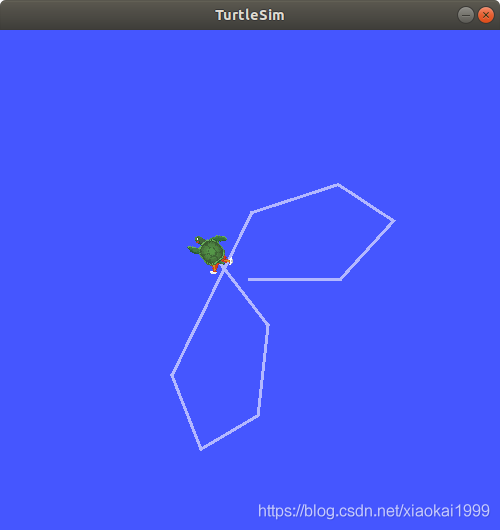
It can be seen that the little turtle will move according to the command previously controlled .
summary
ROS2 Artifact of recording data set in , In this way, you can tell others about your work results .
Reference:
https://docs.ros.org/en/foxy/Tutorials/Ros2bag/Recording-And-Playing-Back-Data.html
Conclusion
This paper is also based on the author's learning and use experience , Strong subjectivity , If there is anything wrong or unclear , Welcome to leave a message in the comments area ~
In order to further discuss the problem with the readers , Set up a wechat group , It's convenient to answer your questions , You can also discuss problems together .
Add group links
版权声明
本文为[Xicheng Xiaokai]所创,转载请带上原文链接,感谢
https://yzsam.com/2022/04/202204221223330247.html
边栏推荐
- MySQL 5.0 installation tutorial illustration detailed tutorial
- 分享一个最近遇到的标签<iframe>
- LeetCode 1608、特殊数组的特征值
- [in depth understanding of tcallusdb technology] example code - asynchronous call interface
- 【深入理解TcaplusDB技术】扫描数据接口说明——[List表]
- 表单是否为空验证
- [in depth understanding of tcallusdb technology] description of data interface for batch deletion of specified location in list - [list table]
- 案例4-1.4:堆中的路径 (小顶堆的模拟建立和模拟路径)
- matlab 自动选择不标准桥梁跨径代码(源代码完全版)
- 【并发编程052】说说双重检查锁以及其优点?
猜你喜欢

【并发编程050】内存屏障的种类以及说明?

Use phpstudy to start MySQL service and create a database
![[concurrent programming 055] will the following daemon thread execute the code in the finally module?](/img/e8/92d33e701d3b1691e30885d4111315.png)
[concurrent programming 055] will the following daemon thread execute the code in the finally module?
ROS2学习笔记(十)从turtlesim学习ROS2的工作空间
【并发编程055】如下守护线程是否会执行finally模块中的代码?

Design and implementation of house leasing system based on J2EE Rar (paper + project source code + database file)
基于J2EE的房屋租赁系统的设计与实现.rar(论文+项目源码+数据库文件)

【并发编程052】说说双重检查锁以及其优点?

Ner brief overview
![[deeply understand tcallusdb technology] insert data into the specified location of the list interface description - [list table]](/img/ed/cccd5dee09d2f0a3e6c788bd265b36.png)
[deeply understand tcallusdb technology] insert data into the specified location of the list interface description - [list table]
随机推荐
ROS2学习笔记(六)从turtlesim学习ROS2动作
有研究显示,现在年轻人越来越不愿意换手机了。下一代智能手机在硬件上出现哪些更新,才会让你有换机的冲动?
【并发编程051】volatile 内存语义的实现原理
JS基础11
4.21学习记录 DP记录路径(LCS)树上背包(选课)一般树形DP(没有上司的舞会)
栈的概念和操作
LeetCode_DFS_中等_200.岛屿数量
购物表格制作
Local deployment of distributed monitoring cat server
Research shows that young people are more and more reluctant to change their mobile phones. What are the hardware updates of the next generation of smart phones that will make you have the impulse to
JS基础14
[in depth understanding of tcallusdb technology] description of data interface of designated location in replacement list - [list table]
【深入理解TcaplusDB技术】示例代码——异步调用接口
abaqus RSG插件二次开发(二)
ROS2学习笔记(七)从turtlesim学习ROS2的工具
Ont and ONU
The higher the refresh rate, the better?
工作中有必要记录的知识点
Low frequency (LF) RFID intelligent terminal
MySQL 5.0安装教程图解详细教程