当前位置:网站首页>SkiaSharp 之 WPF 自绘 投篮小游戏(案例版)
SkiaSharp 之 WPF 自绘 投篮小游戏(案例版)
2022-08-09 16:09:00 【dotNET跨平台】
此案例主要是针对光线投影法碰撞检测功能的示例,顺便做成了一个小游戏,很简单,但是,效果却很不错。
投篮小游戏
规则,点击投篮目标点,就会有一个球沿着相关抛物线,然后,判断是否进入篮子里,其实就是一个矩形,直接是按照碰撞检测来的,碰到就算进去了,对其增加了一个分数统计等功能。
Wpf 和 SkiaSharp
新建一个 WPF 项目,然后,Nuget 包即可 要添加 Nuget 包
Install-Package SkiaSharp.Views.WPF -Version 2.88.0其中核心逻辑是这部分,会以我设置的 60FPS 来刷新当前的画板。
skContainer.PaintSurface += SkContainer_PaintSurface;
_ = Task.Run(() =>
{
    while (true)
    {
        try
        {
            Dispatcher.Invoke(() =>
            {
                skContainer.InvalidateVisual();
            });
            _ = SpinWait.SpinUntil(() => false, 1000 / 60);//每秒60帧
        }
        catch
        {
            break;
        }
    }
});
弹球实体代码 (Ball.cs)
public class Ball
{
    public double X { get; set; }
    public double Y { get; set; }
    public double VX { get; set; }
    public double VY { get; set; }
    public int Radius { get; set; }
}
##粒子花园核心类 (ParticleGarden.cs)
/// <summary>
/// 光线投影法碰撞检测
/// 投篮小游戏
/// </summary>
public class RayProjection
{
    public SKPoint centerPoint;
    public double G = 0.3;
    public double F = 0.98;
    public double Easing = 0.03;
    public bool IsMoving = false;
    public SKPoint CurrentMousePoint = SKPoint.Empty;
    public SKPoint lastPoint = SKPoint.Empty;
    public Rect Box;
    public Ball Ball;
    public SKCanvas canvas;
    public int ALLCount = 10;
    public List<bool> bools = new List<bool>();
    public bool IsOver = false;
    /// <summary>
    /// 渲染
    /// </summary>
    public void Render(SKCanvas canvas, SKTypeface Font, int Width, int Height)
    {
        canvas.Clear(SKColors.White);
        this.canvas = canvas;
        centerPoint = new SKPoint(Width / 2, Height / 2);
        //球
        if (Ball == null)
        {
            Ball = new Ball()
            {
                X = 50,
                Y = Height - 50,
                Radius = 30
            };
        }
        //箱子
        var boxX = Width - 170;
        var boxY = Height - 80;
        if (Box.X == 0)
        {
            Box = new Rect(boxX, boxY, 120, 70);
        }
        else
        {
            if (Box.X != boxX && Box.Y != boxY)
            {
                Box.X = boxX;
                Box.Y = boxY;
            }
        }

        if (bools.Count >= ALLCount)
        {
            IsOver = true;
        }

        if (!IsOver)
        {
            if (IsMoving)
            {
                BallMove(Width, Height);
            }
            else
            {
                DrawLine();
            }

            //弹球
            DrawCircle(canvas, Ball);
            //矩形
            DrawRect(canvas, Box);

            //计分
            using var paint1 = new SKPaint
            {
                Color = SKColors.Blue,
                IsAntialias = true,
                Typeface = Font,
                TextSize = 24
            };
            string count = $"总次数:{ALLCount} 剩余次数:{ALLCount - bools.Count} 投中次数:{bools.Count(t => t)}";
            canvas.DrawText(count, 100, 20, paint1);
        }
        else
        {
            SKColor sKColor = SKColors.Blue;
            //计分
            var SuccessCount = bools.Count(t => t);
            string count = "";
            switch (SuccessCount)
            {
                case 0:
                    {
                        count = $"太糗了吧,一个都没投中!";
                        sKColor = SKColors.Black;
                    }
                    break;
                case 1:
                case 2:
                case 3:
                case 4:
                case 5:
                    {
                        count = $"你才投中:{SuccessCount}次,继续努力!";
                        sKColor = SKColors.Blue;
                    }
                    break;
                case 6:
                case 7:
                case 8:
                case 9:
                    {
                        count = $"恭喜 投中:{SuccessCount}次!!!";
                        sKColor = SKColors.YellowGreen;
                    }
                    break;
                case 10: { count = $"全部投中,你太厉害了!";
                        sKColor = SKColors.Red;
                    } break;
            }
            using var paint1 = new SKPaint
            {
                Color = sKColor,
                IsAntialias = true,
                Typeface = Font,
                TextSize = 48
            };
            var fontCenter = paint1.MeasureText(count);
            canvas.DrawText(count, centerPoint.X - fontCenter / 2, centerPoint.Y, paint1);
        }
        using var paint = new SKPaint
        {
            Color = SKColors.Blue,
            IsAntialias = true,
            Typeface = Font,
            TextSize = 24
        };
        string by = $"by 蓝创精英团队";
        canvas.DrawText(by, 600, 20, paint);
    }
    /// <summary>
    /// 画一个圆
    /// </summary>
    public void DrawCircle(SKCanvas canvas, Ball ball)
    {
        using var paint = new SKPaint
        {
            Color = SKColors.Blue,
            Style = SKPaintStyle.Fill,
            IsAntialias = true,
            StrokeWidth = 2
        };
        canvas.DrawCircle((float)ball.X, (float)ball.Y, ball.Radius, paint);
    }
    /// <summary>
    /// 画一个矩形
    /// </summary>
    public void DrawRect(SKCanvas canvas, Rect box)
    {
        using var paint = new SKPaint
        {
            Color = SKColors.Green,
            Style = SKPaintStyle.Fill,
            IsAntialias = true,
            StrokeWidth = 2
        };
        canvas.DrawRect((float)box.X, (float)box.Y, (float)box.Width, (float)box.Height, paint);
    }
    /// <summary>
    /// 划线
    /// </summary>
    public void DrawLine()
    {
        //划线
        using var LinePaint = new SKPaint
        {
            Color = SKColors.Red,
            Style = SKPaintStyle.Fill,
            StrokeWidth = 2,
            IsStroke = true,
            StrokeCap = SKStrokeCap.Round,
            IsAntialias = true
        };
        var path = new SKPath();
        path.MoveTo((float)CurrentMousePoint.X, (float)CurrentMousePoint.Y);
        path.LineTo((float)Ball.X, (float)Ball.Y);
        path.Close();
        canvas.DrawPath(path, LinePaint);
    }
    public void BallMove(int Width, int Height)
    {
        Ball.VX *= F;
        Ball.VY *= F;
        Ball.VY += G;

        Ball.X += Ball.VX;
        Ball.Y += Ball.VY;

        var hit = CheckHit();
        // 边界处理和碰撞检测
        if (hit || Ball.X - Ball.Radius > Width || Ball.X + Ball.Radius < 0 || Ball.Y - Ball.Radius > Height || Ball.Y + Ball.Radius < 0)
        {
            bools.Add(hit);
            IsMoving = false;
            Ball.X = 50;
            Ball.Y = Height - 50;
        }

        lastPoint.X = (float)Ball.X;
        lastPoint.Y = (float)Ball.Y;
    }
    public bool CheckHit()
    {
        var k1 = (Ball.Y - lastPoint.Y) / (Ball.X - lastPoint.X);
        var b1 = lastPoint.Y - k1 * lastPoint.X;
        var k2 = 0;
        var b2 = Ball.Y;
        var cx = (b2 - b1) / (k1 - k2);
        var cy = k1 * cx + b1;
        if (cx - Ball.Radius / 2 > Box.X && cx + Ball.Radius / 2 < Box.X + Box.Width && Ball.Y - Ball.Radius > Box.Y)
        {
            return true;
        }
        return false;
    }
    public void MouseMove(SKPoint sKPoint)
    {
        CurrentMousePoint = sKPoint;
    }
    public void MouseDown(SKPoint sKPoint)
    {
        CurrentMousePoint = sKPoint;
    }
    public void MouseUp(SKPoint sKPoint)
    {
        if (bools.Count < ALLCount)
        {
            IsMoving = true;
            Ball.VX = (sKPoint.X - Ball.X) * Easing;
            Ball.VY = (sKPoint.Y - Ball.Y) * Easing;
            lastPoint.X = (float)Ball.X;
            lastPoint.Y = (float)Ball.Y;
        }
    }
}
效果如下:
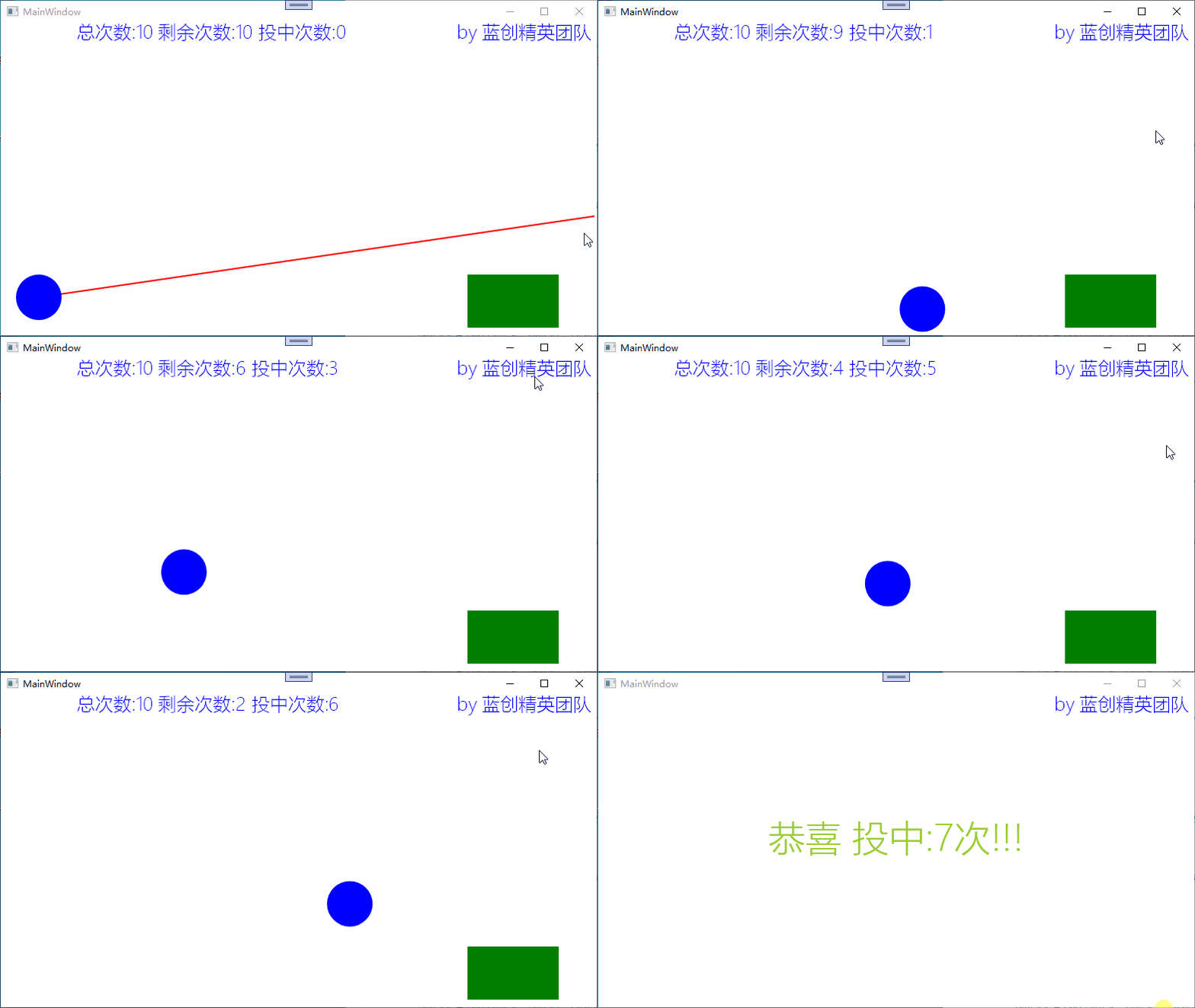
还不错,得了7分,当然,我也可以得10分的,不过,还好了。
总结
这个特效的案例重点是光线投影法碰撞检测,同时又对其增加了游戏的属性,虽然东西都很简单,但是作为一个雏形来讲也是不错的。
SkiaSharp 基础系列算是告一段落了,基础知识相关暂时都已经有了一个深度的了解,对于它的基础应用已经有一个不错的认识了,那么,基于它的应用应该也会多起来,我这边主要参考Avalonia的内部SkiaSharp使用原理,当然,用法肯定不局限的。
代码地址
https://github.com/kesshei/WPFSkiaRayProjectionDemo.git
https://gitee.com/kesshei/WPFSkiaRayProjectionDemo.git
阅
一键三连呦!,感谢大佬的支持,您的支持就是我的动力!
版权
蓝创精英团队(公众号同名,CSDN 同名,CNBlogs 同名)
边栏推荐
猜你喜欢
B44 - Based on stm32 bluetooth intelligent voice recognition classification broadcast trash

2022年中国第三方证券APP创新专题分析

面试中老生常谈的MySQL问答集锦夯实基础

B40 - 基于STM32单片机的电热蚊香蓝牙控制系统

【.NET 6】开发minimal api以及依赖注入的实现和代码演示

如何让button中的内容分两行显示

Volatile:JVM 我警告你,我的人你别乱动

HR获取入职日期 RP_GET_HIRE_DATE

智能家居控制系统的功能和特点
A49 - ESP8266建立AP传输XPT2046AD数据WIFI模块
随机推荐
2022-08-09日报:做学术OR去公司 ? 想通这点,治好 AI 打工人的精神内耗
【燃】是时候展现真正的实力了!一文看懂2022华为开发者大赛技术亮点
CryoEM粒子(Particle)类型预测的数据集构建
After the WeChat developer tool program is developed, no error is reported, but the black screen "recommended collection"
How to create DataFrame with feature importance from XGBClassifier made by GridSearchCV?
<IDEA using tricks & & combined operation of common keys>
Sigrity PowerSI Characteristic Impedance and Coupling Simulation
@AllArgsConstructor and @NoArgsConstructor
PADS生成位号图
Reasons for slow startup of IDEA (1)
QT工程编译过程学习
MySQL 5.5 series installation steps tutorial (graphical version)
Knowledge Bits - How to Write a Project Summary
B44 - Based on stm32 bluetooth intelligent voice recognition classification broadcast trash
图像几何校正
How bad can a programmer be?
The article details of the qiucode.cn website realize the code block can be copied by clicking the button
融云 x N 世界:构建无限用户实时交互的「元宇宙会场」
ceph2
Fees and inquiry methods of futures account opening exchanges