当前位置:网站首页>8.4 control of wheel motion of mobile robot in rodf robot modeling
8.4 control of wheel motion of mobile robot in rodf robot modeling
2022-04-21 22:51:00 【Fish flavored ROS】
The author of this series of tutorials : Little fish
official account : Fish fragrance ROS
QQ Communication group :139707339
Teaching video address : Small fish B standing
Full document address : Fish fragrance ROS Official website
Copyright notice : Reprint and commercial use are prohibited unless permitted .

8.4 Control the wheel movement of mobile robot
I'm little fish , In this section, let's look at how to manually send joint_states To control the robot wheels to rotate continuously
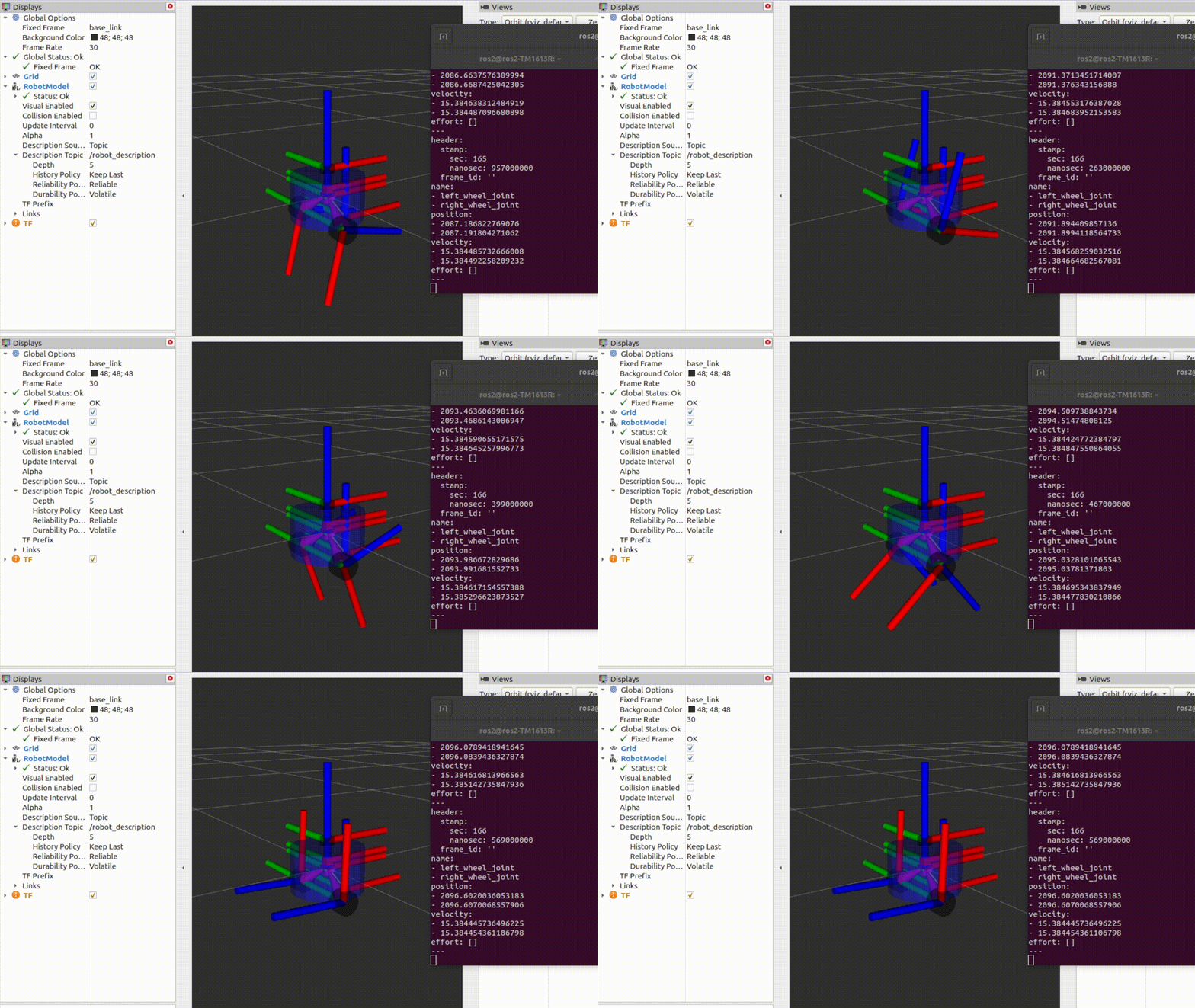
To achieve the above effect , We need to write our own nodes , replace joint_state_publisher Send joint pose to robot_state_pubsher,robot_state_publisher send out tf Control the joint rotation of the robot .

1. The new node
2. Create publisher
3. Write release logic
4. Compile testing
1. The new node
Convenience , We are in fishbot_describle Create a new node in the package ( Refer to Li Si node code )
cd fishbot_ws
touch fishbot_description/fishbot_description/rotate_wheel.py
#!/usr/bin/env python3
import rclpy
from rclpy.node import Node


class RotateWheelNode(Node):
    def __init__(self,name):
        super().__init__(name)
        self.get_logger().info(f"node {
      name} init..")

def main(args=None):
    """ ros2 Run the entry function of the node  1.  Import library file  2.  Initialize the client library  3.  The new node  4. spin Loop nodes  5.  Close the client library  """
    rclpy.init(args=args) #  initialization rclpy
    node = RotateWheelNode("rotate_fishbot_wheel")  #  Create a new node
    rclpy.spin(node) #  Keep nodes running , Check whether the exit instruction is received (Ctrl+C)
    rclpy.shutdown() #  close rclpy
Under configuration setup.py
    entry_points={
        'console_scripts': [
            "rotate_wheel= fishbot_description.rotate_wheel:main"
        ],
    },
Compile operation
colcon build
source install/setup.bash
ros2 run fishbot_description rotate_wheel

2. Create publisher
Before creating a publisher , Need to know robot_state_pubsher What type of topics are subscribed to ?
Recall what you learned in the previous chapters , We can use the following instructions to view
ros2 topic info /joint_states
Type: sensor_msgs/msg/JointState
Publisher count: 1
Subscription count: 1
next
ros2 interfaces show sensor_msgs/msg/JointState
# This is a message that holds data to describe the state of a set of torque controlled joints.
#
# The state of each joint (revolute or prismatic) is defined by:
#  * the position of the joint (rad or m),
#  * the velocity of the joint (rad/s or m/s) and
#  * the effort that is applied in the joint (Nm or N).
#
# Each joint is uniquely identified by its name
# The header specifies the time at which the joint states were recorded. All the joint states
# in one message have to be recorded at the same time.
#
# This message consists of a multiple arrays, one for each part of the joint state.
# The goal is to make each of the fields optional. When e.g. your joints have no
# effort associated with them, you can leave the effort array empty.
#
# All arrays in this message should have the same size, or be empty.
# This is the only way to uniquely associate the joint name with the correct
# states.

std_msgs/Header header

string[] name
float64[] position
float64[] velocity
float64[] effort
Know the topic type , We can then create the publisher reference code 4.2.1 Topic communication is realized (Python)
#!/usr/bin/env python3
import rclpy
from rclpy.node import Node
# 1. Import message types JointState
from sensor_msgs.msg import JointState

class RotateWheelNode(Node):
    def __init__(self,name):
        super().__init__(name)
        self.get_logger().info(f"node {
      name} init..")
        # 2. Create and initialize publisher member properties pub_joint_states_
        self.pub_joint_states_ = self.create_publisher(JointState,"joint_states", 10)
3. Write release logic
3.1 Multithreaded fixed frequency release Rate
Create a publisher , We want the topic to be published at a fixed speed , May adopt ROS2 Timing artifact in Rate, Unclear Rate You can read this article of Xiaoyu :ROS Can you use the fixed frequency artifact in
In order to be able to recycle all the time rate, We open a separate thread for publishing joint_states Topic data , stay ROS2 The method of topic publishing by opening a thread separately in the program is :
import threading
from rclpy.node import Node

class RotateWheelNode(Node):
    def __init__(self):
        #  Create a Rate And thread
        self.pub_rate = self.create_rate(5) #5Hz
        #  Create thread
        self.thread_ = threading.Thread(target=self._thread_pub)
        self.thread_.start()

    def _thread_pub(self):
        while rclpy.ok():
        	# Do something , Use rate Ensure the cycle frequency
            self.pub_rate.sleep()
3.2 Construct and publish data
Then let's construct the published data :
joint_states There is a header and four arrays that need to be assigned ( It can be done by ros2 interface Command query )
std_msgs/Header header # Timestamp information   and  frame_id
string[] name
float64[] position
float64[] velocity
float64[] effort
The corresponding meaning is :
#  This is a message that holds data , Used to describe the state of a set of torque controlled joints .
#
#  Each joint ( Progressive or prismatic ) The state defined by the following factors .
# # The position of the joint (rad or m).
# # The speed of the joint ( radian / Seconds or meters / second ) and
# # The force exerted on the joint (Nm or N).
#
#  Each joint is uniquely identified by its name
#  The head specifies the time for recording the state of the joint . All joint States
#  It must be recorded at the same time .
#
#  This message consists of multiple arrays , The Union state of each part has an array .
#  The goal is to make every field optional . for example , When your joints are not
#  Torque is related to them , You can leave the torque array empty .
#
#  All arrays in this message should have the same size , Or is empty .
#  This is the only way to match the joint name with the correct
#  state .
string[] name # Array of joint names
float64[] position # Joint position array
float64[] velocity # Joint velocity array
float64[] effort # Torque data
3.2.1 name
name Is the name of the joint , To work with urdf The joint names defined in are the same , According to our URDF Defined as
self.joint_states.name = ['left_wheel_joint','right_wheel_joint']
3.2.2 position
Represents the angle value of joint rotation , Because the joint type is continuous, So its value has no upper and lower limits , The initial value is assigned to 0.0
#  The position of the joint
self.joint_states.position = [0.0,0.0]
We use speed to control the rotation of robot wheels , Therefore, the position update of the robot can be calculated by the following formula
The angle of rotation of the wheel over a period of time = ( The current moment - Last time )* The wheel speed between the two moments
delta_time =  time.time()-last_update_time
#  Update location
self.joint_states.position[0]  += delta_time*self.joint_states.velocity[0]
self.joint_states.position[1]  += delta_time*self.joint_states.velocity[1]
3.2.3 velocity
Because we use speed control , Therefore, a speed change interface is provided .
def update_speed(self,speeds):
	self.joint_speeds = speeds
3.3 Post completion code
#!/usr/bin/env python3
import rclpy
from rclpy.node import Node
# 1. Import message types JointState
from sensor_msgs.msg import JointState

import threading
import time

class RotateWheelNode(Node):
    def __init__(self,name):
        super().__init__(name)
        self.get_logger().info(f"node {
      name} init..")
        #  Create and initialize publisher member properties pub_joint_states_
        self.joint_states_publisher_ = self.create_publisher(JointState,"joint_states", 10)
        #  Initialization data
        self._init_joint_states()
        self.pub_rate = self.create_rate(30)
        self.thread_ = threading.Thread(target=self._thread_pub)
        self.thread_.start()


    def _init_joint_states(self):
        #  The initial speed of the left and right wheels
        self.joint_speeds = [0.0,0.0]
        self.joint_states = JointState()
        self.joint_states.header.stamp = self.get_clock().now().to_msg()
        self.joint_states.header.frame_id = ""
        #  Joint name
        self.joint_states.name = ['left_wheel_joint','right_wheel_joint']
        #  The position of the joint
        self.joint_states.position = [0.0,0.0]
        #  Joint speed
        self.joint_states.velocity = self.joint_speeds
        #  force
        self.joint_states.effort = []

    def update_speed(self,speeds):
        self.joint_speeds = speeds

    def _thread_pub(self):
        last_update_time = time.time()
        while rclpy.ok():
            delta_time =  time.time()-last_update_time
            last_update_time = time.time()
            #  Update location
            self.joint_states.position[0]  += delta_time*self.joint_states.velocity[0]
            self.joint_states.position[1]  += delta_time*self.joint_states.velocity[1]
            #  Update speed
            self.joint_states.velocity = self.joint_speeds
            #  to update  header
            self.joint_states.header.stamp = self.get_clock().now().to_msg()
            #  Publish joint data
            self.joint_states_publisher_.publish(self.joint_states)
            self.pub_rate.sleep()

def main(args=None):
    rclpy.init(args=args) #  initialization rclpy
    node = RotateWheelNode("rotate_fishbot_wheel")  #  Create a new node
    node.update_speed([15.0,-15.0])
    rclpy.spin(node) #  Keep nodes running , Check whether the exit instruction is received (Ctrl+C)
    rclpy.shutdown() #  close rclpy
4. Compile testing
compiler
colcon build --packages-select fishbot_description
Run the joint data publishing node
ros2 run fishbot_description rotate_wheel
Before testing, you need to modify display_rviz2.launch.py file , Note its joint_state_publisher node
# ld.add_action(joint_state_publisher_node)
ld.add_action(robot_state_publisher_node)
ld.add_action(rviz2_node)
First run rviz and robot_state_publisher
source install/setup.bash
ros2 launch fishbot_description display_rviz2.launch.py
Observe this moment rviz Interface , You can see the wheels spinning wildly
[ Failed to transfer the external chain picture , The origin station may have anti-theft chain mechanism , It is suggested to save the pictures and upload them directly (img-vcEZqyIA-1650437375770)(./8.4 Control the wheel movement of mobile robot /imgs/image-20220210212327950.png)]
5. Practice after class
Try to parameterize the left and right wheel speeds , Then try to use rqt Dynamic parameter configuration tool , Real time control of wheel speed .
Technical communication && Ask for help :
-
WeChat official account and exchange group : Fish fragrance ROS
-
Xiaoyu wechat :AiIotRobot
-
QQ Communication group :139707339
-
copyright protection : Joined “ Knights of rights ”(rightknights.com) Copyright protection plan of
The authors introduce :
I'm little fish , Senior players in Robotics , Now a one legged robot Algorithm Engineer in Shenzhen
Junior high school learning programming , High school began to contact robots , During the University, playing robot related competitions to achieve monthly income 2W+( The prize money for the competition )
Currently outputting Robot Learning Guide 、 Notes to the paper 、 Work experience , Welcome to pay attention to little fish , Exchange technology together , Learning robots
版权声明
本文为[Fish flavored ROS]所创,转载请带上原文链接,感谢
https://yzsam.com/2022/04/202204212035270450.html
边栏推荐
- APM industry awareness series - 16
- 事件分发机制流程图,程序员翻身之路
- L1-061 new fat formula (10 points)
- 期货开户在手机上办理安全吗?需要线下办理吗?
- [basic learning of FPGA ------ ov7725 camera module]
- Kubenetes(3)--网络通信(2)--flannel和calico
- Kubernetes---Secret配置管理
- L1-056 guess the number (20 points)
- 1. MySQL workbench 8.0 installation
- 5. QT using MySQL
猜你喜欢

Dynamic programming: complete knapsack problem

1957 college entrance examination mathematics problems

Pyqt5 + opencv operate local camera
1. MySQL workbench 8.0 installation

2022電視盒子加購榜排名,超一多半的用戶選購當貝盒子

1956 college entrance examination mathematics

The visual chart tells you whether "the world" and "the rest of life, please give more advice" have exploded or not?

Flow chart of event distribution mechanism, the way for programmers to turn over
Cleaning robot - infrared down looking sensor to detect whether there is a sudden change in ground distance
![[basic learning of FPGA ------ ov7725 camera module]](/img/74/71ead5bca4619456841ce3a4c95b65.png)
[basic learning of FPGA ------ ov7725 camera module]
随机推荐
Outsourcing student management system detailed architecture design document
Nacos Registry - service registration and tiered storage
[basic learning of FPGA ------ ov7725 camera module]
[feignclient] feignclient downloads files across services
MySQL 第3章 SQL基础语法
2022电视盒子加购榜排名,超一多半的用户选购当贝盒子
console. Log (map. Keys) and console Log (weakmap. Keys)
AI application theory - special production and manufacturing session (parts installation and quality inspection)
Concept and working principle of image acquisition card
MySQL 第5章 MySQL表数据的增删改查
事件分发机制流程图,程序员翻身之路
将模型训练外包真的安全吗?新研究:外包商可能植入后门,控制银行放款
[matlab] matlab drawing operation skills
Kubenetes(3)--网络通信(2)--flannel和calico
REM practical development adaptation scheme for mobile web development
APM (application performance monitoring) industry Cognition Series - I
[summary of some tips and shortcut keys in MATLAB]
方法的重载
Yarn online dynamic resource tuning
L1-064 AI core code valued at 100 million (20 points)