当前位置:网站首页>three.js调试工具dat.gui使用
three.js调试工具dat.gui使用
2022-08-05 09:54:00 【Jedi Hongbin】
在three.js 观察物体变化不如网页方便 往往一次不能达到我们想要的位置 需要微调 而每次加载模型还需要一些时间 调试的时间就被加长了 相应的three.js的作者写了这个调试工具 方便three.js中调试。
安装
yarn add dat.gui
or
npm install --save dat.gui
导出
// CommonJS:
const dat = require('dat.gui');

// ES6:
import * as dat from 'dat.gui';
创建一个实例
const gui = new dat.GUI();
我更喜欢这样使用
import {
     GUI } from "dat.gui";

const gui = new GUI();
总之选择你喜欢的方式创建一个gui实例开启调试吧
gui的工作方式
传入一个对象,对象中的键的值的类型决定调试工具的形式
比如 值是一个boolean值 对应的调试工具就展现一个复选框 该展现值的状态
如果 值是一个函数 对应就是一个按钮 点击按钮触发这个函数

以此来作为调试的格式 接下来 根据场景介绍常用的几种调试方式
修改物体的位置
物体的posiiton属性中的x,y,z决定位置

gui.add(mesh.position,'x')
把被修改的对象传进第一个参数 被修改的属性名(字符串形式)作为第二个参数 这样就是修改x轴坐标
gui.add(mesh.position,'x',0,100)
后面两个参数是最小值和最大值
这是类型定义 剩下的一个参数是一次变化多少
针对位置的修改可以封装一个函数 省的一行一行写
typescript
const positionkeys: ["x", "y", "z"] = ["x", "y", "z"];

export const guiPosiiton = (mesh: Object3D, range: number = 20, name?: string) => {

    const {
     name: meshName, type, uuid, position } = mesh;
    // 新建一个文件夹
    const fidld = gui.addFolder(name || meshName || type + uuid.substring(0, 5));

    for (const key of positionkeys) {

        fidld.add(position, key, position[key] - range, position[key] + range);
    }
};
javascript
const positionkeys = ["x", "y", "z"];

export const guiPosiiton = (mesh, range = 20, name) => {

    const {
     name: meshName, type, uuid, position } = mesh;
    // 新建一个文件夹
    const fidld = gui.addFolder(name || meshName || type + uuid.substring(0, 5));

    for (const key of positionkeys) {

        fidld.add(position, key, position[key] - range, position[key] + range);
    }
};
监听值的改变
gui.add({
    count:0},'count',-10,10).onChange(val => {

 xxx.xxx = val;
})
在onChange中获得当前的value
按钮
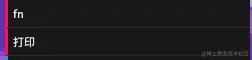
gui.add({
    fn:() =>  console.log(123) },'fn')
点击 fn 调用fn这个函数 如果名字不想用属性名可以主动设置
gui.add({
    fn:() =>  console.log(123) },'fn').name('打印')
修改纹理颜色
const material = new MeshPhongMaterial();

const params = {

    color: 0xffffff
};

gui.addColor(params, "color").onChange((color) => {

    material.color = color;
});


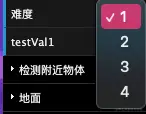
模式选择 – 选择器
const options = [1, 2, 3, 4];

gui.add({
     难度: 1 }, "难度")
    .options(options)
    .onChange((val) => {

        console.log("select", val);
    });

字符串修改
gui.add({
     name: "hongbin" }, "name");
常用的大概就这几个后续会慢慢补充更多调试方式
大家可以根据环境灵活调整 这个工具很有趣 建议大家尝试
边栏推荐
- 开发常用手册链接分享
- Custom filters and interceptors implement ThreadLocal thread closure
- leetcode points to Offer 10- I. Fibonacci sequence
- 皕杰报表的下拉框联动
- Why are RELTABLESPACE values 0 for many tables displayed in sys_class?
- mysql索引
- Going to book tickets tomorrow, ready to go home~~
- 19. Server-side session technology Session
- Tanabata romantic date without overtime, RPA robot helps you get the job done
- Seata source code analysis: initialization process of TM RM client
猜你喜欢

Jenkins使用手册(2) —— 软件配置

2.4G无线收发模块的应用

干货!生成模型的评价与诊断

Seata source code analysis: initialization process of TM RM client

There is only one switch, how to realize the nqa of master-slave automatic switching

入门 Polkadot 平行链开发,看这一篇就够了

express hot-reload

leetcode: 529. 扫雷游戏

Assembly language (8) x86 inline assembly

egg框架使用(一)
随机推荐
深度学习21天——卷积神经网络(CNN):天气识别(第5天)
首次去中心化抢劫?近2亿美元损失:跨链桥Nomad 被攻击事件分析
19.服务器端会话技术Session
Wei Dongshan Digital Photo Frame Project Learning (6) Transplantation of tslib
深度学习21天——卷积神经网络(CNN):服装图像分类(第3天)
egg框架使用(二)
leetcode 剑指 Offer 10- II. 青蛙跳台阶问题
After Keil upgrades to AC6, what changes?
MySQL advanced (twenty-seven) database index principle
干货!生成模型的评价与诊断
入门 Polkadot 平行链开发,看这一篇就够了
无题八
Imitation SBUS fixed with serial data conversion
Example of Noise Calculation for Amplifier OPA855
Happens-before rules for threads
茄子科技CEO仇俊:以用户为中心,做用户真正需要的产品
【Unity】【UGUI】【在屏幕上显示文本】
2022/8/4 考试总结
hcip BGP enhancement experiment
2022-08-01 回顾基础二叉树以及操作