当前位置:网站首页>《ROS2机器人建模URDF》8.2RVIZ2可视化移动机器人模型
《ROS2机器人建模URDF》8.2RVIZ2可视化移动机器人模型
2022-04-21 20:36:00 【鱼香ROS】
本系列教程作者:小鱼
公众号:鱼香ROS
QQ交流群:139707339
教学视频地址:小鱼的B站
完整文档地址:鱼香ROS官网
版权声明:如非允许禁止转载与商业用途。

8.2 RVIZ2可视化移动机器人模型
大家好,我是小鱼,上一节讲完joint和link,我们来把我们上面定义的简单的URDF(包含身体和雷达)用RVIZ2显示出来,直观的感受下,我们的机器人模型。
URDF可视化的步骤如下:
- 建立机器人描述功能包
- 建立
urdf文件夹编写urdf文件 - 建立
launch文件夹,编写launch文件 - 修改
setup.py配置,编译测试
1.建立功能包
轻车熟路,先创建一个fishbot_ws工作空间,然后建立功能包,包的类型选ament_python
ros2 pkg create fishbot_description --build-type ament_python
2.建立URDF文件
建立URDF文件夹,创建urdf文件
cd fishbot_description && mkdir urdf
touch fishbot_base.urdf
完成后的目录结构:
├── fishbot_description
│   ├── __init__.py
├── package.xml
├── setup.cfg
├── setup.py
└── urdf
    └── fishbot_base.urdf
编辑fishbot_base.urdf
<?xml version="1.0"?>
<robot name="fishbot">

  <!-- base link -->
  <link name="base_link">
  	<visual>
      <origin xyz="0 0 0.0" rpy="0 0 0"/>
      <geometry>
		<cylinder length="0.12" radius="0.10"/>
      </geometry>
    </visual>
  </link>

  <!-- laser link -->
  <link name="laser_link">
  	<visual>
      <origin xyz="0 0 0" rpy="0 0 0"/>
      <geometry>
		<cylinder length="0.02" radius="0.02"/>
      </geometry>
      <material name="black">
      	<color rgba="0.0 0.0 0.0 0.8" />
      </material>
    </visual>
  </link>

  <!-- laser joint -->
    <joint name="laser_joint" type="fixed">
        <parent link="base_link" />
        <child link="laser_link" />
        <origin xyz="0 0 0.075" />
    </joint>

</robot>
3.建立launch文件
在目录src/fishbot_description下创建launch文件夹下并新建display_rviz2.launch.py文件。
mkdir launch
touch display_rviz2.launch.py
完成后的目录结构:
├── fishbot_description
│   ├── __init__.py
├── launch
│   └── display_rviz2.launch.py
├── package.xml
├── setup.cfg
├── setup.py
└── urdf
    └── fishbot_base.urdf
import os
from launch import LaunchDescription
from launch.substitutions import LaunchConfiguration
from launch_ros.actions import Node
from launch_ros.substitutions import FindPackageShare


def generate_launch_description():
    package_name = 'fishbot_description'
    urdf_name = "fishbot_base.urdf"

    ld = LaunchDescription()
    pkg_share = FindPackageShare(package=package_name).find(package_name)
    urdf_model_path = os.path.join(pkg_share, f'urdf/{
      urdf_name}')

    robot_state_publisher_node = Node(
        package='robot_state_publisher',
        executable='robot_state_publisher',
        arguments=[urdf_model_path]
        )

    joint_state_publisher_node = Node(
        package='joint_state_publisher_gui',
        executable='joint_state_publisher_gui',
        name='joint_state_publisher_gui',
        arguments=[urdf_model_path]
        )

    rviz2_node = Node(
        package='rviz2',
        executable='rviz2',
        name='rviz2',
        output='screen',
        )

    ld.add_action(robot_state_publisher_node)
    ld.add_action(joint_state_publisher_node)
    ld.add_action(rviz2_node)

    return ld
想要可视化模型需要三个节点参与
joint_state_publisher_gui负责发布机器人关节数据信息,通过joint_states话题发布robot_state_publisher_node负责发布机器人模型信息robot_description,并将joint_states数据转换tf信息发布rviz2_node负责显示机器人的信息
这里我们用到了joint_state_publisher_gui和robot_state_publisher两个包,如果你的系统没有安装这两个包,可以手动安装:
sudo apt install ros-$ROS_DISTRO-joint-state-publisher-gui ros-$ROS_DISTRO-robot-state-publisher
joint_state_publisher_gui,还有一个兄弟叫做joint_state_publisher两者区别在与joint_state_publisher_gui运行起来会跳出一个界面,通过界面可以操作URDF中能动的关节
4.修改setup.py
导入头
from glob import glob
import os
加入目录安装
('share/ament_index/resource_index/packages',
['resource/' + package_name]),
('share/' + package_name, ['package.xml']),
完整
from setuptools import setup
from glob import glob
import os

package_name = 'fishbot_description'

setup(
    name=package_name,
    version='0.0.0',
    packages=[package_name],
    data_files=[
        ('share/ament_index/resource_index/packages',
            ['resource/' + package_name]),
        ('share/' + package_name, ['package.xml']),
        (os.path.join('share', package_name, 'launch'), glob('launch/*.launch.py')),
        (os.path.join('share', package_name, 'urdf'), glob('urdf/**')),
    ],
    install_requires=['setuptools'],
    zip_safe=True,
    maintainer='root',
    maintainer_email='[email protected]',
    description='TODO: Package description',
    license='TODO: License declaration',
    tests_require=['pytest'],
    entry_points={

        'console_scripts': [
        ],
    },
)
5.编译测试
编译
colcon build
运行测试
source install/setup.bash
ros2 launch fishbot_description display_rviz2.launch.py
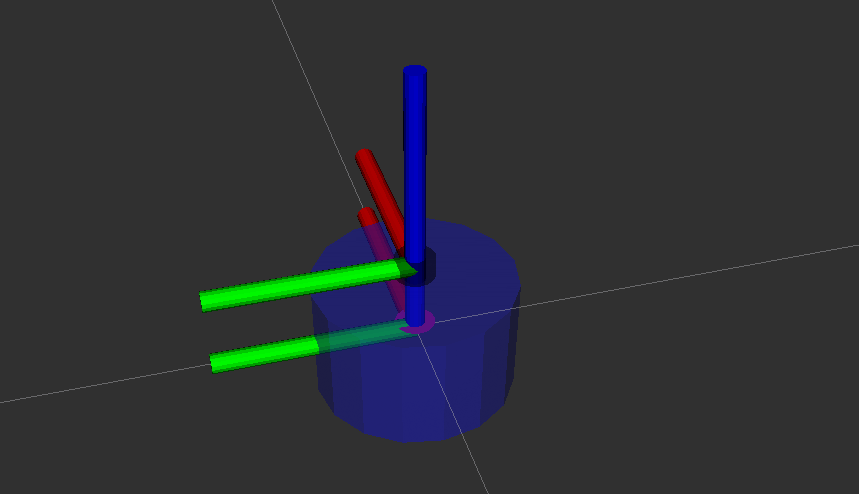
添加robotmodel模块,分别选择link名称如下,即可看到机器人的模型显示

此时看看节点关系图

这里大家可以参考图理一理launch文件中启动的三个节点的关系。
然后打开TF模块,看一下机器人的坐标系关系
6.本节练习
练习1:尝试将修改机器人身体颜色为蓝色,透明度为50%(0.1 0.1 1.0 0.5)
练习2:尝试在URDF中添加imu_link并使用imu_joint将其固定在车体的中心上方2cm,imu采用的几何形状为box。长宽高各是2cm
结果展示:

技术交流&&问题求助:
-
微信公众号及交流群:鱼香ROS
-
小鱼微信:AiIotRobot
-
QQ交流群:139707339
-
版权保护:已加入“维权骑士”(rightknights.com)的版权保护计划
作者介绍:
我是小鱼,机器人领域资深玩家,现深圳某独脚兽机器人算法工程师一枚
初中学习编程,高中开始接触机器人,大学期间打机器人相关比赛实现月入2W+(比赛奖金)
目前在输出机器人学习指南、论文注解、工作经验,欢迎大家关注小鱼,一起交流技术,学习机器人
版权声明
本文为[鱼香ROS]所创,转载请带上原文链接,感谢
https://blog.csdn.net/qq_27865227/article/details/124297366
边栏推荐
- Actual combat | e-commerce business performance test (II): JMeter parameterization function realizes data-driven registration and login
- String.length()和String.getBytes().length的区别
- 【系统分析师之路】2020年下系统分析师论文写作真题
- LeetCode_70 爬楼梯
- MySQL集群解决方案
- C语言:简单的利润与奖金
- composer的源切换
- 「內元宇宙」革命 聯載
- 单、双链表的循环链表(十五)
- Mandelbrot集的最新变化形态一览——MandelBox,Mandelbulb,Burning Ship,NebulaBrot
猜你喜欢

Source insight configuration and problem summary

Data preprocessing for data analysis

In the morning, I met Tencent and took out 38K, which let me see the basic ceiling
< 2021SC@SDUSC > Introduction to the jpress group on software engineering application and practice of Shandong University

【高并发】不得不说的线程池与ThreadPoolExecutor类浅析

LeetCode_70 爬楼梯

实战 | UI 自动化测试框架设计与 PageObject 改造

C语言:简单的利润与奖金
![[network security] stapler1 of red team penetration project (Part 2)](/img/39/7d5594da6e7e89e510040b66eef383.png)
[network security] stapler1 of red team penetration project (Part 2)

Construction of distributed second kill system
随机推荐
Redis can send verification codes and limit the number of times sent every day
Mysql刷题题解_多表联查_运营想要计算一些参加了答题的不同学校、不同难度的用户平均答题量,请你写SQL取出相应数据
Actual combat | complete the performance pressure test of typical e-commerce scenarios (home page browsing) based on JMeter
Debugging MS source code
[network security] stapler1 of red team penetration project (Part 2)
3D 沙盒游戏之人物的点击行走移动
Mysql坑爹指南_sql_mode=“ONLY_FULL_GROUP_BY“所导致错误以及不能使用group by
(转载)mysql HA
全国各大城市的经纬度表,留着以后做查询库用
php处理视频ffmpeg(转)
C package DLL into program
MySQL集群解决方案
Circular linked list of single and double linked lists (XV)
单、双链表的循环链表(十五)
Android Development Internship interview questions, Android development interview basis
Specific methods of configuring Profibus and PROFINET communication in two TIA botu projects
MySQL view (detailed explanation)
Why do you have no idea when doing data analysis?
“国潮”积木,潮玩的下一个答案?
实战 | JMeter 典型电商场景(下单/支付)的性能压测