当前位置:网站首页>【Playwright测试教程】5分钟上手
【Playwright测试教程】5分钟上手
2022-08-04 02:17:00 【泽泽说测试】
我喜欢Playwright! 这是微软开源的一款非常强大的自动化工具,再过几年,他很有可能取代Selenium在浏览器自动化的通知地位。使用过一段时间,我没有找到很好的中文资料可以参考,导致很多问题无法得到及时解决,因此我决定自己记录一下使用的笔记,算是给社区回馈。
开始
这次我想整理一下如何快速搭建Playwright的执行环境,其中有一些坑,我也会记录,以后重新搭环境的时候照着操作就可以了。
Playwright 目前支持的编程语言有 JavaScript、Python、Java、.NET,本教程使用 Python 语言演示。要在 Python 语言当中使用 Playwright,需要执行两个步骤。第一步,安装python的执行环境。第二步,安装 Playwright。
安装
安装python只需要从官方网站下载安装包,点击安装就可以完成。首先我们打开python的官方网站,然后点击 download 下载安装包。不同的操作系统会推荐不同的安装包。下载完成后点击安装文件完成安装。
安装 Playwright
Playwright 的 Python语言安装包几乎包含了所有需要用到的组件,安装 playwright 工具唯一需要做的事情就是打开命令行工具,输入安装指令:
	  pip install playwright
	  playwright install
pip install playwright 安装语言包工具,除此之外,playwright 需要依赖浏览器环境才能运行,playwright install 的意思是下载和安装依赖的浏览器。浏览器不需要提前安装,通过这行命令,程序会自动下载一个 chrioum 浏览器和一个 firefox 浏览器,之后的浏览器操作都会在这些浏览器上运行。耐心等待浏览器下载完成后,就完成了安装,以后每次运行不会再重复下载。
如果觉得等待时间太长,也可以选择单独安装 chromium 浏览器或者 firefox 浏览器,目前支持的浏览器有chromium, chrome, chrome-beta, msedge, msedge-beta, msedge-dev, firefox, webkit。
	  playwright install chromium
	  # or
	  playwright install firefox
所有关于 playwright 的命令行参数,你都可以通过 help 指令查看:
	  $ playwright --help

	  Usage: npx playwright [options] [command]

	  Options:
	  -V, --version                          output the version number
	  -h, --help                             display help for command

	  Commands:
	  open [options] [url]                   open page in browser specified via -b, --browser
	  codegen [options] [url]                open page and generate code for user actions
	  install [options] [browser...]         ensure browsers necessary for this version of Playwright are installed
	  install-deps [browser...]              install dependencies necessary to run browsers (will ask for sudo permissions)
	  cr [options] [url]                     open page in Chromium
	  ff [options] [url]                     open page in Firefox
	  wk [options] [url]                     open page in WebKit
	  screenshot [options] <url> <filename>  capture a page screenshot
	  pdf [options] <url> <filename>         save page as pdf
	  show-trace [options] [trace]           Show trace viewer
	  help [command]                         display help for command
运行
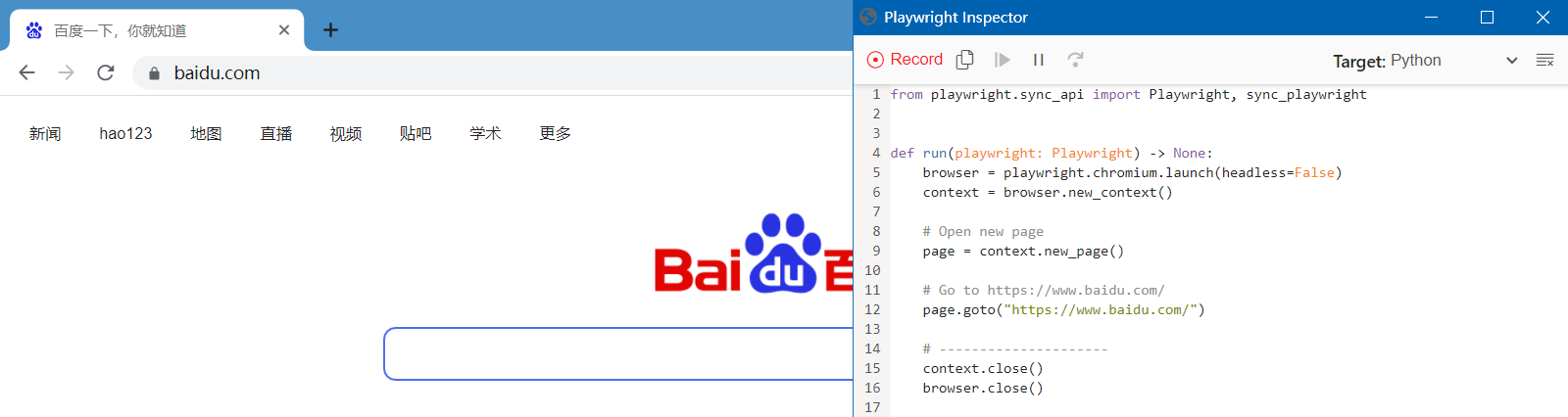
当安装好 Playwright 以及浏览器之后,我们可以通过下面的代码来简单运行。这个程序会打开一个浏览器,并且访问一个网址,然后你就可以在浏览器上执行操作了。你做的每步操作,都会被 playwright 录制下来,生成运行代码,显示在一个 Inspector 的界面中,这些代码可以拷贝下来,保存到代码库当中。
playwright codegen http://www.baidu.com
未完待续~~
边栏推荐
猜你喜欢





随机推荐
Zabbix设置邮件告警+企业微信告警
priority_queue元素为指针时,重载运算符失效
sql有关问题,小时粒度,找到前一个小时内的数据
5.scrapy中间件&分布式爬虫
In a more general sense, calculating the displacement distance and assumptions
持续投入商品研发,叮咚买菜赢在了供应链投入上
2022广东省安全员A证第三批(主要负责人)考试题库及模拟考试
安全至上:落地DevSecOps最佳实践你不得不知道的工具
22/8/3(板子)树状dp板子+中国剩余定理+求组合数3,4+容斥原理
ssh服务详解
简单的线性表的顺序表示实现,以及线性表的链式表示和实现、带头节点的单向链表,C语言简单实现一些基本功能
SAP SD模块前台操作
云开发校园微社区微信小程序源码/二手交易/兼职交友微信小程序开源源码
Example 041: Methods and variables of a class
[QNX Hypervisor 2.2用户手册]10.3 vdev gic
【原创】启动Win10自带的XPS/OXPS阅读器
一个注解替换synchronized关键字:分布式场景下实现方法加锁
可变字符串
Flink原理流程图简单记录
Continuing to invest in product research and development, Dingdong Maicai wins in supply chain investment