当前位置:网站首页>ansible command 模块
ansible command 模块
2022-08-06 01:45:00 【Direct_】
文章目录
command 模块
作用:在远程节点上执行一个命令
我们可以使用 ansible-doc -s command 查看该模块支持的参数,command 是默认模块,可忽略 -m 选项。我们也可以修改默认模块,在 /etc/ansible/ansible.cfg 中修改默认参数
# default module name for /usr/bin/ansible
#module_name = command
[[email protected] ~]# ansible-doc -s command
- name: Execute commands on targets
  command:
      argv:                  # Passes the command as a list rather than a string. Use `argv' to avoid quoting values that would
                               otherwise be interpreted incorrectly (for example "user name"). Only
                               the string or the list form can be provided, not both.  One or the
                               other must be provided.
      chdir:                 # Change into this directory before running the command.
      cmd:                   # The command to run.
      creates:               # A filename or (since 2.0) glob pattern. If it already exists, this step *won't* be run.
      free_form:             # The command module takes a free form command to run. There is no actual parameter named 'free form'.
      removes:               # A filename or (since 2.0) glob pattern. If it already exists, this step *will* be run.
      stdin:                 # Set the stdin of the command directly to the specified value.
      stdin_add_newline:     # If set to `yes', append a newline to stdin data.
      strip_empty_ends:      # Strip empty lines from the end of stdout/stderr in result.
      warn:                  # Enable or disable task warnings.
参数解析:
| 参数 | 说明 |
|---|---|
| chdir | 在执行命令之前,通过 cd 进入到该参数指定的目录 |
| creates | 在创建一个文件之前,先判断文件是否存在,如果存在则跳过前面的东西,如果不存在则执行前面的动作 |
| free_form | 该参数即为输入的 linux 系统命令,实现远程执行和管理 |
| removes | 判断一个文件是否存在,如果存在则执行前面的动作,如果不存在则跳过前面的内容(和上面的 creates 是相反的) |
| warn | 是否提供告警信息 |
注意:
- 使用 command 模块时,不得出现 shell 变量
$name,也不得使用特殊符号> < | ; &等,如果需要使用前面的特殊符号则可以使用shell模块来实现
案例:
- 获取所有被管理机器的负载信息
[[email protected] ~]# ansible dong -m command -a "uptime"
192.168.169.162 | CHANGED | rc=0 >>
 12:00:51 up  1:17,  2 users,  load average: 0.03, 0.04, 0.05
192.168.169.161 | CHANGED | rc=0 >>
 12:00:51 up  1:18,  2 users,  load average: 0.20, 0.06, 0.05

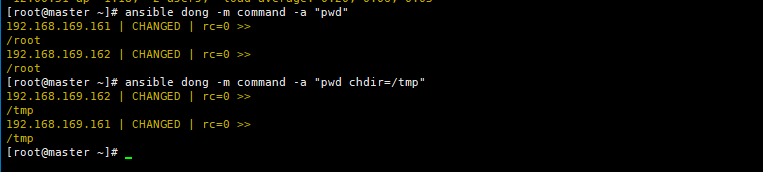
- 让客户端机器,先切换到 /tmp 目录下,然后打印出当前的目录信息
[[email protected] ~]# ansible dong -m command -a "pwd" # 先看下默认工作目录是什么
192.168.169.161 | CHANGED | rc=0 >>
/root
192.168.169.162 | CHANGED | rc=0 >>
/root
[[email protected] ~]# ansible dong -m command -a "pwd chdir=/tmp"
192.168.169.162 | CHANGED | rc=0 >>
/tmp
192.168.169.161 | CHANGED | rc=0 >>
/tmp
[[email protected] ~]#
- creates 参数练习
该参数的作用是在创建一个文件之前,先判断文件是否存在,如果存在则跳过前面的东西,如果不存在则执行前面的动作
# 判断 /dong 文件是否存在,存在则不执行前面的 pwd 命令,不存在则执行 pwd 命令
[[email protected] ~]# ansible 192.168.169.161 -m command -a "pwd creates=/dong"
192.168.169.161 | CHANGED | rc=0 >>
/root
[[email protected] ~]# ansible 192.168.169.161 -m command -a "pwd creates=/opt"
192.168.169.161 | SUCCESS | rc=0 >>		# 返回命令执行成功
skipped, since /opt exists				# 提示命令跳过,/opt 目录已经存在

# 使用 cp 命令拷贝文件
[[email protected] ~]# ansible dong -a "cp /etc/passwd /root creates=/root/passwd"
192.168.169.162 | CHANGED | rc=0 >>

192.168.169.161 | CHANGED | rc=0 >>
- removes 参数练习
判断一个文件是否存在,如果存在则执行前面的动作,如果不存在则跳过前面的内容(和上面的 creates 是相反的)
[[email protected] ~]# ansible 192.168.169.161 -m command -a "pwd removes=/dong"
192.168.169.161 | SUCCESS | rc=0 >>
skipped, since /dong does not exist
[[email protected] ~]# ansible 192.168.169.161 -m command -a "pwd removes=/opt"
192.168.169.161 | CHANGED | rc=0 >>
/root
- warn 参数练习
是否提供告警信息
# 没有使用 warn 参数,在使用一些命令时(例如:chmod),系统会提示一些告警信息
[[email protected] ~]# ansible dong -a "chmod u+x /root/passwd"
[WARNING]: Consider using the file module with mode rather than running 'chmod'.  If you need to use command because file is
insufficient you can add 'warn: false' to this command task or set 'command_warnings=False' in ansible.cfg to get rid of this
message.
192.168.169.161 | CHANGED | rc=0 >>

192.168.169.162 | CHANGED | rc=0 >>

# 使用 warn=false 参数后则没有告警信息显示了
[[email protected] ~]# ansible dong -a "chmod u+x /root/passwd warn=false"
192.168.169.162 | CHANGED | rc=0 >>

192.168.169.161 | CHANGED | rc=0 >>
边栏推荐
猜你喜欢

HTTP中的强缓存与协商缓存

PyTorch笔记 - Attention Is All You Need (4)

pupstudy配置mysql

Safety test - AndroidManifest. XML element analysis (1)

CAN转4G远程透传记录云网关为工程机械赋能

图解 JVM 内存结构

Postman接口测试之断言
typescript74 - create your own type declaration files (provide declaration files for existing js)

Nacos安装指南

PyTorch笔记 - Attention Is All You Need (3)
随机推荐
程序员写程序不是我的错
typescript69 - type declaration file overview
typescript77-在CRA创建支持ts的项目
PAT 甲级 A1087 All Roads Lead to Rome
TS (TypeScript) variable type
【树上差分】CF 1076E. Vasya and a Tree
OpenWrt之kmod内核不兼容分析
typescript72-已有的类型声明文件(第三方库的类型文件)
ERP部门的添加(十一)
SSH-KeyGen - Authentication key generation, management and conversion
SprinBoot自定义异常(统一异常处理)
TS(TypeScript) 二元运算符 + , - , * , / , % , << , >> , >>> , & , | , ^ 分析
多线程-理解
STP实验
互联网职场人写周报的正确姿势
Seata Failed to get available servers: endpoint format should like ip:port 报错原因/解决方案汇总版(看完本文必解决问题)
Kubernetes内存泄露怎么玩
codeforces 4A.watermelon
session、cookie的区别
MVCC interview questions