当前位置:网站首页>[filtering and convolution (II)]
[filtering and convolution (II)]
2022-04-22 16:45:00 【yangyang_ z】
List of articles
- 1、 Box filtering :boxFilter Use of functions
- 2、 Mean filtering :blur Use of functions
- 3、 Gauss filtering :GaussianBlur Use of functions
- 4、 Comprehensive examples : Image linear filtering
- 5、 median filtering :medianBlur Use of functions
- 6、 Bilateral filtering :bilateralFilter Use of functions
- 7、 Comprehensive examples : Image filtering
- 8、 inflation :dilate Use of functions
- 9、 corrosion :erode Use of functions
1、 Box filtering :boxFilter Use of functions
result

C++ Code example
#include<opencv2/opencv.hpp>
#include<string>
using namespace cv;

std::string image_path = "F:/images/renwu1.jpg";
std::string boxFilter_original = "boxFilterOriginal";
std::string boxFilter_result = "boxFilterResult";

static void test()
{

	// 1、 Read images
	Mat image = imread(image_path);

	//2、 create a window
	namedWindow(boxFilter_original, WINDOW_AUTOSIZE);
	namedWindow(boxFilter_result, WINDOW_AUTOSIZE);
	//3、 Show the original
	imshow(boxFilter_original, image);

	//4、 Perform block filtering operation
	Mat result;
	boxFilter(image, result, -1, Size(5, 5));

	//5、 Show renderings
	imshow(boxFilter_result, result);

	waitKey(0);
}

int main()
{

	test();
	system("pause");
	return 0;
}
2、 Mean filtering :blur Use of functions
result
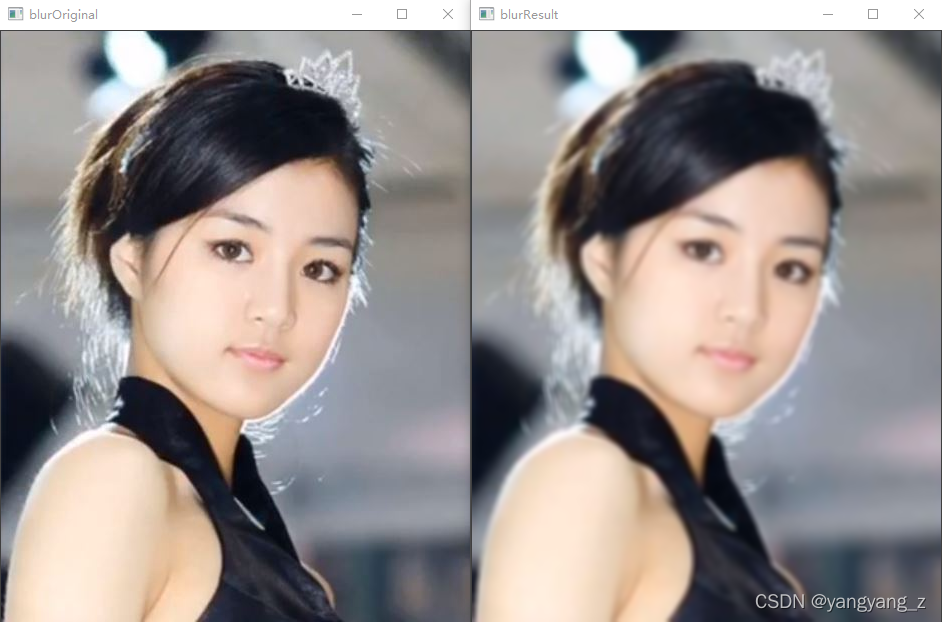
C++ Code example
#include<opencv2/opencv.hpp>
#include<string>
using namespace cv;

std::string image_path = "F:/images/renwu1.jpg";
std::string blur_original = "blurOriginal";
std::string blur_result = "blurResult";


static void  test()
{

	//1、 Load the original drawing
	Mat srcImage = imread(image_path);

	//2、 Show the original image
	imshow(blur_original, srcImage);

	//3、 Perform mean filtering operation
	Mat dstImage;
	blur(srcImage, dstImage, Size(7, 7));

	//4、 Show renderings
	imshow(blur_result, dstImage);

	waitKey(0);
}

int main()
{

	test();
	system("pause");
	return 0;
}
3、 Gauss filtering :GaussianBlur Use of functions
result

C++ Code example
#include<opencv2/opencv.hpp>
#include<string>
using namespace cv;

std::string image_path = "F:/images/renwu1.jpg";
std::string gaussian_blur_original = "GaussianBlurOriginal";
std::string gaussian_blur_result = "GaussianBlurResult";

static void test()
{

	//1、  Load original
	Mat image = imread(image_path);

	//2、 create a window
	namedWindow(gaussian_blur_original);
	namedWindow(gaussian_blur_result);

	//3、 Show the original
	imshow(gaussian_blur_original, image);

	//4、 Gaussian filtering operation
	Mat result;
	GaussianBlur(image, result, Size(5, 5), 0, 0);

	//5、 Show renderings
	imshow(gaussian_blur_result, result);

	waitKey(0);
}

int main()
{

	test();
	system("pause");
	return 0;
}
4、 Comprehensive examples : Image linear filtering
result

C++ Code example
#include<opencv2/opencv.hpp>
#include<string>
using namespace cv;
using namespace std;

std::string image_path = "F:/images/renwu1.jpg";
std::string image_original = "Original";
std::string boxFilter_result = "boxFilterResult";
std::string blur_result = "blurResult";
std::string gaussian_blur_result = "GaussianBlurResult";


Mat g_srcImage, g_dstImage1, g_dstImage2, g_dstImage3;// Store pictures Mat type
int g_nBoxFilterValue = 3;  // Block filter parameter value
int g_nMeanBlurValue = 3;  // Mean filter parameter value
int g_nGaussianBlurValue = 3;  // Gaussian filter parameter value


// Callback function
static void FunBoxFilter(int, void *);		// Mean filtering
static void FunMeanBlur(int, void *);		// Mean filtering
static void FunGaussianBlur(int, void *);	// Gauss filtering


static void  test()
{

	// change console The font color
	system("color 5F");
	//1、  Load original
	g_srcImage = imread(image_path, 1);
	if (!g_srcImage.data) {
     cout << "not load image!! \n"; return; }

	//2、 Clone the original image to three Mat Type in the
	g_dstImage1 = g_srcImage.clone();
	g_dstImage2 = g_srcImage.clone();
	g_dstImage3 = g_srcImage.clone();

	//3、 Show the original
	namedWindow(image_original, 1);
	imshow(image_original, g_srcImage);


	//=================【<1> Box filtering 】==================
	// create a window
	namedWindow(boxFilter_result, 1);
	// Create a trackbar
	createTrackbar(" Kernel value :", boxFilter_result, &g_nBoxFilterValue, 40, FunBoxFilter);
	FunBoxFilter(g_nBoxFilterValue, 0);
	//================================================

	//=================【<2> Mean filtering 】==================
	// create a window
	namedWindow(blur_result, 1);
	// Create a trackbar
	createTrackbar(" Kernel value :", blur_result, &g_nMeanBlurValue, 40, FunMeanBlur);
	FunMeanBlur(g_nMeanBlurValue, 0);
	//================================================

	//=================【<3> Gauss filtering 】=====================
	// create a window
	namedWindow(gaussian_blur_result, 1);
	// Create a trackbar
	createTrackbar(" Kernel value :", gaussian_blur_result, &g_nGaussianBlurValue, 40, FunGaussianBlur);
	FunGaussianBlur(g_nGaussianBlurValue, 0);
	//================================================


	// Output some help information
	cout << endl << "\t The successful running , Please adjust the scroll bar to observe the image effect ~\n\n"
		<< "\t Press down “q” Key time , Program exit .\n";

	// Press down “q” Key time , Program exit
	while (char(waitKey(1)) != 'q') {
    }

	return;
}

int main()
{

	test();
	system("pause");
	return 0;
}


static void FunBoxFilter(int, void *)
{

	// Block filter operation
	boxFilter(g_srcImage, g_dstImage1, -1, Size(g_nBoxFilterValue + 1, g_nBoxFilterValue + 1));
	// Display window
	imshow(boxFilter_result, g_dstImage1);
}


static void FunMeanBlur(int, void *)
{

	// Mean filtering operation
	blur(g_srcImage, g_dstImage2, Size(g_nMeanBlurValue + 1, g_nMeanBlurValue + 1), Point(-1, -1));
	// Display window
	imshow(blur_result, g_dstImage2);
}


static void FunGaussianBlur(int, void *)
{

	// Gaussian filtering operation
	GaussianBlur(g_srcImage, g_dstImage3, Size(g_nGaussianBlurValue * 2 + 1, g_nGaussianBlurValue * 2 + 1), 0, 0);
	// Display window
	imshow(gaussian_blur_result, g_dstImage3);
}
5、 median filtering :medianBlur Use of functions
result

C++ Code example
#include<opencv2/opencv.hpp>
#include<string>
using namespace cv;

std::string image_path = "F:/images/renwu1.jpg";
std::string median_blur_original = "medianBlurOriginal";
std::string median_blur_result = "medianBlurResult";

static void test()
{

	//1、  Load original
	Mat image = imread(image_path);

	//2、 create a window
	namedWindow(median_blur_original,WINDOW_AUTOSIZE);
	namedWindow(median_blur_result,WINDOW_AUTOSIZE);

	//3、 Show the original
	imshow(median_blur_original, image);

	// Carry out median filtering operation
	Mat result;
	medianBlur(image, result, 7);

	//4、 Show renderings
	imshow(median_blur_result, result);

	waitKey(0);
}

int main()
{

	test();
	system("pause");
	return 0;
}
6、 Bilateral filtering :bilateralFilter Use of functions
result

C++ Code example
#include<opencv2/opencv.hpp>
#include<string>
using namespace cv;

std::string image_path = "F:/images/renwu1.jpg";
std::string bilateralFilter_original = "bilateralFilterOriginal";
std::string bilateralFilter_result = "bilateralFilterResult";

static void test()
{

	//1、  Load original
	Mat srcImage = imread(image_path);

	//2、 create a window
	namedWindow(bilateralFilter_original);
	namedWindow(bilateralFilter_result);

	//3、 Show the original
	imshow(bilateralFilter_original, srcImage);

	//4、 Perform bilateral filtering operation
	Mat result;
	bilateralFilter(srcImage, result, 25, 25 * 2, 25 / 2);

	//5、 Show renderings
	imshow(bilateralFilter_result, result);

	waitKey(0);
}

int main()
{

	test();
	system("pause");
	return 0;
}
7、 Comprehensive examples : Image filtering
result

C++ Code example
#include<opencv2/opencv.hpp>
#include<string>
using namespace cv;
using namespace std;

std::string image_path = "F:/images/renwu1.jpg";
std::string image_original = "Original";
std::string median_blur_result = "medianBlurResult";
std::string bilateralFilter_result = "bilateralFilterResult";

Mat g_srcImage, g_dstImage1, g_dstImage2;
int g_nMedianBlurValue = 10;       // Median filter parameter value
int g_nBilateralFilterValue = 10;  // Bilateral filtering parameter value


// Callback function
static void FunMedianBlur(int, void *);		// Median filter
static void FunBilateralFilter(int, void *);// Bilateral filter


static void test()
{

	system("color 4F");
	//  Load original
	g_srcImage = imread(image_path, 1);
	if (!g_srcImage.data) {
     std::cout << "image not load! \n"; return; }

	// Clone the original image to four Mat Type in the
	g_dstImage1 = g_srcImage.clone();
	g_dstImage2 = g_srcImage.clone();
	// Show the original
	namedWindow(image_original, WINDOW_AUTOSIZE);
	imshow(image_original, g_srcImage);

	//=================【<2> median filtering 】===========================
	// create a window
	namedWindow(median_blur_result, WINDOW_AUTOSIZE);
	// Create a trackbar
	createTrackbar(" Parameter values :", median_blur_result, &g_nMedianBlurValue, 50, FunMedianBlur);
	FunMedianBlur(g_nMedianBlurValue, 0);
	//=======================================================


	//=================【<3> Bilateral filtering 】===========================
	// create a window
	namedWindow(bilateralFilter_result, 1);
	// Create a trackbar
	createTrackbar(" Parameter values :", bilateralFilter_result, &g_nBilateralFilterValue, 50, FunBilateralFilter);
	FunBilateralFilter(g_nBilateralFilterValue, 0);
	//=======================================================


	// Output some help information
	cout << endl << "\t The successful running , Please adjust the scroll bar to observe the image effect ~\n\n"
		<< "\t Press down “q” Key time , Program exit .\n";
	while (char(waitKey(1)) != 'q') {
    }

	return;
}

int main()
{

	test();
	system("pause");
	return 0;
}


static void FunMedianBlur(int, void *)
{

	medianBlur(g_srcImage, g_dstImage1, g_nMedianBlurValue * 2 + 1);
	imshow(median_blur_result, g_dstImage1);
}


static void FunBilateralFilter(int, void *)
{

	bilateralFilter(g_srcImage, g_dstImage2, g_nBilateralFilterValue, g_nBilateralFilterValue * 2, g_nBilateralFilterValue / 2);
	imshow(bilateralFilter_result, g_dstImage2);
}
8、 inflation :dilate Use of functions
result

C++ Code example
#include<opencv2/opencv.hpp>
#include<string>
using namespace cv;

std::string image_path = "1.jpg";
std::string dilate_original = "dilateOriginal";
std::string dilate_result = "dilateResult";

static void test()
{


	//1、 Load original
	Mat src_image = imread(image_path);

	//2、 create a window
	namedWindow(dilate_original, WINDOW_AUTOSIZE);
	namedWindow(dilate_result, WINDOW_AUTOSIZE);

	//3、 Show the original
	imshow(dilate_original, src_image);

	//4、 Perform the expansion operation
	Mat element = getStructuringElement(MORPH_RECT, Size(15, 15));
	Mat result;
	dilate(src_image, result, element);

	//6、 Show renderings
	imshow(dilate_result, result);

	waitKey(0);
}

int main()
{

	test();
	system("pause");
	return 0;
}
9、 corrosion :erode Use of functions
result

C++ Code example
#include<opencv2/opencv.hpp>
#include<string>
using namespace cv;

std::string image_path = "1.jpg";
std::string erode_original = "erodeOriginal";
std::string erode_result = "erodeResult";

static void test()
{

	//1、 Load original
	Mat srcImage = imread(image_path);
	//2、 Show the original
	imshow(erode_original, srcImage);
	//3、 Carry out corrosion operation
	Mat element = getStructuringElement(MORPH_RECT, Size(15, 15));
	Mat dstImage;
	erode(srcImage, dstImage, element);
	//4、 Show renderings
	imshow(erode_result, dstImage);
	waitKey(0);
}

int main()
{

	test();
	system("pause");
	return 0;
}
版权声明
本文为[yangyang_ z]所创,转载请带上原文链接,感谢
https://yzsam.com/2022/04/202204221639176212.html
边栏推荐
- An analysis and treatment of abnormal growth of Oracle database table space
- What is the advantage of asemi low voltage drop Schottky diode over ordinary Schottky diode?
- 数据安全审计OTP配置
- 国美零售借数字经济东风,打造“船身”的消费体验
- Blue Bridge Cup practice 011
- Test life | less than 2 years after graduation, 0 experience and won the 30W annual salary of a well-known Internet enterprise. How did he do it?
- Blue Bridge Cup exercise 016
- Analysis of JWT permission verification of golang
- Scrapy框架进阶学习
- 面向全球市场,PlatoFarm今日登录HUOBI等全球四大平台
猜你喜欢

numpy基础大全(创建、索引、常用函数)
NLP之TM:基于gensim库调用20newsgr学习doc-topic分布并保存为train-svm-lda.txt、test-svm-lda.txt

Domestic mobile phone brands have found that they are nothing without the support of domestic consumers

Interview:人工智能岗位面试—人工智能岗位求职之机器学习算法工程师必备知识框架结构图

解决并发问题方案流程及原理总结(表单重复提交问题)

Crashsight general function & feature function introduction

RTP packaging and unpacking of webrtc

i.MX6ULL驱动开发 | 21 - 按键驱动使用 input 子系统上报事件

领域驱动模型DDD(三)——使用Saga管理事务

What is the advantage of asemi low voltage drop Schottky diode over ordinary Schottky diode?
随机推荐
经销商组团检阅欧尚Z6:为高能产品力点赞
Blue Bridge Cup exercise 015
[Ansys Workbench] Mechanical 界面显示模型树窗口和详细信息窗口
如何登录MySQL
frp反向代理
NFT platform security guide
31岁拿了阿里P6的offer,还有必要去吗?
蓝桥杯练习013
【滤波与卷积(二)】
Import project initialization
Domestic mobile phone brands have found that they are nothing without the support of domestic consumers
【csnote】范式
In 2023, Wuhan University of technology energy and power (085800) took the postgraduate entrance examination and landed. Experience guidance of predecessors in preparing for the examination
Summary of process and principle of solution to concurrency problem (form repeated submission problem)
抗疫神器:健康码、行程码自动识别!
SolidWorks insert socket head cap screw
This API hub is powerful. It contains open APIs such as nailing enterprise wechat, and can be debugged directly!
蓝桥杯练习018
Redis optimization series (I) building redis master-slave based on docker
漫谈同源策略(SOP)和跨域资源共享(CORS)