当前位置:网站首页>Command-Line
Command-Line
2022-04-21 07:46:00 【Xiong Xiaohan】
Command line arguments
argsWithProg := os.Args
argsWithoutProg := os.Args[1:]
fmt.Println(argsWithProg)
fmt.Println(argsWithoutProg)
Run the program from the command line and enter :
./command-line-arguments a b c d
Command line output :
[./command-line-arguments a b c d]
[a b c d]
Command line flags
wordPtr := flag.String("word", "foo", "a string")
numbPtr := flag.Int("numb", 42, "an int")
forkPtr := flag.Bool("fork", false, "a bool")
var svar string
flag.StringVar(&svar, "svar", "bar", "a string var")
flag.Parse()
fmt.Println("word:", *wordPtr)
fmt.Println("numb:", *numbPtr)
fmt.Println("fork:", *forkPtr)
fmt.Println("svar:", svar)
fmt.Println("tail:", flag.Args())
% ./command-line-flags -word=opt -numb=7 -fork -svar=flag
word: opt
numb: 7
fork: true
svar: flag
tail: []
% ./command-line-flags -word=opt
word: opt
numb: 42
fork: false
svar: bar
tail: []
% ./command-line-flags -word=opt a1 a2 a3
word: opt
numb: 42
fork: false
svar: bar
tail: [a1 a2 a3]
% ./command-line-flags -word=opt a1 a2 a3 -numb=7
word: opt
numb: 42
fork: false
svar: bar
tail: [a1 a2 a3 -numb=7]
% ./command-line-flags -h
Usage of ./command-line-flags:
-fork
a bool
-numb int
an int (default 42)
-svar string
a string var (default “bar”)
-word string
a string (default “foo”)
% ./command-line-flags -wat
flag provided but not defined: -wat
Usage of ./command-line-flags:
-fork
a bool
-numb int
an int (default 42)
-svar string
a string var (default “bar”)
-word string
a string (default “foo”)
Command line sub parameters
fooCmd := flag.NewFlagSet("foo", flag.ExitOnError)
fooEnable := fooCmd.Bool("enable", false, "enable")
fooName := fooCmd.String("name", "", "name")

barCmd := flag.NewFlagSet("bar", flag.ExitOnError)
barLevel := barCmd.Int("level", 0, "level")

if len(os.Args) < 2 {

	fmt.Println("expected 'foo' or 'bar' subcommands")
	os.Exit(1)
}

switch os.Args[1] {

case "foo":
	fooCmd.Parse(os.Args[2:])
	fmt.Println("subcommand 'foo'")
	fmt.Println(" enable:", *fooEnable)
	fmt.Println(" name:", *fooName)
	fmt.Println(" tail:", fooCmd.Args())
case "bar":
	barCmd.Parse(os.Args[2:])
	fmt.Println("subcommand 'bar'")
	fmt.Println(" level:", *barLevel)
	fmt.Println(" tail:", barCmd.Args())
default:
	fmt.Println("expected 'foo' or 'bar' subcommands")
	os.Exit(1)
}
% ./command-line-subcommands foo -enable -name=joe a1 a2
subcommand ‘foo’
enable: true
name: joe
tail: [a1 a2]
% ./command-line-subcommands bar -level 8 a1
subcommand ‘bar’
level: 8
tail: [a1]
% ./command-line-subcommands bar -enable a1
flag provided but not defined: -enable
Usage of bar:
-level int
level
版权声明
本文为[Xiong Xiaohan]所创,转载请带上原文链接,感谢
https://yzsam.com/2022/04/202204210627175619.html
边栏推荐
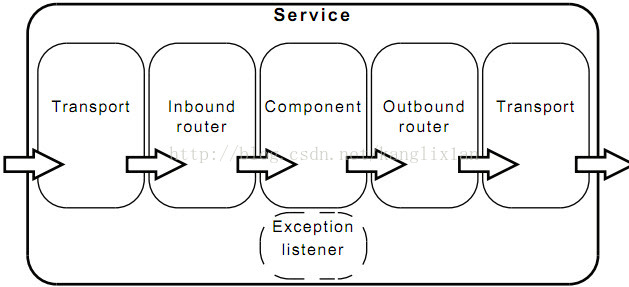
- Enterprise service bus -- Introduction to muleesb
- XML编码解码
- C# asp.net 调百度文字识别接口
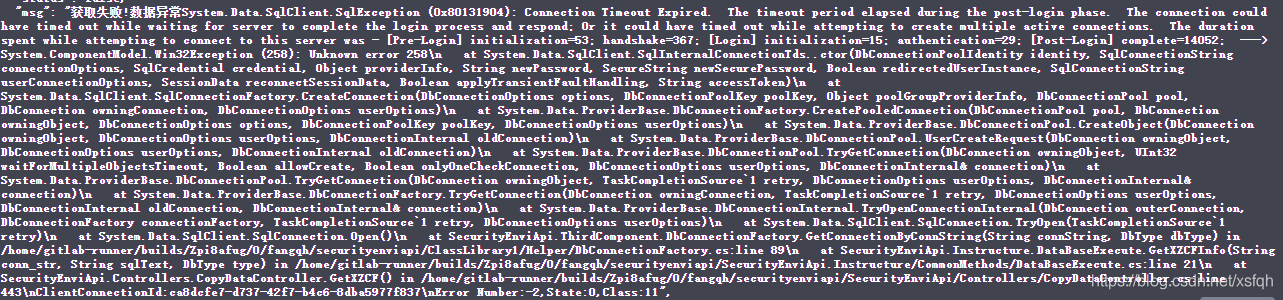
- When deploying. Net core on Linux platform to access SQL Server 2008 R2, it prompts the connection timeout exception
- 标准函数返回值iResult
- Spawning Processes and Exec‘ing Processes
- Steps for umlet beginners
- 树状数组
- mysql where条件后执行规则
- GeoServer 2.20.1 solving cross domain problems CORS
猜你喜欢

Ruijie eg easy gateway remote command execution vulnerability-1
企业服务总线--MuleESB简介

ELK日志分析系统的原理与介绍

Leetcode 1557.可以到达所有点的最少点数目(Minimum Number of Vertices to Reach All Nodes)

PLSQL Developer 14安装详解

2022-1-3至2022-1-16 访问者模式

论文阅读:Social Media and Fake News in the 2016 Election
When deploying. Net core on Linux platform to access SQL Server 2008 R2, it prompts the connection timeout exception
H + background UI framework, click the button to create a new tab

策略模式(2.28-3.6)
随机推荐
线程安全的类的解析:(2.8-3.6)
PHP 对象转数组
写入数据进入磁盘文件代码示例如下:
音乐 下载 等文件名都变成了相同的名字的解决方法
汇编语言——内存定位的方法
Text Templates
可切换开始,战斗,结算三界面的飞机小对决 ,模块化,pygame,Rect,exe打包
Nsctf - some topics WP
Principle and introduction of elk log analysis system
2022-1-17至2022-1-30 迭代器模式
Panic and Recover
Swagger的用法以及常用注解解释
PHP去除字符串开头或末尾逗号
论文阅读:Security Challenges in an Increasingly Tangled Web
GeoServer 2.20.1 解决跨域问题 CORS
解释器模式(3.7-3.13)
Font Icon website - common summary
远程唤醒服务器
Defer
JSON编码解码