当前位置:网站首页>浅析图片懒加载(三种实现方法与两种优化方式)
浅析图片懒加载(三种实现方法与两种优化方式)
2022-04-22 09:59:00 【钧桐】
浅析图片懒加载之三种实现方法与两种优化方式
写在前面
上一篇文章介绍了防抖和节流,那么今天我们就来康康图片懒加载(中间会涉及到节流的优化问题)
你将了解到图片懒加载的实现的三种方法(整体位置比较和视图位置比较和observe)
和优化的两种方式(节流和IntersectionObserver)
写得不对的地方,希望大家能够批评指正!
在不使用图片懒加载的情况下,我们打开开发者工具康康
- 这里
display给block是为了让图片变成块元素,这样图片会自己换行,这样更方便后面进行懒加载的操作 - 注意勾选
禁用缓存,和慢速3G,这样效果更加明显

<!DOCTYPE html>
<html lang="en">

<head>
  <meta charset="UTF-8">
  <meta http-equiv="X-UA-Compatible" content="IE=edge">
  <meta name="viewport" content="width=device-width, initial-scale=1.0">
  <title>Document</title>
  <style> img {
       display: block; width: 100px; height: 100px; margin-top: 20px; } </style>
</head>

<body>
  <p>今天介绍一下图片懒加载</p>
  <img src="./pic/1.png" alt="">
  <img src="./pic/2.png" alt="">
  <img src="./pic/3.png" alt="">
  <img src="./pic/4.png" alt="">
  <img src="./pic/5.png" alt="">
</body>

</html>
- 我们很容易看出,由于图片的加载时间很长,首屏的渲染用了
7s完成 - 下面我们就来看看懒加载和懒加载的优化吧!
- 康康最后通过优化能提升多少性能!
什么是懒加载?
这里就来介绍一下懒加载
- 简单来说,就是懒惰的加载
明日复明日 - 在首屏渲染,如果我的可视区域里面看不到图片,那就先不加载图片
- 这种合理的偷懒就是懒加载,它大大缩减了首屏的渲染时间
懒加载的前两种实现方法(位置判断)
- 获取图片元素,图片的
src属性改为data-src,即src属性为空
  <img data-src="./pic/1.png" alt="">
  <img data-src="./pic/2.png" alt="">
  <img data-src="./pic/3.png" alt="">
  <img data-src="./pic/4.png" alt="">
  <img data-src="./pic/5.png" alt="">
- 添加滚动事件监听,判断图片位置和当前位置来给
src赋值,从而达到了动态加载图片的效果 - 这个距离的判断又有大概两种,下面来分析一下
1.通过整体距离来判断
- 通过下图,我们可以知道
- 一个图片元素的位置的顶部可以用
offsetTop属性获得 - 如果把
div换成文档对象,scrollTop+clientHeight就可以表示滚动距离的最下端 - 故
offsetTop<scrollTop+clientHeight的时候我们就要改变图片的src了 - 注意上面的
offsetTop和后面的scrollTop+clientHeight是针对不同的元素哦,前者是图片,后者是文档对象 document.documentElement会返回一个文档对象

- 一个图片元素的位置的顶部可以用
- 故代码如下:
    const images = document.querySelectorAll('img')
    n = 0
    let lazyload = (e) => {

      const clientHeight = document.documentElement.clientHeight
      const scrollTop = document.documentElement.scrollTop
      for (let i = n; i < images.length; i++) {

        if (images[i].offsetTop < clientHeight + scrollTop) {

          images[i].setAttribute('src', images[i].getAttribute('data-src'))
          n = i + 1
        }
      }
      console.log('scroll触发');
    }
2.通过视口距离来判断
- 与上面的方法不同的是,我们不去管整体滚动了多少,图片相对于整体的offset位置是多少
- 我们只去关心视口的距离
getBoundingClientRect().top可以帮我们获得图片相对于视口距离顶部的距离window.innerHeight可以帮我们获得视口的高度(一般来说,对一个设备来说是一个固定值!)
    const images = document.querySelectorAll('img')
    let n = 0
    let lazyload = (e) => {

      for (let i = n; i < images.length; i++) {

        const imageTop = images[i].getBoundingClientRect().top
        if (imageTop < window.innerHeight) {

          images[i].setAttribute('src', images[i].getAttribute('data-src'))
          n = i + 1
        }
      }
      console.log('scroll触发');
    }
3.两种距离判断方法的比较示意图
为了更好地帮助大家理解这个判断的区别,我画了一个示意图

为什么要优化懒加载
- 在前面的懒加载函数中,我们写了一个
log - 好,现在我们去控制台看一下输出

scroll多次监听事件多次触发,这是我们不愿意看到的
懒加载的两种优化方式
- 懒加载的优化本质上就是减少监听事件的调用
节流
- 在上一篇文章里面提到了节流,我们直接拿节流函数过来用
    function throttle (fn, delay) {

      let pre = 0
      let timer
      return function () {

        if (!pre) pre = new Date()
        let now = new Date()
        let context = this
        let args = arguments
        let remainTime = delay - (now - pre)
        if (now - pre > delay) {

          fn.apply(context, args)
          pre = now
        } else {

          if (timer) return
          timer = setTimeout(() => {

            fn.apply(context, args)
            pre = now
            timer = null
          }, remainTime)
        }
      }
    }
    window.onscroll = throttle(lazyload, 1000)
- 我们看控制台可以明显看到调用次数减少了
- 虽然完成了所有的懒加载后,但是我们
仍然可以触发事件,所以才有了第二种优化方式

IntersectionObserver(第三种实现方法,同时是第二种优化方式)
IntersectionObserver是什么?- 允许你追踪目标元素与其祖先元素或视窗的交叉状态。此外,尽管只有一部分元素出现在视窗中,哪怕只有一像素,也可以选择触发回调函数。
- 所以它完美契合了懒加载!
- 我们从代码中来学习它的用法吧!
   const images = document.querySelectorAll('img')
    const callback = (entries) => {

      entries.forEach(entry => {

        console.log(entry)
        if (entry.isIntersecting) {
                // 监听到出现
          const image = entry.target           // 获取目标
          image.setAttribute('src', image.getAttribute('data-src'))
          observer.unobserve(image)            // 取消监听
          console.log('触发');
        }
      })
    }
    const observer = new IntersectionObserver(callback)
    images.forEach(image => {

      observer.observe(image)
    })
- 函数中
logentry,我们主要是康isIntersecting属性来判断是否出现

- 通过这个优化方式,几张图片就会触发几次,不会多次触发!
observer会监听交叉状态,即出现和消失,出现交叉状态后会去调用new的时候传入的callback回调函数observer.observe添加交叉监听observer.unobserve取消交叉监听- 上面这两个api基本够用了
- 给每张图片添加
observe callback里面判断交叉出现,就给src赋值然后unobserve
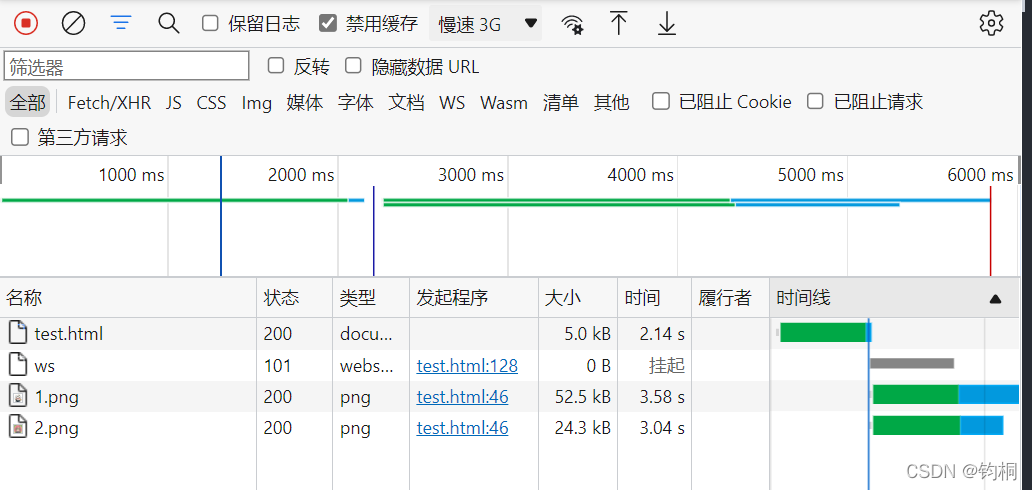
最后,我们看一下优化后懒加载能提高多少性能
- 从第一次渲染加载
5张图片变成了加载2张图片 - 请求的总耗时从
7s降到了6s - 从我自己实验打开,还是明显感觉到要快一些了的(当然是在
3G慢速模式下)
总结
- 1.前两种方法存在多次触发问题,所以我们可以使用节流来优化
- 2.第三种方法自己就考虑的优化(所以第三种方法也就是第二种优化方式)
- 3.咋一看,第三种方法是可以取代前两种方法的
- 但是,有的浏览器不兼容第三种方法的时候,我们就只能老老实实使用前两种方法并节流优化了
版权声明
本文为[钧桐]所创,转载请带上原文链接,感谢
https://blog.csdn.net/qq_42136832/article/details/124251410
边栏推荐
- [flutter topic] 125 illustrated autobiography ace_ ICON. Ttf Icon Library
- Difference between sub table and partition
- Summary of JS page refresh methods
- The VirtualBox virtual machine uses virtio net to run dpdk + VPP and cannot receive VLAN messages
- Zhezheng nail scanning code login
- QT event filter instance
- Linux 7 silent installation oracle12c reports an error [fatal] [ins-35344] the value is not specified
- Etcd watch exception scenario
- 超越 iTerm!号称下一代 Terminal 终端神器,用完爱不释手!
- Getimagesize() function gets the inverse of the width and height of the picture
猜你喜欢

头条面试居然跟我扯了半小时的Semaphore

Sorting and publishing of remote sensing image segmentation data set

【SQL server】SQL 概览

Linux Installation Oracle 19C Full Version (graphics + silent installation)
![[C language advanced level 10 -- character and string functions and their simulation implementation (1)]](/img/9b/7fab7122e697bccd7d0d38ce3f30ee.png)
[C language advanced level 10 -- character and string functions and their simulation implementation (1)]
The root cause of Android's security vulnerability is Apple's lossless audio codec

一款简易的自定义数字键盘输入控件

IOS development - Database - Introduction to basic knowledge (01)

Command ‘yum‘ not found, but can be installed with: apt install yum
J'ai eu un entretien d'une demi - heure avec Semaphore.

随机推荐
L3-005 dustbin distribution (30 points) (dijkstar)
Various location codes applied in transformer model
【SQL server】SQL 概览
IOS development - Database - Introduction to basic knowledge (01)
L3-007 ladder map (30 points) (condition DIJ)
Implementation and analysis of watchablestore in etcd
[flutter topic] 125 illustrated autobiography ace_ ICON. Ttf Icon Library
超越iTerm! 号称下一代终端神器,功能贼强大!
matplotlib教程04---绘制常用的图形
頭條面試居然跟我扯了半小時的Semaphore
SQL operator
L2-033 simple calculator (25 points)
Creating student management system with MySQL
美团一面:有在⼯作时间中使⽤过 jstat, jmap, mat⼯具吗? 能给⼀个实际的例⼦说明⼀下吗?
Softing datafeed OPC Suite: empowering industrial equipment to connect to the Internet of things
Get browser URL
【Go】程序流程控制
QT AxObject库的简单操作
Transformer模型中应用的各类位置编码
P8资料大放送