当前位置:网站首页>(转)Aspose.words编程指南之Working with Document
(转)Aspose.words编程指南之Working with Document
2022-04-23 00:09:00 【zyb418】
https://blog.csdn.net/sinat_30276961/article/details/48159623
上一篇Aspose.words编程指南之DOM树再识,各层结构之间的关系从UML结构图直观的了解了DOM树层级之间的关系,并且通过代码展示了层级之间获取的方法。这一篇,我会接着讲解最核心的Node节点—Document,也就是一个文档的根节点。
Document总览
如果你仔细读过前面几篇的博客,那你一定知道,Document是一个文档的核心节点,也是根节点。它是一个的文档起始,没有它,你就别想创建一个word文档了。Document包含了所有内容。
通过Document,我们可以获得全局的text, bookmarks和form fields或者直属于各个Section。
Document里维护了一个Section的collection,也就是它的子节点。可以copy,插入或者移除。
Document可以在任意时候保存成文件或者流。甚至可以直接传给浏览器。
Document Properties
通过office软件,查看,编辑属性
要注意的是,这里讲的属性有别于前面几篇讲到的属性。
Document properties指的是一个文档所包含的全局属性。举个例子,你创建了一个word文档之后,可以通过鼠标右键查看它的一些属性。如下图所示:

这些是默认的,每个文档都会存在的属性。我们可以通过这个窗口,编辑属性。
我们也可以自定义一些属性,通过点击刚才窗口的自定义tab,然后可以新建属性:
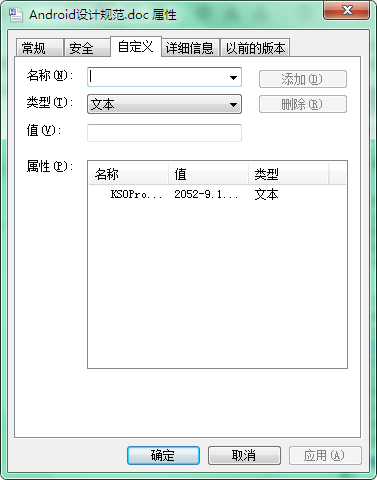
上面这两类属性合起来就是Document Properties。
String fileName = getMyDir() + "Properties.doc";
Document doc = new Document(fileName);

System.out.println(MessageFormat.format("1. Document name: {0}", fileName));

System.out.println("2. Built-in Properties");
for (DocumentProperty prop : doc.getBuiltInDocumentProperties())
    System.out.println(MessageFormat.format("{0} : {1}", prop.getName(), prop.getValue()));

System.out.println("3. Custom Properties");
for (DocumentProperty prop : doc.getCustomDocumentProperties())
    System.out.println(MessageFormat.format("{0} : {1}", prop.getName(), prop.getValue()));
通过Aspose.words查看编辑属性
1.通过Document.BuiltInDocumentProperties,获取一个文档的默认属性。
2.通过Document.CustomDocumentProperties,获取一个文档的自定义属性。
Document.BuiltInDocumentProperties返回一个Properties.BuiltInDocumentProperties对象;Document.CustomDocumentProperties返回一个Properties.CustomDocumentProperties对象。
这两个对象都是collection,我们可以通过index和名称进行遍历。
Properties.CustomDocumentProperties允许我们做添加和移除属性动作。
Properties.DocumentProperty允许你获取名称,值和类型。
更新默认(内嵌)的属性
我们都知道,当我们修改了一个word文档,那么它的修改日期会自动帮我们更新。
但是Aspose.words没有这项便利服务,好吧,我们只能自己去修改了。
它给我们提供了一个方法:Document.UpdateWordCount,用来重新计算一些统计方面的数据。如下列举了哪些会去重新计算的属性:
BuiltInDocumentProperties.Characters,
BuiltInDocumentProperties.CharactersWithSpaces,
BuiltInDocumentProperties.Words,
BuiltInDocumentProperties.Paragraphs
增加或移除自定义属性
我们无法增加或移除默认的属性,不过可以操作自定义属性。
Document doc = new Document(getMyDir() + "Properties.doc");

CustomDocumentProperties props = doc.getCustomDocumentProperties();

if (props.get("Authorized") == null)
{
    props.add("Authorized", true);
    props.add("Authorized By", "John Smith");
    props.add("Authorized Date", new Date());
    props.add("Authorized Revision", doc.getBuiltInDocumentProperties().getRevisionNumber());
    props.add("Authorized Amount", 123.45);
}
Document doc = new Document(getMyDir() + "Properties.doc");

doc.getCustomDocumentProperties().remove("Authorized Date");
代码很简单。
Clone Document
为啥要单独把它拎出来讲呢?
前面几篇讲到过,要创建一个Document,我们需要一步步添加DOM层级,比方说,先创建一个document,然后创建一个section,添加到document,然后是创建一个Body,添加到section,再创建一些paragraph,添加到body……这个过程漫长而麻烦,那么有没有一个简单快捷的方法,比方说克隆。
答案是有的!当然这个方案有个大前提,那就是你要克隆的文档与你想要创建的文档结构上类似。那么这样一来,我只要克隆一个,然后稍微做下修修改改,那不是很方便~~
而且,代码很简单:
Document doc = new Document(getMyDir() + "Document.doc");
Document clone = doc.deepClone();
哈哈,那不是可以给自己准备一些模板,然后直接克隆一下,再做修改?对了!就是这样!
下一篇,我将继续讲解一个核心的辅助类,DocumentBuilder。这个很好玩哦~~。Aspose.words编程指南之DocumentBuilder一
版权声明
本文为[zyb418]所创,转载请带上原文链接,感谢
https://blog.csdn.net/zyb418/article/details/100559572
边栏推荐
猜你喜欢

【ACM】78. 子集(返回所有节点的元素,不用设置终止条件)

SystemVerilog verification - Test Platform writing guide learning notes (3): connecting design and test platform

条码WMS系统的架构

pycharm界面改为中文,中英文切换

Why can't people see the facts?
人为什么看不到事实?

Algorithm -- adding two numbers II (kotlin)

WMS warehouse management system solution

样本不均衡的问题

【ACM】90. 子集 II(同一树层的去重问题首先要对数组进行排序(使用sort))
随机推荐
Shell脚本笔记(5)- 本的条件语句
Write a beautiful login page with fluent (latest version)
图像感受野的一些理解
3D旋转动画
Q: How to mark data points on the image of MATLAB? & Text function elaboration
根据宽度计算文字大小
归纳AI数据增强的方法
L1-070 eating hot pot (15 points)
绝对定位不使用left,right,top,bottom等属性
Mysql中的七种常用查询连接详解
Literal aggregation
Why can't people see the facts?
L1-075 obsessive compulsive disorder (10 points)
庞加莱球模型
获取某一点的颜色
SystemVerilog verification - Test Platform writing guide learning notes (3): connecting design and test platform
【必备知识】线激光扫描三维成像原理
Sample imbalance
be based on. NETCORE development blog project starblog - (3) model design
Scheme of making target detection training samples