当前位置:网站首页>Using MCU Xpress to develop rt1060 (1) -- drive RGB interface LCD
Using MCU Xpress to develop rt1060 (1) -- drive RGB interface LCD
2022-04-21 19:11:00 【EEHAHA】
One 、 development environment
1.TencentOS Internet of things development kit ,MCU by RT1060
2.IDE:MCUXpresso v11.4.1
3. The screen is light snow 4.3 " IPS The screen ,RGB888 Interface
Two 、 Use MCUXpreso Configuration tools
1. utilize IDE The function of , from SDK Import routines from hello_world, As the basic framework of the program .
2. open IDE Peripheral page in the configuration tool .

3. Add... In the left peripheral LCDIF, Turn on the peripherals LCDIF Set up .

RGB mode initialization Part is configured by the user according to the parameters of the screen , Including screen pixel frame rate and other parameters .
You can see it on the way IDE Reported a warning. Because it is calculated according to parameters such as pixel points and frame rate LCD The controller clock is different from the actual clock , The actual clock is determined by the hardware , Cannot be configured as like as two peas designed. , therefore IDE A warning message is generated . This warning message does not affect the normal operation of the screen . As can also be seen in the figure, the frame rate we designed is 60Hz, But according to the current clock configuration , The actual frame rate should be 64Hz.
Lower part Signals polarity yes LCD Polarity of control signal , Set according to the interface of the screen .

It is worth noting that ,LCD data bus namely LCD In the format of data bus ,RGB888 There are two formats , One is unpackaged , Occupy 32bits The format of , The other is to abandon the highest 8 Bit 24bits Format . This format must correspond to the program written by yourself , Otherwise, an error will appear on the screen .
LCDIF_Buffer Is a video memory variable , The tool will open up a memory space with this name . Users can modify LCDIF_Buffer To display what you want .
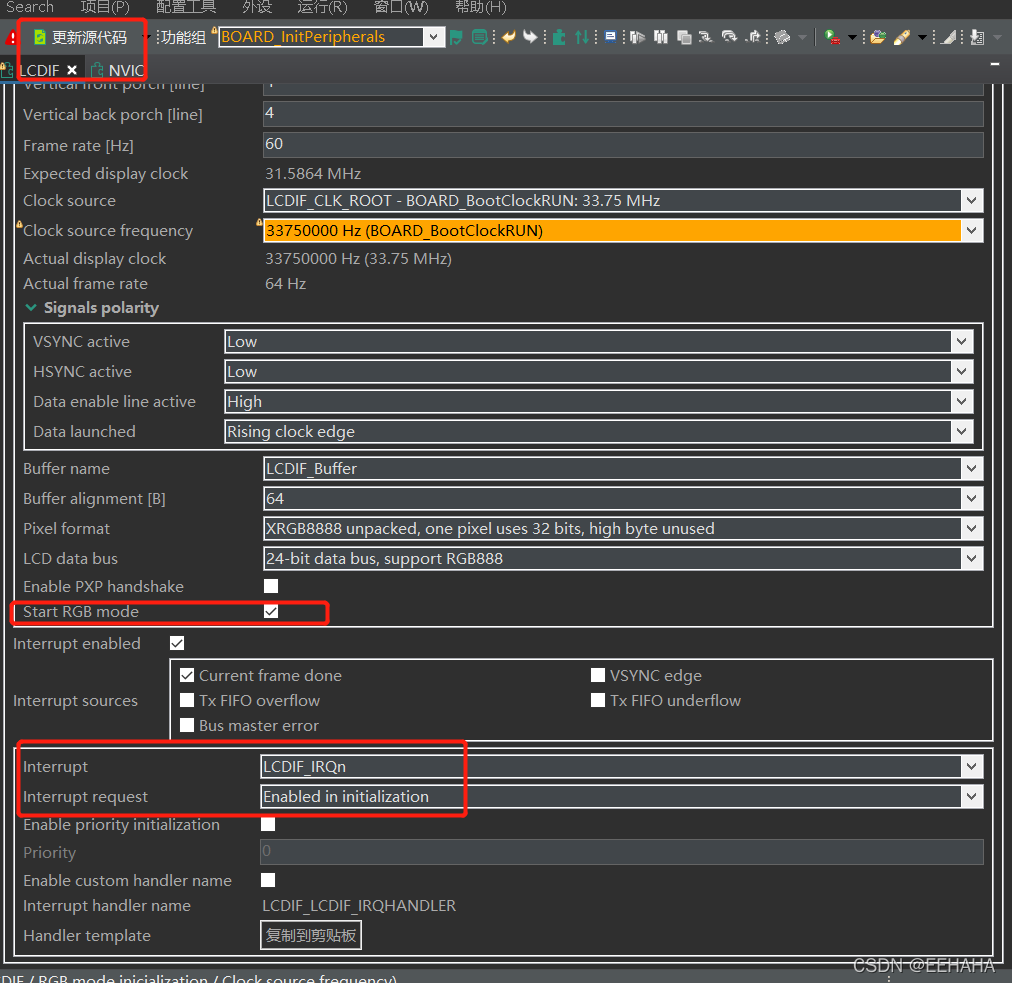
Remember to check that start RGB mode, Otherwise, you need to add open in the user program RGB The code for the pattern .
The configuration content at the bottom is the same as LCD Related to the interruption of the controller . In this program , I turned on the interrupt of frame transmission completion .LCDIF_IRQn Is the interrupt function we need to rewrite .
After the above configuration , Click update code , It will be added in the project directory peripheral.c and .h file , In which LCD Initialization work .
3、 ... and 、 Program code
open peripheral Source files and header files , Let's see what the official configuration tool has done for us .( Only part of the code is shown in the article )
//peripheral.c

const elcdif_rgb_mode_config_t LCDIF_rgbConfig = {
  .panelWidth = LCDIF_PANEL_WIDTH,
  .panelHeight = LCDIF_PANEL_HEIGHT,
  .hsw = 30U,
  .hfp = 210U,
  .hbp = 30U,
  .vsw = 4U,
  .vfp = 4U,
  .vbp = 4U,
  .polarityFlags = (kELCDIF_VsyncActiveLow | kELCDIF_HsyncActiveLow | kELCDIF_DataEnableActiveHigh | kELCDIF_DriveDataOnRisingClkEdge),
  .bufferAddr = (uint32_t) LCDIF_Buffer[0],
  .pixelFormat = kELCDIF_PixelFormatXRGB8888,
  .dataBus = kELCDIF_DataBus24Bit
};
/* RGB buffer */
AT_NONCACHEABLE_SECTION_ALIGN(uint32_t LCDIF_Buffer[2][LCDIF_PANEL_HEIGHT][LCDIF_PANEL_WIDTH], LCDIF_RGB_BUFFER_ALIGN);
This part is to build LCD Setting parameters of controller , Is the pixel we filled in the configuration tool before 、 Frame rate and other settings .
The bottom line of code is to apply for a section of memory space LCDIF_Buffer, For video storage . For the specific implementation method, please refer to the wild fire in the resources of this article RT1052 Development board tutorial .
//peripheral.c


static void LCDIF_init(void) {
  /* RGB mode initialization */
  ELCDIF_RgbModeInit(LCDIF_PERIPHERAL, &LCDIF_rgbConfig);
  /* Enable interrupts */
  ELCDIF_EnableInterrupts(LCDIF_PERIPHERAL, (kELCDIF_CurFrameDoneInterruptEnable));
  /* Enable interrupt LCDIF_IRQn request in the NVIC. */
  EnableIRQ(LCDIF_LCDIF_IRQN);
  /* RGB mode start */
  ELCDIF_RgbModeStart(LCDIF_PERIPHERAL);
}

/***********************************************************************************************************************
 * Initialization functions
 **********************************************************************************************************************/
void BOARD_InitPeripherals(void)
{
  /* Initialize components */
  LCDIF_init();
}

/***********************************************************************************************************************
 * BOARD_InitBootPeripherals function
 **********************************************************************************************************************/
void BOARD_InitBootPeripherals(void)
{
  BOARD_InitPeripherals();
}
Just look at the names of these functions , This code is for peripherals LCD Initialization and interrupt configuration of controller , And layers of packaging . We are main The last middle note in the function is called. BOARD_InitBootPeripheraals Function to complete the initialization of peripherals .
From the above code analysis , The configuration tool has helped us LCD The controller is set , The user only needs to call one function , Reduced code development . After that, the user can choose according to their own needs , Just design the code at the application level .
I wrote a piece of code , Let the screen alternate between blue and white . It mainly refers to the wild fire RT1052 The program in the tutorial .
//mylcd.c

#include "my_rd_lcd.h"
#include "fsl_common.h"
#include "stdint.h"
#include "fsl_debug_console.h"
#define MY_RD_LCD_TEST 1
// Create video memory space
// It has also passed IDE The built-in design tools are set up
//AT_NONCACHEABLE_SECTION_ALIGN(pixel_t
//s_psBufferLcd[2][LCD_PIXEL_HEIGHT][LCD_PIXEL_WIDTH], FRAME_BUFFER_ALIGN);

static uint32_t current_frame_buff = (uint32_t)LCDIF_Buffer[0];

static pixel_t current_text_color = CL_WHITE;
static pixel_t current_back_color = CL_BLUE;

static uint8_t s_frameDone = 1;
static uint8_t frameBufferIndex = 0;
/*  Frame counter  */
static volatile uint32_t s_frame_count = 0;
static void put_pixel(uint16_t x, uint16_t y, pixel_t color)
{
	if((x < LCDIF_PANEL_WIDTH) && (y < LCDIF_PANEL_HEIGHT))
	{
		//LCDIF_Buffer[0][y][x] = color;
		*(pixel_t*)(current_frame_buff + LCD_BPP*(x + (LCDIF_PANEL_WIDTH * y))) = color;
	}
}

void LCDIF_LCDIF_IRQHANDLER(void)
{
	volatile uint32_t intStatus;
	intStatus = ELCDIF_GetInterruptStatus(LCDIF);
	ELCDIF_ClearInterruptStatus(LCDIF, intStatus);
	if (intStatus & kELCDIF_CurFrameDone)
	{
		s_frameDone = 1;
		s_frame_count++;
	}
}
Four 、 Running results
This program allows the screen to display a frame of data , Show next frame now , And pass systick Interrupt timing , Calculate the refresh frame rate of the screen , You can achieve 80 The frame rate of .
There is also a problem here ,LCDIF The default clock source is selected PLL3 Produced , It is found that LCD Your clock frequency is wrong , Change it to PLL2 after , Is the correct clock frequency , Yet to be explored .

utilize MCUXpresso Users can easily develop NXP MCU program , Especially in use RT1060 This kind of cross-border MCU More complex peripherals in . Using the official configuration tool is more helpful for users to understand the functions of peripherals , You don't have to change the code line by line to the official routine , Speed up development , Reduce the probability of error .
Used to KEIL Development ARM after , Use this based on eclipse Of IDE I still feel a little uncomfortable . But because it's NXP Officially designed , More suitable for developing NXP The single chip computer of , And provides a lot of KEIL There is no more convenient tool for development . And this kind of IDE It's completely free , For personal enthusiasts , It is still necessary to learn and use MCUXpresso To develop the single chip microcomputer project .
5、 ... and 、 Reference resources
Embedfire-rt1052: Wildfire imx-rt1052 Development board project team 
https://www.waveshare.net/wiki/4.3inch_Capacitive_Touch_LCD2021 TencentOS Tiny AIoT Application innovation competition TencentOS Tiny AIoT The application innovation competition is Tencent TencentOS The team teamed up with NXP semiconductor 、ARM Online developer activities initiated by China , Mainly for embedded engineers in small and medium-sized enterprises 、 The majority of embedded developers 、 Internet of things enthusiasts 、 Maker team, etc , It is expected that developers can participate in domestic open source projects , Through open source collaboration , be based on TencentOS Tiny Create more innovative 、 practical 、 Valuable and creative AIoT Applications and solutions .
 https://cloud.tencent.com/developer/competition/introduction/10032
版权声明
本文为[EEHAHA]所创,转载请带上原文链接,感谢
https://yzsam.com/2022/04/202204211852074234.html
边栏推荐
- The CPU and memory consumption are too high, but the memory and CPU occupied by the processes in the task manager cannot be seen
- Introduction to GPS Beidou satellite time synchronization system (clock device) technology of power grid
- [leetcode] daily question: goat Latin
- cpu和内存占用过高,但是任务管理器中的进程占用的内存和cpu看不出来
- [Wangdao postgraduate entrance examination 3] OSI seven layer reference model, TCP / IP reference model and five layer reference model
- mysql (三) 索引优化以及案例分析
- shardingJdbc的LocalDateTime问题
- Shandong University project training (IV) adding click events to multiple point markers
- An important trend in the development of children's programming training
- How to classify cosmetics in the management system?
猜你喜欢
![[continuous update] C # common problems and their solutions (vs2019)](/img/68/0e929adf32c67b937fc22b4ec7d88b.png)
[continuous update] C # common problems and their solutions (vs2019)

Wide application of medical robot in AI field

SIGIR'22「阿里」MetaCVR:元学习缓解小规模推荐中数据分布波动问题

Stm32cupeide / stm32cupemx USB link w25qxx as USB flash disk

体育场馆系统可以连接其他智能设备吗

Release announcement of HMS core version 6.4.0

DVWA-Brute Force

Sleuth+Zipkin链路追踪

mysql (三) 索引优化以及案例分析

Machine learning notes - Trace operator (tracking operator)
随机推荐
Rk3399 - add USB to serial driver
Seata(一) 服务配置以及启动
[Wangdao postgraduate entrance examination 3] OSI seven layer reference model, TCP / IP reference model and five layer reference model
MKL library matrix multiplication
力扣-53.最大子数组和
Which futures trading platform is the safest? How do I choose?
直面阿里的勇气
使用8266做串口调试工具二
Analytic robot intelligent reasoning planning
哪个期货交易平台最安全呢?我该怎么选择?
分布式事务基础
Webrtc video cannot be played. How to add UDP hole drilling program in easycvr?
Elementary mathematical modeling problem
[deep eye] emotion analysis -- Text Classification textrnn based on cyclic neural network for multi task learning
Database advanced learning: introduction to index and BTREE, B + tree, hash
大佬们分析一下,为什么这种方式调用函数会慢10倍?
每日CISSP認證常錯題(2022年4月20日)
What are the factors affecting VPS website optimization?
Some keywords of the robotframework cannot be used or are black
The difference between null and undefined