当前位置:网站首页>Layer 3 Switch/Router OSPF Configuration Details [Huawei eNSP Experiment]
Layer 3 Switch/Router OSPF Configuration Details [Huawei eNSP Experiment]
2022-08-04 09:01:00 【Progressive small vegetable pig】
Article table of contents
I. Preface
We have successfully configured the use of VRRP+MSTP between Layer 3 switches and routers before.
Now let's record the detailed explanation of OSPF configuration of Layer 3 switches/routers.
The requirements are as follows:
5. The company network needs to configure ospf routing protocol on two aggregation layer switches and one core router to realize internal network communication.
Look at the topology first:
Screenshot of the requirements we need to implement;
1.1OSPF
Before OSPF appeared, RIP (Routing Information Protocol) was widely used on the network as an interior gateway protocol.
Because RIP is a routing protocol based on the distance vector algorithm, it has problems such as slow convergence, routing loops, and poor scalability, so it is gradually replaced by OSPF.
OSPF, as a link-state-based protocol, can solve many problems faced by RIP.In addition, OSPF has the following advantages:
OSPF uses multicast to send and receive packets, which can reduce the impact on other routers that do not run OSPF.
OSPF supports Typeless Inter-Domain Routing (CIDR).
OSPF supports load balancing for equal-cost routes.
OSPF supports packet encryption.
Because of the above advantages of OSPF, OSPF is quickly accepted and widely used as an excellent interior gateway protocol.
Two. Experiment started
Look at my topology first: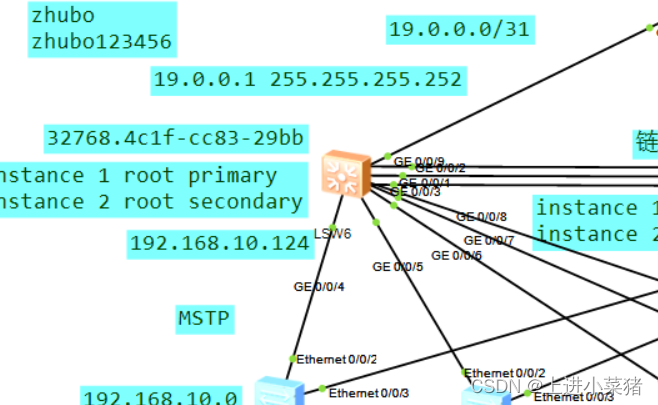
The Layer 3 switches at the aggregation layer are configured as follows:
First configure the ip address of the following vlan10 port as:
interface Vlanif10
ip address 192.168.10.124 25
The vlan60 configuration of the link router is:
interface Vlanif60
ip address 19.0.0.1 255.255.255.252

Marked in the picture:
interface Vlanif60
ip address 29.0.0.1 255.255.255.252
Release the vlan of the above ports, allowing the specified vlan
OSPF:
Network current network segment anti-mask
ospf 1
area 0.0.0.0
network 192.168.20.0 0.0.0.255
network 192.168.30.0 0.0.0.255
network 11.1.1.1 0.0.0.0
network 19.0.0.1 0.0.0.0
network 192.168.10.0 0.0.0.255
The router configuration is as follows:
First configure the interface ip:
The GigabitEthernet0/0/1 port is configured as follows:
interface GigabitEthernet0/0/1
ip address 19.0.0.2 255.255.255.252
The GigabitEthernet0/0/2 port is configured as follows:
interface GigabitEthernet0/0/2
ip address 29.0.0.2 255.255.255.252

Configure ospf:
Enter ospf 1 to view:
ospf 1
default-route-advertise
area 0.0.0.0
network 19.0.0.2 0.0.0.0
network 29.0.0.2 0.0.0.0
network 33.1.1.1 0.0.0.0
Network current network segment anti-mask
Communication detection:
ping 29.0.0.2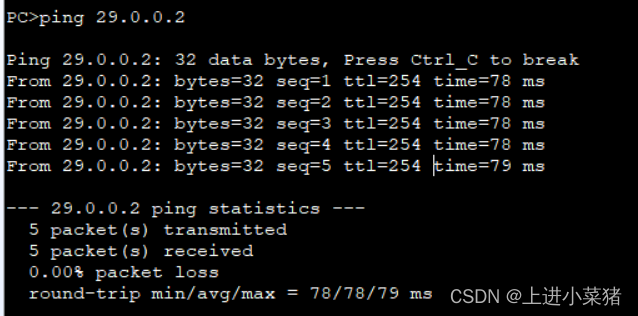
ping 33.1.1.1
OSPF configuration is basically completedneed.
Check the router's routing table;
display ip routing-table
Layer 3 switch:
边栏推荐
猜你喜欢


随机推荐
如何设计一个注册中心
【论文笔记】Understanding Long Programming Languages with Structure-Aware Sparse Attention
经典动态规划问题的递归实现方法——LeetCode39 组合总和
Wang Shuang's Assembly Language Chapter 4: The First Program
Libpq 是否支持读写分离配置
线程的状态
recursive thinking
【UE虚幻引擎】UE5实现动态导航样条线绘制
Convert callback function to Flow
布局管理器
The separation configuration Libpq is supported, speaking, reading and writing
The difference between character stream and byte stream
How to import data from PG to kingbaseES
请你谈谈网站是如何进行访问的?【web领域面试题】
记录十条工作中便利的API小技巧
预测性维护学习之路
并查集介绍和基于并查集解决问题——LeetCode 952 按公因数计算最大组件大小
基于cRIO-904X搭建Simulink与Labview环境
去掉js代码文件所有注释
Interpretation of new features | MySQL 8.0 online adjustment REDO