当前位置:网站首页>CentOS7使用yum安装MySQL——指定版本
CentOS7使用yum安装MySQL——指定版本
2022-04-21 23:27:00 【any3321】
在CentOS中使用yum安装指定版本的MySQL
1、进入MySQL官网获取MySQL的yum源,顺序如下:
点击DownLoad ——> 点击下面的MySQL Community (GPL) Downloads ——> 点击MySQL Yum Repository ——> 根据自己CentOS的版本选择下载rpm包
2、将下载好后的rpm包放到CentOS服务器上(如:/opt/mysql下),之后安装rpm包
rpm -Uvh /opt/mysql/mysql80-community-release-el7-5.noarch.rpm
后面的路径根据存放的rpm包具体路径修改
3、查看服务器上是否已安装MySQL
yum list installed | grep mysql
如果已经安装MySQL的话,这时候需要先卸载,再重新安装,卸载指令如下:
rpm -e --nodeps mysql
不建议使用yum remove 来删除软件,因为会把所有相关的依赖包都删除。
4、使用yum查看MySQL的仓库,查看MySQL的版本
yum repolist | grep mysql

这时候能看到默认选择的MySQL版本是8,如果想要选择其它版本,比如5.7,那么禁用8的版本,开启5.7的版本。有两种操作方式:
1). 使用yum命令操作
禁用MySQL8版本
yum-config-manager --disable mysql80-community
使用MySQL5.7版本
yum-config-manager --enable mysql5.7-community
如果使用 yum-config-manager报错,那么是没有安装 yum-utils工具包,使用yum -y install yum-utils安装即可。
2). 直接修改yum的MySQL仓库文件,文件路径为/etc/yum.repos.d/mysql-community.repo
vim /etc/yum.repos.d/mysql-community.repo
将MySQL 8.0 Community Server下的enable设置为0,将MySQL 5.7 Community Server设置为1,之后保存退出。

这时候yum的MySQL仓库默认安装的版本切换为了5.7
5、安装MySQL
yum install -y mysql-community-server
6、MySQL安装完成后运行MySQL
systemctl start mysqld.service
查看MySQL的运行状态
systemctl status mysqld.service

运行成功
7、查看MySQL设置的root用户的初始密码(在5.7及以上的版本,安装好后会默认设置一个初始密码)
cat /var/log/mysqld.log | grep "password"

标红处为密码
8、登入MySQL,修改密码,设置允许远程登录
登录MySQL
mysql -u root -p
修改密码
ALTER USER 'root'@'localhost' IDENTIFIED BY 'new_password';
new_password就是你要设置的新的密码,注意:MySQL要求密码必须包含大小写特殊符号和数字。
设置允许远程登录(root用户)
update mysql.user set host = "%" where user='root';
刷新权限
flush privileges;
9、修改MySQL服务端的默认编码为utf8
查看MySQL的编码信息等,登入MySQL后输入
status;
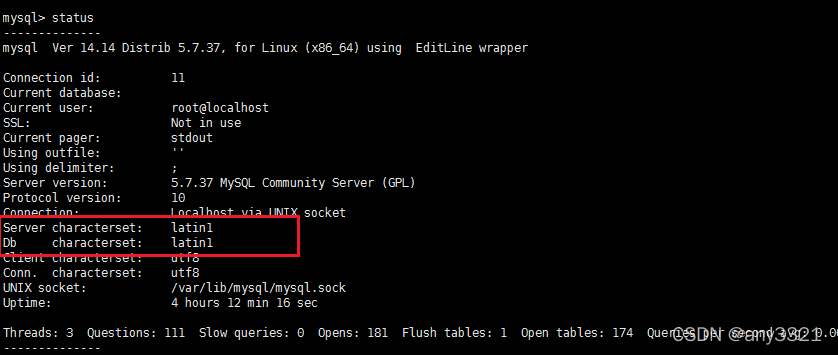
查询后发现服务端的编码并非UTF8,退出MySQL
编辑MySQL的配置文件
vim /etc/my.cnf
新增标红下图标红的内容即可

保存退出,重启MySQL,MySQL的编码即变为utf8
systemctl restart mysqld.service
版权声明
本文为[any3321]所创,转载请带上原文链接,感谢
https://blog.csdn.net/weixin_43606226/article/details/124322782
边栏推荐
- 系列文章分类汇总(第二期)
- 信噪比和信干噪比
- 早晚安打卡签到v2.0.1 公众号模块
- Finally, someone made it clear that this is the global one-piece network technology with low delay
- 339-Leetcode 单词规律
- Buuctf question brushing record
- Golang force buckle leetcode 2245 There can be at most a few trailing zeros in the product of the corner path
- Click, walk and move of characters in 3D sandbox game
- Basic concepts of audio and video and a simple introduction to ffmpeg
- IJCAI2022录用结果出炉!接收率15%,你中了吗?
猜你喜欢

Self made whole person computer applet

通过点击导入的文件或点击组件进入对应的组件页面进行编辑

Prompt, can you do it or not?

早晚安打卡签到v2.0.1 公众号模块

thinkphp开发卡密社区系统

Custom login successfully processed

从零开始自制实现WebServer(十六)---- 学习新工具CMake自动编写MakeFile 分门别类整理源文件心情愉悦

Why don't MySQL use select * as query criteria? (continuously updated)

新独立版抖音口红机全修复版本附视频教程

Ruffian Heng embedded: talk about the application and influence of system watchdog wdog1 in the startup of i.mxrt1xxx system
随机推荐
PP semantic retrieval system
2022/4/21
Red Star Macalline labor pains: "wield a knife" to reduce leverage and cut the net interest rate
PP语义检索系统
Selection and evolution of microservices under cloud native architecture
C language: simple profit and bonus
6、协议层次化和服务模型(重点)
Vs2019 configuring opencv4
继华为仓颉后,再现4款国产编程语言,形式多样,有一款0代码
87 r K-means, hierarchical clustering, implementation of EM clustering
Mobile app Games / software / resource download station / software box source code
点滴浓缩洁净,洗衣液行业的破局之路
Ruffian Heng embedded: talk about the application and influence of system watchdog wdog1 in the startup of i.mxrt1xxx system
Basic concepts of audio and video and a simple introduction to ffmpeg
Buuctf question brushing record
NN in pytoch Brief introduction to adaptive avgpool2d (output_size)
SWOOLE高性能内存数据库的使用和配置教程
.100滚轮事件
Classified summary of series articles (second issue)
.101键盘事件