当前位置:网站首页>Fast r-cnn code detailed annotation data shape
Fast r-cnn code detailed annotation data shape
2022-04-22 01:13:00 【PD, I'm your true love fan】
Faster R-CNN Code combat – Panden's in-depth study notes
List of articles
Data set introduction
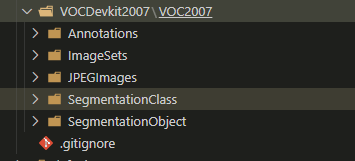
The data set used is VOCDevkit2007/VOC2007
-
Annotation: XML file , Is the annotation data for framing the image

-
ImageSets: The number and attribute of the picture

-
JPEGImages: Store image

-
The following doesn't work , Those do semantic segmentation … later
Data processing

First look at combined_roidb

among get_roidb It will call the data set written in API Call method of , This place can be directly used as what others have made , Have a look API What the given data looks like
-
roidb

-
imdb

RoIDataLayer
ad locum RoIDataLayer Mainly to disrupt the order , There's no need to disrupt the order here ; And the last one RoIDataLayer The data is specially fed to Fast R-CNN, To train Fast R-CNN, So when initializing here , It's enough roidb The data of

get_output_dir
get_output_dir It's mainly about pre training VGG Save up , Use it in the back
Trian The process
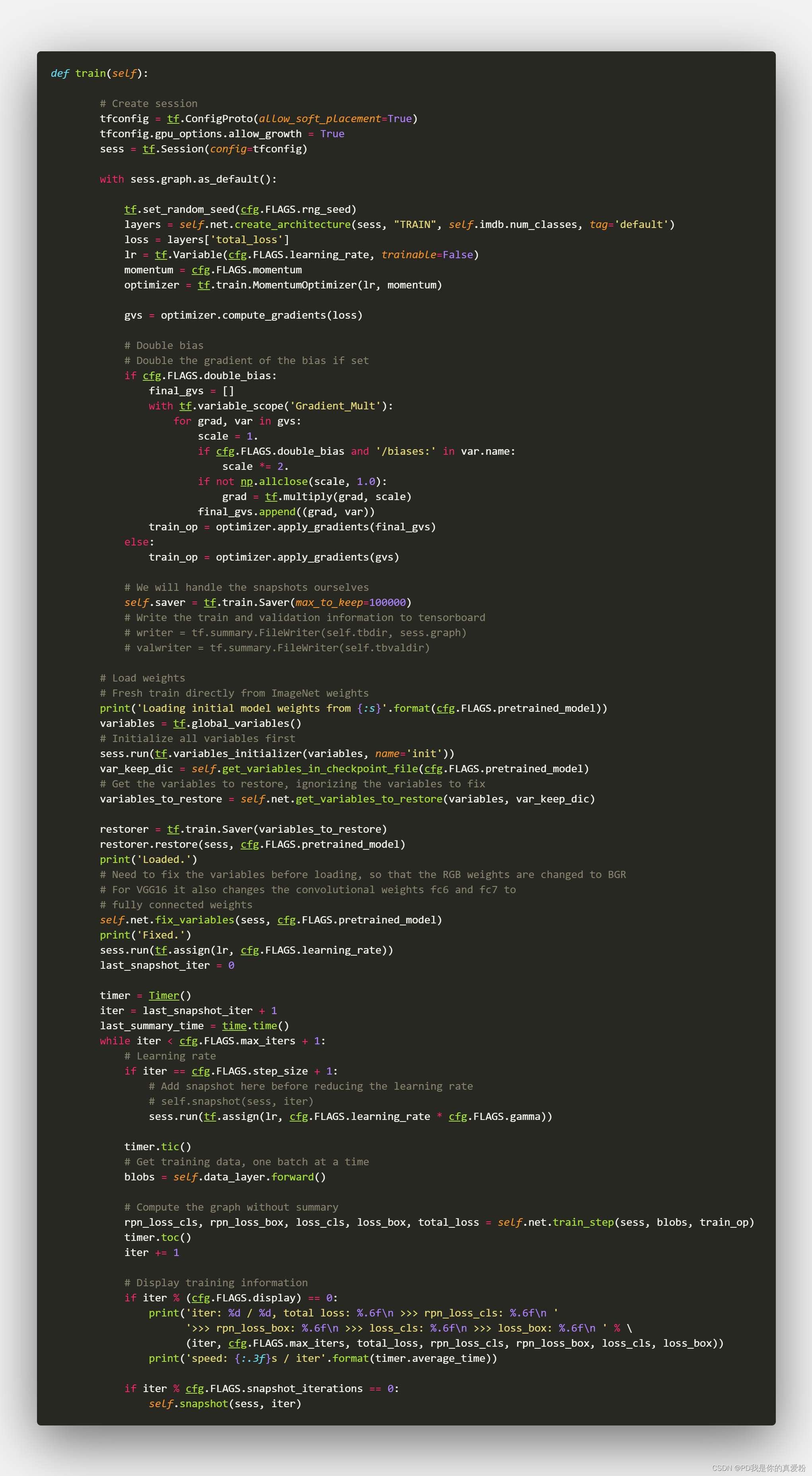
There's nothing to see in front , The key is this sentence layers = self.net.create_architecture(sess, "TRAIN", self.imdb.num_classes, tag='default')
create_architecture

The front is not the key , The key is this sentence self.build_network(sess, training)
build_network

Build head
Here is the construction of a VGG16 It's just the Internet

Build RPN
Here is how to build RPN Network
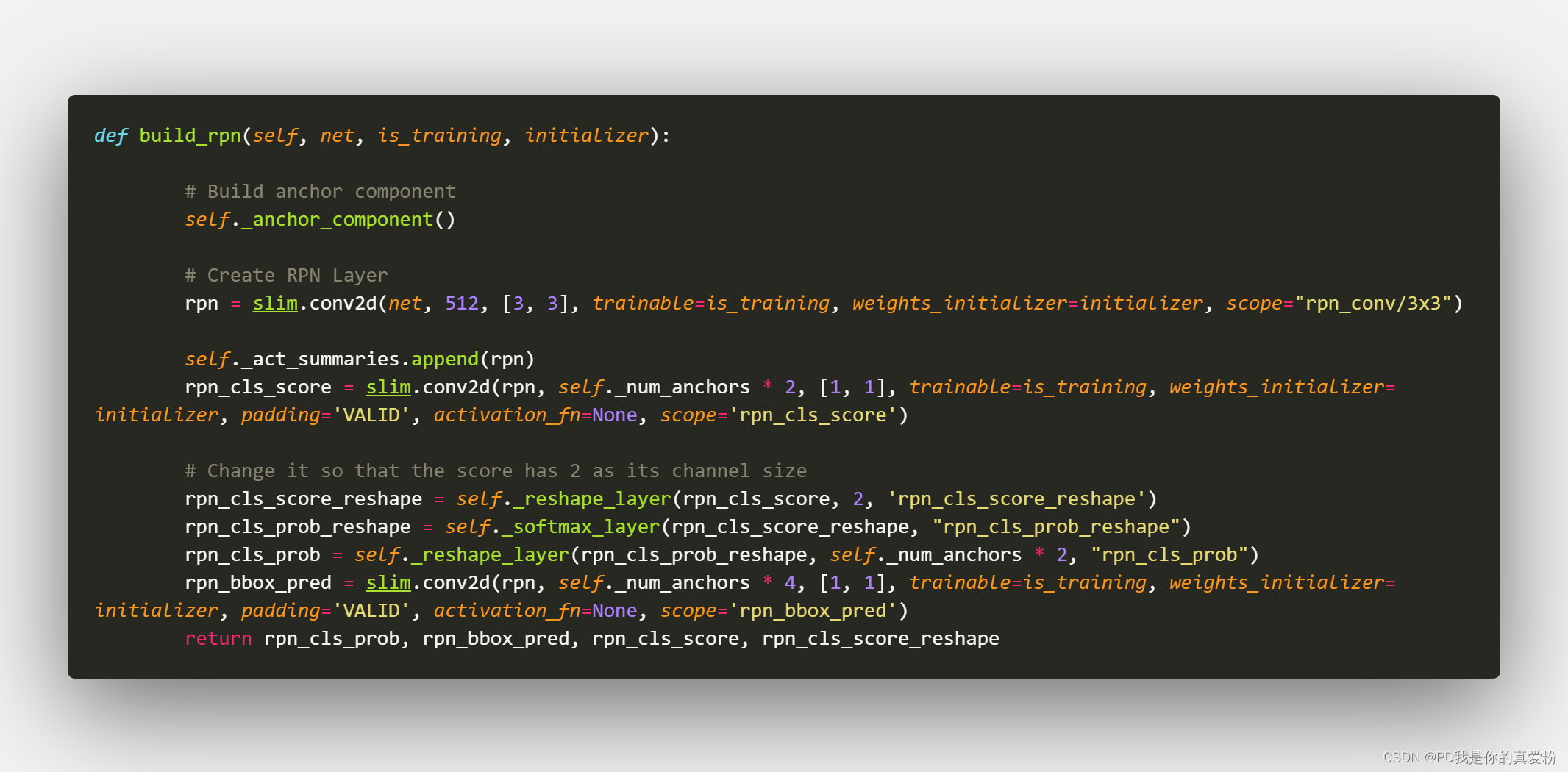
Let's talk about the data shape here , because tf Of tensor It's a static structure , Without data coming in, you can't see the size , Let's simulate it here …
Suppose the size of the picture taken at the beginning is shape=(333,500,3) The index number is 1807
1. forward
Because in Train When , Would call RoIDataLayer Of forward Method , First look at forward Method

1.1 Into the _get_next_minibatch in

1.1.1 _get_next_minibatch_inds Method , Get the index of small batch data

1.1.2 get_minibatch Method

1.1.2.1 The core is _get_image_blob

One of them if Judgment mainly refers to the enhancement of judgment data , Because it's horizontal enhancement , So flip the picture horizontally
The key is prep_im_for_blob Method The ratio of the generated picture to the scaled picture
1.1.2.1.1 prep_im_for_blob
Zoom the picture to the desired size (600,1000) Here is mainly to scale the short edge to 600, Then the long side follows the change , If it exceeds, cut it off , Don't care if you don't exceed , Slightly different from the original paper

go back to 1.1.2 get_minibatch Method
- im_scale: Zoom the picture 1.8
- blobs[‘data’]: It's a picture of a batch ( It's just one ) After scaling, the mean value is normalized shape=(600,901)
- blobs[‘gt_boxes’]: Is a two-dimensional array ,shape=(K,5) The first four columns are the scaled coordinate values , The fifth column is the category number of the box
- blobs[‘im_info’]: Is a one-dimensional array. The first two are the width and length of the picture, and the last one is the scaling , [600,901,1.8]
go back to create_architecture, The first three lines are to accept just now forward Exported data

go back to _anchor_component

- Height=600/16=38
- Weight=901/16=57
38*57 The corresponding is Bottom The area of ( namely VGG Coming out Feature Map Size )
tf.py_func function
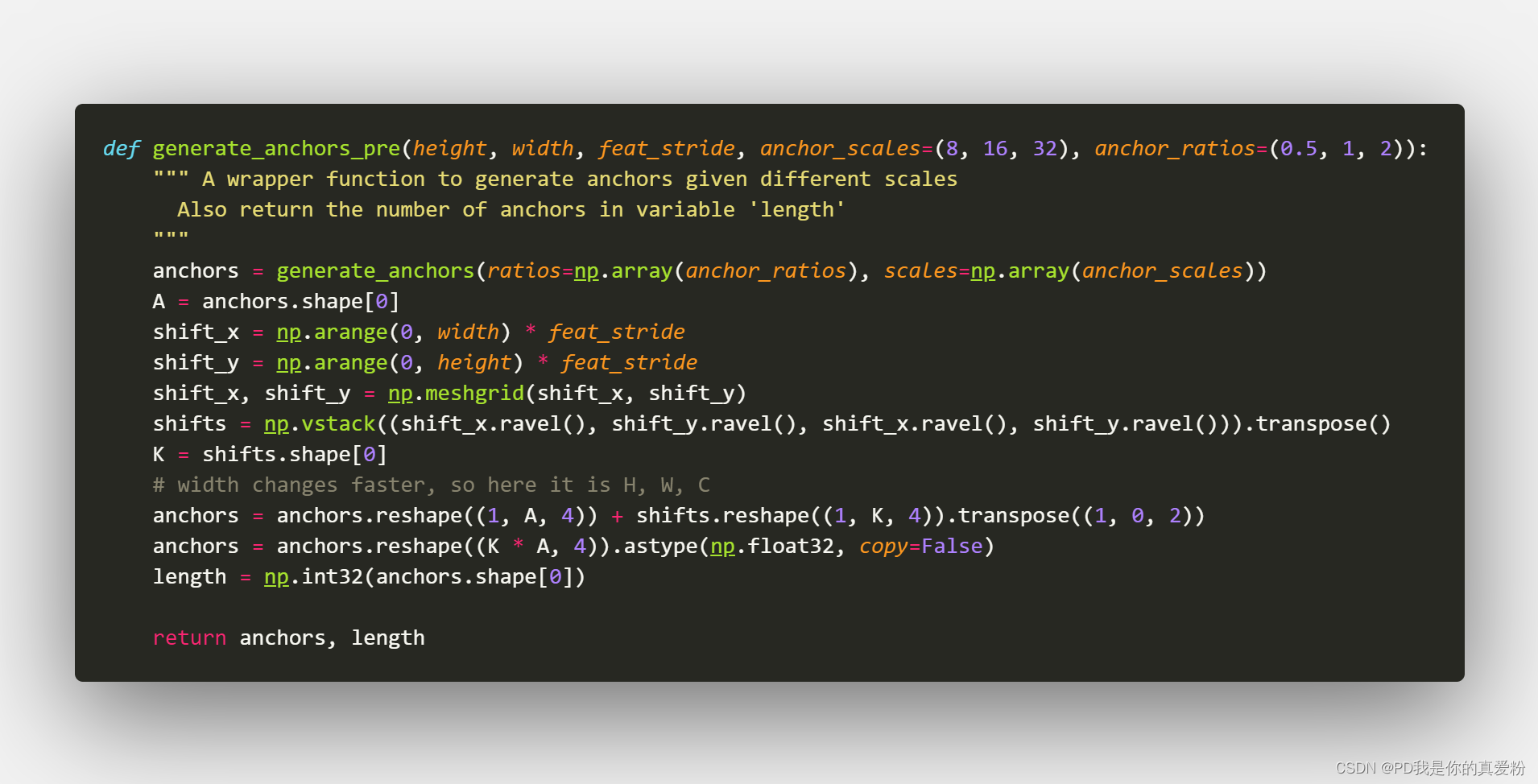
The purpose of this function is to put tensor The operation of is changed to numpy Arithmetic , Easily change tensor, The core operation function is generate_anchors_pre
2.1 generate_anchors_pre
2.1.1 generate_anchors
generate_anchors The function was written by the original author

The main thing is to generate that Anchor The corresponding nine Anchor boxes, It should be emphasized that : Anchor boxes Follow Anchor Walking , and Anchor yes Featrue Map One pixel on , as long as Anchor unchanged Anchor boxes, As for the back Predict boxes Want to ground truth near , That will Anchor boxes Translated ( It's equivalent to making a copy of , Take it again train),Anchor boxes It is the same.
Generated in this function anchors In fact, it's every Anchor boxes The upper left corner and the lower right corner of Relative coordinates
array([[ -83.,  -39.,  100.,   56.],
      [-175.,  -87.,  192.,  104.],
      [-359., -183.,  376.,  200.],
      [ -55.,  -55.,   72.,   72.],
      [-119., -119.,  136.,  136.],
      [-247., -247.,  264.,  264.],
      [ -35.,  -79.,   52.,   96.],
      [ -79., -167.,   96.,  184.],
      [-167., -343.,  184.,  360.]])
2.1.2 shifts
shifts By Anchor Composed of central coordinates shape=(K,4)(K=38*57=2166) Array of , In fact, as long as shape=(K,2) Can describe Anchor The position of the central coordinates , And the reason for four , It's to make Anchor boxes The relative coordinates of the upper left corner and the lower right corner of can be directly connected with shifts The operation becomes absolute coordinates

Last 2166 individual Anchor And 9 individual Anchor boxes Perform related operations , Again reshape become (2166*9=19494), There is... In all 19494 Boxes ( It is the same as that in the paper 2 Ten thousand, almost )
go back to Build RPN
Next floor 3*3 Convolution , Another floor 1*1 Convolution
- net --> 3*3 Convolution
- (1,38,57,512)
- 1*1 Convolution
- rpn_cls_score(1,38,57,18)
- _reshape_layer
- (1,18,38,57)
- (1,2,513,38)
- rpn_cls_score_reshape(1,513,38,2)
- _softmax_layer
- (19494,2)
- (1,513,38,2)
- _reshape_layer
- (1,2,513,38)
- (1,18,57,38)
- rpn_cls_prob(1,57,38,18)
- 1*1 Convolution
- (1,38,57,51)
- rpn_bbox_pred(1,38,57,36)

Build proposals
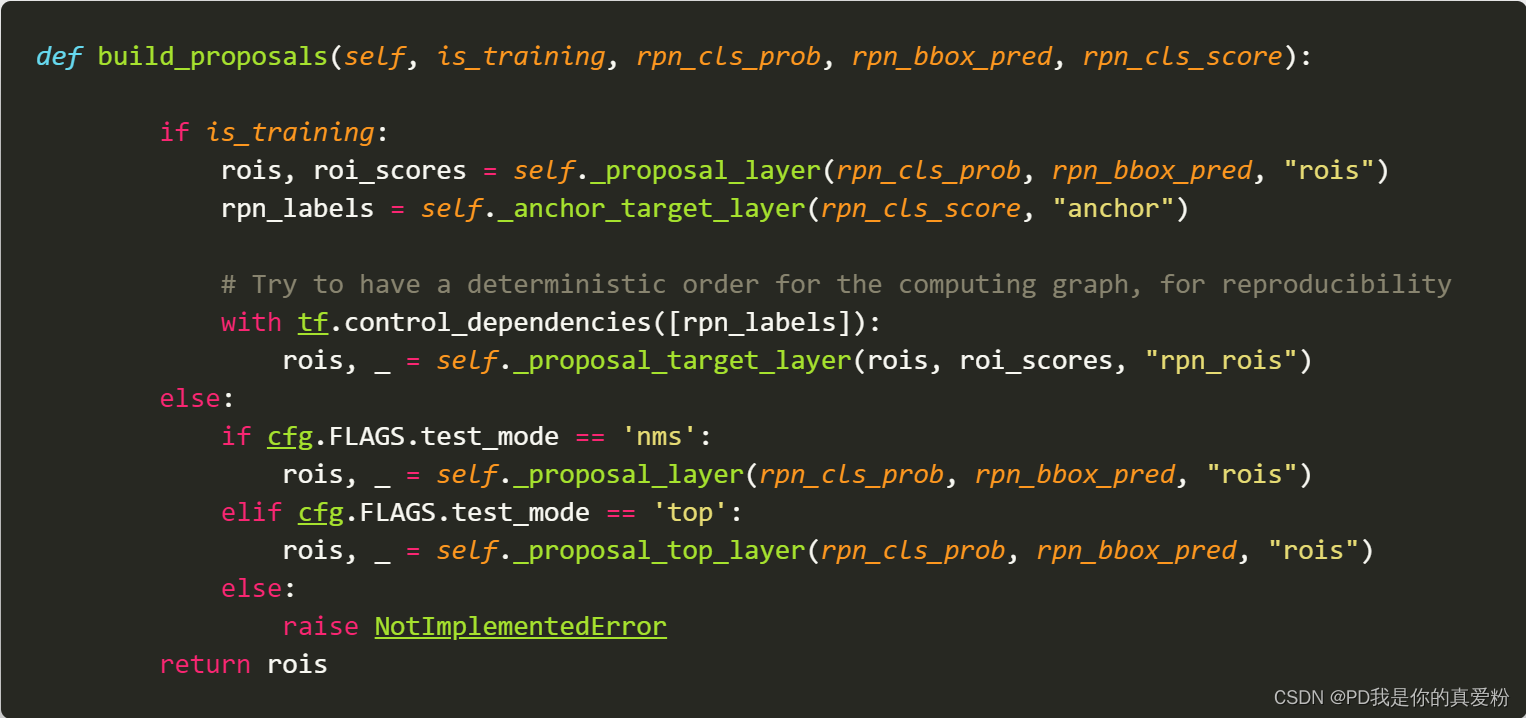
The core is three sentences
- _proposal_layer It's equivalent to predicting , For the back ROI pooling To use the candidate box
- _anchor_target_layer to RPN Positive and negative examples of network preparation
- _proposal_target_layer
_proposal_layer

3.1 proposal_layer

- pre_nms_topN: 12000
- post_nms_topN: 2000
- nms_thresh: 0.7
- im_info: 600
- scores: (19494,1), It's the one in front rpn_cls_prob(1,57,38,18) Take the last nine of the fourth dimension , Because the example prob Often the higher , So I'm in the back , Here is to take out the positive example , Back reshape become (19494,1)
- rpn_bbox_pred: (19494,4), take rpn_bbox_pred(1,38,57,36)reshape become (19494,4)
3.1.1 bbox_transform_inv
- Passed in anchor in front shifts It is said that shape(19494,4) On the original drawing 19494 A box corresponds to 4 A coordinate , It's the subscript in the paper a a a Of x , y , w , h x,y,w,h x,y,w,h

- Passed in rpn_bbox_pred: (19494,4) Represents the position of the predicted box ,( It should be ) It's in the paper x , y , w , h x,y,w,h x,y,w,h, But it's a little different here , there rpn_bbox_pred Is the predicted value and the original Anchor boxes The offset , We know , Prediction can directly predict the value , Can also predict residuals , This is equivalent to the prediction residual
- The output of the function is... In the paper x , y , w , h x,y,w,h x,y,w,h

3.1.2 clip_boxes
clip_boxes Is to cut the prediction box , If it is larger than the original picture, don't

3.1.3 NMS
I said this when I read the paper before , I won't go into that

3.1.4 other
The rest is to NMS The next box , Control in post_nms_topN Within the scope of , If there are more, remove the ones with low scores , Don't care if it's less
- rois = Return value blob: The first column is batch The index number of , The last four columns are the position coordinates of the filtered box
- roi_scores = Return value scores: Framed scores
_anchor_target_layer

4.1 anchor_target_layer
This function is also written by the original author …

- rpn_cls_score: (1,38,57,18) It's not softmax Transformed Z value
- all_anchors: shifts All boxes generated in
- A: 9
- total_anchors: 19494
- K: 2166
- im_info: 600
- height: 38
- width: 57
First, remove all boxes beyond the figure ( Can pass **_allowed_border** To control how much more is tolerable )
Be careful : Why not build at the beginning anchor boxes Get rid of him when you need to , But only when processing the sample ?
Because when it's really used , There may be objects in the corners of the picture , At this time, you only need to cut the box , and gt Training set ground truth Always in the picture , It is impossible to go beyond the figure , Therefore, the box of the training set beyond the graph should be removed
Then there is the label label: 1 is positive, 0 is negative, -1 is dont care
Filter the rest of the above Anchor And ground truth Calculate the overlap , because bbox_overlaps The function is called repeatedly , A lot of calls , The author compiles it into C, It's turned into pyd, Can't see , But it's not hard to understand this function , It's just calculation IOU Of
- overlaps: Two dimensional array (N,W) N Express ROI The number of ,W Express GT The number of , It's filled with IOU
- argmax_overlaps: One dimensional array (N,) Indicates which... The candidate box is associated with GT Of IOU Maximum , It's filled with GT The index number of
- max_overlaps: One dimensional array (N,) And argmax_overlaps of ,argmax_overlaps It's an index number , What's installed here is IOU value , Two one-to-one correspondence
- gt_argmax_overlaps: One dimensional array (W,) To express with GT The index number of the candidate box with the largest overlap
- gt_max_overlaps: One dimensional array (W,) And gt_argmax_overlaps of , What's installed here is IOU value
- gt_argmax_overlaps: Search again , Because there may be such a situation , Namely
overlaps.argmax(axis=0)You get only one value , But the two largest possible values are equal , thatargmaxOnly the first index number will be returned , Search again to find all gt_max_overlaps Equal candidate boxes , therefore gt_argmax_overlaps The final shape may be larger than W
Then comes the real standard dataset
-
Relevant partition parameters

-
rpn_batchsize: 256, among 128 For example ,128 The negative example is
From the top down :
- max_overlaps Less than 0.3 The candidate box is divided into negative examples
- gt_argmax_overlaps All are classified as positive examples
- max_overlaps Greater than 0.7 The candidate boxes are divided into positive examples
- Random selection 128 The true example of ,128 A negative example , The extra will label The assignment is -1
4.1.1 _compute_targets
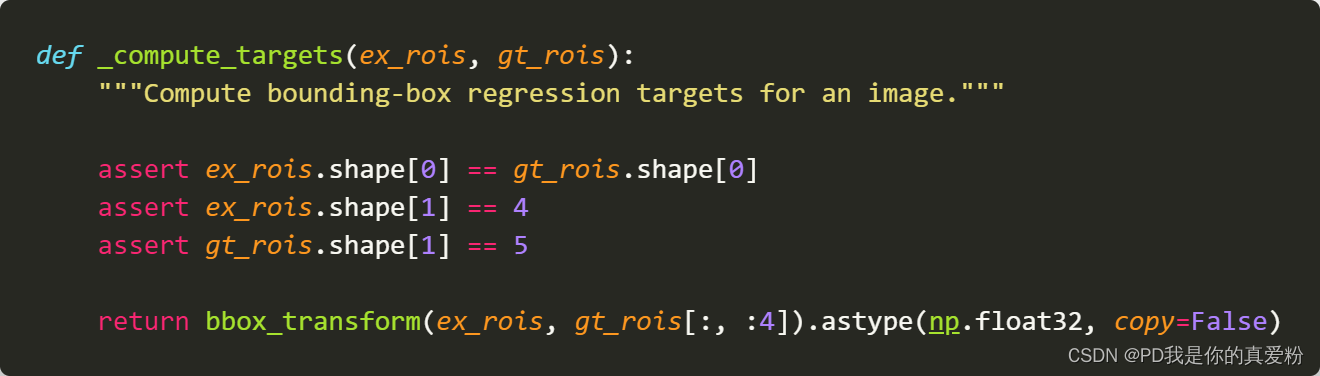
_compute_targets The main function of the method is : Calculate each Anchor boxes The one closest to them GT How far is the difference between the positions of
4.1.1.1 bbox_transform

This can correspond to the of the paper t x ∗ , t y ∗ , t w ∗ , t h ∗ t_x^*,t_y^*,t_w^*,t_h^* tx∗,ty∗,tw∗,th∗
In the end, I put t x ∗ , t y ∗ , t w ∗ , t h ∗ t_x^*,t_y^*,t_w^*,t_h^* tx∗,ty∗,tw∗,th∗ Place in rows , Got target shape( Less than 19494,4)( Because of the input ex_rois It's filtered )
So back to 4.1 anchor_target_layer
- bbox_targets: ( Less than 19494,4) Filtered anchor boxes Of t x ∗ , t y ∗ , t w ∗ , t h ∗ t_x^*,t_y^*,t_w^*,t_h^* tx∗,ty∗,tw∗,th∗ Place in rows
- bbox_inside_weights: ( Less than 19494,4) Filtered anchor boxes The weight of , If it is labels by 1, Then that 4 The value of that dimension is (1,1,1,1), Otherwise (0,0,0,0)
- bbox_outside_weights: ( Less than 19494,4) Corresponding to the original text loss Of 1 N r e g \frac{1}{N_{reg}} Nreg1, All the same, positive and negative , Are the reciprocal of the number of positive examples , namely 1 n l a b e l = 1 \frac{1}{n_{label=1}} nlabel=11

4.1.2 _unmap
_unmap The function is to reduce the number of operations just performed to 19494 Box of , restore 19494, Because when you really train , The box is still 19494, It's just that we don't want to use those out of bounds boxes , Now go back to ,label Still set to -1, It doesn't affect the result

- labels: (19494,)
- bbox_targets: (19494,4)
- bbox_inside_weights: (19494,4)
- bbox_outside_weights: (19494,4)
go back to 4.1 anchor_target_layer
- rpn_labels: (1,1,9*38,57) take labels(-1,) First reshape become (1,38,57,9) Again reshape become (1,9,38,57) Again reshape become (1,1,9*38,57)
- rpn_bbox_targets: (1,38,57,9*4) take bbox_targets(19494,4) reshape become (1,38,57,9*4)
- rpn_bbox_inside_weights: (1,38,57,9*4)
- bbox_outside_weights: (1,38,57,9*4)
_proposal_target_layer
_proposal_target_layer It's for the final Fast RCNN Preparation of positive and negative samples , In execution _proposal_target_layer Wait before _anchor_target_layer The execution may end because _anchor_target_layer There is bbox_overlaps, And this function also needs to use bbox_overlaps, So avoid GPU Let's explode …
Input (NMS The next box , Control in post_nms_topN Range )
- rois: (2000,5) The first column is batch The index number of , The last four columns are the position coordinates of the filtered box
- roi_scores: (2000,1) Box score scores

5.1 proposal_target_layer

- all_rois: rois(2000,5) The first column is batch The index number of , The last four columns are the position coordinates of the filtered box
- all_scores: roi_scores: (2000,1) Box score scores
if cfg.FLAGS.proposal_use_gtI want to make sure whether to put GT Used for training , Here is False, It doesn't matter- num_images: 1
- rois_per_image: 256
- fg_rois_per_image: 64
5.1.1 _sample_rois
_sample_rois The function is mainly to generate roi And related scores And the final adjustment position of the frame

- overlaps: (2000,W) W yes GT The number of
- gt_assignment: (2000,) Express ROI With which GT Of IOU Maximum , It's filled with GT The index number of
- max_overlaps: (2000,) Express ROI And the biggest IOU Of GT Of IOU, It's filled with IOU Value
gt_boxes=blobs['gt_boxes']: (W,5) The first four columns represent GT Coordinates of , The latter column represents the category number- labels: (2000,) Express ROI Which category are you most likely to fall into
- fg_inds: One dimensional array Express max_overlaps Medium IOU Greater than 0.5 Those of ROI The index number of
- bg_inds: One dimensional array Express max_overlaps Medium IOU Less than 0.5 But it's bigger than 0.1 Those of ROI The index number of
- Then the logical judgment , Is to ensure that the positive and negative examples meet the requirements … All in all 256, A positive example is 64 individual , The rest is negative
- keep_inds: The index numbers of positive and negative examples form a list ( The positive example is before , The negative example is after )
labels = labels[keep_inds]Yes labels To filter The filtered shape is (256,1)labels[int(fg_rois_per_image):] = 0: Mark the negative example as 0- rois: The coordinates of the box of positive and negative examples
- roi_scores: Positive and negative examples of the box scores
- bbox_target_data: (256,5) The first column is label The last four columns are targets( To look down )
- bbox_targets: (256,84) It is equivalent to making a change in the position of the box of each category One-hot code , Belong to the first k The box of class will only be in [4k,4k+4] The position of has coordinate values
- bbox_inside_weights: It's just one in [4k,4k+4] The location of (1.0, 1.0, 1.0, 1.0) Array of
5.1.1.1 _compute_targets
gt_boxes[gt_assignment[keep_inds], :4] The function of is to form the same shape as the positive and negative examples GT Coordinates of , Because it's calculating loss A positive example needs its corresponding GT Box to calculate the offset …
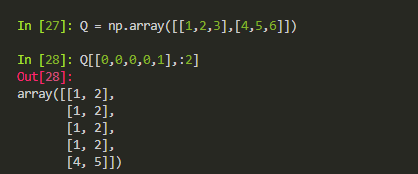
Although this function is similar to the previous _compute_targets Name the same , But the specific aspects are different , I guess the author forgot to change his name

- ex_rois: (256,4) 256 The coordinates of the positive and negative examples of
- gt_rois: (256,4) 256 The positive and negative examples of are the closest GT Coordinates of
- labels: (256,1)
- targets: bbox_transform As mentioned earlier, this method , Out came target shape(256,4)
- The last one to return : (256,5) The first column is label The last four columns are targets
5.1.1.2 _get_bbox_regression_labels
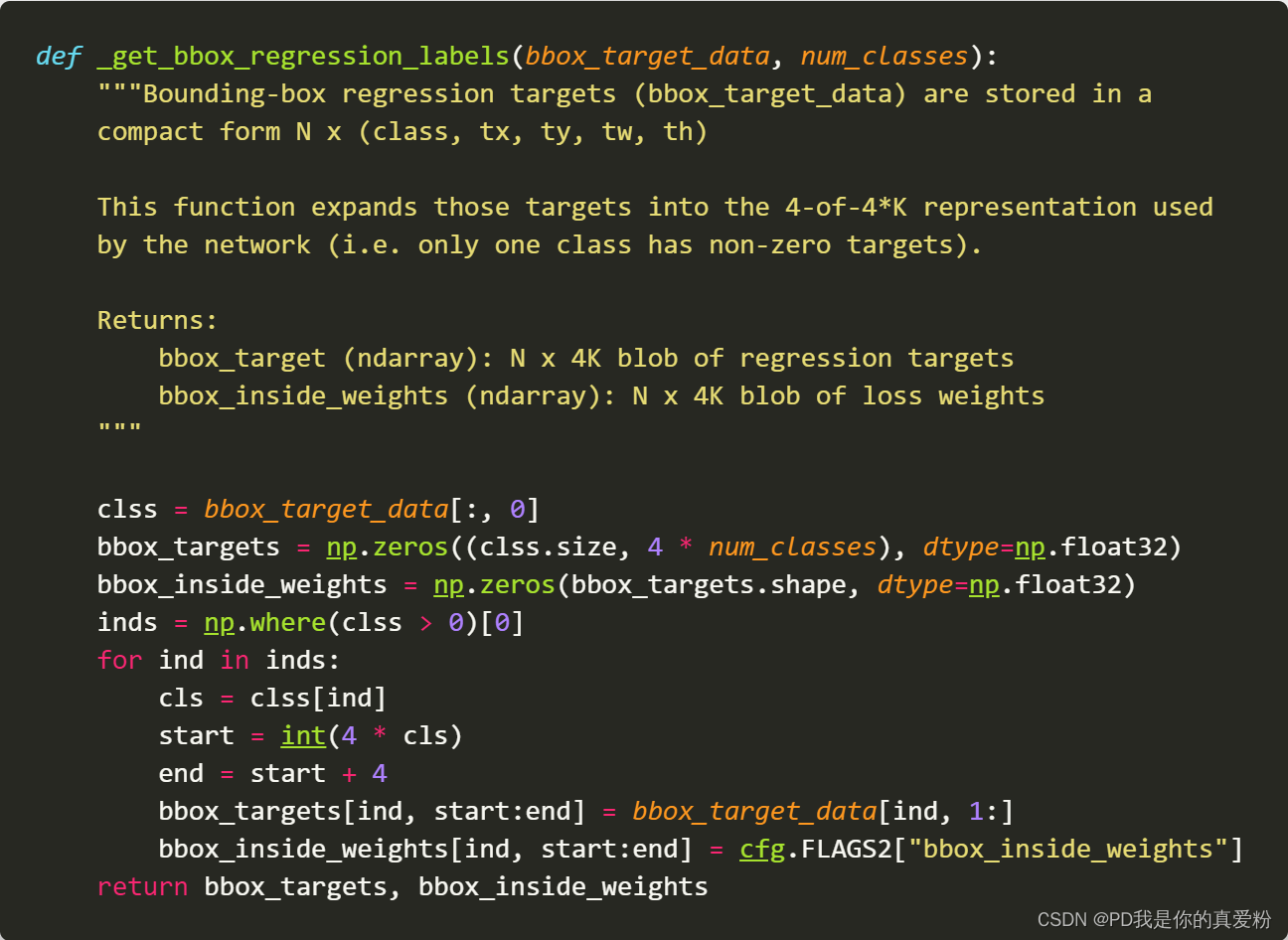
- bbox_target_data: (256,5) The first column is label The last four columns are targets( To look down )
- num_classes: 21
- bbox_targets: (256,84) It is equivalent to making a change in the position of the box of each category One-hot code , Belong to the first k The box of class will only be in [4k,4k+4] The position of has coordinate values
- bbox_inside_weights: It's just one in [4k,4k+4] The location of (1.0, 1.0, 1.0, 1.0) Array of
go back to _proposal_target_layer
- rois: (256,5)
- roi_scores: (256,)
- labels: (256,)
- bbox_targets: (256,21*4)
- bbox_inside_weights: (256,21*4)
- bbox_outside_weights: (256,21*4)
build_predictions

- First floor ROI Pooling layer
- The first floor is flattened
- Two layers are all connected
- First floor Output layer
- cls_score: softmax Before Z value
- cls_prob: softmax Then the probability value
- Another layer Output layer
- bbox_prediction: Linear transformation without activation function
go back to build_network
The next step is to link the information such as prediction and score to net On
go back to create_architecture
_add_losses
_add_losses The way is to put four loss Merge into one loss( Here is the whole training , Unlike the separate training in the paper , But the paper also says that you can train as a whole , Even in the paper loss With the loss It's the same )

go back to Train
The hardest thing to do create_architecture It's done , Then there is the routine process , It's just that it's friendly here , All kinds of printing, saving and so on , No more details …
Remember to put the file in a folder without Chinese path …


版权声明
本文为[PD, I'm your true love fan]所创,转载请带上原文链接,感谢
https://yzsam.com/2022/04/202204220032504983.html
边栏推荐
- js数组对象去重
- [knowledge atlas] tushare data acquisition and display (1 / *)
- Faster R-CNN代码详解 标注数据形状
- Beauty salon management system based on SSM (with source code + project display)
- Rpcx source code learning - server side
- MySQL basic collection
- What are the main constraints on the development of mobile phone hardware performance
- 华为云云主机体验有感:你的软件收纳专家
- OTS parsing error: invalid version tag solution
- Public testing, exclusive, penetration testing, picking up ragged tips
猜你喜欢
【ACM/webank】#491. Incremental subsequence (use HashSet to record and prevent repeated subsequences)
Honda North America product planning release! Insight hybrid has stopped production, and CR-V and accord will be released soon

Mysql database common sense storage engine

智汀如何连接华为智能音箱?

2022年4月21日,第14天

3D 沙盒游戏之人物的点击行走移动

作文以记之 ~ 二叉树的中序遍历

诚邀报名丨首期OpenHarmony开发者成长计划分享日

DPI released the latest progress report on AI drug research and development

MySQL advanced common functions

随机推荐
Ideal one finally replaced? Brand new product sequence named L8, heavily camouflaged road test exposure
Cloud native enthusiast weekly: looking for open source alternatives to netlify
While hoarding goods, it's time to recognize cans again
Servlet
js查找数组下标
Live broadcast of goods, delivery of takeout and freight transportation. Airlines rely on sidelines to "return blood"
Why does the web login need a verification code?
2022年Redis最新面试题第1篇 - Redis基础知识
On software development skills of swen2003
How can zhiting connect Huawei smart speakers?
JS array object de duplication
Analysis and interpretation of the current situation and challenges faced by enterprise operation and maintenance in the digital era
不能再简单的意向锁
七朋元视界打破常规的社交模式构建多样化场景社群
ZGC garbage collector for JVM from getting started to giving up
From the perspective of source code, what are the ways to create thread pool
短视频APP相关推荐资源位的高扩展高可用工程实践
Pytorch安装及GroupSpatialSoftmax报错解决
logstash导入movielens测试数据
Several schemes of single USB to multi serial port