当前位置:网站首页>【Win10】若干睡眠问题及对策
【Win10】若干睡眠问题及对策
2022-08-08 04:26:00 【Flying with Python】
目录
前言
本文是一个记录。
【系统环境】Win10 工作站版
1. 问题:执行睡眠后1秒钟即唤醒
执行睡眠后,很明显,电脑进入了睡眠状态,键盘指示灯熄灭,风扇无声。但仅仅1秒钟,即自动唤醒,进入登录页面。
1.1. 原因分析
(可能)跟光电鼠标的灵敏有关。
1.2. 对策
- 设置鼠标不能唤醒即可。
- 操作步骤:
【Win + R】
→键入【devmgmt.msc】,回车,等待2s
→在设备管理器点开【鼠标及其他指针设备】
→右键点击【HID-compliant mouse】
→点击【属性】
→点击【电源管理】
→不勾选【允许此设备唤醒计算机】
→点击【确定】
2 问题:夜里或中午自动唤醒
2.1. 原因分析
(可能)有计划任务
2.2. 对策
2.2.1. 查看计划任务,基本上是升级程序,取消即可
【Win + R】
→键入【control schedtasks】,回车
→见下图
建议详细看一下这里:【Microsoft】→【Windows】→【UpdateOrchestrator】
2.2.2 设置电源选项属性
【Win + R】
→键入【powercfg.cpl】
→点击【更改计划设置】
→点击【更改高级电源设置】
→参考下图设置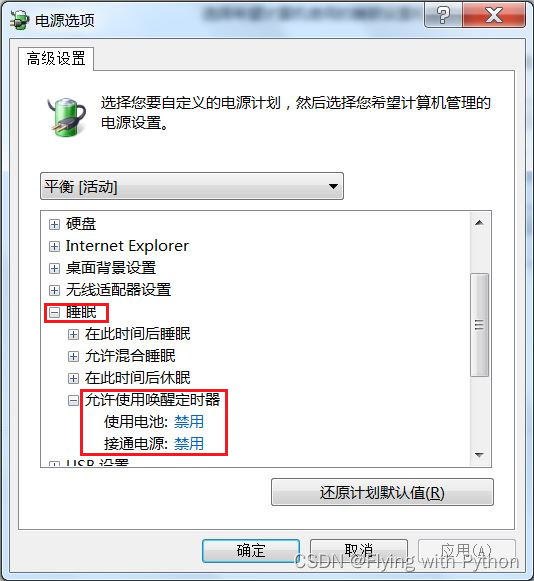
3 其他可能有用的对策
3.1. 设置本地组策略
【Win + R】
→键入【gpedit.msc】,回车,等待2s
→依下图依次选择并进入【睡眠设置】
→按你的需要进行设
3.2. 查看硬件唤醒事件
以 管理员身份 运行 Windows PowerShell
→键入【powercfg -a】:查看睡眠状态,一般S3非常好!
→键入【powercfg -lastwake】:查看上次唤醒电脑的设备
→键入【powercfg /devicequery wake_armed】:查看能唤醒电脑的设备
→键入【powercfg /devicequery wake_programmable】:查看所有能唤醒电脑的设备
→键入【powercfg /deviceenablewake “HID-compliant mouse (003)”】:允许鼠标唤醒电脑
→键入【powercfg /devicedisablewake “HID-compliant mouse (003)”】:禁止鼠标唤醒电脑
→键入【powercfg -waketimers】:查看计划任务
→键入【powercfg /requests】:查看有电源需求的进程、设备等
4. 推荐博文
5. 附:开启休眠
【Win + R】
→键入【powercfg -h on】

边栏推荐
猜你喜欢

NLP之基本介绍

新零售项目及离线数仓核心面试,,220807,,

Strong Net Cup 2019 - Casual Bet (Stacked Injection)

Building a High-Performance Platform on AWS Using Presto and Alluxio to Support Real-Time Gaming Services

Week 4 Step by step building multi-layer neural network and application (1 & 2)

07查询表达式 及 page分页、order 排序《ThinkPHP6 入门到电商实战》

监控工具Prometheus及项目总结,220805,,

L3-006 迎风一刀斩

08 获取器 withAttr、多连缀、whereRaw、事务、数据集《ThinkPHP6 入门到电商实战》

MySQL4(多表查询)
随机推荐
MySQL从入门到入土【20W字收藏篇】
【模板引擎】velocity
第4周 一步步搭建多层神经网络以及应用(1 & 2)
The 5 most mainstream project time management systems in China
一行代码统计文本中指定字符串出现的次数
C# "Original CSharp" 4th Chapter It is common for people to change in time, but it is difficult to know the succession of humanities
向往的开源之多YOUNG新生 | 从开源到就业的避坑指南来啦!
Strong Net Cup 2019 - Casual Bet (Stacked Injection)
实现Express中间件原理
Some excellent blog recommendations for Qt event learning reference
The effect of base 0 or base 1 on the number of image iterations
[Code Analysis] Graph small sample anomaly detection method: GDN: Few-shot Network Anomaly Detection via Cross-network Meta-learning
[Graph Basics] How to Define Few-Shot Learning on Heterogeneous Graphs: Heterogeneous Graph Few-Shot Learning
leetcode: 874. Simulate a walking robot
Knowledge of DisplayPort-DP interface
【论文分享】异质图上的小样本学习:HG-Meta: Graph Meta-learning over Heterogeneous Graphs
【多任务模型】《Multi-Faceted Hierarchical Multi-Task Learning for a Large Number of Tasks with Multi-dimens
Monitoring tool Prometheus and project summary, 220805,,
亚马逊云科技Build On学习心得
数据库缓冲区高速缓存中块的类型