当前位置:网站首页>How to test Android WebView for automated testing of dry goods app
How to test Android WebView for automated testing of dry goods app
2022-04-21 18:20:00 【Hua Weiyun】
Hybrid App( Hybrid mobile applications ) Is between Web-app、Native-app Between app, Essentially, Native-app Embedded in WebView Components , stay WebView Components can access Web App.Hybrid App While giving users a good interactive experience , And you have Web App cross-platform 、 Heat renewal mechanism and other advantages .
Android WebView stay Android On the platform is a special View, Use it to display web content .WebView The internal implementation uses the rendering engine to display View The content of , Provides Web pages forward and backward 、 Page enlargement 、 narrow 、 Search and other functions . Use WebView Testing requires the cooperation of developers to open a WebView The switch of .
WebView switch
WebView It's a browser embedded in mobile applications , stay Android 4.4 Before WebView The kernel uses WebKit,Android 4.4 Then I used Chrome As a built-in browser . It is used to load HTML Page controls . In the simulator (android6.0 edition ) The default is to open WebView On off , It can be debugged and tested directly WebView. When testing a real machine , Must be opened in the app WebView Commissioning switch . To enable the WebView debugging , Please be there. WebView Class setWebContentsDebuggingEnabled.
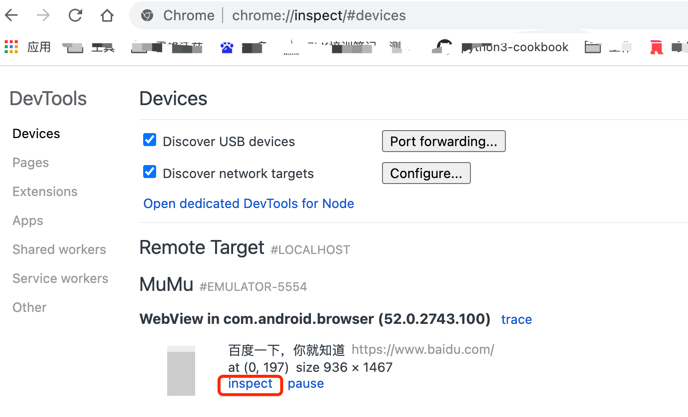
if (Build.VERSION.SDK_INT >= Build.VERSION_CODES.KITKAT) { if (0 != (getApplicationInfo().flags &\ ApplicationInfo.FLAG_DEBUGGABLE)) { WebView.setWebContentsDebuggingEnabled(true); } } After turning on this switch , Open the tested on the mobile terminal WebView page , Then on the computer side Chrome Enter... In the browser address bar “chrome://inspect” The... On the device will be displayed WebView list .
Click the... You want to debug WebView At the bottom of the inspect link , You can view the source code of this page . Through the source code, you can view and determine the element positioning expression .
If you encounter Chrome Browser version and Chromedriver Version mismatch problem , You can see :
https://ceshiren.com/t/topic/3275
WebView test
Switch to WebView page , You can use Selenium Operational elements .
driver.switch_to.context Method can switch from the native page to WebView page , The sample code is as follows :
webview = driver.contexts[-1] driver.switch_to.context(webview)WebView Case study
Snowball case , Open the snowball app , Click on “ transaction ”, Click on “A Account opening ” Go to the account opening page , Verify that the page is correct . Here's the picture :

def test_webview(self): # Click trade self.driver.find_element(MobileBy.XPATH, '//*[@text=" transaction "]').click() # Print the context of the current page print(self.driver.contexts) e = self.driver.contexts for context in self.driver.contexts[::-1]: if 'webview' in context.lower(): aim = context break # Switch context self.driver.switch_to.context(aim) # Click on 'A Account opening ' print(self.driver.window_handles) A_locator = (MobileBy.XPATH, '//*[@id="Layout_app_3V4"]/div/div/ul/li[1]/div[2]/h1') WebDriverWait(self.driver, 10).until(expected_conditions.element_to_be_clickable(A_locator)) Enter into APP after , Open a file containing H5 The page of , The system default is Native The context of . If you want to operate H5 On the element , You need to switch to WEBVIEW The context of .
The above code first passes through driver.contexts Find all contexts( That is context ), Loop through this contexts, Find the target WEBVIEW, Then switch to this WEBVIEW in , Then perform the corresponding operation . It can be used at this time Selenium The positioning mode of is to H5 The elements of the page .
Link to the original text
Get more :https://qrcode.ceba.ceshiren.com/link?name=article&project_id=qrcode&from=hwyun×tamp=1650524546
版权声明
本文为[Hua Weiyun]所创,转载请带上原文链接,感谢
https://yzsam.com/2022/04/202204211813094199.html
边栏推荐
- [牛客网刷题 Day4] JZ23 链表中环的入口结点
- [small program] Alipay applet custom pull down refresh component
- generic paradigm
- 靶机渗透练习77-DC9
- 年末我的Android面试复盘
- Composant tooltip: déterminer si tooltip est affiché en fonction du débordement de contenu
- MYCAT horizontal sub table (global table)
- C语言进阶第47式:递归函数分析
- Target penetration exercise 76-dc8
- Target penetration exercise 74-dc6
猜你喜欢




随机推荐
generic paradigm
移动平台WorkPlus集成化办公,打造企业全场景业务生态
The difference between integer, equals and = =
Target penetration exercise 74-dc6
About LINQ statements
Mongodb用户权限总结
redis启动服务和连接客户端
Target penetration exercise 71-dc3
随笔小杂记(六)——tqdm进度条显示出现多余行
CDF全球调查:软件交付性能停滞不前
华为、TCL、大疆
Kubernetes详解(三)——Kubernetes集群组件
CDF global survey: stagnant software delivery performance
C language operator summary
干货|app自动化测试之Andriod WebView如何测试
【pytorch图像分类】ResNet网络结构
可愛的Tommy C語言
业绩最好 C语言
移植openharmony之添加wifi驱动
关于Linq语句