当前位置:网站首页>Anaconda creates a new environment and installs the GPU version of pytorch
Anaconda creates a new environment and installs the GPU version of pytorch
2022-04-22 19:46:00 【Xiaobai learns knowledge】
1. Why create a new environment
Recent deep learning uses GPU Faster training , But when the program runs, it is found that the previous installation is CPU Version of pytorch. Originally wanted to put CPU Version of pytorch Delete , Then put on a new one GPU edition pytorch. But a search , It's a lot of trouble , Afraid of problems in the process , And some code written before is also CPU Version of , I'm afraid only GPU There will be problems with the version . therefore , I just thought of Anaconda I'll build a new one gpu Version environment , And then install it inside GPU Version of pytorch.
I found various schemes on the Internet , It doesn't work well in my environment , It took a lot of synthesis to finally solve , It's recorded here .
2. install CUDA
This reference, this link , It's very good , You can go and praise the big guy . Click here to view the
3. Create a new environment
Step1: Error introduction
The previous steps are OK according to the above link , But when I create the environment locally , It's all kinds of error reporting , Error is as follows :

solve :
I found many on the Internet , There may be a problem with the installation environment configuration . Last , It took several explorations to succeed . First , Find... In the following figure .condarc :

Then replace the contents with the following code , Remember to https Change it to http, Or you'll make another mistake :
channels:
  - defaults
show_channel_urls: true
channel_alias: https://mirrors.tuna.tsinghua.edu.cn/anaconda
default_channels:
  - http://mirrors.tuna.tsinghua.edu.cn/anaconda/pkgs/main
  - http://mirrors.tuna.tsinghua.edu.cn/anaconda/pkgs/free
  - http://mirrors.tuna.tsinghua.edu.cn/anaconda/pkgs/r
  - http://mirrors.tuna.tsinghua.edu.cn/anaconda/pkgs/pro
  - http://mirrors.tuna.tsinghua.edu.cn/anaconda/pkgs/msys2
custom_channels:
  conda-forge: http://mirrors.tuna.tsinghua.edu.cn/anaconda/cloud
  msys2: http://mirrors.tuna.tsinghua.edu.cn/anaconda/cloud
  bioconda: http://mirrors.tuna.tsinghua.edu.cn/anaconda/cloud
  menpo: http://mirrors.tuna.tsinghua.edu.cn/anaconda/cloud
  pytorch: http://mirrors.tuna.tsinghua.edu.cn/anaconda/cloud
  simpleitk: http://mirrors.tuna.tsinghua.edu.cn/anaconda/cloud
Step2: Create an environment
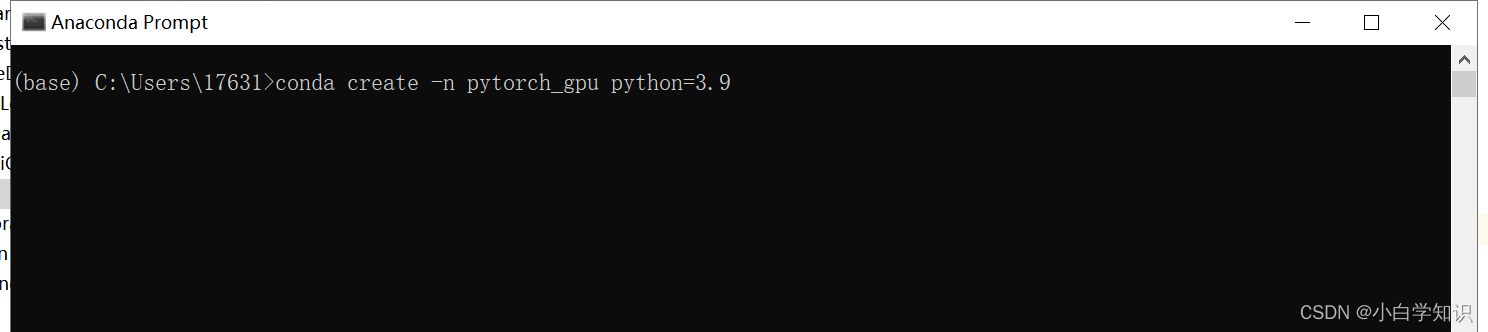
Go to the search box and find " Anaconda Prompt ", Then turn it on :

Then enter the code in it :
conda create -n pytorch_gpu python=3.9
# pytroch_gpu  It's the environment name
# python=3.9  It's what you want to install in the new environment python edition
Pictured :
After success , Enter the command as shown in the figure , Check whether the new environment is completed :

4. install GPU Version of pytorch
First , Click the link to select the corresponding pytorch, Click to get pytorch, Check it as shown in the figure below, and the installation command will appear :

secondly , open Anaconda Prompt terminal , Activate to the new environment , Then enter the command above , that will do ( You can run the command before , Turn off the computer firewall ):

Last , Test installed GPU Version of pytorch Can I call GPU, Enter the following commands in sequence :

If the display True, It means success ; conversely , You don't succeed , Then you can only go and see what's wrong .
5. Postscript
Environmental installation is really a very metaphysical thing , Be patient to solve !!!
版权声明
本文为[Xiaobai learns knowledge]所创,转载请带上原文链接,感谢
https://yzsam.com/2022/04/202204221943285265.html
边栏推荐
- 08-UDFs
- 怎么才能申购新股呢?申购新股安全吗?
- . net using supersocket to build socket server
- [AI vision · quick review of robot papers today, issue 33] Thu, 21 APR 2022
- 10.4.4 51单片机控制系统8个LED“跑马灯”实验
- 哪个品牌的运动耳机比较好、好用的运动耳机推荐
- Quarkus dependency injection 9: bean read / write lock
- 关于log4j2的重新加载,以及不同级别日志输出到不同日志文件
- MySql根据起始结束日期获取每一天的集合
- LeetCode_ 343 integer split
猜你喜欢

C develop OPC client

LeetCode_ 343 integer split

sqlserver可用空间过大,回收未用空间
![[eight part essay] thread safety](/img/64/9508be7c7cb39a41a5ba4ecd611ee8.png)
[eight part essay] thread safety

DNS解析流程&基础知识

uniapp商品分类选项卡

10.4.4 51单片机控制系统8个LED“跑马灯”实验

ASP.NET之WEBAPI和webservice返回json数据

从功能测试到自动化测试,待遇翻倍,我整理了这一份3000字超全学习指南
2-way can / can FD data recording diagnostic instrument solves the difficulty of accidental errors for enterprises
随机推荐
MySQL gets the collection of each day according to the start and end date
5篇关于强化学习在金融领域中应用的论文推荐
添加/删除/筛选/排序数组元素
2路CAN/CAN FD 数据记录诊断仪为企业解决偶发性错误难点
光刻机巨头ASML爆料:芯片太缺,都开始拆洗衣机了!
Quarkus dependency injection 9: bean read / write lock
Influxdb根据time删除某条数据
[eight part essay] thread safety
10-Streaming Query
Dotnet obtains the equipment manufacturer through WMI
656 · large integer multiplication
百度被美国列入确定摘牌清单,ICLR 2022杰出论文公布,清华量子计算创业公司浮出水面 ,今日更多大新闻在此
【架构】为什么需要主从复制与分片
13-Set Time Zone
短信验证两种定时禁用处理机制及区别
【近期功能更新】无缝体验免费 Demo!
SqlServer判断表中某列是否包含中文,英文,纯数字
关于log4j2的重新加载,以及不同级别日志输出到不同日志文件
代码中的位运算
Unable to log in to remote MySQL server 1045 error