当前位置:网站首页>实际开发中,如何实现复选框的全选和不选
实际开发中,如何实现复选框的全选和不选
2022-08-04 05:26:00 【愿为浪漫渡此劫】
实际开发中,如何使用ElementUI实现复选框的全选和不选
项目需求:复选框按钮样式实现全选和全不选
前言
本项目是基于,ant-design for Vue的UI库, 是没有按钮样式的多选框组件的,所以引用了ElementUI库的复选框组件
ElementUI的复选框组件使用事项
官网样例如下
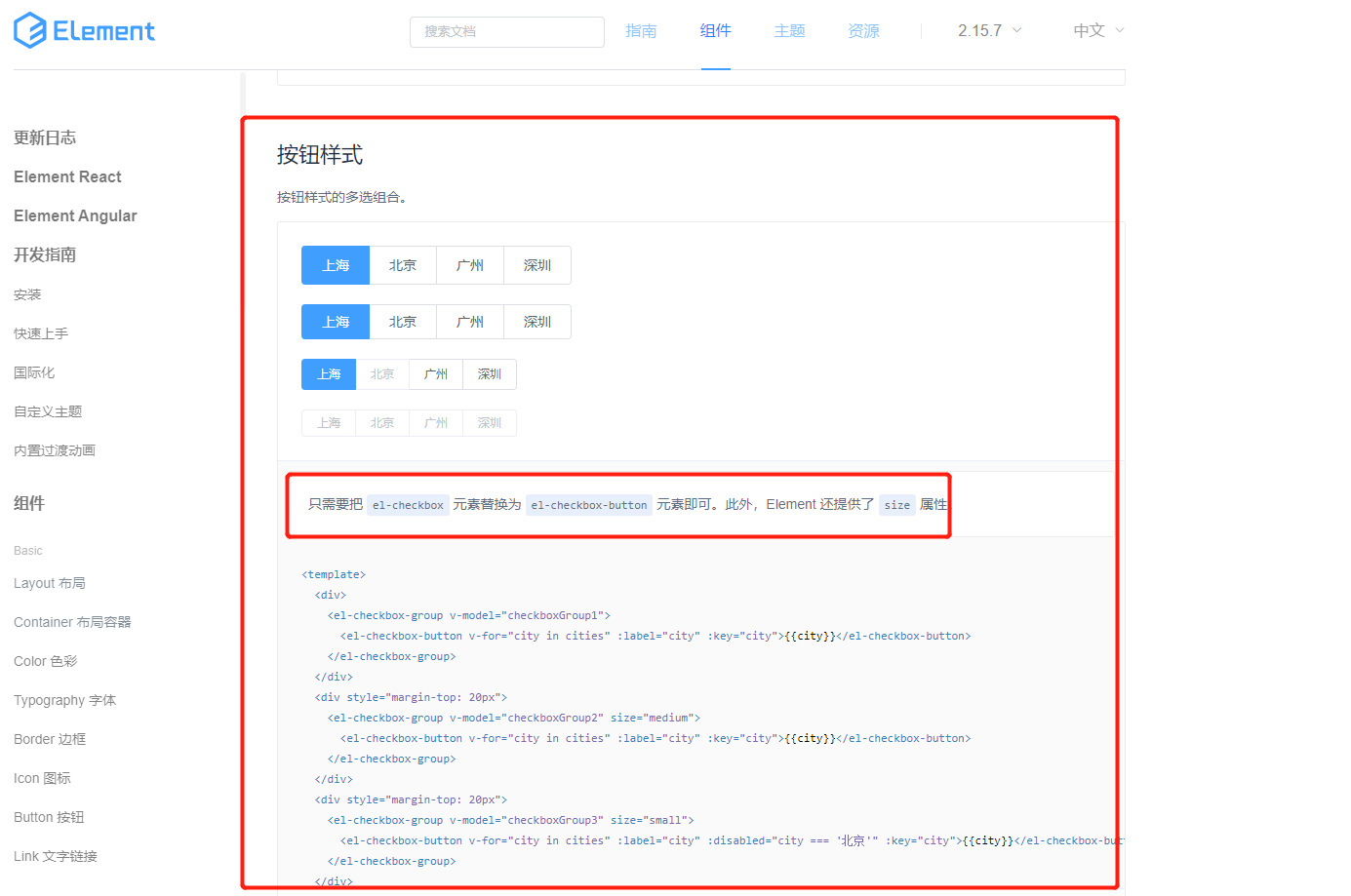
注意:官网使用的是:按钮组,无法使用indeterminate属性进行全选全不选的样式控制。
所以不能使用 按钮组来实现按钮样式的 带全选的复选框
官网表明,全选的样式控制 是基于checkbox的,而不是 checkbox-button

最终实现如下:
<template>
    <div id="check-box">
        <el-checkbox  size="small" style="margin-right: 30px;height: 40px;padding: 0px 14.5px;line-height: 40px;" :indeterminate="isIndeterminate" v-model="checkAll" @change="handleCheckAllChange">全部({
    {
    total}})</el-checkbox>
        // 这里也必须使用checkbox 才能应用indeterminate属性
        <el-checkbox-group v-model="checkedTags" @change="handleCheckedCitiesChange">
            <el-checkbox size="small" v-for="tag in tags" :label="tag.id" :key="tag.id" >{
    {
    tag.value}}({
    {
    tag.count}})</el-checkbox>
        </el-checkbox-group>
    </div>
</template>
<script>
  export default {

    props : ['total','tags'],
    data() {

      return {

        checkAll: true,
        checkedTags: [],  // 收集的值和label保持一致
        isIndeterminate: true
      };
    },
    watch : {

        tags() {

            this.checkedTags = this.tags.map(item=>item.id);
        }
    },
    methods: {

      handleCheckAllChange(val) {

        this.checkedTags = val ? this.tags.map(item=>item.id) : [];
        this.isIndeterminate = false;
        this.$emit('checkedAll',this.checkedTags)
      },
      handleCheckedCitiesChange(value) {

        // 这里收集的是el-checkbox label属性值
        this.checkedTags = value;
        this.$emit('checkedItem',this.checkedTags)
        let checkedCount = value.length;
        this.checkAll = checkedCount === this.tags.length;
        this.isIndeterminate = checkedCount > 0 && checkedCount < this.tags.length;
      }
    },
    mounted() {

        this.checkedTags = this.tags.map(item=>item.id);
    }
  };
</script>
<style scoped>
#check-box {

    display: flex;
}
</style>
<style>
.el-checkbox__input {

    display: none;
}
.el-checkbox__label {

    padding-left: 6px;
}
.el-button+.el-button, .el-checkbox.is-bordered+.el-checkbox.is-bordered {

    margin-left: 0px;
}
.el-checkbox {

    background: #F2F5F7;
    border-radius: 2px;
    padding: 9.5px 14.5px;
    margin-bottom: 30px;
}
.el-checkbox.is-checked {

    background: rgba(64, 140, 255, 0.1);
}
</style>
边栏推荐
- lambda函数用法总结
- webrtc中的任务队列TaskQueue
- Embedded system driver primary [4] - under the basis of character device driver _ concurrency control
- 乱码解决方案
- CentOS7 —— yum安装mysql
- 败给“MySQL”的第60天,我重振旗鼓,四面拿下蚂蚁金服offer
- 力扣:343. 整数拆分
- 部署LVS-DR群集【实验】
- The cost of automated testing is high and the effect is poor, so what is the significance of automated testing?
- 显式调用类的构造函数(而不是用赋值构造),实现一个new操作
猜你喜欢





随机推荐
【问题解决】同一机器上Flask部署TensorRT报错记录
7. Execution of special SQL
warning C4251: “std::vector&lt;_Ty&gt;”需要有 dll 接口由 class“Test”的客户端使用错误
8款最佳实践,保护你的 IaC 安全!
高性能高可靠性高扩展性分布式防火墙架构
TensorRTx-YOLOv5工程解读(一)
12、分页插件
Can‘t connect to MySQL server on ‘localhost3306‘ (10061) 简洁明了的解决方法
程序员的财富观
5个开源组件管理小技巧
手把手教你实现buffer(二)——内存管理及移动语义
Camera2 闪光灯梳理
FLV格式详解
7.16 Day22---MYSQL(Dao模式封装JDBC)
webrtc中的视频编码(一) 视频编码模块轮廓
Cannot read properties of null (reading 'insertBefore')
EntityComponentSystemSamples学习笔记
php将多维数据保存进json文件
TensorRTx-YOLOv5工程解读(二)
MySQL数据库面试题总结(2022最新版)