当前位置:网站首页>How to reset the power-on password of win7 without u disk
How to reset the power-on password of win7 without u disk
2022-08-06 16:56:00 【nginx】
win7无ureset the power-on password
1、开机启动计算机.当出现“正在启动windows”的画面时,Directly press and hold the computer shutdown button for more than three seconds,Force start the computer,Until the second picture is displayed;


2、Use the arrow keys to select in the picture in Figure 2【启动启动修复】;
3、The computer will then start the repair process,当电脑提示【是否还原】时,选择否.The computer will enter the Startup Repair process again;

4、After the repair fails again, the computer will prompt【启动修复无法自动修复此计算机】,这时候我们点击【查看问题详细信息】;

5、在【See issue details】Pull the scroll wheel all the way to the bottom,Click File at the bottom;

6、The newly popped up file is txt格式,At this time, we click on the upper left corner【文件】按钮;

7、The page that opens the file will be【文件类型】选择为【所有文件】;

8、查找【c盘-windows-System32】目录位置的【cmd】程序,右键点击【cmd】,选择【以管理员身份运行】;
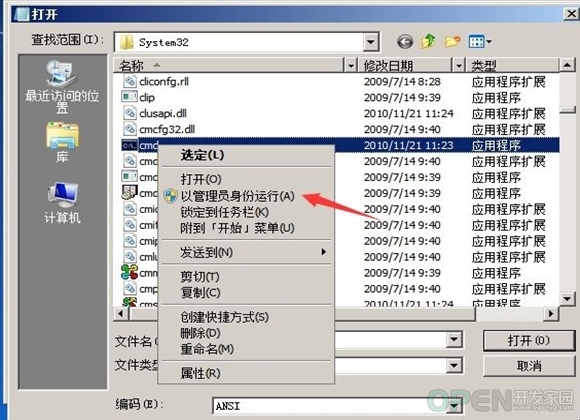
9、Enter in order on the new page【copy sethc.exe sethc_bak.exe】,【copy /y cmd.exe sethc.exe】,按下回车.之后输入【shuot down /r /t 】,如图九.Finally, press Enter and the computer will restart automatically;

10、After restarting, you will come to the login interface,按下【shift】键5次,The administrator run interface appears,如图十;
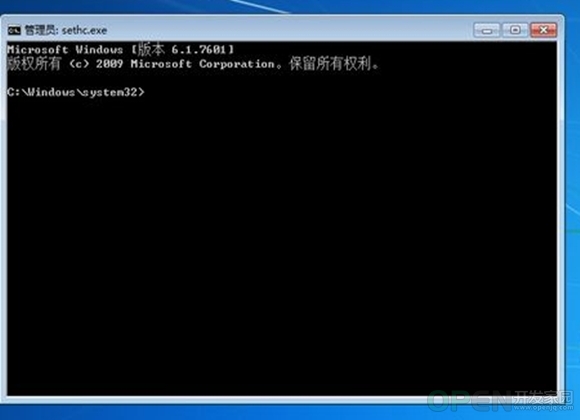
11、在新页面中输入【net user】,At this time, the system will display the login user name,We note down the username.接着输入【net user The username you just wrote down 新的密码】,之后按下回车,The power-on password is reset.8005就是用户名,newpassword就是新密码.

12、At this time, you can log in to the computer with the password you just set.
以上就是小编今天为大家带来的win7无uDisk reset power-on password as wellwin7Forgot password how to reset computer password all content,希望能够帮助到大家.
上一篇:win7How to adjust screen sleep time win7How to Set Sleep TimeNext:win7An exclamation mark appears on the network and it is done in one step win7Network yellow exclamation mark I want to share:QQ空间新浪微博腾讯微博人人网百度贴吧豆瓣网天涯社区更多
边栏推荐
- Jupyter Notebook使用
- Yum, apt to get wget, curl, and the use of PIP range
- JVM: (4) Program counter in runtime data area
- The number of items displayed on each page of the dedecms search result page does not take effect
- 域名-IP 映射解析工具 nslookup
- 电脑系统怎么重装win7u盘启动 台式笔记本电脑重装win7步骤
- 对于目标文件系统文件过大放不到u盘里怎么办 u盘空间够为何提示文件过大
- In-depth understanding of AVLTree [rotation control balance (single rotation, double rotation)]
- win7启动项设置在哪 win7关闭开机启动项怎么设置
- win7隐藏文件夹怎么显示 win7如何显示隐藏文件和文件夹
猜你喜欢

Matplotlib

0x0000001a蓝屏代码是什么意思 0x0000001a蓝屏代码怎么解决

历史上的今天:微信 5.0 发布;百度上市;LinkedIn 创始人诞生

C专家编程 第7章 对内存的思考 7.3 虚拟内存

win7台式机如何调整屏幕亮度 win7设置屏幕亮度
![[St. Regis Takeaway] day02: Log in and log out of the background system](/img/c6/019098b387cf31d9a6b01668f00f74.png)
[St. Regis Takeaway] day02: Log in and log out of the background system

Common gadgets of shell (sort, uniq, tr, cut)
Likou 07 - Linked List Intersection - Linked List & Hash Table Storage & Double Pointer

win7运行速度提高90% 怎么提高win7系统运行速度

2020最新office产品密钥永久激活码_office激活密钥永久key免费(附激活方法)
随机推荐
win7怎么设置屏幕不休眠 win7关闭休眠功能
ASEMI整流桥GBL610参数,GBL610尺寸,GBL610特征
win7怎么打开无线投屏功能 win7投屏到电视机
win7台式机如何调整屏幕亮度 win7设置屏幕亮度
Computational Protein Design with Deep Learning Neural Networks
sql报错注入
【瑞吉外卖】day02:后台系统登录、退出功能
设备树
office2019密钥永久有效 office2019密钥大全分享
抖音 滑块验证方案 s_v_web_id 参数分析
win7打印机共享设置(详细图文步骤)
【kali-漏洞利用】(3.3)后渗透之Meterpreter(上):命令大全
【freertos】013-任务通知及其实现细节
The dedecms program GBK code picks up the wrong plug-in and submits Chinese to be filtered
深入理解AVLTree【旋转控制平衡(单旋、双旋)】
小程序中实现搜索功能
《迁移学习导论》第2版,升级内容抢先看!(文末赠书)
win7升级win10数据会丢失吗 win7升win10怎么保留文件
dedecms proves that the next article on the mobile station has changed to the previous one and there is an error Request Error!
【kali-漏洞利用】(3.4)免杀Payload 生成工具(上):Veil安装、启动、Can‘t find the WINE profile问题