当前位置:网站首页>开源一夏|OpenHarmony如何查询设备类型(eTS)
开源一夏|OpenHarmony如何查询设备类型(eTS)
2022-08-05 09:14:00 【InfoQ】
- 通过js接口查询指定系统参数(const.build.characteristics)进而确定设备类型,详见系统属性。
// @ts-nocheck

import parameter from '@ohos.systemParameter'

@Entry
@Component
struct GetDeviceTypeSample {
 @State deviceType: string = 'unknown';


 build() {
 Column() {
 Text("获取设备类型").fontSize(24)
 Text(this.deviceType).fontSize(24).onClick(()=>{
 try {
 this.deviceType = parameter.getSync("const.build.characteristics");
 } catch(e) {
 console.log("getSync unexpected error: " + e);
 }

 })
 }
 .width('100%')
 .height('100%')
 }
}
// @ts-nocheck
/*
 * Copyright (c) 2021 JianGuo Device Co., Ltd.
 * Licensed under the Apache License, Version 2.0 (the "License");
 * you may not use this file except in compliance with the License.
 * You may obtain a copy of the License at
 *
 * http://www.apache.org/licenses/LICENSE-2.0
 *
 * Unless required by applicable law or agreed to in writing, software
 * distributed under the License is distributed on an "AS IS" BASIS,
 * WITHOUT WARRANTIES OR CONDITIONS OF ANY KIND, either express or implied.
 * See the License for the specific language governing permissions and
 * limitations under the License.
 */
import parameter from '@ohos.systemParameter'

@Entry
@Component
struct GetDeviceTypeSample {
 @State deviceType: string = 'unknown';


 build() {
 Column() {
 Text("获取设备类型").fontSize(24)
 //通过js接口查询指定系统参数(const.build.characteristics)进而确定设备类型
 Text(this.deviceType).fontSize(24).onClick(()=>{
 try {
 this.deviceType = parameter.getSync("const.build.characteristics");
 } catch(e) {
 console.log("getSync unexpected error: " + e);
 }

 })
 //通过deviceInfo查询设备类型
 Text(this.deviceType).fontSize(24).onClick(()=>{
 try {
 this.deviceType= deviceInfo.deviceType;
 } catch(e) {
 console.log("getSync unexpected error: " + e);
 }

 })
 //通过display查询显示设备的属性(包括屏幕宽、高和屏幕密度等)
 Text(this.deviceType).fontSize(24).onClick(()=>{
 display.getDefaultDisplay()
 .then((displayInfo) => {
 console.info('Display width: '+ displayInfo.width);
 console.info('Display height: '+ displayInfo.height);
 console.info('Display density: '+ displayInfo.densityDPI);
 })
 .catch((error) => {
 console.error('Failed to obtain the default display size. Cause: '+JSON.stringify(error));
 })

 })
 }
 .width('100%')
 .height('100%')
 }
}
如何查询屏幕/窗口尺寸
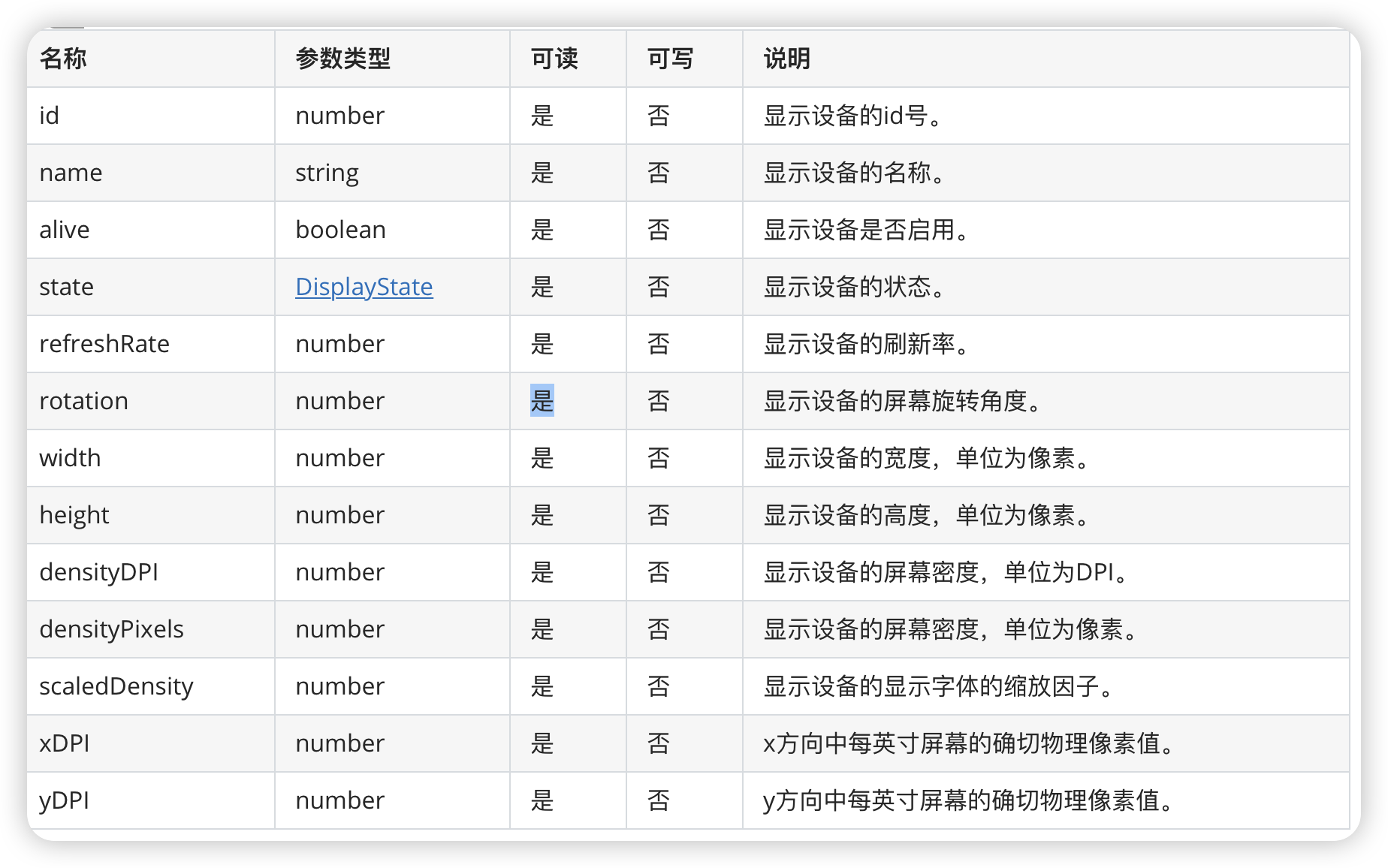
- 通过display查询显示设备的属性(包括屏幕宽、高和屏幕密度等),详见屏幕属性。
// @ts-nocheck
/*
 * Copyright (c) 2021 JianGuo Device Co., Ltd.
 * Licensed under the Apache License, Version 2.0 (the "License");
 * you may not use this file except in compliance with the License.
 * You may obtain a copy of the License at
 *
 * http://www.apache.org/licenses/LICENSE-2.0
 *
 * Unless required by applicable law or agreed to in writing, software
 * distributed under the License is distributed on an "AS IS" BASIS,
 * WITHOUT WARRANTIES OR CONDITIONS OF ANY KIND, either express or implied.
 * See the License for the specific language governing permissions and
 * limitations under the License.
 */
import deviceInfo from'@ohos.deviceInfo'
import parameter from '@ohos.systemParameter'
import display from '@ohos.display';

@Entry
@Component
struct GetDeviceTypeSample {
 @State deviceType: string = 'deviceType';
 @State device: string = 'device';
 @State displayInfo: string = 'displayInfo';

 aboutToAppear() {
 try {
 this.deviceType = parameter.getSync("const.build.characteristics");
 } catch(e) {
 console.log("getSync unexpected error: " + e);
 }
 }
 build() {
 Column() {
 Text("设备属性").fontSize(36)
 //通过js接口查询指定系统参数(const.build.characteristics)进而确定设备类型
 Text(this.deviceType).fontSize(28).onClick(() => {
 try {
 this.deviceType = parameter.getSync("const.build.characteristics");
 console.log("坚果"
 +
 this.deviceType);
 } catch (e) {
 console.log("getSync unexpected error: " + e);
 }

 })
 //通过deviceInfo查询设备类型
 Text( this.device).fontSize(28).onClick(() => {
 this.device= deviceInfo.deviceType;
 })
 //通过display查询显示设备的属性(包括屏幕宽、高和屏幕密度等)
 Text(this.displayInfo).fontSize(28).onClick(() => {
 display.getDefaultDisplay()
 .then((displayInfo) => {
 console.info('Display width: ' + displayInfo.width);
 console.info('Display height: ' + displayInfo.height);
 console.info('Display density: ' + displayInfo.densityDPI);
 this.displayInfo=JSON.stringify(displayInfo);
 console.info('Display density: ' + JSON.stringify(displayInfo));

 })
 .catch((error) => {
 console.error('Failed to obtain the default display size. Cause: ' + JSON.stringify(error));
 })

 })
 }
 .width('100%')
 .height('100%').justifyContent(FlexAlign.Center).alignItems(HorizontalAlign.Center)
 }
}
{"alive":true,"densityDPI":560,"densityPixels":3.5,"height":2560,"id":0,"name":"内置屏幕","refreshRate":60.000004,"rotation":0,"scaledDensity":3.5,"state":2,"width":1440,"xDPI":560,"yDPI":560}
Display
边栏推荐
- 欧盟 | 地平线 2020 ENSEMBLE:D2.13 SOTIF Safety Concept(下)
- sql server收缩日志的作业和记录,失败就是因为和备份冲突了吗?
- 为什么我推荐使用智能化async?
- 【Excel实战】--图表联动demo_001
- Happens-before rules for threads
- 基因数据平台
- MySQL内部函数介绍
- Xcode 12 ld: symbol(s) not found for architecture armv64
- 营销建议 | 您有一份八月营销月历待查收! 建议收藏 !
- tensorflow.keras cannot introduce layers
猜你喜欢

【ASM】字节码操作 方法的初始化 Frame

15.1.1、md—md的基础语法,快速的写文本备忘录

施一公:科学需要想象,想象来自阅读

Embedded practice ---- based on RT1170 transplant memtester to do SDRAM test (25)

2.4G无线收发模块的应用

CCVR eases heterogeneous federated learning based on classifier calibration

Undefined symbols for architecture arm64解决方案

Dry goods!Generative Model Evaluation and Diagnosis

shell脚本实例

mySQL数据库初始化失败,有谁可以指导一下吗
随机推荐
今天是元宵节~~
好资料汇总
让程序员崩溃的N个瞬间(非程序员误入)
微信小程序请求封装
PAT乙级-B1019 数字黑洞(20)
线程之Happens-before规则
PAT Level B - B1021 Single Digit Statistics (15)
The difference between beautiful MM and ordinary MM
PAT乙级-B1021 个位数统计(15)
HStreamDB Newsletter 2022-07|分区模型优化、数据集成框架进一步完善
express hot-reload
【LeetCode】623. Add a row to the binary tree
seata源码解析:TM RM 客户端的初始化过程
my journal link
DPU — 功能特性 — 管理系统的硬件卸载
Luogu P4588: [TJOI2018]数学计算
Seata source code analysis: initialization process of TM RM client
歌词整理
ts/js function pass parameter with function writing
js graphics operation one (compatible with pc, mobile terminal to achieve draggable attribute drag and drop effect)