当前位置:网站首页>Qt编写自定义控件:文字聚光灯效果之一
Qt编写自定义控件:文字聚光灯效果之一
2022-08-05 07:23:00 【友善啊,朋友】
#ifndef WIDGET_H
#define WIDGET_H

#include <QWidget>
#include <QTimer>

class Widget : public QWidget
{
    Q_OBJECT

public:
    Widget(QWidget *parent = nullptr);
    ~Widget();

protected:
    void paintEvent(QPaintEvent *event)override;

private:
    void onTimer();
    QString text;
    QTimer timer;
    QRect textRect;
    int changeValue{0};
    bool runDirectionIsRight{true};
};
#endif // WIDGET_H
#include "widget.h"
#include <QPainter>
#include <QPaintEvent>
#include <QPainterPath>
Widget::Widget(QWidget *parent)
: QWidget(parent)
{
text = "黄河之水天上来,奔流到海不复回";
auto font = this->font();
font.setPixelSize(40);
font.setBold(true);
setFont(font);
connect(&timer,&QTimer::timeout,this,&Widget::onTimer);
timer.start(40);
}
Widget::~Widget()
{
}
void Widget::paintEvent(QPaintEvent *event)
{
QPainter painter(this);
painter.setRenderHint(QPainter::Antialiasing,true);
painter.setFont(this->font());
auto rect = event->rect();
painter.save();
painter.setPen(QColor("#574E54"));
painter.drawText(rect, Qt::AlignCenter | Qt::TextWordWrap, text);
painter.restore();
textRect = painter.boundingRect(rect,Qt::AlignCenter | Qt::TextWordWrap,text);
auto pos = textRect.topLeft() + QPoint(changeValue,0);
QPolygon polygon;
polygon << pos << pos + QPoint(50,0);
pos = textRect.bottomLeft() + QPoint(changeValue,0);
polygon << pos + QPoint(25,0) << pos - QPoint(25,0);;
QPainterPath path;
path.addPolygon(polygon);
painter.setClipPath(path);
auto tempRect = polygon.boundingRect();
QLinearGradient linearGradient(tempRect.topRight(),tempRect.bottomLeft());
linearGradient.setColorAt(0.0,Qt::magenta);
linearGradient.setColorAt(0.2,Qt::darkYellow);
linearGradient.setColorAt(0.4,Qt::green);
linearGradient.setColorAt(0.6,Qt::red);
linearGradient.setColorAt(0.8,Qt::darkRed);
linearGradient.setColorAt(1.0,Qt::blue);
painter.setBrush(Qt::transparent);
painter.setPen(QPen(QBrush(linearGradient),3));
painter.drawText(rect, Qt::AlignCenter | Qt::TextWordWrap, text);
}
void Widget::onTimer()
{
if(runDirectionIsRight)
{
changeValue += 15;
if(changeValue >= textRect.width())
{
runDirectionIsRight = false;
}
}
else
{
changeValue -= 15;
if(changeValue <= 0)
{
runDirectionIsRight = true;
}
}
update();
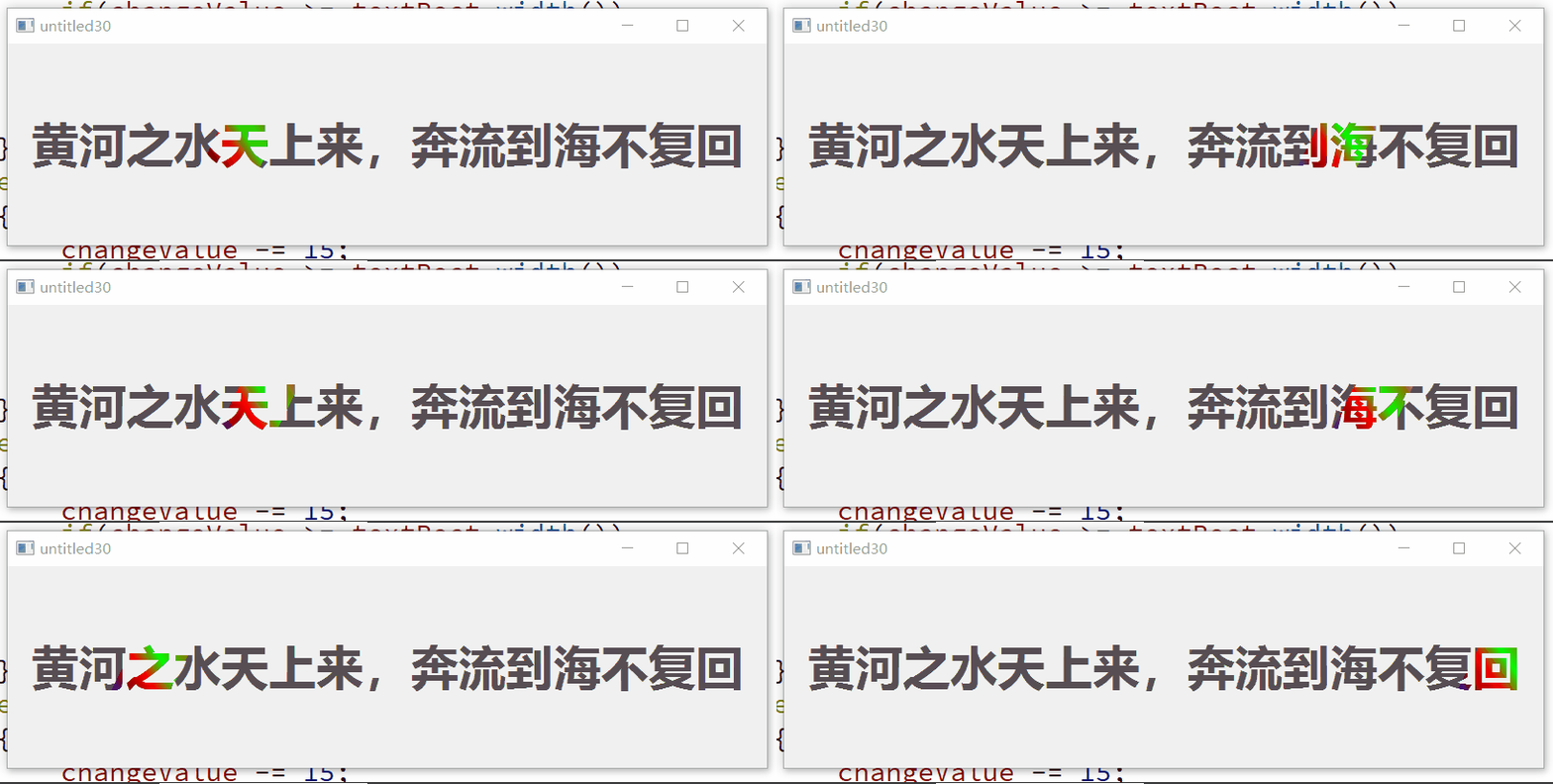
}
边栏推荐
- mysql使用in函数的一个小问题
- 在anaconda Promat界面import torch通过,在jupyter notebook中报错的问题(仅提供思路理解!)
- Does Libpq support read-write separation configuration?
- MobileNetV2架构解析
- Rapid Medical's Ultra-Small and Only Adjustable Thromb Retriever Receives FDA Clearance
- 2006年星座运势全解-巨蟹
- protobuf根据有关联的.proto文件进行编译
- TRACE32——通用寄存器查看与修改
- Flink学习11:flink程序并行度
- Mysql主从延迟的原因和解决方案
猜你喜欢





随机推荐
Does Libpq support read-write separation configuration?
Task flow scheduling tool AirFlow,, 220804,,
常用的遍历map的方法
How to avoid online memory leaks
2022起重机司机(限桥式起重机)考试题库及模拟考试
二叉树进阶复习1
Put Cloudflare on the website (take Tencent Cloud as an example)
Vulnhub靶机:HA_ NARAK
在anaconda Promat界面import torch通过,在jupyter notebook中报错的问题(仅提供思路理解!)
MobileNetV2架构解析
Why does Mysql fail to create a database
An IP conflict is reported after installing the software on a dedicated computer terminal
Win10 设置锁屏壁纸提示尝试其它图片
Tencent Business Security Post IDP Talk Summary
Vulnhub target drone: HA_ NARAK
UDP broadcast
693. 行程排序
Modeling of the MAYA ship
基于 Docker 快速使用远程(云)数据库
【win7】NtWaitForKeyedEvent