当前位置:网站首页>[MySQL] extract and query JSON type field data
[MySQL] extract and query JSON type field data
2022-04-21 12:24:00 【South wind of Mu City】
Catalog
3.1 General basic query operations
3.2 General function query operation
4. JSON Data addition, update and deletion
Preface
After going online yesterday, a... Was found through the system alarm bug, So the emergency rollback operation was carried out , But during this period, some users placed orders , The data had an impact , Therefore, it is necessary to check which orders are affected , And repair the data .
1. Problem phenomenon
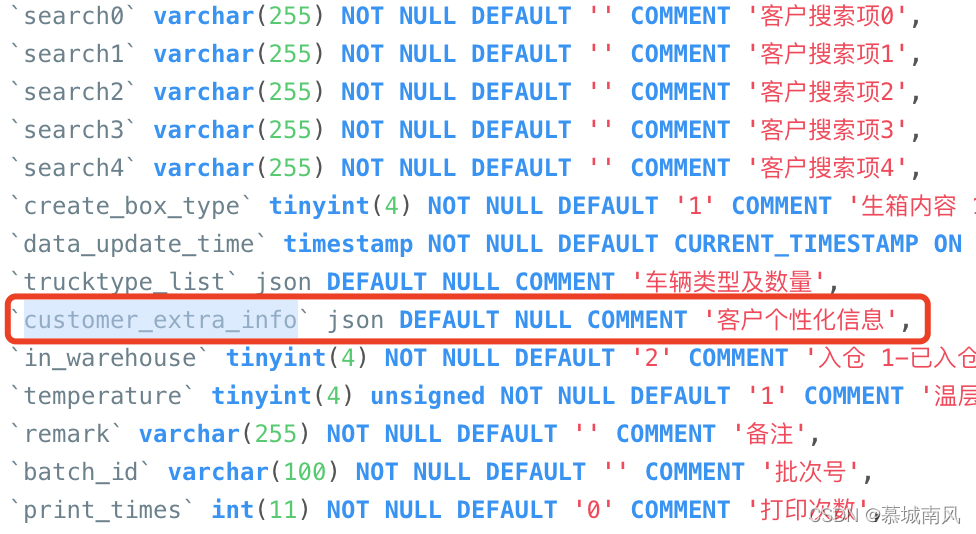
because bug Led to the of the order form customer_extra_info Field hasFreightInsurance Mistakenly updated to “ yes ”, Therefore, you need to query the total number of false updates to before rollback “ yes ” The order of , Here's the picture :

So check the order table customer_extra_info The field type found is JSON Type of
2. Solution
Search information found mysql5.7 A new field format is provided later -json.
Yes JSON Data of type MySQL Provides related query operations .
First give the query SQL, In the introduction MySQL Yes JSON Query operation of type field
SELECT
	*
FROM
	( SELECT id, customer_extra_info -> '$.hasFreightInsurance' AS Insurance FROM oms_order_list WHERE project_id = 1 AND update_time > '2022-04-15 16:30:17' ) t
WHERE
	JSON_CONTAINS ( Insurance, JSON_OBJECT ( "value", " yes " ) )
3. JSON Data query
3.1 General basic query operations
1、 Use json Field name ->’$.json attribute ’ Query criteria
SELECT
	id,
	customer_extra_info
FROM
	oms_order_list
WHERE
	project_id = 1
	AND update_time > '2022-04-15 16:30:17'
	AND customer_extra_info -> '$.maxClaimAmount'=10
The query results are as follows :

2、 Association table query
json Fields also support the query of associated tables , Here is only the method of use , Do not show examples . among deptLeaderId and id Namely dept,dept_leader Associated fields in two tables .
SELECT * from dept,dept_leader WHERE dept.json_value->'$.deptLeaderId'=dept_leader.json_value->'$.id' ;
3.2 General function query operation
Written here, we all found , We inquired about json It's the whole json data , It doesn't seem so convenient , So if we just want to see json What about a field in ?
This introduces our first function :json_extract( Field name ,json Field name )
Before introducing the usage in detail, we can take a look at the function introduction on the official website :

We can see the introduction on the official website json_extract() This function is very detailed :Return data from JSON document
from json Return field in
1、 function json_extract(): from json Return the desired field
usage :json_extract( Field name ,$.json Field name )
example :
SELECT
	id,
	json_extract ( customer_extra_info, '$.hasFreightInsurance' ) AS hasFreightInsurance
FROM
	oms_order_list
WHERE
	project_id = 1
	AND update_time > '2022-04-15 16:30:17'
The query results are as follows :

2、 function JSON_CONTAINS():JSON Whether the format data contains a specific object in the field
usage : JSON_CONTAINS(target, candidate[, path])
example :
SELECT
	id,
	customer_extra_info
FROM
	oms_order_list
WHERE
	project_id = 1
	AND update_time > '2022-04-15 16:30:17'
	AND JSON_CONTAINS ( customer_extra_info, JSON_OBJECT ( "maxClaimAmount", 10 ) )
The query results are as follows :

3、 function JSON_OBJECT(): Convert a list of key value pairs into json object
For example, we want to query the value of an object
We can see hasFreightInsurance There's another object in , There are also name and value Two attribute fields , So how should we query value= No, what about your order .
usage :JSON_OBJECT([key, val[, key, val] …])
example :
SELECT
	*
FROM
	( SELECT id, customer_extra_info -> '$.hasFreightInsurance' AS Insurance FROM oms_order_list WHERE project_id = 1 AND update_time > '2022-04-15 16:30:17' ) t
WHERE
	JSON_CONTAINS ( Insurance, JSON_OBJECT ( "value", " no " ) )
The query results are as follows :

4、 function JSON_ARRAY(): establish JSON Array
usage :JSON_ARRAY([val[, val] …])
example : We need to check deptName contain 1 The data of
SELECT
	id,
	customer_extra_info
FROM
	oms_order_list
WHERE
	project_id = 1
	AND update_time > '2022-04-15 16:30:17'
	AND JSON_CONTAINS ( customer_extra_info -> '$.deptName', JSON_ARRAY ( "1" ) )
The query results are as follows :

5、 function JSON_TYPE(): Query a json Field attribute type
usage :JSON_TYPE(json_val)
Example : For example, we want to query deptName What are the field properties of
SELECT
	id,
	customer_extra_info -> '$.deptName',
	JSON_TYPE ( customer_extra_info -> '$.deptName' ),
	customer_extra_info -> '$.hasFreightInsurance',
	JSON_TYPE ( customer_extra_info -> '$.hasFreightInsurance' )
FROM
	oms_order_list
WHERE
	project_id = 1
	AND update_time > '2022-04-15 16:30:17'
The query results are as follows :

6、 function JSON_EXTRACT() : from JSON Document return data
This is also a function often used in our development
SELECT
	*
FROM
	oms_order_list
WHERE
	project_id = 1
	AND update_time > '2022-04-15 16:30:17'
	AND JSON_CONTAINS ( JSON_EXTRACT ( customer_extra_info, '$.hasFreightInsurance' ), JSON_OBJECT ( "value", " no " ) )
The query results are as follows :

7、 function JSON_KEYS() :JSON Key array in document
usage :JSON_KEYS(json_value)
example : For example, we want to query json All in the format data key
SELECT
	id,
	JSON_KEYS ( customer_extra_info )
FROM
	oms_order_list
WHERE
	project_id = 1
	AND update_time > '2022-04-15 16:30:17'
The query results are as follows :

4. JSON Data addition, update and deletion
Next 3 Both functions are new data types :
JSON_SET(json_doc, path, val[, path, val] …)
JSON_INSERT(json_doc, path, val[, path, val] …)
JSON_REPLACE(json_doc, path, val[, path, val] …)
1、 function JSON_SET() : Insert data into JSON In the format , Yes key The replacement , nothing key Then add
This is also a function often used in our development process
usage :JSON_SET(json_doc, path, val[, path, val] …)
example : For example, we want to target id=2 Add a new set of data :newData: New data , modify deptName For the new Department 1
sql The statement is as follows :
update dept set json_value=JSON_SET('{"deptName": " department 2", "deptId": "2", "deptLeaderId": "4"}','$.deptName',' New Department 1','$.newData',' New data ') WHERE id=2;

select * from dept WHERE id =2
result :
 Be careful :json_doc If you don't take the previous value of this cell , The previous value will be overwritten by the new value , For example, if we change the updated statement to :
update dept set json_value=JSON_SET('{"a":"1","b":"2"}','$.deptName',' New Department 1','$.newData',' New data ') WHERE id=2We can see here json_doc yes {“a”:“1”,“b”:“2”}, In this way, the previous cell values will be overwritten and then added / Overwrite this cell field
result :

2、 function JSON_INSERT(): Insert value ( Go to json Insert new value in , But don't replace old values that already exist )
usage :JSON_INSERT(json_doc, path, val[, path, val] …)
example :
UPDATE dept set json_value=JSON_INSERT('{"a": "1", "b": "2"}', '$.deptName', ' New Department 2','$.newData2',' New data 2')
WHERE id=2
result :

We can see that because of json_doc The change overwrites the previous value , Added deptName and newData2.
If we do the following just now sql, Just changed value, We'll see what's inside key The value does not change .
Because this function is only responsible for json Insert new value in , But don't replace old values that already exist .
3、 function JSON_REPLACE()
usage :JSON_REPLACE(json_doc, path, val[, path, val] …)
Use cases :
If we want to update id=2 In the data newData2 The value of is : Updated data 2
sql The statement is as follows :
UPDATE dept set json_value=JSON_REPLACE('{"a": "1", "b": "2", "deptName": " New Department 2", "newData2": " New data 2"}', '$.newData2', ' Updated data 2') WHERE id =2;

select * from dept WHERE id =2
result :

4、 function JSON_REMOVE() : from JSON Delete data from document
usage :JSON_REMOVE(json_doc, path[, path] …)
give an example : Delete key by a Field of .
UPDATE dept set json_value=JSON_REMOVE('{"a": "1", "b": "2", "deptName": " New Department 2", "newData2": " Updated data 2"}','$.a') WHERE id =2;result :

5、 function JSON_SEARCH() : Used in json Query and return qualified nodes in the format
This is a very powerful function
版权声明
本文为[South wind of Mu City]所创,转载请带上原文链接,感谢
https://yzsam.com/2022/04/202204211131469134.html
边栏推荐
- 游戏行业实战案例2:玩家等级
- 基于C#实现文本读取的7种方式
- [software testing series I] basic knowledge of software testing
- 二进制文件版本控制工具选择难?看完这篇你会找到答案
- idea中往数据库中插入多条数据
- Usage Summary of hiredis and rapidjson Libraries
- There is no market for virtual currency. Why can there be no small temptation for some people?
- 新技术又来了,拥抱AGP7.0,准备好告别Transform了吗?
- jsapi 支付缺少appid
- 机器学习-Sklearn-13(回归类大家族-下——非线性问题:多项式回归(多项式变换后形成新特征矩阵))
猜你喜欢
![[BSidesCF 2019]Kookie](/img/85/e97fe5ec5fa94bc007af56c7098b11.png)
[BSidesCF 2019]Kookie

open-mmlab / mmpose安装、使用教程
pycharm 跳转到指定行

给定字符串提取姓名(字符串、list、re“零宽断言”)

CVPR 2022 oral | Hong Kong Chinese open source posec3d: skeleton motion recognition framework based on 3d-cnn

Chris LATTNER, father of llvm: the golden age of compilers

Daily AI frontier terminology: active learning

Integration announcement keyfi is now online moonbeam
2020BATJZ大厂Android高级工程师面试题-选择题合集(附答案解析)

win11的WiFi按钮不见了无法联网

随机推荐
Study notes of deep learning (6)
hiredis和rapidjson库的使用小结
数据显示ETH燃烧的有多猛
Title record of TIANTI competition (II)
[software test series x] stress test scheme
风丘科技为您提供10M以太网解决方案
[dark horse morning post] Tao Hong paid 260 million dividends from Zhangting MLM company in three years; Yiling pharmaceutical replied to Lianhua Qingwen dispute: the case has been reported; Tencent v
[BSidesCF 2019]Kookie
One minute teaches you to use yolov5 to train your dataset and test it
最佳实践 | 通过使用 Jira Service Management 改进 HR 工作流程
虚拟货币已然没有市场,为何还能对一些人产生不小的诱惑?
爱可可AI前沿推介 (4.21)
Aaai2022 | unbiased temporal knowledge reasoning based on probabilistic soft logic
The small program rotates the mobile phone to push the stream, and the remote pull stream picture is cut
Berkeley, Samsung | a fast post training converter pruning framework
Couleurs du thème sublime
[Software Test Series VII] software test plan
Live broadcast of changes in the Jianghu: Li Jiaqi is trapped in a luxury house, Luo Yonghao fades out, and Weiya Sydney helps broadcast it
Kubernetes 服务发现 监控APIServer
Game industry case 2: player level